

- 🪪 ID document: ID photo-based identity authentication
- 🧠 Knowledge-based: User input information-based identity authentication
Tab Structure
Authentication enhancement and forgery prevention settings consist of three tabs:- ID and Face Based
- Additional Authentication & Meta Information
- Device Info
- ID forgery prevention: MRZ check, driver’s license barcode (PDF417) check, ID liveness, streaming capture
- Face authentication: Selfie process, face duplicate check, selfie liveness, face-based age verification
ID and Face Based
Set ID forgery prevention and face authentication related options.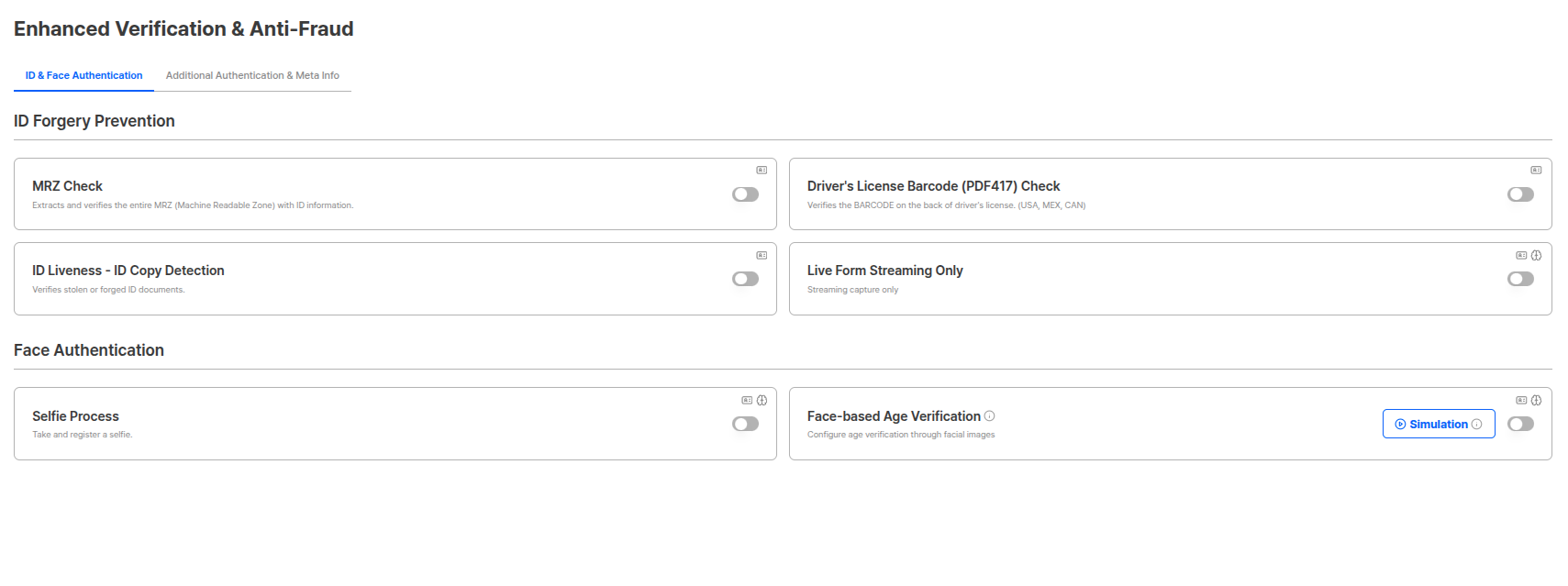
ID and Face Based Settings Tab
ID Forgery Prevention
You can set security options to block forgery and fraud attempts during the identity verification process.MRZ Check
Scans MRZ (Machine Readable Zone) existing on IDs to verify information accuracy. (e.g., bottom of passport)
MRZ Check Settings
Driver’s License Barcode (PDF417) Check
Scans barcodes of US, Mexico, and Canada driver’s licenses to verify information accuracy.
Driver's License Barcode (PDF417) Check Settings
- United States (USA)
- Mexico (MEX)
- Canada (CAN)
ID liveness - ID Copy Detection
Can specifically detect forgery methods (presentation attacks) that frequently occur in ID-based authentication.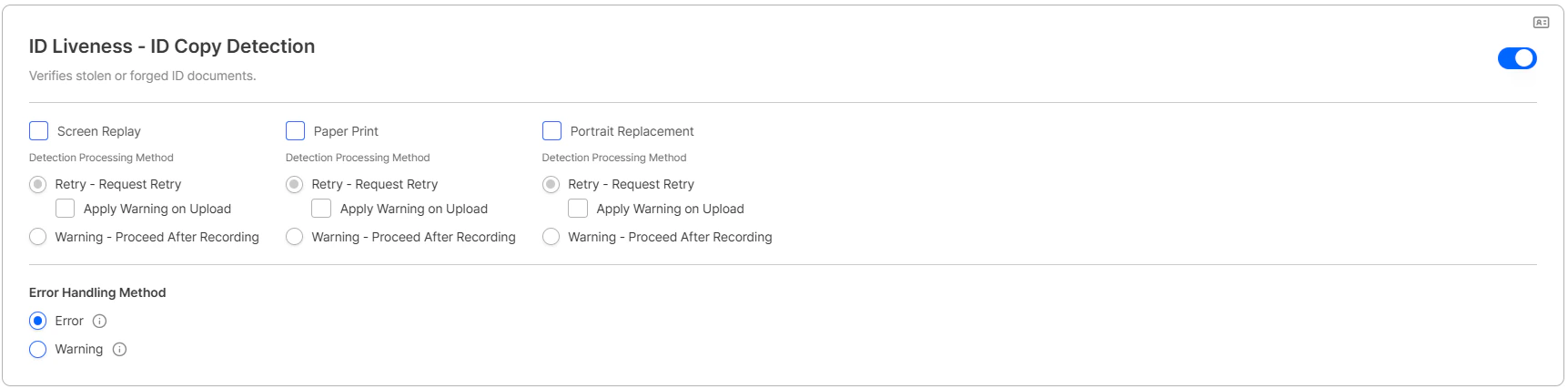
ID liveness - ID Copy Detection Settings
- The checkbox can be configured independently per pipeline (e.g., enabled for Screen Replay and Paper Print but not for Portrait Replacement).
- The checkbox appears only when Retry is selected. It is hidden when Warning is selected.
- Submissions auto-converted to Warning under Upload mode appear in the Custom Policy list with the following values.
Expired ID New in 2026-04
Controls how submissions with an expired identification document are handled. Previously expired IDs were always rejected; you can now route them into Retry or Warning to match your policy.
Expired ID settings
Liveform Streaming Capture Only
Allows only real-time capture for both ID and selfie and blocks photo uploads to configure a live capture-based submission environment. Click the allow ID upload button to allow ID uploads.
Liveform Streaming Capture Only Settings
Allow ID Upload — Image Quality Check (2026-04)
When the liveform streaming capture only option is ON and Allow ID Upload is turned ON, users can upload an image as an alternative to camera capture to submit their ID document. The Image Quality Check toggle appears alongside this option, allowing you to decide whether to apply the same frontend quality checks as the camera capture.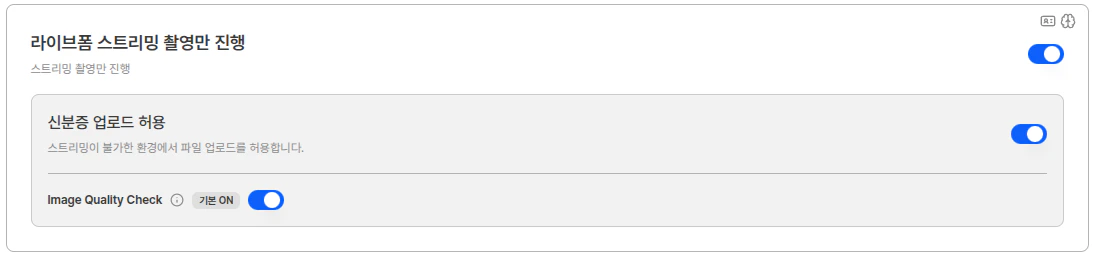
Allow ID Upload and Image Quality Check Toggle
Face Authentication
Set user authentication and verification options through face recognition.Selfie Process
You can register user face information through face recognition. When used in ID document pipeline, it compares the portrait on the ID with the user’s Selfie.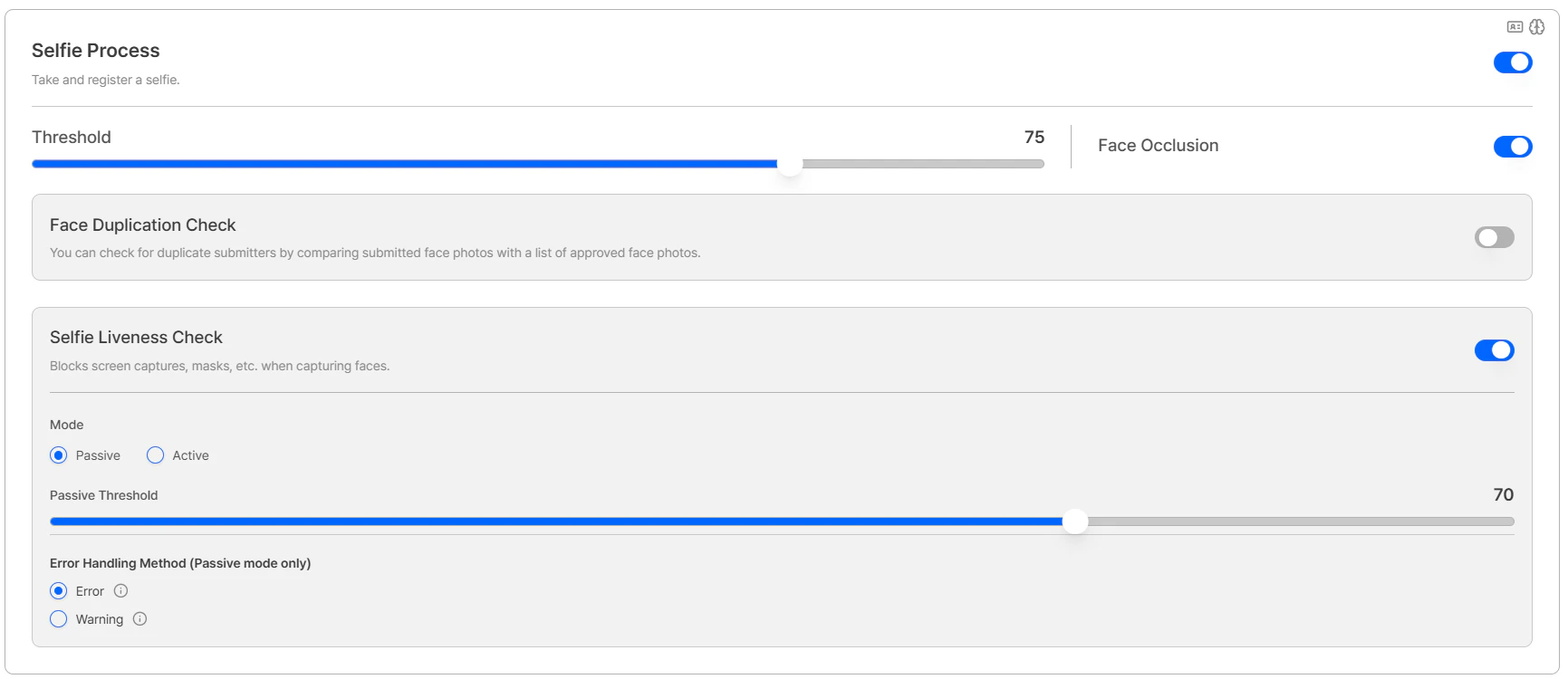
Selfie Process Settings
Face Duplicate Check
You can check for duplicates with already approved person photos. Requires selfie process to be activated.- Register and Proceed: Records duplicate submissions for the case and continues the process.
- Reject if Duplicate: Rejects authentication when duplicates occur above the set count.
Selfie Liveness
You can choose between Active mode (deepfake detection) and Passive mode (texture-based detection). Requires selfie process to be activated.Face-based Age Verification
A function that analyzes face images to estimate age range and verifies by comparing with set reference age. Provides age range (Low, High) rather than exact age, and verification criteria can be set by applying Buffer.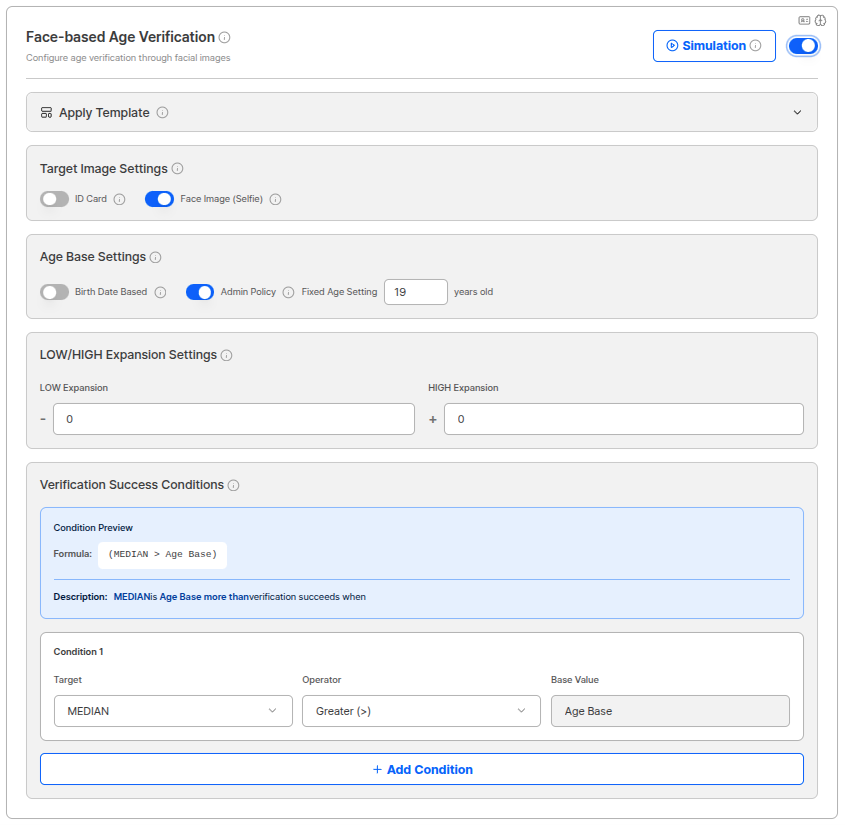
Face-based Age Verification Settings
Additional Authentication & Meta Information
Set third-party data source verification and meta-information-based verification options.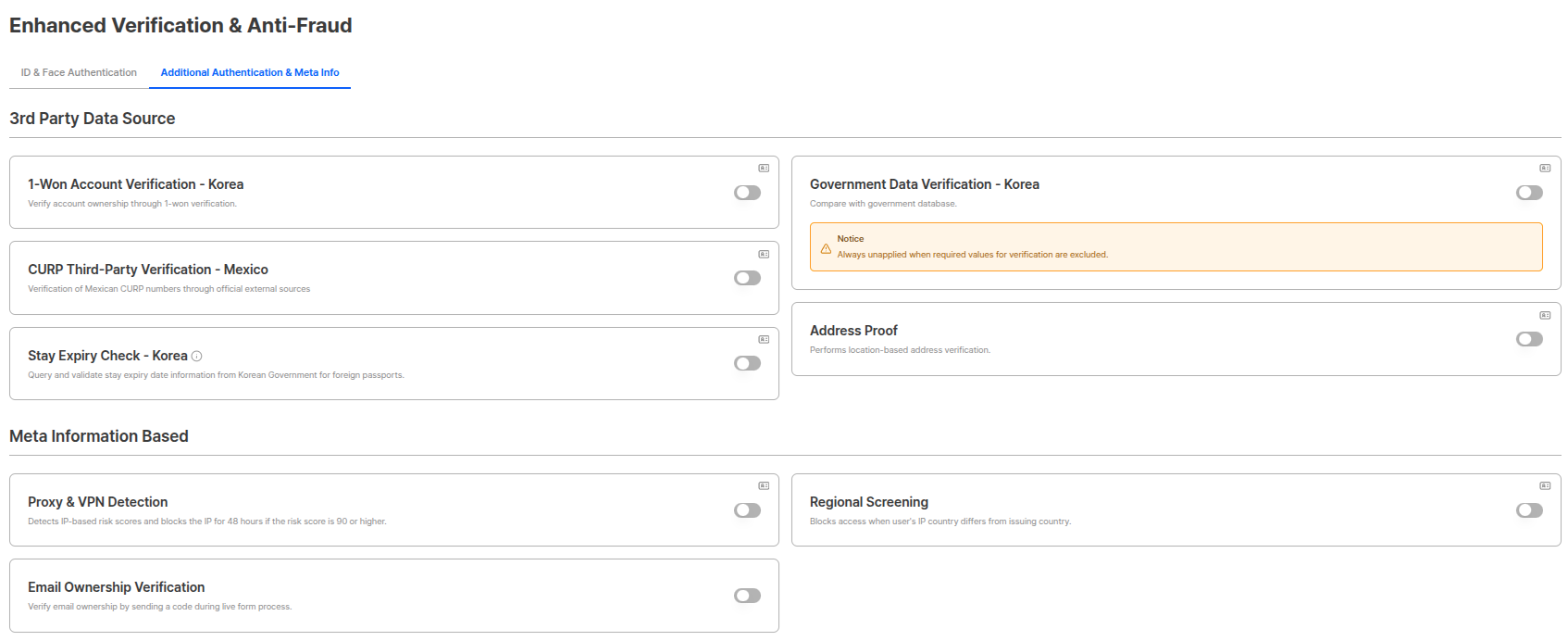
Additional Authentication & Meta Information Settings Tab
3rd party Data Sources
Set additional verification options using external data sources.1 Won Account Authentication - Korea
Confirms account possession through 1 won authentication.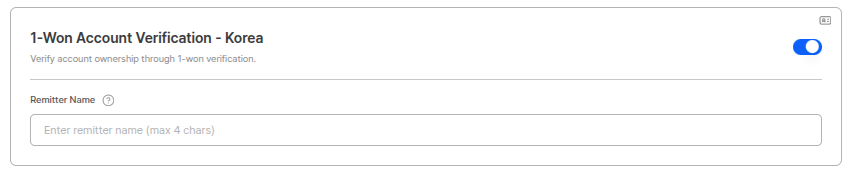
1 Won Account Authentication Settings
- User enters account information.
- System deposits 1 won to the account.
- User confirms and enters the depositor name.
- When depositor name matches, account possession confirmation is complete.
Government Data Verification - Korea
2026-04 Redesigned Performs government data verification for IDs issued in Korea. Starting with the 2026-04 update, the previous single ON/OFF toggle has been split into individual switches per ID type, allowing you to choose which Korean ID types to perform authenticity verification for.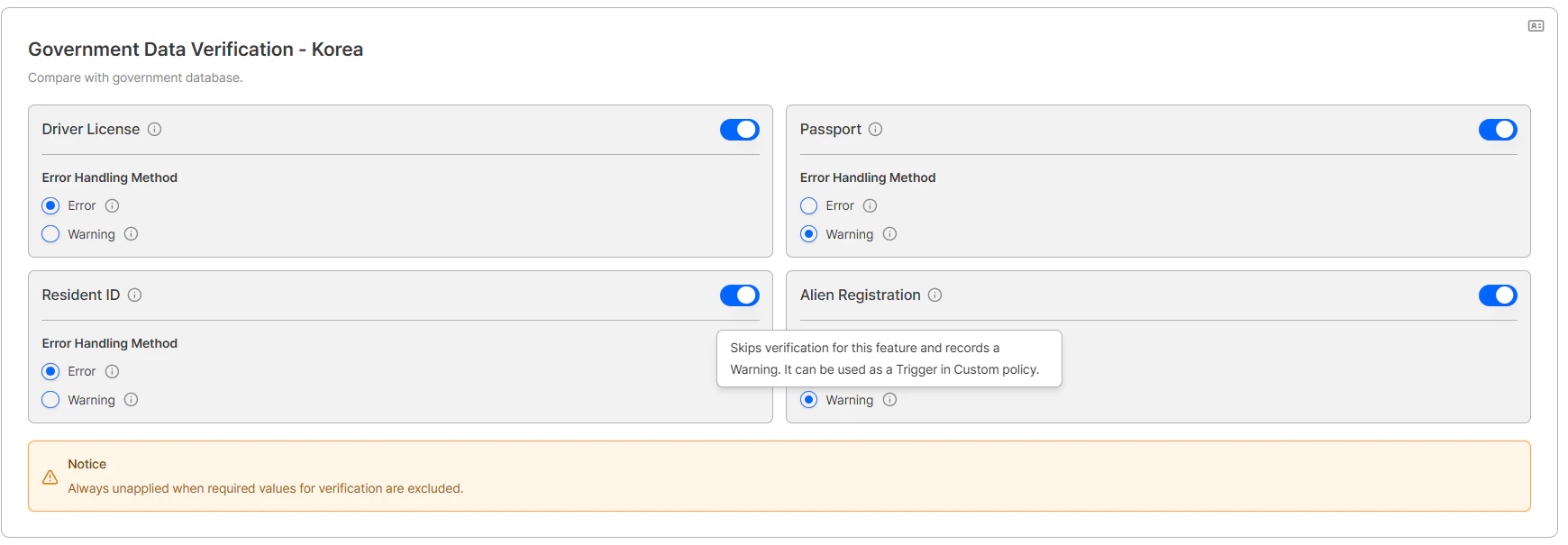
Government Data Verification - Korea (Individual switches per ID type)
CURP Third-party Verification - Mexico
Performs Mexico CURP number verification through official external sources.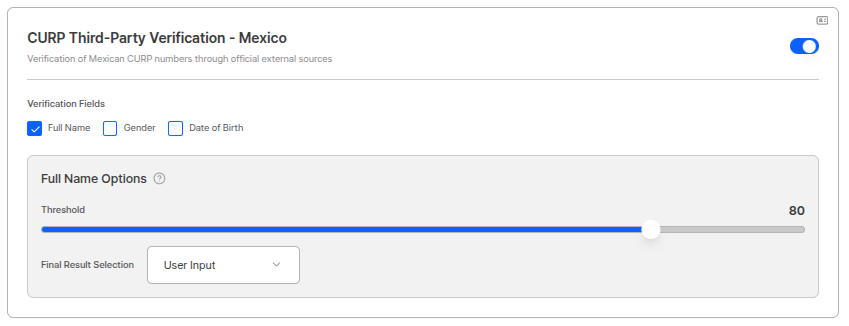
CURP Third-party Verification Settings
Address Proof
Performs location-based address verification.
Address Information Verification Settings
Residency Expiration Date Query - Korea
Queries and verifies Korean government’s residency expiration date information for passports from other countries.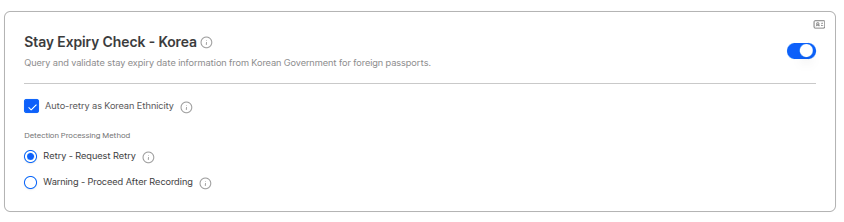
Residency Expiration Date Query Settings
Meta Information-based Detection
Set risk detection options based on IP addresses, regional information, etc.Proxy & VPN Detection
Detects IP-based risk and blocks the IP for 48 hours when risk score is 90 or above.
Proxy & VPN Detection Settings
VPN & Proxy Pre-verification List
Regional Pre-screening
A function that controls access by comparing user’s IP country with ID issuing country. By default, it blocks access when user’s IP country differs from issuing country, and detailed policies can be configured through exception settings and target designation.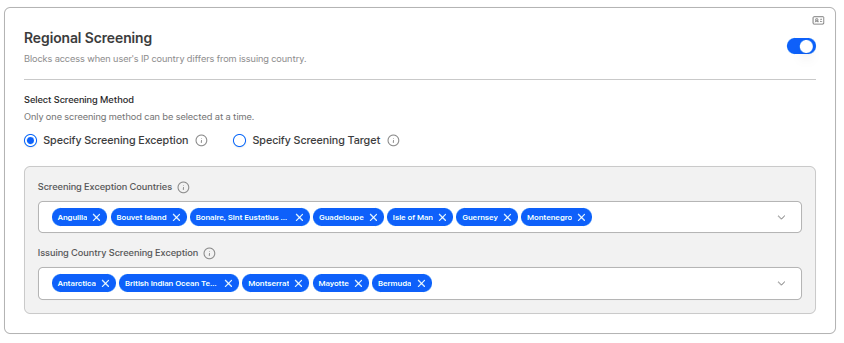
Regional Pre-screening Exception Settings
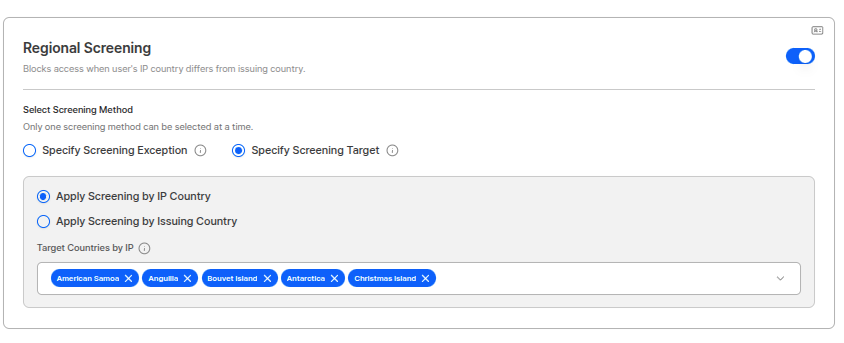
Regional Pre-screening Target Settings
Exception Settings
You can set countries to process as exceptions in regional pre-screening.Pre-screening Exception Countries
When IP address belongs to the country, pre-screening passes even if IP country and issuing country differ. Operation Method:- If user’s IP address is included in the exception country list, access is allowed even if IP country and issuing country do not match.
- For example, if “United States” is added to exception countries, pre-screening passes when accessing from US IP regardless of issuing country.
Issuing Country Pre-screening Exception
When ID issuing country belongs to the country, pre-screening passes even if IP country and issuing country differ. Operation Method:- If the issuing country of the ID submitted by the user is included in the exception country list, access is allowed even if IP country and issuing country do not match.
- For example, if “Korea” is added to exception countries, pre-screening passes when using IDs issued in Korea regardless of IP country.
Target Designation
You can designate targets to apply regional pre-screening. It is not an OR condition, but selects one of IP country based or Issuing country based to designate targets. Setting Options:- When accessing from IP addresses of countries designated as screening targets or using IDs issued from those countries, always compares IP address and issuing country and blocks access if they do not match.
- For countries not designated as screening targets, pre-screening check is not performed.
- Allow only Korean ID + Korean IP: If “Korea” is designated as issuing country based in target designation, when using IDs issued in Korea, access is only allowed from Korean IP.
- Specific Country Exception Processing: If “United States” is added to pre-screening exception countries for overseas-residing Koreans, access is allowed even when using Korean IDs from US IP.
- Specific Issuing Country Exception: If “Passport” is added to issuing country pre-screening exceptions, access is allowed regardless of IP country when using passports.
Email Owner Verification
Performs email ownership verification by sending code during liveform process.
Email Owner Verification Settings
- User enters email address.
- System sends authentication code to the email.
- User enters the received authentication code.
- When code matches, email ownership verification is complete.
Device Info
2026-04 New Tab A dedicated tab for configuring device-based pre-blocking options. Device Info verification is performed first when entering the liveform. If blocked at this stage, the user cannot proceed to subsequent pre-verification steps (Turnstile, Proxy & VPN) or the KYC process itself.Device Verification → Fingerprint option → Turnstile → Proxy & VPN Detection → KYC ProcessDevice Verification
A Static check that analyzes browser, GPU, and touch information to preemptively block access from non-mobile devices (desktops, virtual environments, automated bots, etc.).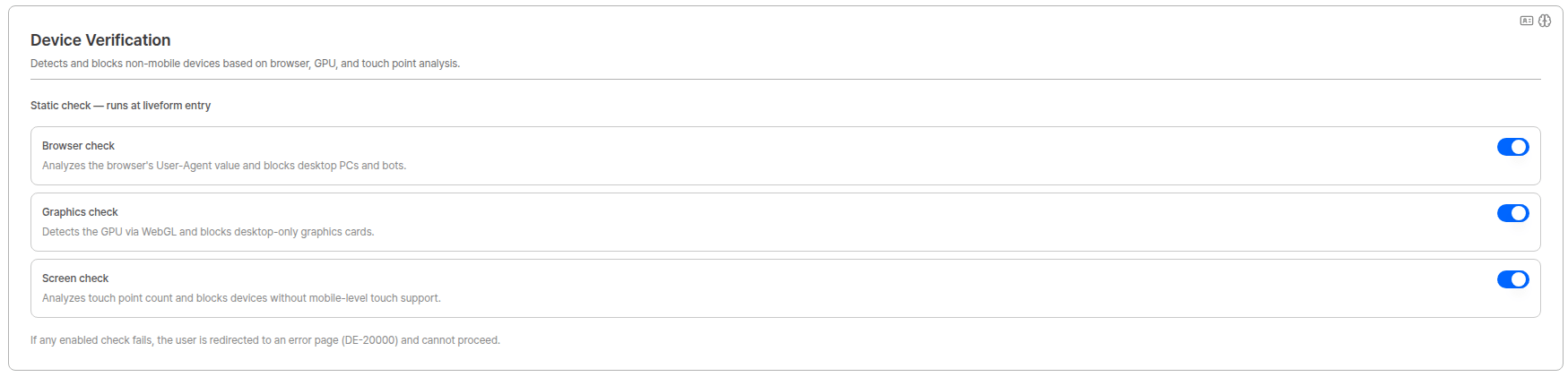
Device Verification — Static check
Device Verification Pre-verification List
Sensor Verification
2026-07 New An option that verifies the device’s sensor signals at the moment of capture to detect attempts to forge the camera path and inject pre-prepared images (media injection). Toggled on or off as a single switch.
Sensor Verification settings
Fingerprint option
2026-04 New Advanced threat detection options based on device fingerprinting. Detects virtual environments, emulators, malicious bots, and tampered browsers, and controls repeated approvals from the same device through Device Duplicate Check.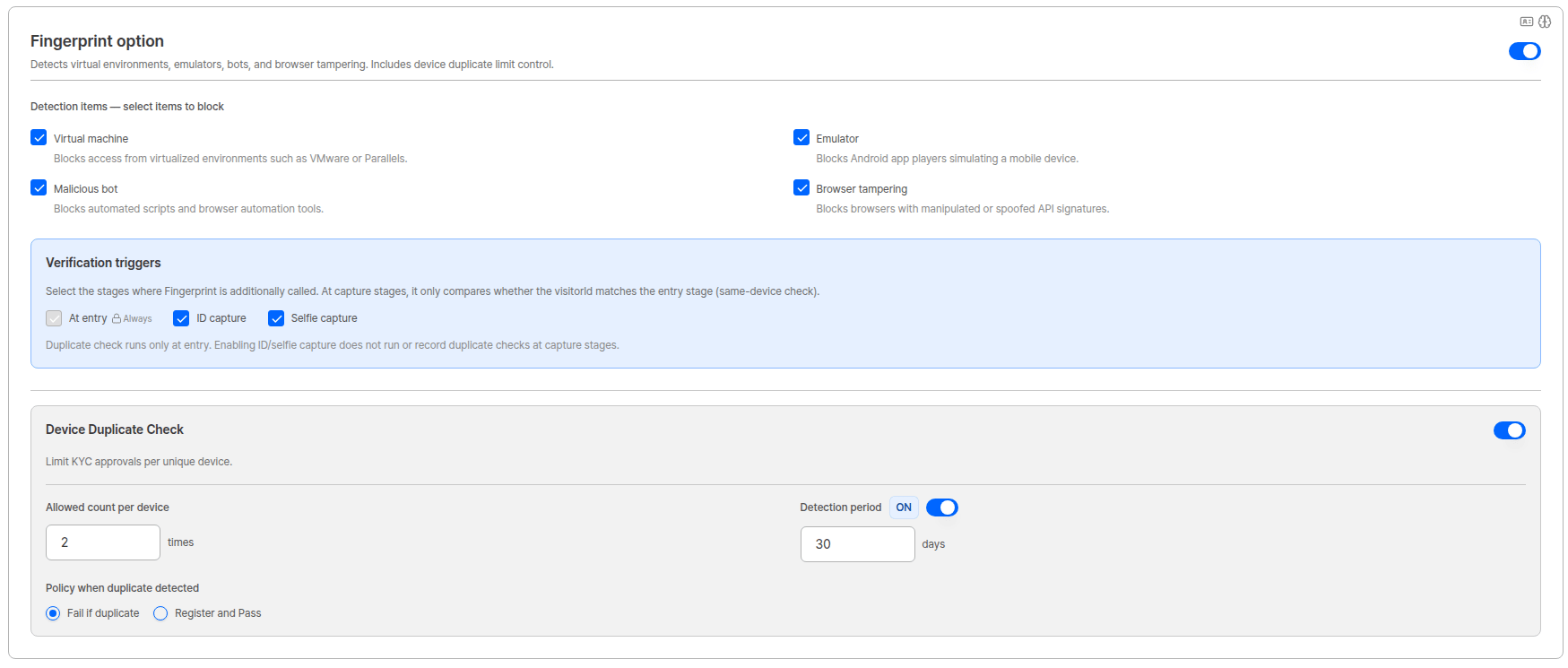
Fingerprint option and Device Duplicate Check settings
Detection items
Select the items to block using individual checkboxes. If any checked item is detected, the user is redirected to an error page (DE-30000).
Verification triggers
2026-07 New Select the stages where Fingerprint is additionally called.Device Duplicate Check
Limits the number of times a KYC approval can occur from the same device. Can be toggled ON/OFF independently while the Fingerprint option is enabled.Use Cases
Financial Institution High-Security KYC Process
Financial Institution High-Security KYC Process
International Service Multi-country ID Verification
International Service Multi-country ID Verification
Online Platform Fraud Prevention System
Online Platform Fraud Prevention System