

Device Info tab and Fingerprint option
New Feature The Authentication Enhancement and Forgery Prevention settings have been expanded to three tabs. The Device Verification option that was previously inside the “Additional Authentication & Meta Information” tab has been moved to a dedicated Device Info tab, and the Fingerprint-based Fingerprint option and Device Duplicate Check have been newly added.Device Info is the first verification performed upon liveform entry. If blocked at the Device Info stage, the user cannot proceed to Turnstile, Proxy & VPN detection, or the KYC process itself.
Fingerprint option (new)
Select the items to block using individual checkboxes. If any item is detected, the user is redirected to the error page (DE-30000).
Device Duplicate Check (new)
Limits the number of times a KYC approval can occur from the same device.New error codes
The error code and its definition are displayed together on the error page so clients can immediately identify the reason for the block.
Government Data Verification split by ID type
Feature Improvement Government Data Verification - Korea has been split from a single ON/OFF toggle into individual switches per ID type, allowing clients to perform authenticity verification only for the specific ID types they require. If a temporary issue occurs with the verification server, only the affected ID type can be selectively turned off, improving operational flexibility.Individual control switches
The Alien Registration switch controls alien registration card, domestic residence report for foreign nationals of Korean descent, and permanent residence card simultaneously — all three types at once.
Return URL error code support
Feature Update Error Code (errorCode) has been added as a new dynamic field in the Dashboard Integration Information > Return URL settings. When a user is blocked by pre-verification (Device Info, etc.) or token validation and lands on an error page, they can still return to your service via the Return URL button. The errorCode value is included in the URL query string so your service can identify the reason for the block.
Return URL example (error page → return URL):
The full error code mapping is available in the Error Codes and Pages reference.
Token error code standardization (TK-10000 ~ TK-10004)
Feature Improvement Token-related error pages have been assigned error codes with theTK- prefix, and user-facing messages have been made clearer. Previously only developer codes (e.g., token-missing) were shown, leading to repeated support inquiries. Now the error code and its definition are provided together, making troubleshooting easier.
Expired ID follow-up action options
Feature Update A new Expired ID option has been added under Anti-fraud & Forgery Prevention > ID and Face-based, letting you choose how ARGOS handles submissions containing an expired ID. Previously expired IDs were always rejected; you can now route them into Retry or Warning.Warning data
Submissions approved in Warning state leave the following Warning data on the dashboard.New Custom Policy trigger
A Warning condition has been added to the Custom Policy Trigger list, so you can use expired-ID warnings as a trigger in your custom rules.ID Liveness auto Warning fallback for Upload mode
Feature Update Each ID Liveness pipeline (Screen Replay / Paper Print / Portrait Replacement) with Retry selected now exposes a new sub-checkbox Apply Warning on Upload. When checked, the pipeline’s Retry is converted to Warning only when the user submitted the ID via Upload mode, because Upload-mode users have no way to recapture — this lets the submission continue under Warning instead of being stuck on Retry.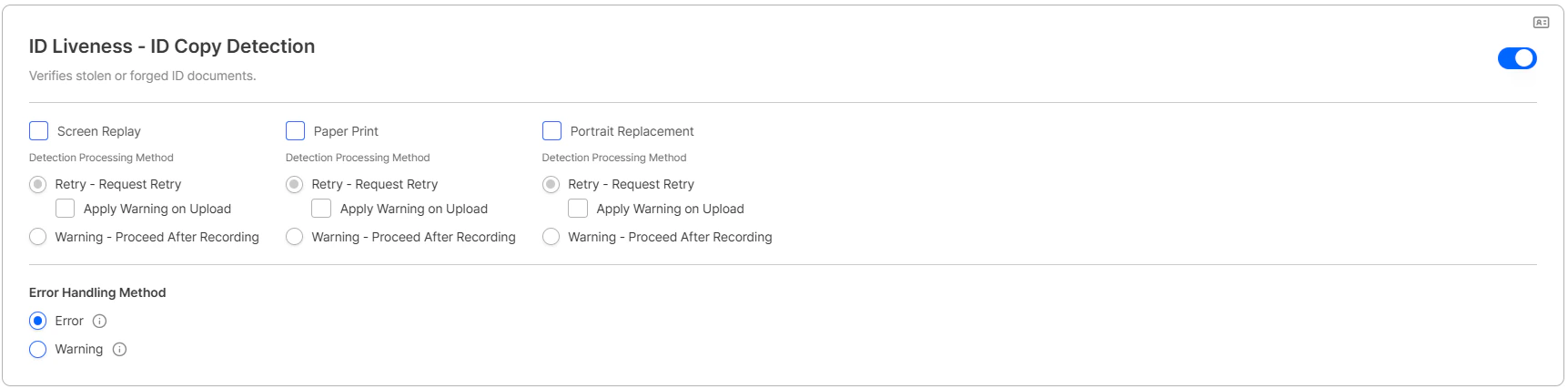
ID liveness — 'Apply Warning on Upload' checkbox under Retry in each pipeline
- The checkbox is independent per pipeline.
- It appears only when Retry is selected, and is hidden when Warning is selected.
Custom Policy exposure
Warning data generated from Upload-mode auto-fallback is exposed in the Custom Policy list.Change account password from the dashboard
New Feature Previously, changing your password required logging out and going through the Forgot password flow. You can now change your password directly from the dashboard’s Account menu > Change password while logged in. The flow branches based on whether OTP is enabled.Submission search minimum length reduced (3 → 2)
UX Improvement The minimum query length for searching the Submission list has been reduced from 3 characters to 2 characters, so environments using 2-characteruserId values can now search successfully.
Passive Face Auto Capture
New Feature Auto Capture has been added to passive face capture in the liveform. Once the user aligns their face with the guide, the capture completes automatically without any button press.Changes
- The guide message has moved to the top of the screen for better visibility.
- A new capture type
face-passive-auto-capturehas been added. - Capture standby time is reduced from 2 seconds → 1 second.
Expiry date OCR for Korean Alien Registration Card
Feature Update Expiry date (expiry_date) recognition is now enabled for the Korean Alien Registration Card. The expiry date is extracted automatically and can be used for expiry validation and Custom Policy rules.
The value printed as Period of Sojourn on the card is treated as the ID’s
expiry_date.How it works
OCR referencesexpiry_date and expiry_date0 in priority order, and the extracted value is returned via the GET Submission API in the data.idcard_expireDate field.
Response example
English Name (full_name_en) Added to Submission Response
New Feature
The full_name_en field (DB: fullNameEn) containing the applicant’s Full Name in English has been added. When KYC is approved, the submitter’s Full Name is converted to English and can be used without additional conversion work in environments where English names need to be passed to external systems (e.g., Korean driver’s licenses and resident registration cards where names are recognized in Hangul).
Processing Policy
Liveform Streaming — Upload Image Quality Check Option
Feature Update The Image Quality Check toggle has been newly added under Dashboard Authentication Enhancement and Forgery Prevention → Forgery Prevention → Liveform Streaming Capture Only → Allow ID Upload. When IQC failures occur repeatedly due to upload environment conditions, you can toggle OFF to allow users to complete the authentication flow.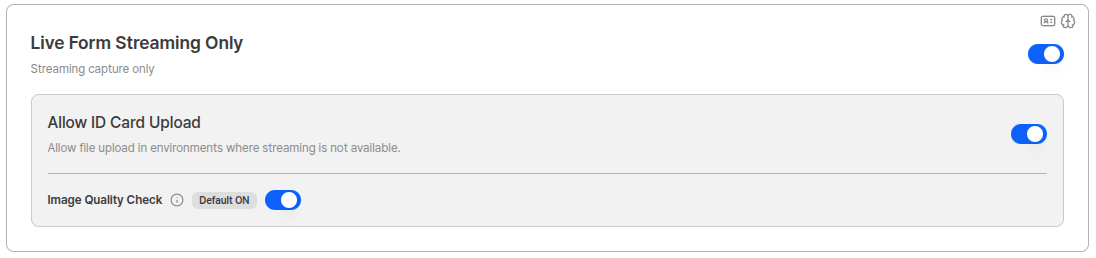
Allow ID Upload and Image Quality Check Toggle
The Image Quality Check toggle is only visible when Liveform Streaming is ON and Allow ID Upload is ON.
startValidUntil — Pre-authentication Validity Period Setting
New Feature The query string optionstartValidUntil has been added, allowing you to set an expiration time before users access the Liveform link. This is useful when you need to enforce “link entry within a set time period,” such as guardian authentication for minors or separate project flows. It operates independently from the existing “post-authentication validity period.”
ARGOS continues to improve its identity verification service for stronger security and a better user experience. Thank you for using ARGOS Identity. The ARGOS Identity team