

Verification now runs at three points 2026-07 ChangePreviously, verification ran only once at liveform entry. In addition to entry, verification now also runs at ID capture (
idCapture) and selfie capture (selfie), and the values collected at each capture stage are compared against the values from entry to detect whether the device or environment was swapped mid-session.How to ActivateConfigure Device verification, Sensor verification, and Fingerprint option in the Device Info tab under Project Management > Policy and Authentication > Authentication Enhancement and Forgery Prevention.
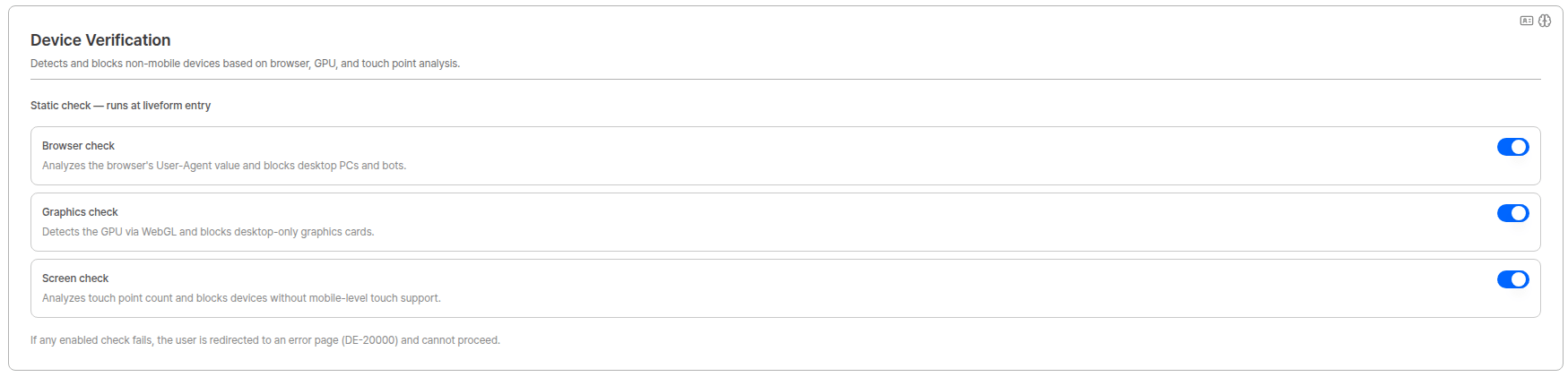
Device verification settings in the Device Info tab
Verification Types
The Device Verification page shows results for three types of verification.Device (Static check)
Analyzes device information to determine whether it is a mobile device. If determined to be a non-mobile device, the check results in FAIL.Sensor 2026-07 New
Collects and verifies the device’s motion sensor signals at the moment the ID or selfie is captured to detect attempts to forge the camera path and inject pre-prepared images (media injection).Detection criteria are continuously updated, and specific decision logic and threshold values are not disclosed for security reasons.
Fingerprint
Detects virtual environments, emulators, malicious bots, and tampered browsers based on device Fingerprint (Visitor ID), and limits repeated approvals from the same device.Detection criteria are continuously updated, and specific detection logic is not disclosed for security reasons.
Verification Points
2026-07 New Verification runs at the following three points (Steps), and the checks performed differ by point.Cross-step comparison (Step Consistency)
Values from each capture stage are always compared against the values collected at entry. This detects attempts to pass verification at entry and then switch to a different device or environment.Device Duplicate Check runs only at entry. Even if you enable ID capture and selfie capture under Fingerprint verification triggers, duplicate checks are not executed or recorded at the capture stages. This prevents users from being rejected because their own earlier stage was flagged as a duplicate.
Verification Results List
When Device Verification is activated, you can view each verification result in the list. All three types — Device, Sensor, and Fingerprint — are displayed together in one list, and you can select which columns to show usingTable Columns at the top.

Device Verification results list
Multiple Validation IDs are created for a single user 2026-07 ChangeA Validation ID is issued for each verification point × verification type. With all options enabled, a single KYC session for one user produces up to 8 Validation IDs.
entry 2 (Device, Fingerprint) + idCapture 3 (Device, Sensor, Fingerprint) + selfie 3 (Device, Sensor, Fingerprint) = 8Seeing several rows around the same Submission Time is expected. Use the Step field in the detail view to identify which point each row belongs to.Verification Detail
Clicking a row in the list opens theVerification detail modal for that verification. The fields shown depend on the verification type.
Common — Basic Information
Shown for all types.Device detail
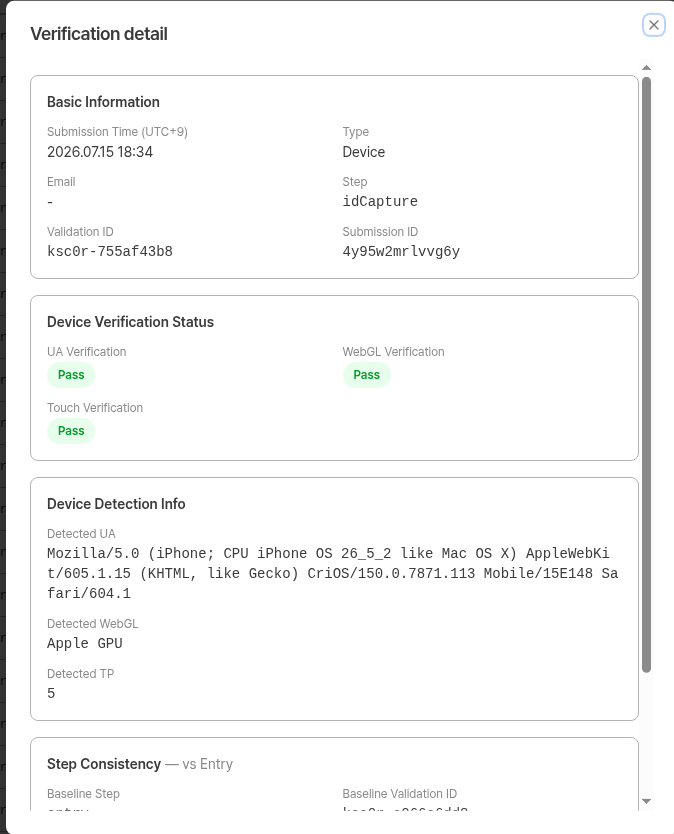
Verification detail — Device
Device Detection Info — The raw values actually detected during verification.
Step Consistency — vs Entry 2026-07 New

Step Consistency — Device
Step is idCapture or selfie — it does not appear on the entry record, which serves as the baseline.
Sensor detail 2026-07 New

Verification detail — Sensor
Sensor Detection Info
The Sensor type has no Step Consistency section. Sensor signals represent the physical environment at the moment of capture, so they are not compared across points.
Fingerprint detail

Verification detail — Fingerprint
Raw Values — The raw values returned by the detection engine (
virtualMachine, emulator, bot.result, tampering, anomalyScore, antiDetectBrowser).
Step Consistency — vs Entry 2026-07 New

Step Consistency — Fingerprint
Internal Code
When the cross-step comparison finds an issue, a reason-specific error code is recorded in theInternal Code field. This is the error code shown to the user when a capture-stage block occurs; in the dashboard you can review which reason applied via the Internal Code field.
No code is assigned for Sensor verification failures.
Viewing from Submission Detail
From a user submission’s detail view, the Pre-verification list dropdown gives you direct access to that submission’s Device Verification results.
Submission detail - Pre-verification list dropdown
Since the 2026-07 update added more verification points, a single submission can now be linked to up to 8 Validation IDs.
User Error Pages on Block
When Device Verification fails at the entry point, the user sees a different error page depending on which verification failed. Every error page shows the error code and its definition so that clients can diagnose the cause quickly.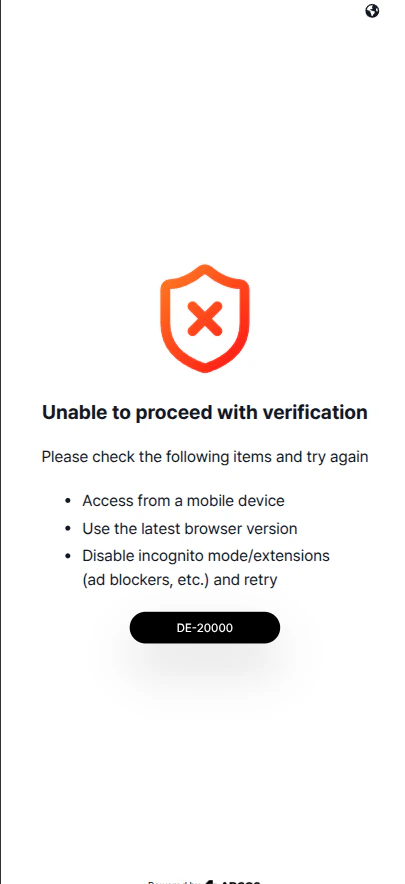
Device Verification error page
- Access from a mobile device
- Use the latest browser version
- Disable incognito mode/extensions (ad blockers, etc.) and retry
Verification Process Flow
1
Liveform entry (entry)
The user enters the KYC liveform. Device verification (Static check) and Fingerprint verification run first among all pre-verification steps, and the values collected here become the baseline for comparison at later capture stages.
2
Turnstile · Proxy & VPN verification
Once Device Info verification passes, Turnstile verification and Proxy & VPN detection run in sequence.
3
ID capture (idCapture)
At the moment the ID document is captured, the configured checks run again.
- Device — collects the values again and compares them against entry
- Sensor — verifies the sensor signals at the moment of capture
- Fingerprint — compares the Visitor ID against entry (duplicate check is not performed)
4
Selfie capture (selfie)
The same checks run at selfie capture, again comparing against the values from entry.
These checks run before the paid selfie engines (liveness, face compare, etc.) are executed.
5
KYC process completes
Once all verification points pass, KYC authentication proceeds normally.
Each verification point is recorded under its own Validation ID, so results can be reviewed per point in the dashboard.
In flows without ID capture, such as Knowledge-based, verification at that capture point does not run. Even then, the comparison baseline for selfie capture is still entry.
Related Documents
VPN & Proxy
Check VPN & Proxy detection results.
Authentication Enhancement and Forgery Prevention
Learn how to configure Device Verification options.
User Submissions
Manage the submission list and view details.
Error Codes and Pages
See the full list of error codes.