

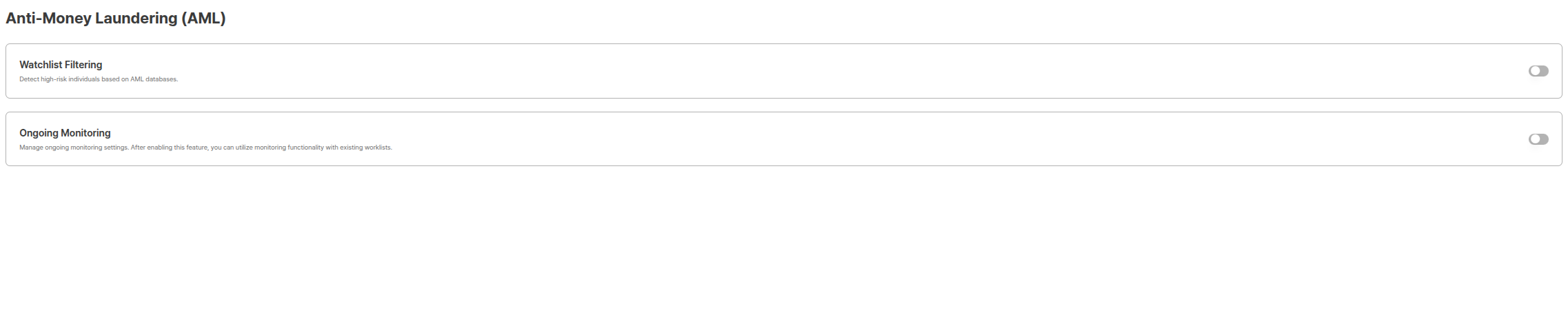
Anti-Money Laundering (AML) Settings Page
Why AML is Needed
Anti-Money Laundering (AML) is a legal obligation that financial institutions and regulated companies must comply with. Through AML functions, the following purposes can be achieved:Legal Compliance and Regulatory Response
- Financial Real Name Transaction Act Compliance: Fulfill obligations for customer identity verification and risk person checks
- International Sanctions Regulation Compliance: Identify persons included in international sanctions lists such as UN, OFAC
- Financial Supervisory Service Guidelines Compliance: Fulfill AML/CFT (Anti-Money Laundering and Counter-Terrorism Financing) obligations of financial institutions
Risk Management and Loss Prevention
- Money Laundering Prevention: Preemptively block illegal fund inflows to prevent institutional reputation damage
- Sanctions Violation Prevention: Preemptively block transactions with sanctioned persons to avoid legal liability
- PEP (Politically Exposed Person) Management: Perform enhanced due diligence (EDD) when transacting with politically exposed persons
Operational Efficiency Improvement
- Automated Checks: Improve operational efficiency by minimizing manual review work
- Real-time Monitoring: Immediately detect changes through continuous monitoring
- Systematic Record Management: Systematically manage AML check results for easy audit response
AML Function Overview
The AML (Anti Money Laundering) function is anti-money laundering monitoring that can reference cases where the person collected from the submission is an actual person of concern or risk based on name, date of birth, nationality, etc. ARGOS provides two AML check methods:AML Watch list filtering
AML Ongoing Monitoring
AML Watch list filtering vs AML Ongoing Monitoring
Compare the differences between the two methods and when to use each.Comparison Table
Usage Scenarios
AML Watch list filtering Usage Scenarios
AML Watch list filtering Usage Scenarios
Immediate Check at New Customer Registration
- Check risk person status when opening bank accounts
- Block sanctioned persons when joining financial services
- Verify transaction counterparty before large transactions
- Check recipient before high-value remittances
- Automatically performs check simultaneously with eKYC completion
- Can immediately decide approval/rejection based on check results
- No separate monitoring registration process needed
AML Ongoing Monitoring Usage Scenarios
AML Ongoing Monitoring Usage Scenarios
Continuous Monitoring of Existing Customers
- Detect when existing customers are newly added to sanctions lists
- Detect PEP (Politically Exposed Person) status changes
- Detect reputation risk exposure (RRE) changes
- Regular customer re-screening (KYC re-verification)
- Manage monitoring policies by Worklist unit
- Immediate alerts for changes through periodic automatic re-checks
- Track changes by comparing with past judgment results
Selection Guide
AML Watch list filtering
You can perform AML Watch list filtering for users who have completed eKYC.
AML Watch list filtering Settings Options
Settings Options
Threshold Setting Guide
- Low Threshold (e.g., 70-80): Returns more matching results but increases false positive possibility
- High Threshold (e.g., 90-95): High accuracy but may miss some risk persons
- Recommended Setting: Industry standard is 90-93 range, adjustable according to internal policies
Operation Method
- eKYC Completion: User completes ID authentication and becomes approved status.
- Automatic Check: AML check is automatically performed according to set threshold and options.
- Result Verification: Check results can be viewed on the AML Search page.
- Action Decision: Decide approval, additional verification, or rejection based on check results.
AML Ongoing Monitoring
You can set up Ongoing Monitoring for continuous management monitoring of users who have completed eKYC.
AML Ongoing Monitoring Worklist List
Key Concepts
Worklist
Monitor Record
Matches
Operation Method
- Worklist Creation: Create Worklist by setting monitoring policies and thresholds.
- Monitoring Registration: Automatically register at eKYC completion or manually register monitoring targets.
- Periodic Screening: Automatically performs re-checks according to set cycle.
- Change Detection: When changes occur in sanctions lists, PEP, reputation risks, etc., creates alerts as Open matches.
- Match Review: Administrators review matching results and judge as True Positive or False Positive.
AML Ongoing Monitoring Detailed Guide
API Integration Methods
You can build automated workflows by integrating AML functions via API.AML Watch list filtering API
Although automatically checked after eKYC completion, you can manually call the API to perform checks when needed.POST/AML API
For KR region projects, replace the host with
kr.rest-api.argosidentity.com. See Regions for details.AML Ongoing Monitoring API
You can perform Worklist creation, monitoring registration, match queries, etc. via API.POST/AML Ongoing
GET/AML Ongoing
DELETE/AML Ongoing
Webhook Integration
You can receive AML check results or Ongoing Monitoring match results via webhook to perform automated processing.Webhook Guide
Related Documentation and Integration Methods
Refer to related documentation to effectively utilize AML functions.AML Search
AML Ongoing Monitoring
AML Codes
POST/AML API
GET/AML Report API
Webhook Guide
Integrated Workflow Example
An example workflow using AML functions integrated.1
1. AML Configuration
Activate Watch list filtering and Ongoing Monitoring in Project Management > Policy and Authentication > Anti-Money Laundering (AML) and set thresholds.
2
2. eKYC Process
When users complete ID authentication, AML Watch list filtering is automatically performed.
3
3. Check Result Verification
View check results on the AML Search page, and decide additional verification or rejection if risk persons are found.
4
4. Monitoring Registration
For approved users requiring monitoring, register automatically or manually in Ongoing Monitoring.
5
5. Continuous Monitoring
Ongoing Monitoring performs regular re-checks, and when changes are detected, notifications are received via webhook.
6
6. Match Review and Actions
Review Ongoing Monitoring match results and take appropriate actions.