

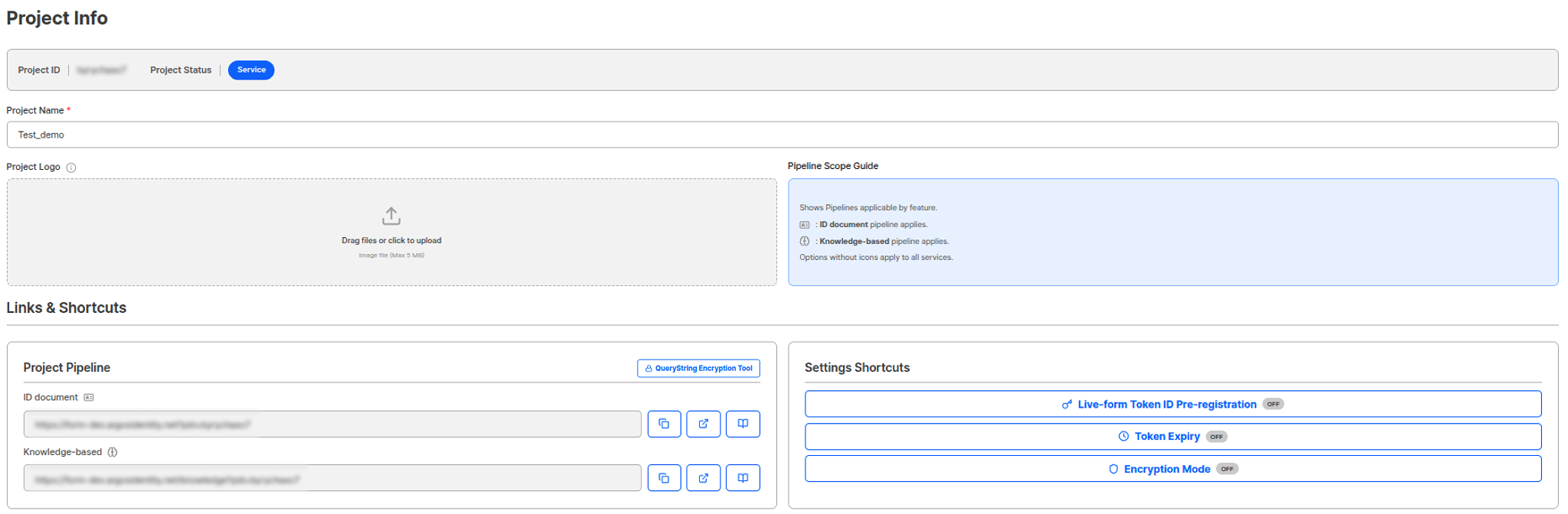
Project Information Page
Project Basic Information
Project ID
A unique ID for identifying the project. Project ID cannot be changed, and providing it when contacting ARGOS customer support enables faster customer support.Project ID UsageHelps quickly find the project when contacting customer support.
Project Status
You can view the current project’s operational status.Project status changes and project additions should be requested through sales inquiries.
Project Name
You can change the project name. Since the project name is displayed in the email subject when using the KYC email notification function, it is important to enter an accurate service name that users can recognize.Project Logo Settings
You can upload and manage logo images to be displayed on the liveform start page. Project Logo: Upload a logo image to be displayed on the liveform start page.Project Pipeline
You can view liveform URLs by pipeline provided by the project. The host of the liveform URL depends on the region your project belongs to; see Regions for details.ID document Pipeline
You can view the liveform URL for the method that authenticates and verifies user selfie information based on ID authentication.US region:https://form.argosidentity.com?pid=xxxxxxxxxKR region:https://form-kr.argosidentity.com?pid=xxxxxxxxx
Knowledge-based Pipeline
You can view the liveform URL for the method that authenticates and verifies user selfie information based on directly entered identity information and SMS authentication.US region:https://form.argosidentity.com/knowledge?pid=xxxxxxxxxKR region:https://form-kr.argosidentity.com/knowledge?pid=xxxxxxxxx
Liveform URL UsageLiveform URLs are automatically displayed as QR codes on PC, and connect directly to the identity authentication start page on mobile. You can provide this URL to users to proceed with the identity authentication process.
Query string encryption/decryption tool
This tool lets you generate and test liveform URLs with query string options directly from the web.- Encrypt: Add query string option fields such as
email,userid,selectedIdType,allowedIdTypes, andstartValidUntilto generate an encrypted URL. - Decrypt: Decrypt an encrypted URL to verify the included query string options.
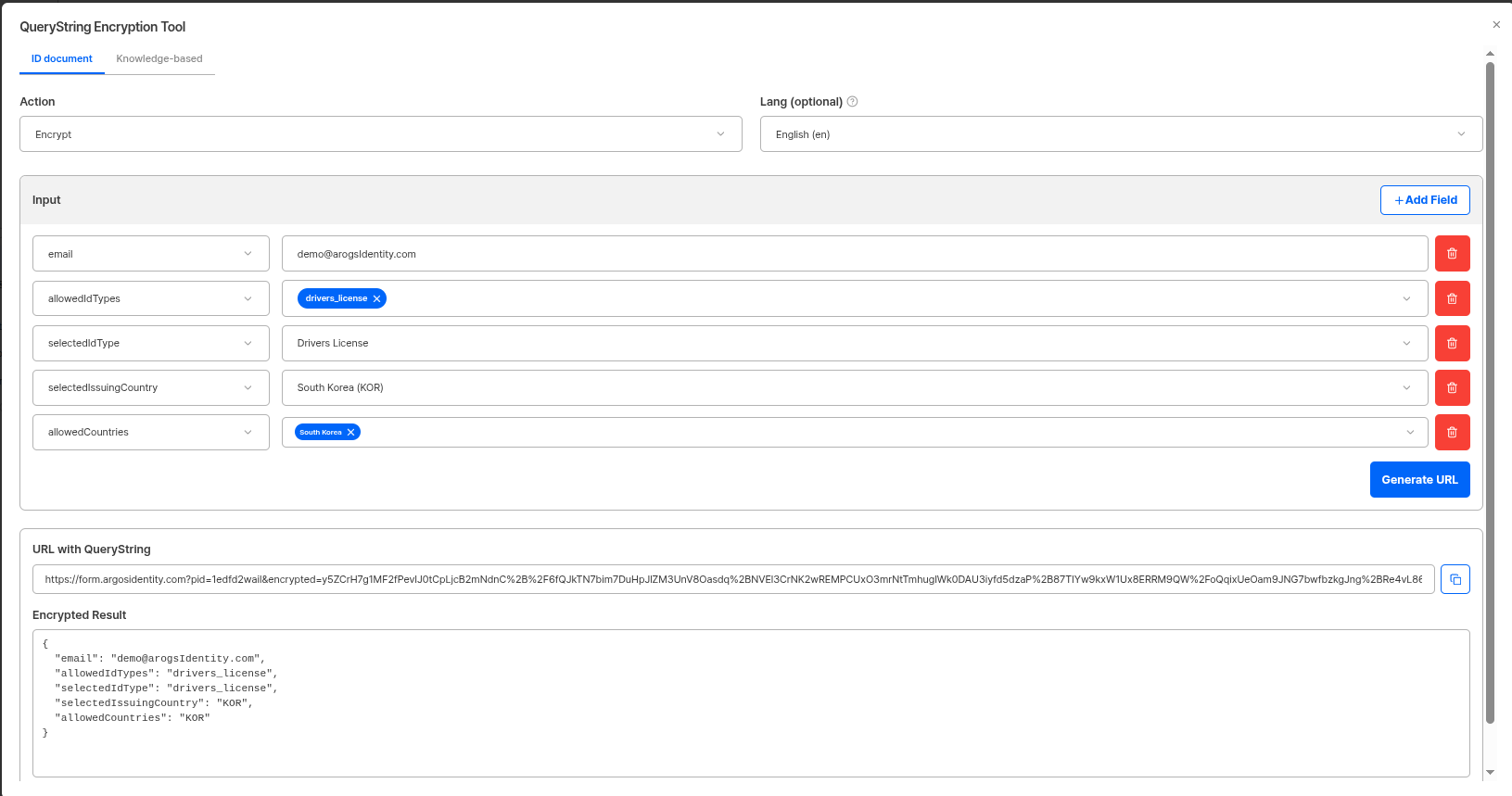
Query string encryption/decryption tool
Major Setting Options Verification
You can view the status of major setting options activated in the project.Live-form Token ID Pre-registration
You can check if the Live-form Token ID pre-registration function is activated. When this function is activated, only pre-registered Token IDs can be used.Token ID Pre-registrationDetailed settings for pre-registration function can be managed on the Security Settings > Access Control page.
Token Expiration Conditions
You can check if token expiration condition settings are activated. Token expiration conditions support usage-based expiration and time-based expiration.Token Expiration ConditionsDetailed settings for token expiration conditions can be managed on the Security Settings > Access Control page.
Encryption-only Mode
You can check if encryption-only mode is activated. When this function is activated, all query parameters must be encrypted.Encryption-only ModeDetailed settings for encryption-only mode can be managed on the Security Settings > Data Protection page.