

1. Customizable Query String Options
The query string options available in Liveform and API allow you to send additional information and customize the KYC process.2. Basic URL Structure
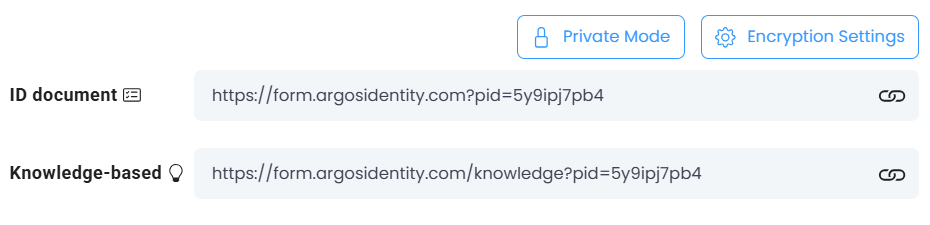
- Base Form URL: US region
https://form.argosidentity.com?pid={project_Id}, KR regionhttps://form-kr.argosidentity.com?pid={project_Id} - URL with query string:
https://form.argosidentity.com?pid={project_Id}&blacklistCountries=false
The Liveform URLs on this page are for US region projects. KR region projects use the host
form-kr.argosidentity.com. See Regions for details.Add-on FaceAuth uses a different URL and a different set of parameters.FaceAuth uses its own add-on URL in the form
https://form.argosidentity.com/face-auth?pid={faceAuth_projectId}, and its parameters — sid, authUserId, authCf1–authCf3, token — differ from the ones on this page. Encryption also uses the API key of the FaceAuth project.Note also that FaceAuth does not run without a query string — pid alone cannot enter the flow; an encrypted sid is required. lang behaves the same as in Liveform and is passed as plaintext.- Parameter definitions: FaceAuth Getting Started
- Error codes and user-facing messages on validation failure: FaceAuth URL Validation and Error Handling
3. Key Query String Parameters
3-0. Which parameter for which situation?
Quick lookup by goal. For exact behavior, constraints, and encryption requirements, refer to the detailed table and Accordions below.startValidUntil Behavior (2026-04)- Validation Priority: Evaluated before all other validations such as token ID validation. If start expiration is confirmed, subsequent validations are not performed.
- Encryption Required: Cannot be used as plain text. Must be included in the
encryptedparameter alongside other encryption options. - Timezone: Always interpreted as UTC+0. Example:
{"startValidUntil":"2026-04-30T15:00:00Z"}. - Supported Pipelines: ID document, Knowledge-based.
- Expiration Behavior: Redirects to error page
/error-page/expired-start-valid-until(error codePV-40018), displaying the message “The verification link has expired. Please try again with a new link.” to the user.
3 - Common
Show Skipping typing Email in the Processes
Show Skipping typing Email in the Processes
- Below is an example of ID check with and without an email query parameter.
- Example:
https://form.argosidentity.com?pid={project_Id}&email={type_your_email_address}
Note that this is appliable both in ID Documnet and Knolwedge-Based
3 - ID check
3 - Knowledge-Based
4. Token ID Options
ThetokenId is a string used for Liveform submissions in Private Mode.
Purpose: Prevent shared or duplicate use of the same URL.
5. Encrypted Only
You can enable the encrypted only option in the dashboard. After activation, URL query parameters only allowpid(project id), encrypted and lang(language), other parameters are not allowed.
-
https://form.argosidentity.com?pid={project_Id}&encrypted={encrypted_option}&lang=en(O) -
https://form.argosidentity.com?pid={project_Id}&encrypted={encrypted_option}&email=your_email_address@argosidentity.com(X) email is not an allowed parameter, so access is denied.
Related documents
POST/Token
Secure token registration API guide with private mode and encryption settings
GET/Token
Encrypted token retrieval API guide in private mode
Token expired
This event is triggered when a Token ID expires according to the configured expiration conditions. You can manage tokens based on usage count or time through Token Expiration settings, and webhooks are automatically sent when tokens expire. This allows you to track token lifecycle and prevent token reuse issues.