

ID Document PII Masking - Korea
New Feature The ID number masking options, previously configurable only from the internal ARGOS console, can now be controlled directly from the dashboard. A new card has been added to the General tab of Project Management > Policy and Authentication > Verification Data. Set, per number type, whether the numbers printed on Korean ID documents (Passport, National Id, Driver’s License, Resident Permit) are collected and whether they are hidden on the ID document image.
Do not collect skips storing the number but leaves it visible on the ID document image; Do not collect + mask hides it on the image as well. The last 7 digits are hidden for the resident registration number, and the whole number area is hidden for the document number.
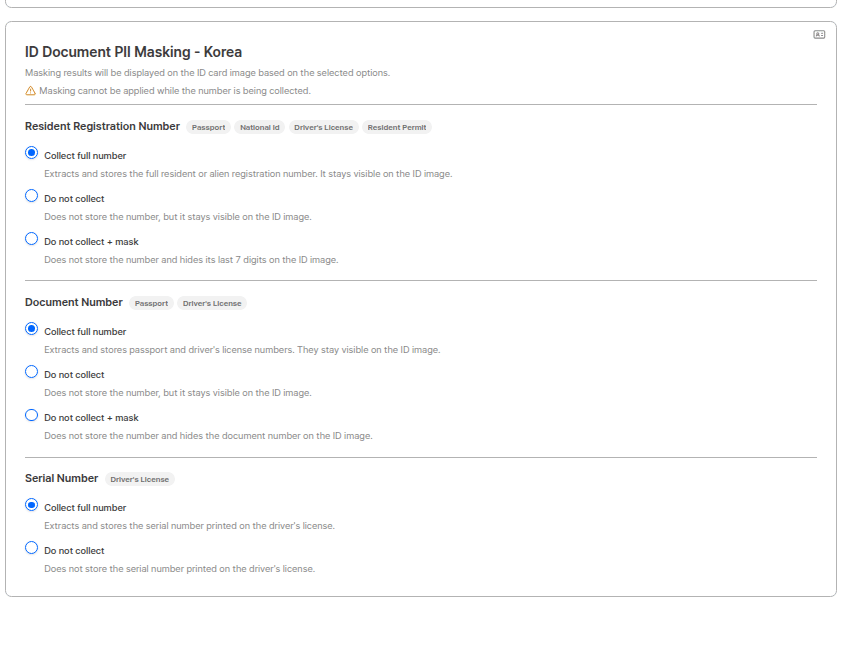
ID document PII masking settings
Serial Number has no masking option. For the serial number on a driver’s license you can only choose whether to collect it.
ID document recognition (OCR) engine improvements
Improvement ID document recognition (OCR) now runs on a new recognition engine, updated to its latest version. Accuracy in reading text from ID documents and overall processing stability are improved. The core of this update is better recognition for the Korean Driver’s License, National Id, and Resident Permit. Fields that previously had a low recognition rate are now extracted more reliably.User Submissions — custom field search
Improvement Custom Field #1 ~ #3 (cf1 ~ cf3) have been added to the text search criteria in User Submissions. In addition to submission ID, email, full name, and user ID, you can now look up submissions directly by the custom field values passed from your system.
The values searched here are the same custom field values shown in the Metadata section of the submission detail view.

Selecting the text search criterion
userId values and short custom field values can now be searched successfully.
FaceAuth API revision — /v3/face-auth
Breaking change
The FaceAuth REST API has moved to /v3/face-auth. Response fields are now consistently camelCase, the list and single lookups are separate endpoints, and error responses have been consolidated into a single { code, message } format.
The main changes are:
- Fields are never omitted from responses. Unused policies and results keep their keys and come back as
null, so code that decides whether a policy was used from key existence needs updating. policyis now a nested{ enabled, threshold }object. Whether a policy applied is determined byenabled, not bythreshold.- Pagination now uses a single cursor. Instead of
nextPage_key(nextKey_id·nextKey_date), passnextCursorback verbatim ascursor, andcount(1–2,000) is replaced bylimit(10–200, default 100). - Image download is now a
302redirect. The binary is no longer returned in the body, so the HTTP client must follow redirects. - A successful POST returns
201 Createdwith the same submission object as the lookups.
- FaceAuth Common Reference — Migrating from the previous API field mapping and structural changes
- FaceAuth Getting Started endpoint list
FaceAuth — Return URL support
New feature An AddOn Return URL card has been added to the FaceAuth project settings. It defines where the user is sent after authentication and which fields travel with them.
Selected fields are appended to the return URL query in the order above.
Return URL example
encrypted parameter delivered with AES-256-ECB.
- FaceAuth Getting Started — Return URL developer guide
- FaceAuth Guide — Return URL Settings dashboard guide
ARGOS continues to improve its identity verification service for stronger security and a better user experience. Thank you for using ARGOS ID check. The ARGOS Identity team