

Use Cases
Customer Onboarding Process Automation
Customer Onboarding Process Automation
When a new customer’s KYC verification is completed at a financial institution, receive immediate notification via webhook to automatically proceed with subsequent processes such as account opening, card issuance, and service activation. Based on approval or rejection status, send customized notification messages to customers or take actions like requesting additional documents.
Real-time Monitoring and Response for Operations Teams
Real-time Monitoring and Response for Operations Teams
When KYC submissions are rejected or specific risk factors are detected, send immediate notifications to operations teams via webhook for rapid response. Combined with email notification functionality, allow staff to understand situations in real-time and provide customer support.
Business Intelligence and Analytics System Integration
Business Intelligence and Analytics System Integration
Send real-time data related to KYC verification status to BI systems or data warehouses for use in real-time dashboard configuration or statistical analysis.
Step 1: Access Webhook Settings Page
Access the Settings → Webhook menu in the dashboard to configure webhook functionality.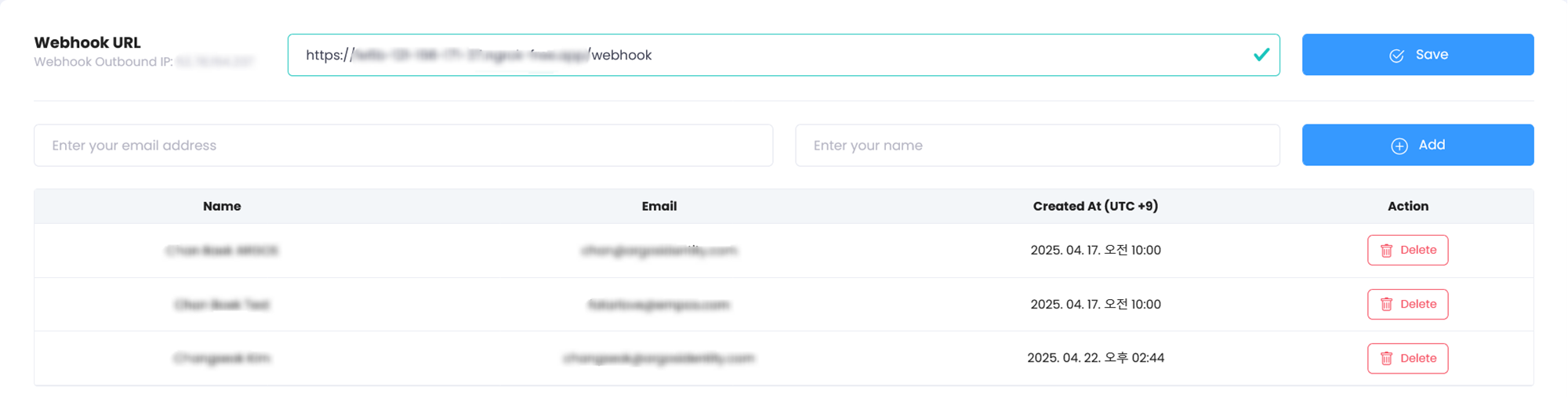
Webhook and Email Notification Settings
Step 2: Email Notification Settings
Configure email notifications to receive when webhook events occur.Notifications are sent to configured email addresses when key status changes occur, such as KYC submission completion, approval, or rejection.
| Setting | Description |
|---|---|
| Notification Email Address | Enter email address to receive webhook event notifications. |
| Event Type Selection | Select events you want to be notified about, such as KYC submission completion, approval, rejection. |
| Real-time Notifications | Email notifications are sent immediately when configured events occur. |
Step 3: Endpoint URL Configuration
Configure the endpoint URL where your system will receive webhook data. HTTP POST requests are sent to the configured URL when webhook events occur.Webhook IP and URL ManagementFixed webhook IPs for each project can only be viewed on this page, and webhook URL change history is not stored, so please manage webhook URLs carefully.
Step 4: Webhook Testing and Verification
After webhook configuration is complete, verify normal operation as follows:1
Generate Test Event
Generate test events to verify webhook delivery.
2
Confirm Data Receipt
Confirm webhook data receipt in your system.
3
Verify Email Notification
Verify normal email notification receipt.
4
Modify if Needed
Modify endpoint URL or email address if needed.
Benefits of Webhook Functionality
Real-time Integration
Immediate system integration through real-time event notifications.
Efficient Data Receipt
Efficient data receipt without separate API polling.
Real-time Monitoring
Real-time monitoring by staff through email notifications.
Automation Support
Support for automated follow-up process integration.
Webhook Event Types
| Event | Description |
|---|---|
| approved | Triggered when KYC verification is approved |
| rejected | Triggered when KYC verification is rejected |
| retry | Triggered when retry occurs |
| updated | Triggered when submission information is updated |
| delete | Triggered when submission is deleted |
| submit | Triggered when new submission is completed |
| token | Triggered on token-related events |
| injection | Triggered on data injection |
| aml | Triggered on AML screening results |
| aml-ongoing | Triggered on AML ongoing monitoring results |