

Use Cases
Enhanced Due Diligence (EDD) in Financial Services
Enhanced Due Diligence (EDD) in Financial Services
When conducting additional reviews on high-risk customers at banks or securities firms, you can collect documents such as income verification and source of funds confirmation as PDFs, and receive information like occupation or investment purpose through dropdowns. This helps secure detailed customer information for anti-money laundering compliance.
Detailed Information Collection for Insurance Applications
Detailed Information Collection for Insurance Applications
During life insurance or health insurance applications, detailed information such as medical history, family history, and lifestyle habits can be collected through text fields and dropdowns. You can also receive health checkup reports or medical records as PDF file uploads for accurate risk assessment.
Background Checks in HR Recruitment Processes
Background Checks in HR Recruitment Processes
During corporate recruitment processes, you can collect employment verification certificates, degree certificates, etc. as PDFs, and receive preferred work location or salary range through dropdowns. Contact information can be collected in proper format using the Phone Number type to facilitate follow-up contact.
Step 1: Access Additional Information Settings Page
Access the Additional Information menu in the dashboard for EDD (Enhanced Due Diligence) settings.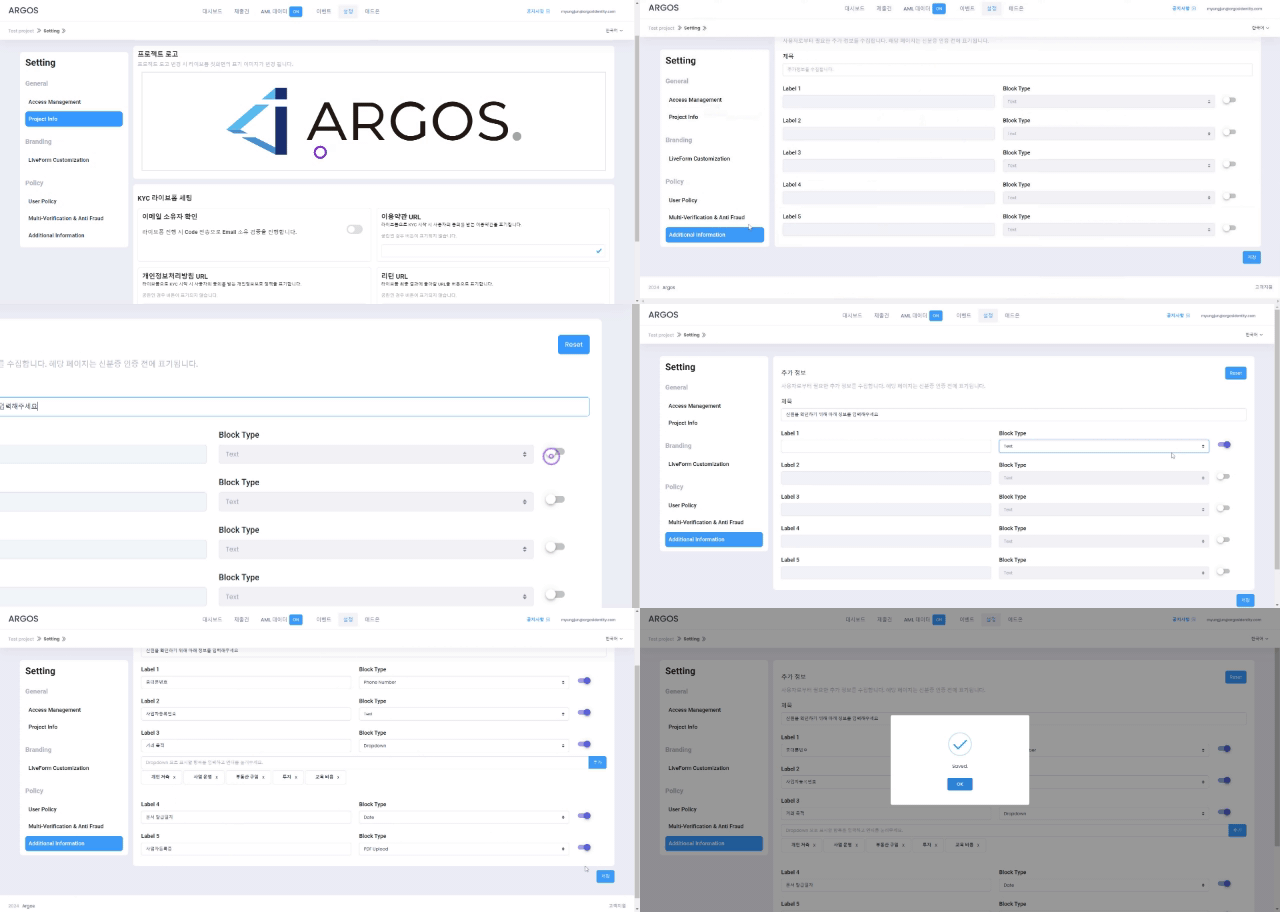
Additional Information Settings Page
Step 2: Configure Additional Information Items
You can customize additional information to collect in liveform.Configuration LimitsYou can add up to 5 items, and each item requires a label.
Supported Input Types
| Type | Description |
|---|---|
| Phone Number | Collects mobile phone numbers in proper format linked with country selection. |
| Text | Suitable for freely collecting all types of text information. |
| Dropdown | Adds predefined options to a dropdown menu to provide users with choices. |
| Date | Allows selecting date information through a calendar interface. |
| File Upload | Allows uploading PDF documents. (Maximum 1MB, PDF files only) |
| Checkbox | Use to replace existing privacy policy or terms of service display, or when 3 or more consent procedures are needed. |
Title Settings
You can directly define the topic of information to collect, and the actual entered content is displayed on the information collection screen. After completing the above detailed settings, click Save.Step 3: Collect Additional Information in Liveform
After settings are complete, customized ‘Additional Information’ items are automatically displayed in liveform step 2. Users can enter information or upload files according to the configured fields.
Additional Information Collection User Screen
Step 4: Review Collected Additional Information
After liveform submission is complete, you can review collected additional information in the following ways:1
View Submission
Check the additional information section on the submission lookup page.
2
Review Data
Review collected data for each item.
3
Download Files
Download and review uploaded PDF files.
4
Follow-up Actions
Proceed with follow-up actions for additional verification if needed.
Benefits of Additional Information Collection
Customized Information Collection
Improve work efficiency with customized information collection.
Various Input Types
Collect accurate data with various input types.
EDD Process Automation
Support regulatory compliance with EDD process automation.
Evidence Document Collection
Collect supporting documents with PDF file uploads.