

Feature Applicability by Authentication Method
- 🪪 ID document: ID document capture-based identity authentication
- 💡 Knowledge-based: User-entered information-based identity authentication
Use Cases
High-security KYC Process for Financial Institutions
High-security KYC Process for Financial Institutions
Banks and securities firms can secure the highest level of security by enabling multi-factor authentication options such as government data verification, 1 KRW account verification, and face duplicate checking. Active mode selfie liveness and ID attack prevention features effectively block deepfakes and presentation attacks.
Multi-country ID Verification for International Services
Multi-country ID Verification for International Services
Companies providing global services can accurately authenticate IDs from each region using country-specific verification options such as MRZ checking (passports), PDF417 barcode checking (North American driver’s licenses), and CURP third-party verification (Mexico).
Fraud Prevention System for Online Platforms
Fraud Prevention System for Online Platforms
E-commerce and sharing economy platforms can preemptively block fake account creation and ID forgery attempts through fraud prevention options like Proxy & VPN detection, ID validity verification, and mandatory real-time camera capture.
Multi-factor Authentication
Multi-factor authentication allows you to add authentication processes to your ID check workflow.
Multi-factor Authentication Settings Screen
🪪 Government Data Verification - Korea
Performs government data verification for IDs issued in Korea.💡🪪 Selfie Process
Allows registration of user facial information through face recognition. When used in the ID document pipeline, it compares the portrait on the ID with the user’s selfie.| Setting | Description |
|---|---|
| Threshold | Sets the threshold to apply when comparing portrait and selfie. (Default: 85 points) |
| Face Occlusion | Authentication fails if face is covered by glasses, mask, etc. during selfie authentication. |
🪪 1 KRW Account Verification - Korea
Adds a 1 KRW account verification process, allowing deposit name to be set up to 4 characters.🪪 Address Verification
Allows additional location-based address verification.💡🪪 Face Duplicate Check
Checks for duplicates against previously approved person photos.| Setting | Description |
|---|---|
| Threshold | Determines duplicate status based on facial similarity with approved person photos. |
| Duplicate Face Policy | Determines how to proceed after detecting duplicates. |
- Register and Proceed: Records duplicate submissions for the case and continues the process.
- Reject on Duplicate: Rejects authentication when duplicates exceed the set count.
Fraud Prevention
Configure security options to block forgery and fraud attempts during the identity verification process.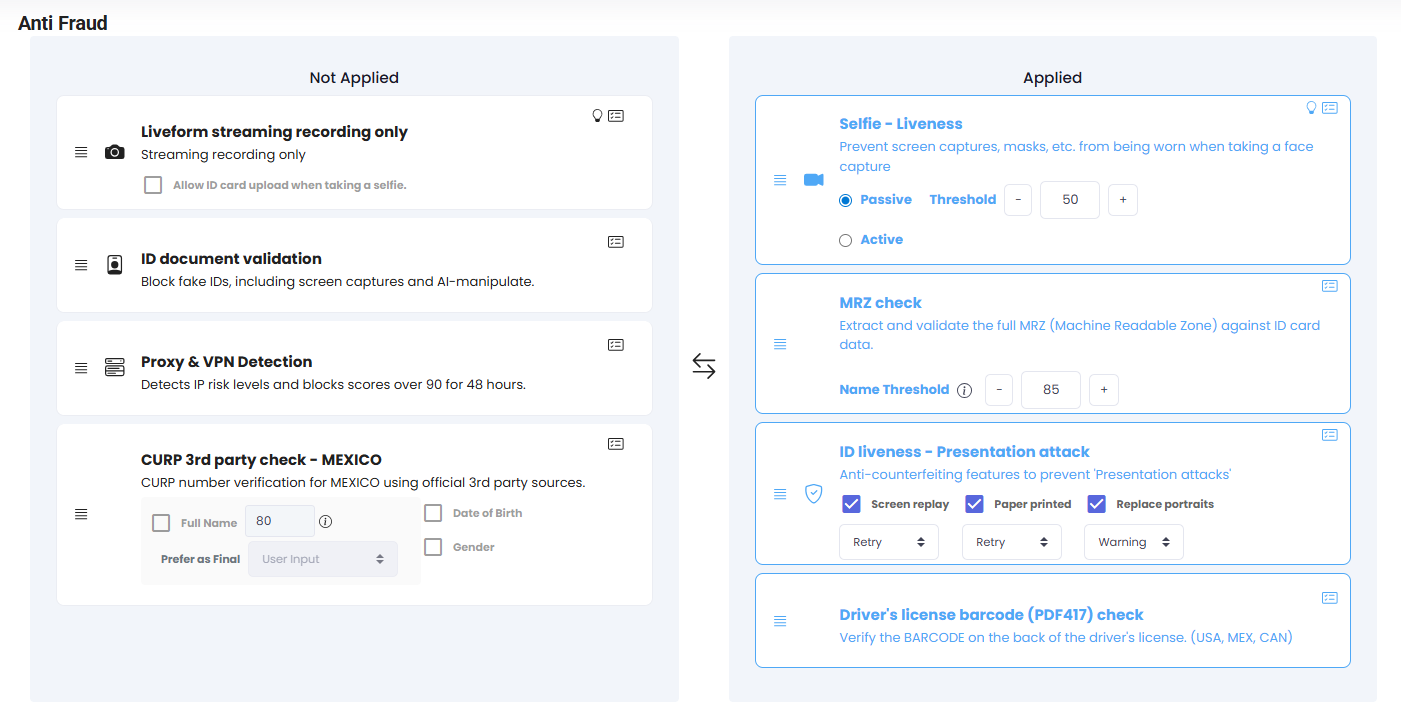
Fraud Prevention Settings Screen
💡🪪 Liveform Streaming Capture Only
Allows only real-time capture for both ID and selfie, blocking photo uploads to configure a live capture-based submission environment.🪪 Proxy & VPN Detection
Analyzes submitter IP information and measures risk level, blocking for 48 hours when score is 90 or above.Pre-verification List
Learn how to check Proxy & VPN detection results.
🪪 ID Validity Verification
Filters forged/altered IDs and detects black-and-white photos and screen capture images.🪪 ID Liveness - ID Copy Detection
Detects common forgery methods (presentation attacks) in ID-based authentication.| Pipeline | Description |
|---|---|
| Screen Replay | Detects if ID is displayed on a monitor or display |
| Paper Printout | Detects if ID is a paper printout like color print |
| Portrait Replacement | Detects if a photo is pasted on top of actual ID |
| Processing | Description |
|---|---|
| Retry | Blocks further progress and requests retry. (Accumulated retries lead to rejection. Default: 3 times) |
| Warning | Records on submission and continues process. (Warnings can be viewed in submission detail) |
When Retry and Warning occur simultaneously across pipeline settings, processing proceeds as Retry.
🪪 MRZ Check
Scans and verifies the accuracy of MRZ (Machine Readable Zone) on IDs. (e.g., bottom of passports)| Setting | Description |
|---|---|
| Name Threshold | Allows continuation only when MRZ and user-entered name comparison exceeds this value. |
🪪 Driver’s License Barcode (PDF417) Check
Scans and verifies the accuracy of barcode information on US, Mexico, and Canada driver’s licenses.💡🪪 Selfie Liveness
Choose between Active mode (deepfake detection) and Passive mode (texture-based detection).| Mode | Description |
|---|---|
| Active Mode | Mode specialized for deepfake detection |
| Passive Mode | Texture-based liveness detection |
| Setting | Description |
|---|---|
| Threshold | Sets passing criteria for each mode. 85 points or above recommended for high security policies against forgery. |
🪪 CURP Third-party Verification - Mexico
Supports authenticity verification through CURP number on Mexican IDs.| Setting | Description |
|---|---|
| Full Name | Similarity threshold for comparing user-submitted value with name verified via CURP number |
| Final Result Selection | Determines which name to use as final when verification passes |
| Date of Birth | Comparison verification of user-submitted value with DOB verified via CURP number |
| Gender | Comparison verification of user-submitted value with gender verified via CURP number |
Recommended Settings
PG/Finance
- Liveness ON (≥80)
- Proxy/VPN ON
- MRZ/PDF417 ON
Platform/Commerce
- Streaming capture only
- Face duplicate check ON