

KR (South Korea) region support
New feature Starting October 1, 2026, ID Check supports the KR (South Korea) region. You can now place a project in either the US (United States) region or the KR region. The region is set per project. Dashboard features, policies, and options are the same in both regions — only the API and Liveform access addresses (endpoints) and the webhook sender IP differ.Existing customers do not need to take any action. All existing projects stay in the US region, and the existing API and Liveform endpoints and the webhook sender IP do not change.
Using the KR region
Please ask the sales team to create a KR region project. To move an existing US region project to the KR region, you need to create a new project in the KR region and migrate your data. Please contact the sales team or customer support.Integration values for KR region projects
KR region projects use the values below. Use the values that match the region your project belongs to.The firewall of the server that receives webhooks must allow the sender IP of the region your project belongs to. If you use projects in both the US and KR regions, please allow both IPs.
Dashboard
The dashboard address (https://idcheck.argosidentity.com) is the same regardless of region. After you log in, the Project List shows US (United States) / KR (South Korea) tabs, and each tab lists the projects in that region. If you have projects in both regions, you can see each of them in its own tab, and a member invited to a project enters the region the project belongs to.
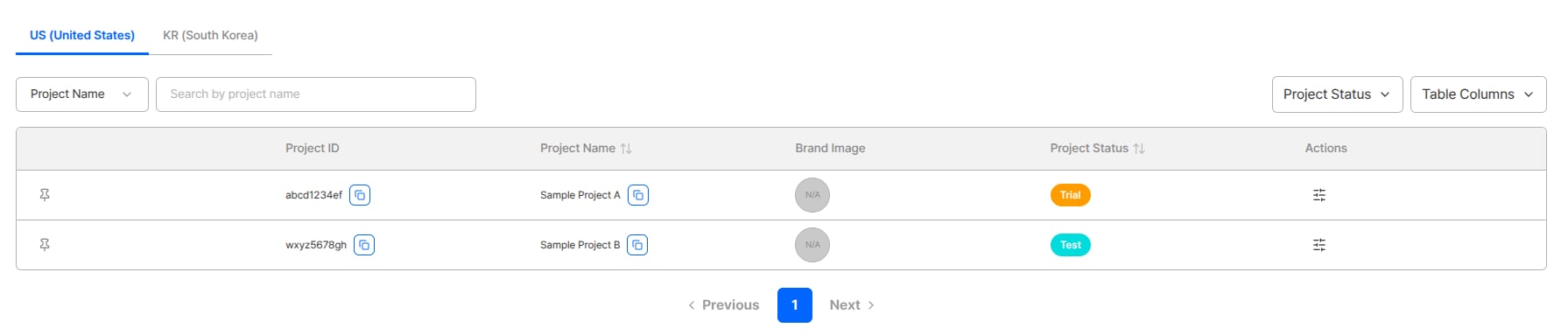
Region tabs in the Project List
Where data is processed
KYC processing and data storage take place in the region the project belongs to. Some third-party integrations, such as IP lookup, use the US region; apart from these, users’ personal information (PII) is always processed in the project’s region.Documentation changes
Most endpoints and request examples in the API Reference can be switched betweenUS / KR tabs. For examples without tabs, replace only the host with the one for your project’s region.
- Regions how to check a project’s region, endpoints by region, and where data is processed
ARGOS continues to improve its identity verification service for stronger security and a better user experience. Thank you for using ARGOS Identity. The ARGOS Identity team