

Supported ID type management
Feature Update You can now manage which ID document types — such as national ID cards, driver’s licenses, and passports — are allowed, directly from the dashboard. Flexibly configure supported ID types to match your service requirements, making operations significantly more convenient.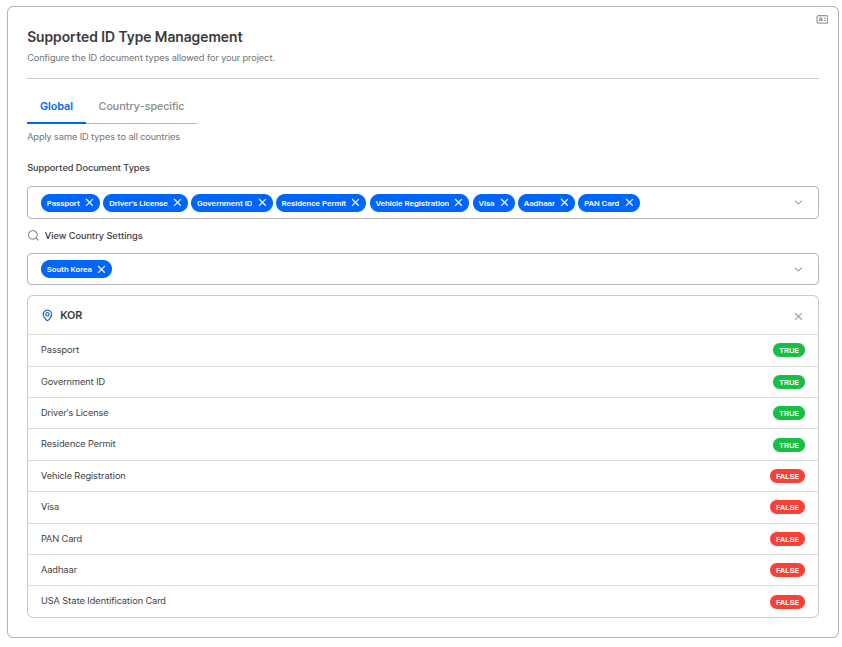
Supported ID type management - Global settings
Advanced search for user submissions
Feature Update We’ve overhauled the search experience in Liveform for finding forms, verification results, and customers. With expanded search filters, faster performance, and enhanced sorting and filtering options, you can now locate large volumes of submissions quickly and accurately.
Advanced search filters
OCR confidence score display
Feature Update Confidence scores are now displayed alongside OCR recognition results. Both operators and customers can intuitively gauge the accuracy of each recognized field, making it easier to quickly identify items that may require manual review.
OCR confidence score display
Error code / page documentation improved
Docs Update Error pages have been reorganized by error type, with tailored messages and screens for each scenario. This improves the overall user experience and makes it easier to identify and analyze the root cause of issues when they occur.ARGOS continually improves identity verification for stronger security and better user experience. Thank you for using ARGOS Identity. ARGOS Identity Team