

Device verification extended through the capture stages
New Feature Device verification previously ran only once, at liveform entry. That left a gap: after passing the check at entry, an attacker could forge the camera path at the moment the ID or selfie was captured and bypass verification. With this update, verification now extends through ID capture and selfie capture. Values are collected again at each capture stage and compared against the values from the initial entry to determine whether the device or environment was swapped in between.Three verification points
Each capture stage’s values are compared against the values from the initial entry.
Device Duplicate Check runs only at entry. Duplicate checks are not executed or recorded at the capture stages. This prevents users from being rejected because their own earlier stage was flagged as a duplicate.
New Sensor verification
New Feature Sensor verification has been added as a new verification type. It collects the device’s motion sensor signals at the moment the ID or selfie is captured, detecting attempts to inject pre-prepared images from emulators, virtual machines, or automation tools. Enable it with a single toggle in the Device Info tab under Project Management > Policy and Authentication > Authentication Enhancement and Forgery Prevention. It runs at ID capture and selfie capture only — these stages are fixed, and it does not run at entry.
Sensor Verification settings
Fingerprint verification triggers
Feature Improvement Fingerprint option now includes verification triggers, letting you select the stages where Fingerprint is additionally called.
At the capture stages, it only compares whether the visitorId matches the entry stage to confirm it is the same device.
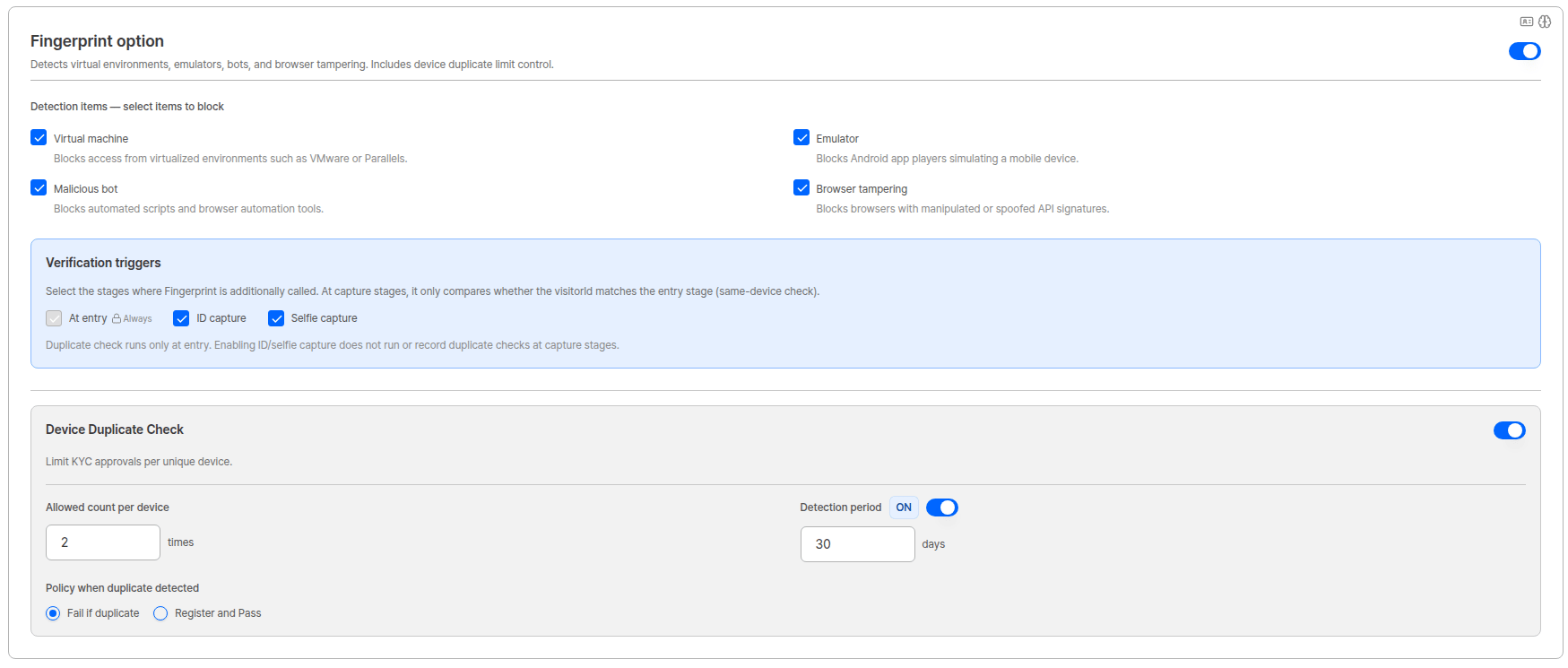
Fingerprint option — verification triggers
Dashboard — redesigned verification results view
Feature Improvement With more verification points, the Device Verification view has been redesigned.- List — Sensor has been added to the
Typecolumn, so Device / Sensor / Fingerprint are all visible in one list. - Detail — a
Stepfield shows which point (entry/idCapture/selfie) a verification belongs to. - Step Consistency — capture-stage verifications now show the comparison result against entry, including the baseline verification (
Baseline Validation ID), whether values matched, and any mismatched items.
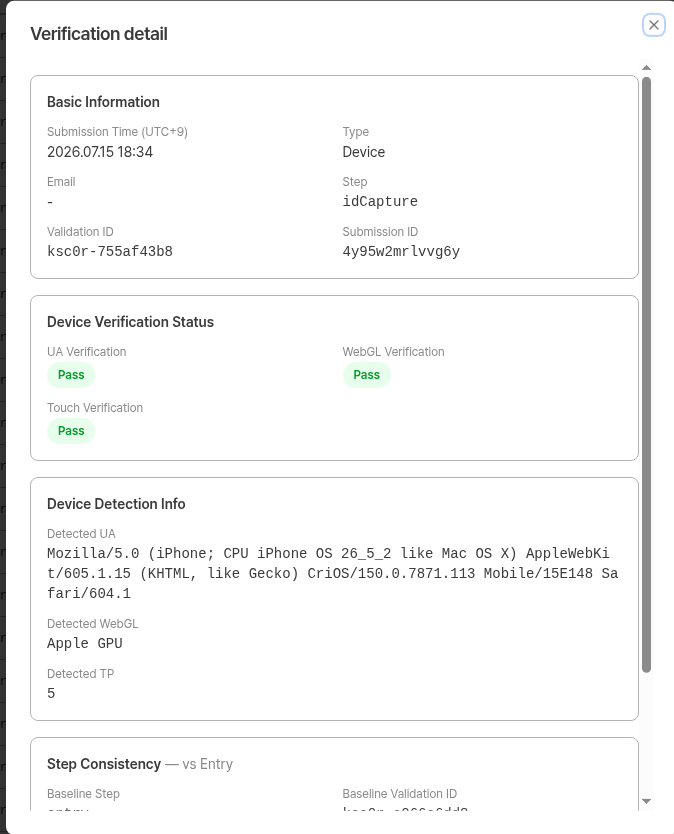
Verification detail — Step field and Step Consistency
Up to 8 Validation IDs per userA Validation ID is issued for each verification point × verification type. With all options enabled, a single KYC session for one user produces up to 8. Seeing several rows at around the same time in the list is expected — use the
Step field in the detail view to tell them apart.Bug fixes
- Fixed an issue where the pre-verification list showed fewer items than actually existed after ID capture retries.
- Fixed an issue where a submission’s pre-verification list was not displayed accurately.
- Fixed an issue where Device Verification and Selfie items did not match each other in the verification list of user submissions.
- Fixed an issue where Raw Values data was displayed incorrectly in the Fingerprint verification detail view.
- Fixed an issue where the final result was incorrectly shown as Fail even though Device Static Match had actually passed.
- Fixed an issue where Device Detection info and Verification Status were shown as empty during Device verification.
- Fixed an issue where motion permission and probe result items were not displayed in the dashboard’s Session Journey view.
- Fixed an issue where the sensor permission popup did not appear during Knowledge-based selfie capture. The permission popup now appears as it does with Active Liveness.
ARGOS continues to improve its identity verification service for stronger security and a better user experience. Thank you for using ARGOS Identity. The ARGOS Identity team