

Safe data transmission and storage are supported through liveform encryption settings and secure transmission settings.
Liveform Encryption Settings
You can maintain higher security levels for user submissions through liveform encryption settings.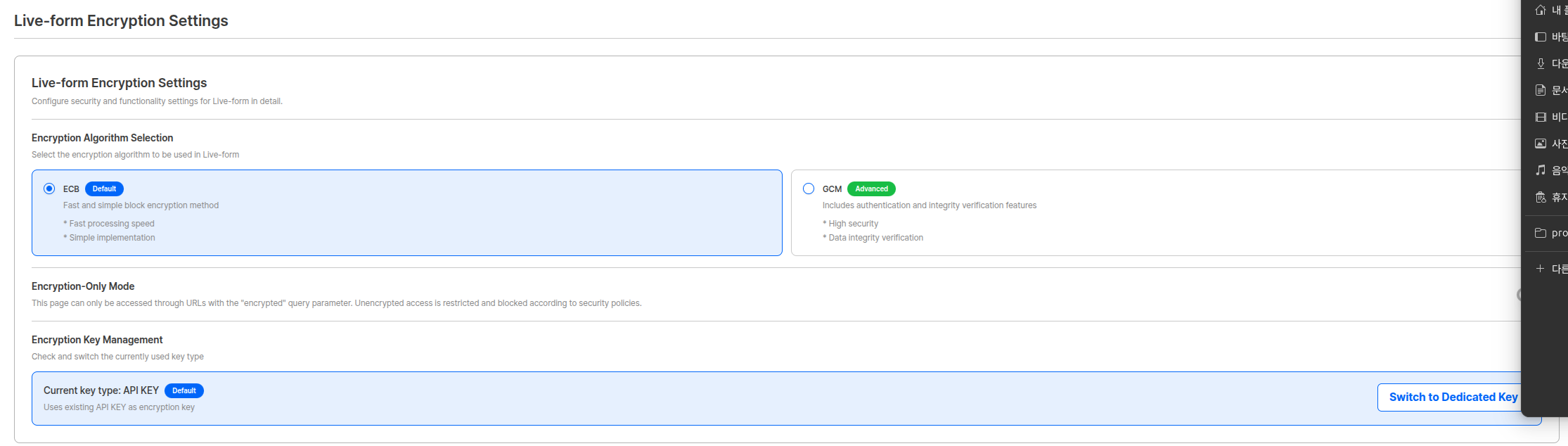
Liveform Encryption Settings Screen
Encryption Algorithm Selection
When encryption is needed in liveform URL’s Query String, data must be encrypted using the selected encryption algorithm and encryption key.How to Use After Algorithm SelectionAfter selecting encryption algorithm, parameters requiring encryption in liveform URL’s Query String must be encrypted using the selected algorithm and encryption key, then used in the form
encrypted={encrypted_data}.Encryption-only Mode
Activate encryption-only mode when you want to encrypt and use all Query String parameters.
Encryption-only Mode Settings
pid, encrypted, lang parameters are allowed in liveform URL, and all other parameters must be encrypted and included in the encrypted parameter.
The Liveform URLs on this page are for US region projects. KR region projects use the host
form-kr.argosidentity.com. See Regions for details.Encryption Key Management
Manages keys to be used for encryption. You can use API KEY or issue and use a dedicated key (secretKey).
Encryption Key Management Screen
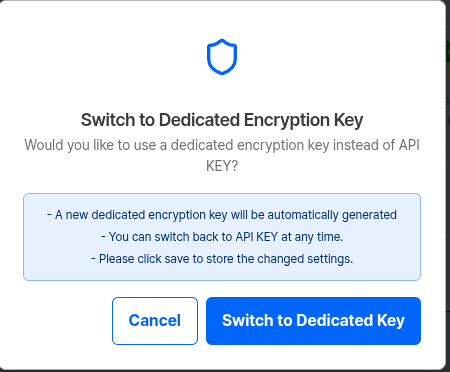
Encryption Key Issuance Popup
How to Use Liveform URL Encryption
Learn how to encrypt and use Query String parameters in liveform URLs.Step 1: Prepare Data to Encrypt
Prepare Query String parameters to encrypt in JSON format.Non-encryptable Parameters
pid, lang query strings and sid, action query strings used in ‘Additional Process (Injection)’ page do not support encryption. However, when using Injection, sid and action must be encrypted by including them inside the encrypted parameter.Step 2: Perform Encryption
Encrypt data using the selected encryption algorithm (ECB or GCM) and encryption key (API KEY or secretKey).Encryption Guide
Step 3: Add Encrypted Data to URL
Add encrypted data to theencrypted query parameter.
URL EncodingEncrypted data must be URL encoded before use in URLs.
Secure Transmission Settings
Settings to strengthen security for data transmission via API methods.
Secure Transmission Settings Screen
Secure Data Transmission
When secure data transmission option is activated, all data transmission between ARGOS and customers is encrypted.API Request Data Encryption
When secure data transmission is activated, Request Body must be encrypted when making API requests.For KR region projects, replace the host with
kr.rest-api.argosidentity.com. See Regions for details.- API Requests (GET, POST, PATCH): AES-256-ECB method
- Webhook Data: AES-256-CBC method
API Response Data Decryption
When secure data transmission is activated, API responses are also encrypted, so decryption is required. Response Format:Webhook Data Encryption/Decryption
Webhook data is encrypted using AES-256-CBC method.Encryption Guide
Configuration Guide by Scenario
Scenario 1: Selective Encryption Usage
Scenario 1: Selective Encryption Usage
When selecting encryption algorithm and encrypting only some Query Strings.Configuration:In this case,
- Encryption Algorithm: Select ECB or GCM
- Encryption Key: Select API KEY or dedicated key
- Encryption-only Mode: Deactivated
email is a normal parameter, and sensitive information such as token is encrypted and included in the encrypted parameter.Scenario 2: Full Encryption Usage (Encryption-only Mode)
Scenario 2: Full Encryption Usage (Encryption-only Mode)
When encrypting and using all Query String parameters.Configuration:In this case, all parameters except
- Encryption Algorithm: Select ECB or GCM
- Encryption Key: Select API KEY or dedicated key
- Encryption-only Mode: Activated
pid, lang must be encrypted and included in the encrypted parameter.Scenario 3: API Data Transmission Security Enhancement
Scenario 3: API Data Transmission Security Enhancement
When strengthening security for data transmission via API.Configuration:
- Secure Data Transmission: Activated
- Encrypt all API requests (Request Body)
- Decrypt all API responses (Response Body)
- Decrypt webhook received data