

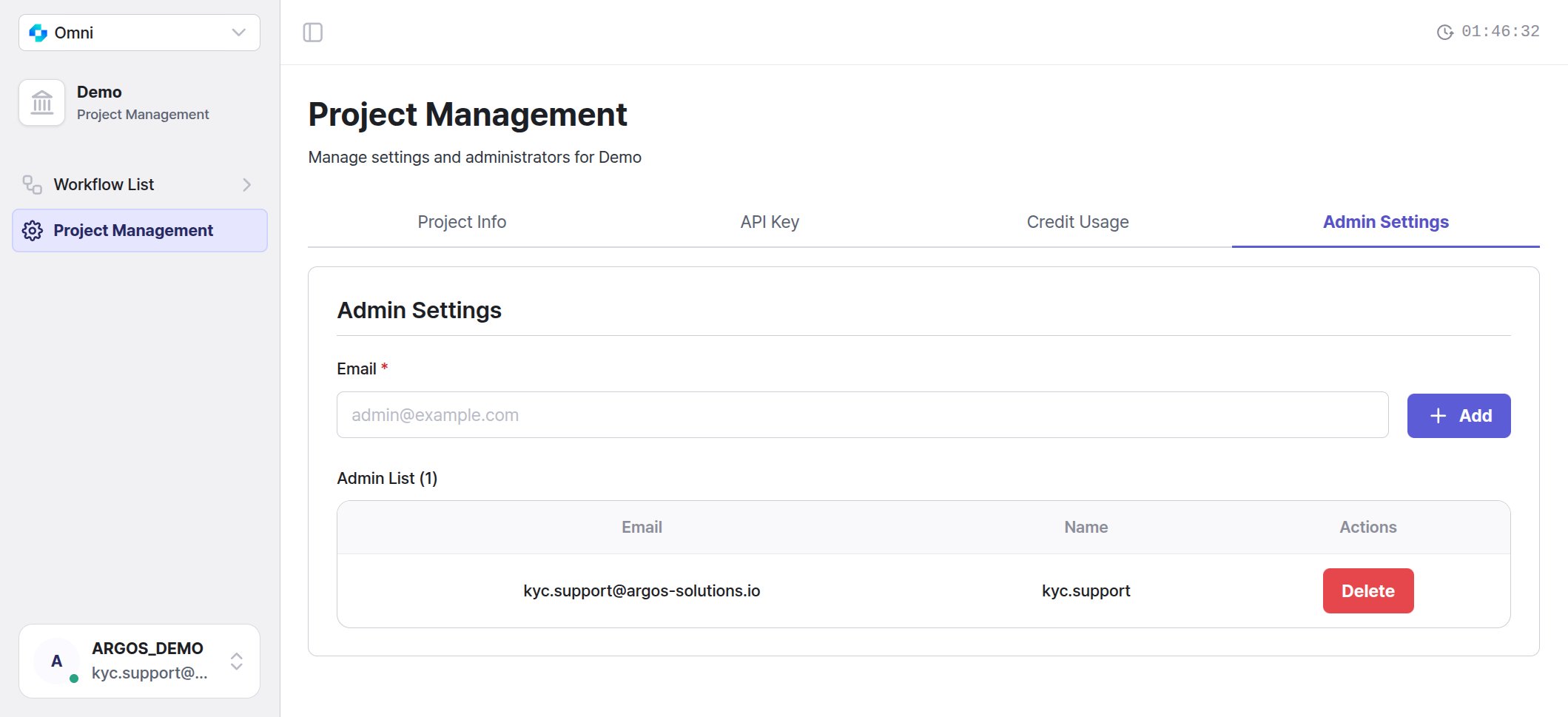
The Admin Settings tab — add or invite administrators by email, and remove them from the list.
Adding and inviting an administrator
Enter an Email and select + Add. You do not enter a name.
The list has three columns — Email, Name, and Actions (with Delete) — and the heading shows the current count. An added user sees this project in their project list from their next sign-in.
The person you invite
They open the link in the invitation email, sign up (including email verification), and land directly in the project. An invitation link is valid for 7 days from when it was sent. If the link is opened in a browser that is already signed in to a different account, they are asked to switch accounts. Switching signs them out of the current account, including other ARGOS services that share the session. The invitation link stays valid.Invitation delivery status
After you send an invitation email, Invitation delivery status appears below the email field. It shows the email you just invited and one line for each invitation sent to that email. Sending may take up to a minute. If there is a long history, select More history. This section appears only on the screen where you sent the invitation. It disappears when you refresh the page or move to another screen.
“No invitation history was found. This does not confirm a failed delivery.” means no invitation was found for that email. It does not mean delivery failed.
Removing an administrator
Use the Delete button on the row. The owner cannot be removed. A removed user loses access to the project, but the workflows and profiles they created stay exactly as they are.Permissions
Errors
Related pages
- Project management — creating projects, project status, and deletion
- API key
- October 2026 update — when invitations were introduced