

https://omni.argosidentity.com is the new Omni dashboard. You can keep using the existing dashboard (Omni v1) at a separate address until December 31, 2026, and the existing API keeps working until then with no change to its address or key. Existing data is not moved to the new dashboard.
Dates and addresses
What existing customers should know
- Existing data is not moved. Projects, Workflows, Cases and analysis results are not moved to the new dashboard. The new dashboard starts empty. Use the Omni v1 screen and the existing API to see your existing data.
- The Omni v1 screen is available until December 31, 2026. You open Omni v1 by entering its address directly. The service switch button in the ID check dashboard leads to the new dashboard.
- The existing API keeps working until December 31, 2026. Systems you have already integrated need no changes until then. This API works with Projects created in Omni v1.
- There is no API address yet for Projects created in the new dashboard. Project settings in the new dashboard also have an API Key tab, but the external address to call with that key is still being prepared. We will announce it on this page and in Product updates as soon as it is ready.
- What happens to Omni v1 data and the API after December 31, 2026 will be announced separately.
What changed in the new dashboard
Signing in
You sign in without a password. Select Continue with Google, or select Continue with email to get a sign-in link. The link works once and for 10 minutes. You can also enter the 6-digit code from the email on the sign-in screen. If it is your first time, continuing the same way creates your account. When an account with no Projects signs in for the first time, a trial Project is created automatically. If you have been invited to a Project, no trial Project is created. See the Quickstart for details.Sidebar
The sidebar has Projects, Workflow, Case and Info Request. When you open a Project, you see its Workflows. You change the language and time zone from the account menu. The screen language is Korean or English.A profile in Omni v1 is a Case in the new dashboard.
Creating a Workflow
Creating a Workflow now takes 5 steps instead of 4: Basic information → Policy definition → Documents to collect → Select AI model → Output Schema. The Information Checklist is the list of materials to collect from the Applicant, and you can create a Workflow with it left empty. See Creating a workflow for details.Collecting documents with Info Request
You can now collect documents from an Applicant directly. In Info Request, enter the recipient’s email address and send the request. The Applicant opens the link in the email, then uploads documents or answers in text. Analysis starts automatically when the submission is complete. See the Info Request overview for details.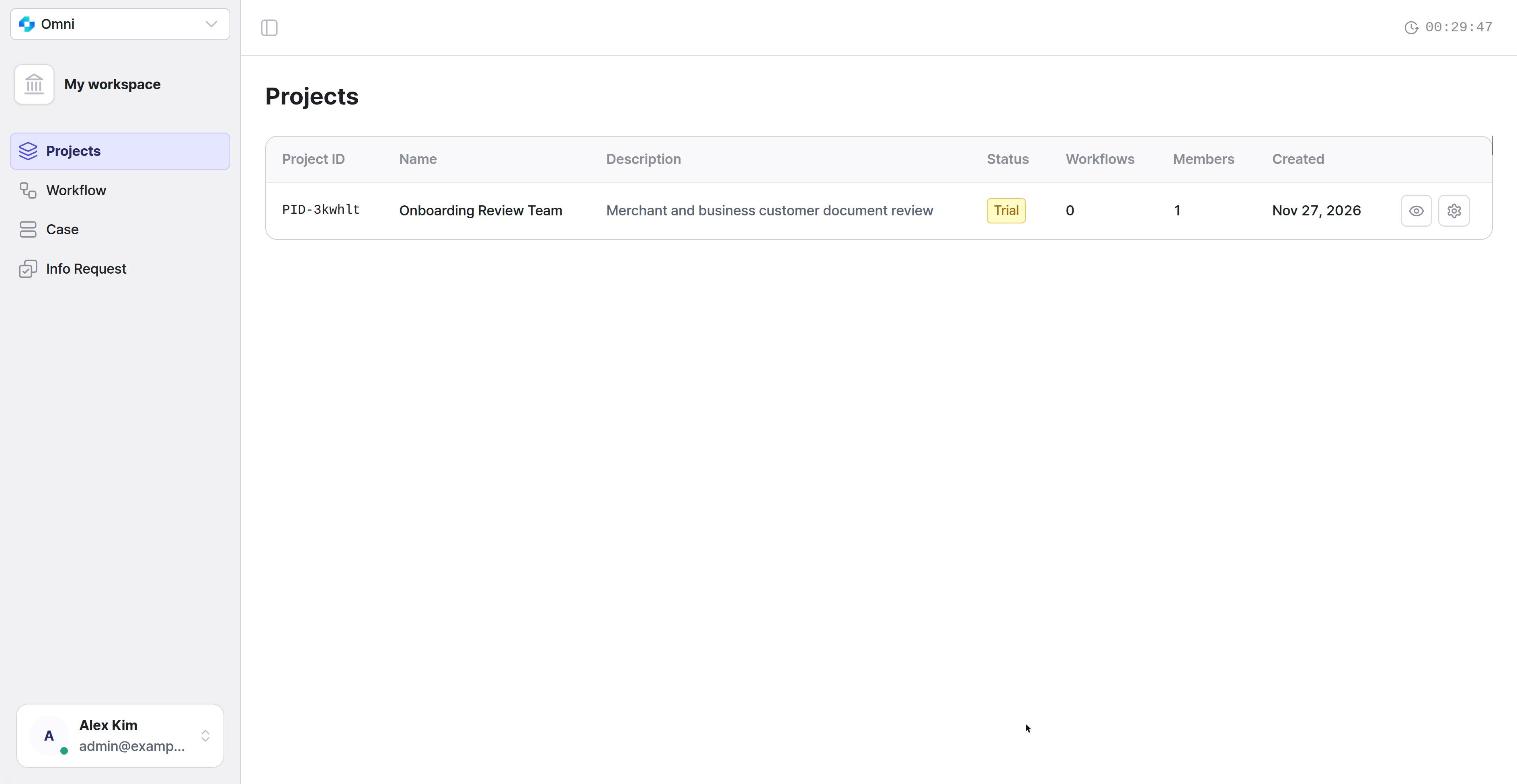
Name mapping
The
profiles in API paths has not changed. See Core concepts for the full list of terms.
Frequently asked questions
Where do I see my existing Projects and analysis results?
Where do I see my existing Projects and analysis results?
Use the Omni v1 screen (
https://omni-v1.argosidentity.com) and the existing API. Both are available until December 31, 2026.Can I move my existing data to the new dashboard?
Can I move my existing data to the new dashboard?
No. The new dashboard starts empty, so create the Workflows you need again.
Can I sign in to the new dashboard with my Omni v1 account?
Can I sign in to the new dashboard with my Omni v1 account?
You sign in to the new dashboard with Google, or with a sign-in link or 6-digit code sent by email. It does not use passwords. Your Omni v1 account and password still work in Omni v1.
Do I need to change the API I have integrated?
Do I need to change the API I have integrated?
Not until December 31, 2026. The address and key of the existing API stay the same, and it works with your Omni v1 Projects. We will announce what happens after that date separately.
Can I call a Project created in the new dashboard through the API?
Can I call a Project created in the new dashboard through the API?
The external address to call with that key is still being prepared. We will announce it on this page and in the product updates as soon as it is ready.
How do I open the Omni v1 screen?
How do I open the Omni v1 screen?
Enter
https://omni-v1.argosidentity.com directly. The service switch button in the ID check dashboard leads to the new dashboard.What happens after December 31, 2026?
What happens after December 31, 2026?
What happens to Omni v1 data and the API will be announced separately.
Related documents
Quickstart
Sign in to the new dashboard and follow along to your first analysis.
Core concepts
The terms of the new dashboard, from Project to Verdict.
Dashboard overview
Sign-in, sidebar, account menu and session.
API overview
The existing API for Omni v1 Projects.