> ## Documentation Index
> Fetch the complete documentation index at: https://developers.argosidentity.com/llms.txt
> Use this file to discover all available pages before exploring further.
# 데이터 암호화 및 복호화
> 고객 데이터를 안전하게 보호하고 무단 접근과 데이터 유출 위험을 최소화하기 위한 강력한 암호화 솔루션을 제공합니다. 최신 보안 표준을 준수하며, 다양한 환경에서 쉽게 구현할 수 있는 방법을 상세히 설명합니다.
## 암복호화 도구
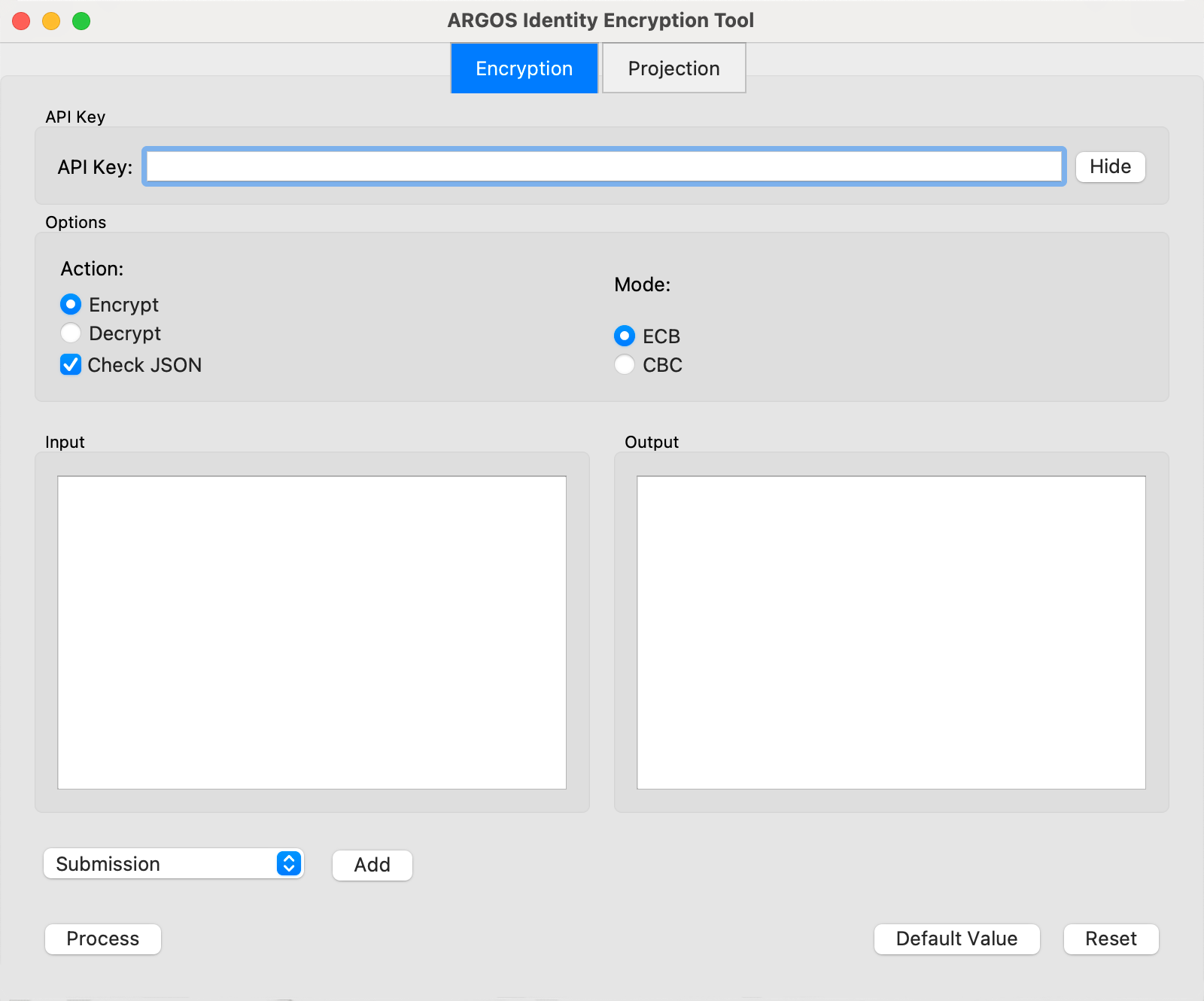
개발 목적을 위해 암복호화 도구를 제공합니다.\
필요시 [링크](https://argos-logo.s3.ap-northeast-2.amazonaws.com/developer_guide/EncryptionTool_0616.zip)에서 다운로드 하셔서 사용하시기 바랍니다.
맥OS에서 사용시, 첫 실행때 "개인정보 보호 및 보안" 설정에서 허용을 해주셔야 사용이 가능합니다.
 ## 암호화 옵션
암호화 모듈의 종류
쿼리 스트링 암호화
안전한 데이터 전송 옵션
암/복호화 방식
## 1. 암호화 모듈의 종류
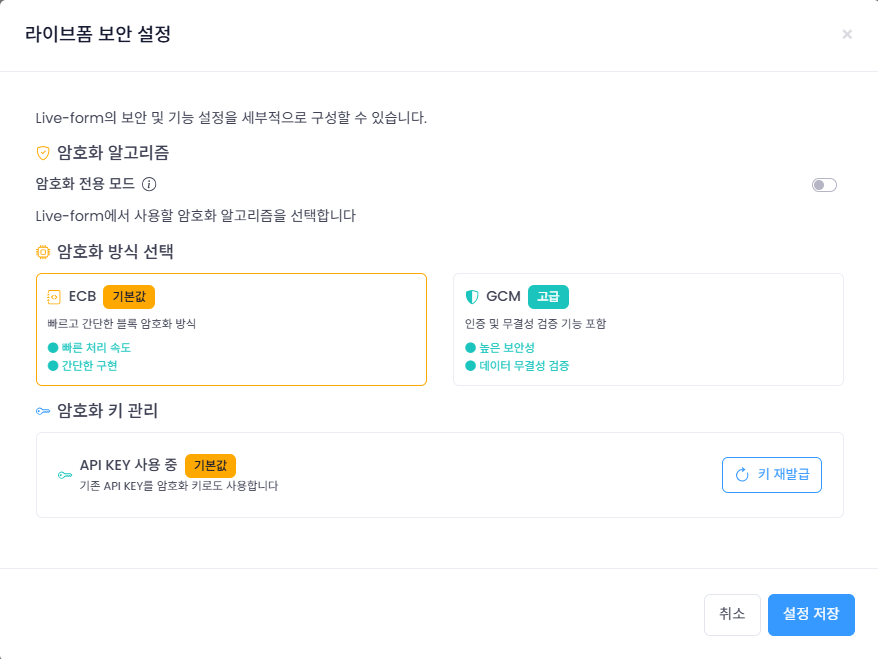
적용 가능한 암호화 모듈의 종류는 다음 두가지 입니다.
* AES-256: 빠르고 간단한 블록 암호화 방식
* GCM-256: 인증 및 무결성 기능을 포함한 강화된 암호화 방식
### 암호화 키 종류
* API 키: Project에 부여된 API 키
* Custom API 키: 라이브폼에서 신규로 발급받아 사용하는 secretKey
## 암호화 옵션
암호화 모듈의 종류
쿼리 스트링 암호화
안전한 데이터 전송 옵션
암/복호화 방식
## 1. 암호화 모듈의 종류
적용 가능한 암호화 모듈의 종류는 다음 두가지 입니다.
* AES-256: 빠르고 간단한 블록 암호화 방식
* GCM-256: 인증 및 무결성 기능을 포함한 강화된 암호화 방식
### 암호화 키 종류
* API 키: Project에 부여된 API 키
* Custom API 키: 라이브폼에서 신규로 발급받아 사용하는 secretKey
 ## 2. 쿼리 스트링 암호화
URL의 쿼리 스트링으로 전송되는 민감한 데이터를 AES-256 방식이나 GCM-256 방식으로 암호화합니다.
각 Query String 키에 대한 설명은 다음 링크를 참조하세요.
[주요 QueryString 파라미터](https://developers.argosidentity.com/ko/idcheck/getting-started/liveform-url/querystring-and-token-guide#2-1-%EC%A3%BC%EC%9A%94-querystring-%ED%8C%8C%EB%9D%BC%EB%AF%B8%ED%84%B0)
```json id_document.json theme={null}
{
"email": "email@email.com",
"userid": "userid",
"cf1": "value 1",
"cf2": "value 2",
"cf3": "value 3",
"blacklistCountries": false,
"approvePeriod": false,
"rejectPeriod": false,
"ageLimit": false,
"rejectDuplicateUser": true,
"token": "token_id",
"allowedCountries": "USA,KOR"
}
```
```json knowledge_based.json theme={null}
{
"email": "email@email.com",
"userid": "userid",
"cf1": "value 1",
"cf2": "value 2",
"cf3": "value 3",
"knowledgeField": "birthDate,gender,nationality,name,SSN,name,address,phoneNumber",
"knowledgePrefill" : "gender=male,nationality=USA,SSN=123-34-0001,address=Washington D.C.,name=Brown James,birthDate=1980-01-01,phoneNumber=+15555551234",
"blacklistCountries": false,
"ageLimit": false,
"rejectDuplicateUser": true,
"allowedCountries": "USA"
}
```
## 2. 쿼리 스트링 암호화
URL의 쿼리 스트링으로 전송되는 민감한 데이터를 AES-256 방식이나 GCM-256 방식으로 암호화합니다.
각 Query String 키에 대한 설명은 다음 링크를 참조하세요.
[주요 QueryString 파라미터](https://developers.argosidentity.com/ko/idcheck/getting-started/liveform-url/querystring-and-token-guide#2-1-%EC%A3%BC%EC%9A%94-querystring-%ED%8C%8C%EB%9D%BC%EB%AF%B8%ED%84%B0)
```json id_document.json theme={null}
{
"email": "email@email.com",
"userid": "userid",
"cf1": "value 1",
"cf2": "value 2",
"cf3": "value 3",
"blacklistCountries": false,
"approvePeriod": false,
"rejectPeriod": false,
"ageLimit": false,
"rejectDuplicateUser": true,
"token": "token_id",
"allowedCountries": "USA,KOR"
}
```
```json knowledge_based.json theme={null}
{
"email": "email@email.com",
"userid": "userid",
"cf1": "value 1",
"cf2": "value 2",
"cf3": "value 3",
"knowledgeField": "birthDate,gender,nationality,name,SSN,name,address,phoneNumber",
"knowledgePrefill" : "gender=male,nationality=USA,SSN=123-34-0001,address=Washington D.C.,name=Brown James,birthDate=1980-01-01,phoneNumber=+15555551234",
"blacklistCountries": false,
"ageLimit": false,
"rejectDuplicateUser": true,
"allowedCountries": "USA"
}
```
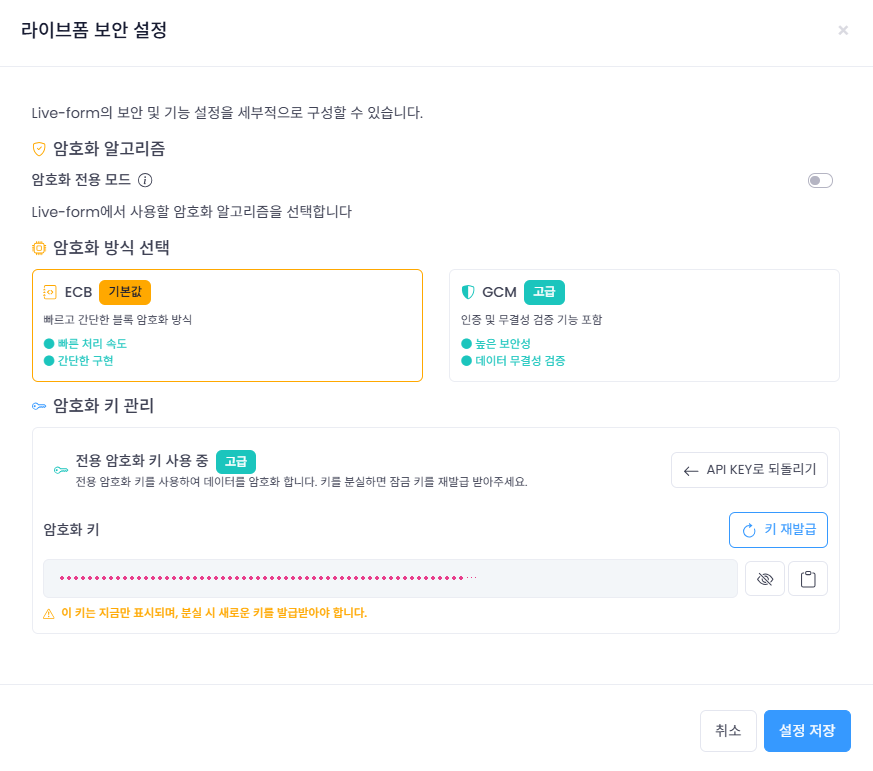 secretKey의 경우 한번 발급 이후 표시되지 않습니다. 분실 시, 재발급해서 사용해주세요.
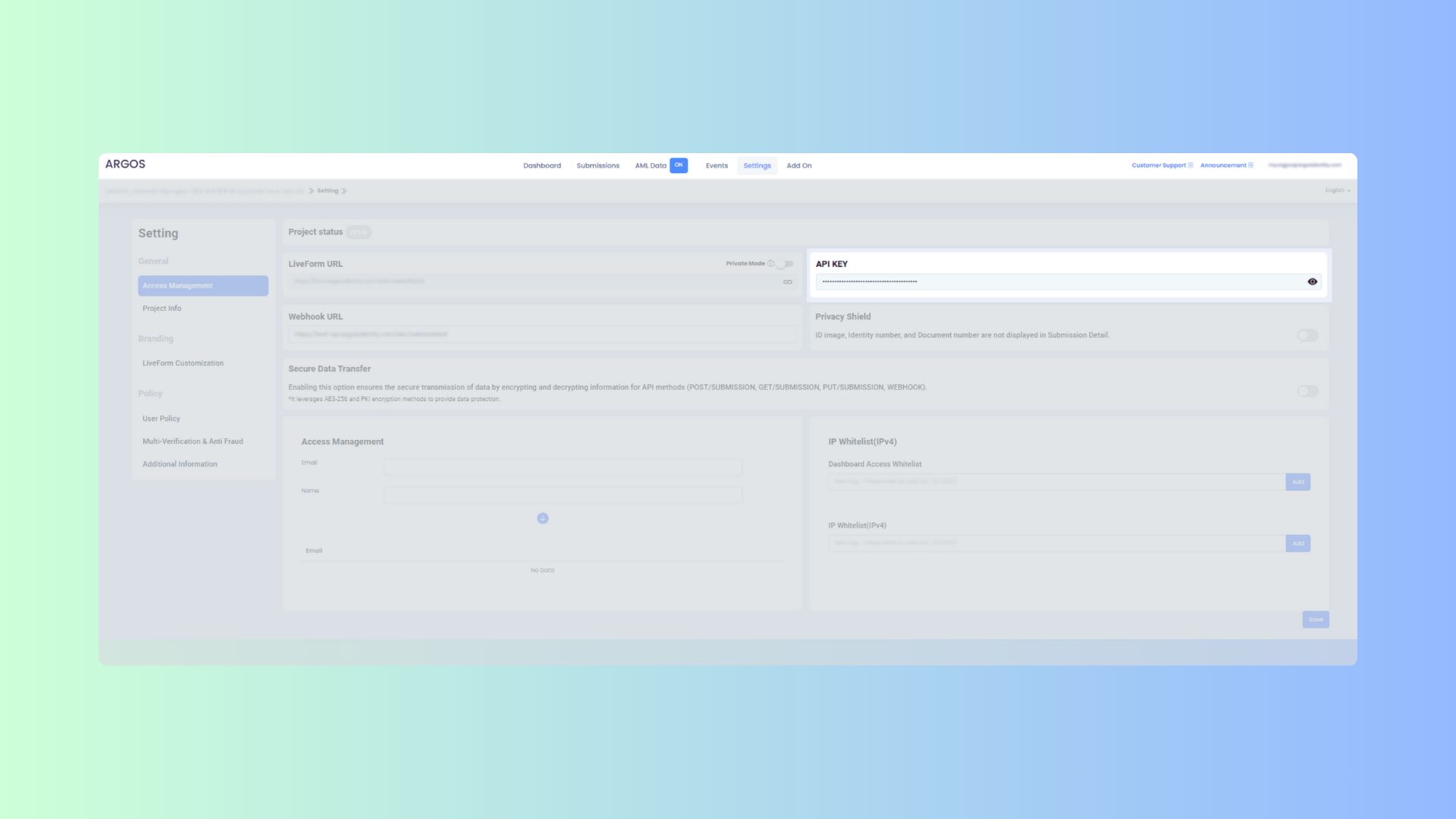 AES-256 암호화 수행 전에 쿼리 스트링 암호화 및 복호화 단계를 확인해주세요.
secretKey를 발급받은 경우, secretKey를 활용해주세요.
```text example.url theme={null}
https://form.argosidentity.com?pid={project_Id}&encrypted={encrypted_json_text}
```
주의: pid, lang 쿼리 스트링 및 ‘추가 프로세스 (Injection)’ 페이지에서 사용하는 sid, action 쿼리 스트링은 암호화를 지원하지 않습니다.
## 3. 쿼리 스트링 암호화 및 복호화 방법
### 3-1. 키 생성 프로세스
AES-256
```mermaid theme={null}
graph LR
A[API Key] -->|SHA-256 해시| B[Hashed Key]
B -->|AES-256 암호화에 사용| C[암호화/복호화]
```
GCM-256
```mermaid theme={null}
flowchart LR
%% 키 생성
API[API Key] -->|SHA-256 해시| KEY[해시된 키 32바이트]
%% 암호화
KEY --> ENC[AES-256-GCM 암호화]
IV[IV Nonce 12바이트 랜덤 생성] --> ENC
AAD[AAD 추가 인증 데이터 선택] --> ENC
DATA[평문 데이터] --> ENC
ENC --> CT[암호문]
ENC --> TAG[인증 태그 16바이트]
%% 패키징
CT --> OUT[IV + 암호문 + 태그]
IV --> OUT
TAG --> OUT
AAD -->|헤더 또는 별도 필드| OUT
```
```javascript Node.js(crypto module) theme={null}
var crypto = require('crypto');
var hashedKey = crypto.createHash('sha256').update(APIKEY).digest();
```
```javascript Node.js(crypto-js library) theme={null}
const CryptoJS = require('crypto-js');
const hashedKey = CryptoJS.SHA256(APIKEY);
```
아래 예시는 데이터를 AES-256 방식으로 암호화하는 방법을 보여줍니다.
```javascript Node.js(crypto module) theme={null}
var crypto = require('crypto');
/**
* @param {string} data - Stringified JSON data
* @param {string} apiKey - Project API key
* @returns {string} Encrypted data
*
* 정확한 암호화를 위해선 formatJSON 으로 사용해주세요. 예시는 다음과 같습니다.
* const data = {
userid: "10912301",
email: "email@email.com"
* };
*
* 다음과 같이 직접 string 으로 입력을 피해주세요.
* 기대한 암호화 결과가 달라질 수 있습니다.
* `{"userid":"10912301","email":"email@email.com"}`
*/
function encrypt(data, apiKey) {
var hashedKey = crypto.createHash('sha256').update(apiKey).digest();
var cipher = crypto.createCipheriv('aes-256-ecb', hashedKey, null);
return cipher.update(data, 'utf8', 'base64') + cipher.final('base64');
}
```
```javascript Node.js(crypto-js library) theme={null}
const CryptoJS = require('crypto-js');
const encrypt = (data, apiKey) => {
const hashedKey = CryptoJS.SHA256(apiKey);
const encrypted = CryptoJS.AES.encrypt(data, hashedKey, {
mode: CryptoJS.mode.ECB,
});
return encrypted.ciphertext.toString(CryptoJS.enc.Base64);
};
```
```java java(crypto-js library) theme={null}
import javax.crypto.Cipher;
import javax.crypto.spec.SecretKeySpec;
import java.nio.charset.StandardCharsets;
import java.security.MessageDigest;
import java.util.Base64;
public class Encryption {
public static String encrypt(String data, String apiKey) throws Exception {
// API 키를 SHA-256으로 해시
MessageDigest digest = MessageDigest.getInstance("SHA-256");
byte[] hashedKey = digest.digest(apiKey.getBytes(StandardCharsets.UTF_8));
// AES-256 호환을 위한 32바이트 길이 보장
byte[] aesCompatibleKey = new byte[32];
System.arraycopy(hashedKey, 0, aesCompatibleKey, 0, 32);
// AES 암호화를 위한 키 생성
SecretKeySpec secretKey = new SecretKeySpec(hashedKey, "AES");
// AES/ECB/PKCS5Padding 모드로 Cipher 초기화
Cipher cipher = Cipher.getInstance("AES/ECB/PKCS5Padding");
cipher.init(Cipher.ENCRYPT_MODE, secretKey);
// 데이터 암호화
byte[] encryptedBytes = cipher.doFinal(data.getBytes(StandardCharsets.UTF_8));
// Base64 인코딩하여 결과 반환
return Base64.getEncoder().encodeToString(encryptedBytes);
}
}
```
아래 예시는 데이터를 AES-256-GCM 방식으로 암호화하는 방법을 보여줍니다.
```javascript Node.js(crypto module) theme={null}
var crypto = require('crypto');
/**
* @param {string} data - Stringified JSON data
* @param {string} apiKey - Project API key
* @returns {string} Encrypted data in hex format (IV + ciphertext + tag)
*
* GCM 모드는 인증된 암호화를 제공하며, IV와 인증 태그가 포함됩니다.
* 반환값은 12바이트 IV + 암호문 + 16바이트 인증 태그를 hex 문자열로 인코딩한 형태입니다.
*/
function encryptGCM(data, apiKey) {
var hashedKey = crypto.createHash('sha256').update(apiKey).digest();
var iv = crypto.randomBytes(12);
var cipher = crypto.createCipheriv('aes-256-gcm', hashedKey, iv);
var encrypted = cipher.update(data, 'utf8');
encrypted = Buffer.concat([encrypted, cipher.final()]);
var tag = cipher.getAuthTag();
var result = Buffer.concat([iv, encrypted, tag]);
return result.toString('hex');
}
/**
* @param {string} encryptedHex - Hex encoded encrypted data
* @param {string} apiKey - Project API key
* @returns {string} Decrypted data
*/
function decryptGCM(encryptedHex, apiKey) {
var hashedKey = crypto.createHash('sha256').update(apiKey).digest();
var encryptedBuffer = Buffer.from(encryptedHex, 'hex');
var iv = encryptedBuffer.slice(0, 12);
var tag = encryptedBuffer.slice(-16);
var encrypted = encryptedBuffer.slice(12, -16);
var decipher = crypto.createDecipheriv('aes-256-gcm', hashedKey, iv);
decipher.setAuthTag(tag);
var decrypted = decipher.update(encrypted);
decrypted = Buffer.concat([decrypted, decipher.final()]);
return decrypted.toString('utf8');
}
```
```javascript Node.js(crypto-js library) theme={null}
const CryptoJS = require('crypto-js');
/**
* @param {string} data - Stringified JSON data
* @param {string} apiKey - Project API key
* @returns {string} Encrypted data in hex format
*/
const encryptGCM = (data, apiKey) => {
const hashedKey = CryptoJS.SHA256(apiKey);
const iv = CryptoJS.lib.WordArray.random(12);
// GCM 모드는 crypto-js에서 직접 지원하지 않으므로
// Node.js crypto 모듈을 사용하는 것을 권장합니다.
// 아래는 개념적인 예시입니다.
// 실제 구현시에는 Node.js crypto 모듈 사용을 권장
throw new Error('GCM 모드는 crypto-js에서 지원하지 않습니다. Node.js crypto 모듈을 사용하세요.');
};
/**
* @param {string} encryptedHex - Hex encoded encrypted data
* @param {string} apiKey - Project API key
* @returns {string} Decrypted data
*/
const decryptGCM = (encryptedHex, apiKey) => {
// crypto-js는 GCM을 지원하지 않으므로 Node.js crypto 모듈 사용 권장
throw new Error('GCM 모드는 crypto-js에서 지원하지 않습니다. Node.js crypto 모듈을 사용하세요.');
};
```
```java Java theme={null}
import javax.crypto.Cipher;
import javax.crypto.spec.GCMParameterSpec;
import javax.crypto.spec.SecretKeySpec;
import java.nio.charset.StandardCharsets;
import java.security.MessageDigest;
import java.security.SecureRandom;
import java.util.Base64;
import java.util.HexFormat;
public class GCMEncryption {
private static final int GCM_IV_LENGTH = 12;
private static final int GCM_TAG_LENGTH = 16;
/**
* @param data - Stringified JSON data
* @param apiKey - Project API key
* @return Encrypted data in hex format (IV + ciphertext + tag)
*/
public static String encryptGCM(String data, String apiKey) throws Exception {
// API 키를 SHA-256으로 해시
MessageDigest digest = MessageDigest.getInstance("SHA-256");
byte[] hashedKey = digest.digest(apiKey.getBytes(StandardCharsets.UTF_8));
// AES 암호화를 위한 키 생성
SecretKeySpec secretKey = new SecretKeySpec(hashedKey, "AES");
// GCM 모드로 Cipher 초기화
Cipher cipher = Cipher.getInstance("AES/GCM/NoPadding");
// 12바이트 IV 생성
byte[] iv = new byte[GCM_IV_LENGTH];
SecureRandom random = new SecureRandom();
random.nextBytes(iv);
// GCM 파라미터 설정 (태그 길이 128비트)
GCMParameterSpec gcmSpec = new GCMParameterSpec(GCM_TAG_LENGTH * 8, iv);
cipher.init(Cipher.ENCRYPT_MODE, secretKey, gcmSpec);
// 데이터 암호화
byte[] encryptedBytes = cipher.doFinal(data.getBytes(StandardCharsets.UTF_8));
// IV + 암호문 + 태그를 결합하여 hex로 인코딩
byte[] result = new byte[iv.length + encryptedBytes.length];
System.arraycopy(iv, 0, result, 0, iv.length);
System.arraycopy(encryptedBytes, 0, result, iv.length, encryptedBytes.length);
return HexFormat.of().formatHex(result);
}
/**
* @param encryptedHex - Hex encoded encrypted data
* @param apiKey - Project API key
* @return Decrypted data
*/
public static String decryptGCM(String encryptedHex, String apiKey) throws Exception {
// API 키를 SHA-256으로 해시
MessageDigest digest = MessageDigest.getInstance("SHA-256");
byte[] hashedKey = digest.digest(apiKey.getBytes(StandardCharsets.UTF_8));
// AES 복호화를 위한 키 생성
SecretKeySpec secretKey = new SecretKeySpec(hashedKey, "AES");
// hex 문자열을 바이트 배열로 변환
byte[] encryptedData = HexFormat.of().parseHex(encryptedHex);
// IV와 암호문 분리
byte[] iv = new byte[GCM_IV_LENGTH];
byte[] ciphertext = new byte[encryptedData.length - GCM_IV_LENGTH];
System.arraycopy(encryptedData, 0, iv, 0, GCM_IV_LENGTH);
System.arraycopy(encryptedData, GCM_IV_LENGTH, ciphertext, 0, ciphertext.length);
// GCM 모드로 Cipher 초기화
Cipher cipher = Cipher.getInstance("AES/GCM/NoPadding");
GCMParameterSpec gcmSpec = new GCMParameterSpec(GCM_TAG_LENGTH * 8, iv);
cipher.init(Cipher.DECRYPT_MODE, secretKey, gcmSpec);
// 데이터 복호화
byte[] decryptedBytes = cipher.doFinal(ciphertext);
return new String(decryptedBytes, StandardCharsets.UTF_8);
}
}
```
```python Python theme={null}
import os
import base64
from cryptography.hazmat.primitives import hashes
from cryptography.hazmat.primitives.ciphers.aead import AESGCM
def hashed_key(api_key: str) -> bytes:
"""API 키를 SHA-256으로 해시하여 32바이트 키 생성"""
digest = hashes.Hash(hashes.SHA256())
digest.update(api_key.encode("utf-8"))
return digest.finalize()
def encrypt_gcm(data: str, api_key: str) -> str:
"""
AES-256-GCM 방식으로 데이터를 암호화합니다.
Args:
data: 암호화할 JSON 문자열
api_key: 프로젝트 API 키
Returns:
hex 형식의 암호화된 데이터 (IV + ciphertext + tag)
"""
key = hashed_key(api_key)
iv = os.urandom(12) # 12바이트 IV 생성
aesgcm = AESGCM(key)
# 데이터 암호화 (인증 태그 포함)
ct_tag = aesgcm.encrypt(iv, data.encode("utf-8"), None)
# IV + 암호문 + 태그를 결합하여 hex로 인코딩
result = iv + ct_tag
return result.hex()
def decrypt_gcm(encrypted_hex: str, api_key: str) -> str:
"""
AES-256-GCM 방식으로 암호화된 데이터를 복호화합니다.
Args:
encrypted_hex: hex 형식의 암호화된 데이터
api_key: 프로젝트 API 키
Returns:
복호화된 데이터
"""
key = hashed_key(api_key)
encrypted_data = bytes.fromhex(encrypted_hex)
# IV와 암호문+태그 분리
iv = encrypted_data[:12]
ct_tag = encrypted_data[12:]
aesgcm = AESGCM(key)
decrypted_data = aesgcm.decrypt(iv, ct_tag, None)
return decrypted_data.decode("utf-8")
```
아래 예시는 AES-256 방식으로 암호화된 데이터를 복호화하는 방법을 보여줍니다.
```javascript Node.js(crypto module) theme={null}
var crypto = require('crypto');
/**
* @param {string} encryptedData
* @param {string} apiKey
* @returns {string} Decrypted data
*/
function decrypt(encryptedData, apiKey) {
var hashedKey = crypto.createHash('sha256').update(apiKey).digest();
var decipher = crypto.createDecipheriv('aes-256-ecb', hashedKey, null);
return decipher.update(encryptedData, 'base64', 'utf8') + decipher.final('utf8');
}
```
```javascript Node.js(crypto-js library) theme={null}
const CryptoJS = require('crypto-js');
const decrypt = (encryptedData, apiKey) => {
const hashedKey = CryptoJS.SHA256(apiKey);
const decrypted = CryptoJS.AES.decrypt(encryptedData, hashedKey, {
mode: CryptoJS.mode.ECB
});
return decrypted.toString(CryptoJS.enc.Utf8);
};
```
아래 예시는 AES-256-GCM 방식으로 암호화된 데이터를 복호화하는 방법을 보여줍니다.
```javascript Node.js(crypto module) theme={null}
var crypto = require('crypto');
/**
* @param {string} encryptedHex - Hex encoded encrypted data (IV + ciphertext + tag)
* @param {string} apiKey - Project API key
* @returns {string} Decrypted data
*/
function decryptGCM(encryptedHex, apiKey) {
var hashedKey = crypto.createHash('sha256').update(apiKey).digest();
var encryptedBuffer = Buffer.from(encryptedHex, 'hex');
// IV, 암호문, 태그 분리
var iv = encryptedBuffer.slice(0, 12);
var tag = encryptedBuffer.slice(-16);
var encrypted = encryptedBuffer.slice(12, -16);
var decipher = crypto.createDecipheriv('aes-256-gcm', hashedKey, iv);
decipher.setAuthTag(tag);
var decrypted = decipher.update(encrypted);
decrypted = Buffer.concat([decrypted, decipher.final()]);
return decrypted.toString('utf8');
}
```
```javascript Node.js(crypto-js library) theme={null}
const CryptoJS = require('crypto-js');
/**
* @param {string} encryptedHex - Hex encoded encrypted data
* @param {string} apiKey - Project API key
* @returns {string} Decrypted data
*/
const decryptGCM = (encryptedHex, apiKey) => {
// crypto-js는 GCM을 지원하지 않으므로 Node.js crypto 모듈 사용 권장
throw new Error('GCM 모드는 crypto-js에서 지원하지 않습니다. Node.js crypto 모듈을 사용하세요.');
};
```
```java Java theme={null}
import javax.crypto.Cipher;
import javax.crypto.spec.GCMParameterSpec;
import javax.crypto.spec.SecretKeySpec;
import java.nio.charset.StandardCharsets;
import java.security.MessageDigest;
import java.util.HexFormat;
public class GCMDecryption {
private static final int GCM_IV_LENGTH = 12;
private static final int GCM_TAG_LENGTH = 16;
/**
* @param encryptedHex - Hex encoded encrypted data (IV + ciphertext + tag)
* @param apiKey - Project API key
* @return Decrypted data
*/
public static String decryptGCM(String encryptedHex, String apiKey) throws Exception {
// API 키를 SHA-256으로 해시
MessageDigest digest = MessageDigest.getInstance("SHA-256");
byte[] hashedKey = digest.digest(apiKey.getBytes(StandardCharsets.UTF_8));
// AES 복호화를 위한 키 생성
SecretKeySpec secretKey = new SecretKeySpec(hashedKey, "AES");
// hex 문자열을 바이트 배열로 변환
byte[] encryptedData = HexFormat.of().parseHex(encryptedHex);
// IV와 암호문+태그 분리
byte[] iv = new byte[GCM_IV_LENGTH];
byte[] ciphertext = new byte[encryptedData.length - GCM_IV_LENGTH];
System.arraycopy(encryptedData, 0, iv, 0, GCM_IV_LENGTH);
System.arraycopy(encryptedData, GCM_IV_LENGTH, ciphertext, 0, ciphertext.length);
// GCM 모드로 Cipher 초기화
Cipher cipher = Cipher.getInstance("AES/GCM/NoPadding");
GCMParameterSpec gcmSpec = new GCMParameterSpec(GCM_TAG_LENGTH * 8, iv);
cipher.init(Cipher.DECRYPT_MODE, secretKey, gcmSpec);
// 데이터 복호화
byte[] decryptedBytes = cipher.doFinal(ciphertext);
return new String(decryptedBytes, StandardCharsets.UTF_8);
}
}
```
```python Python theme={null}
import os
from cryptography.hazmat.primitives import hashes
from cryptography.hazmat.primitives.ciphers.aead import AESGCM
def hashed_key(api_key: str) -> bytes:
"""API 키를 SHA-256으로 해시하여 32바이트 키 생성"""
digest = hashes.Hash(hashes.SHA256())
digest.update(api_key.encode("utf-8"))
return digest.finalize()
def decrypt_gcm(encrypted_hex: str, api_key: str) -> str:
"""
AES-256-GCM 방식으로 암호화된 데이터를 복호화합니다.
Args:
encrypted_hex: hex 형식의 암호화된 데이터 (IV + ciphertext + tag)
api_key: 프로젝트 API 키
Returns:
복호화된 데이터
"""
key = hashed_key(api_key)
encrypted_data = bytes.fromhex(encrypted_hex)
# IV와 암호문+태그 분리
iv = encrypted_data[:12]
ct_tag = encrypted_data[12:]
aesgcm = AESGCM(key)
decrypted_data = aesgcm.decrypt(iv, ct_tag, None)
return decrypted_data.decode("utf-8")
```
## 4. 안전한 데이터 전송 옵션
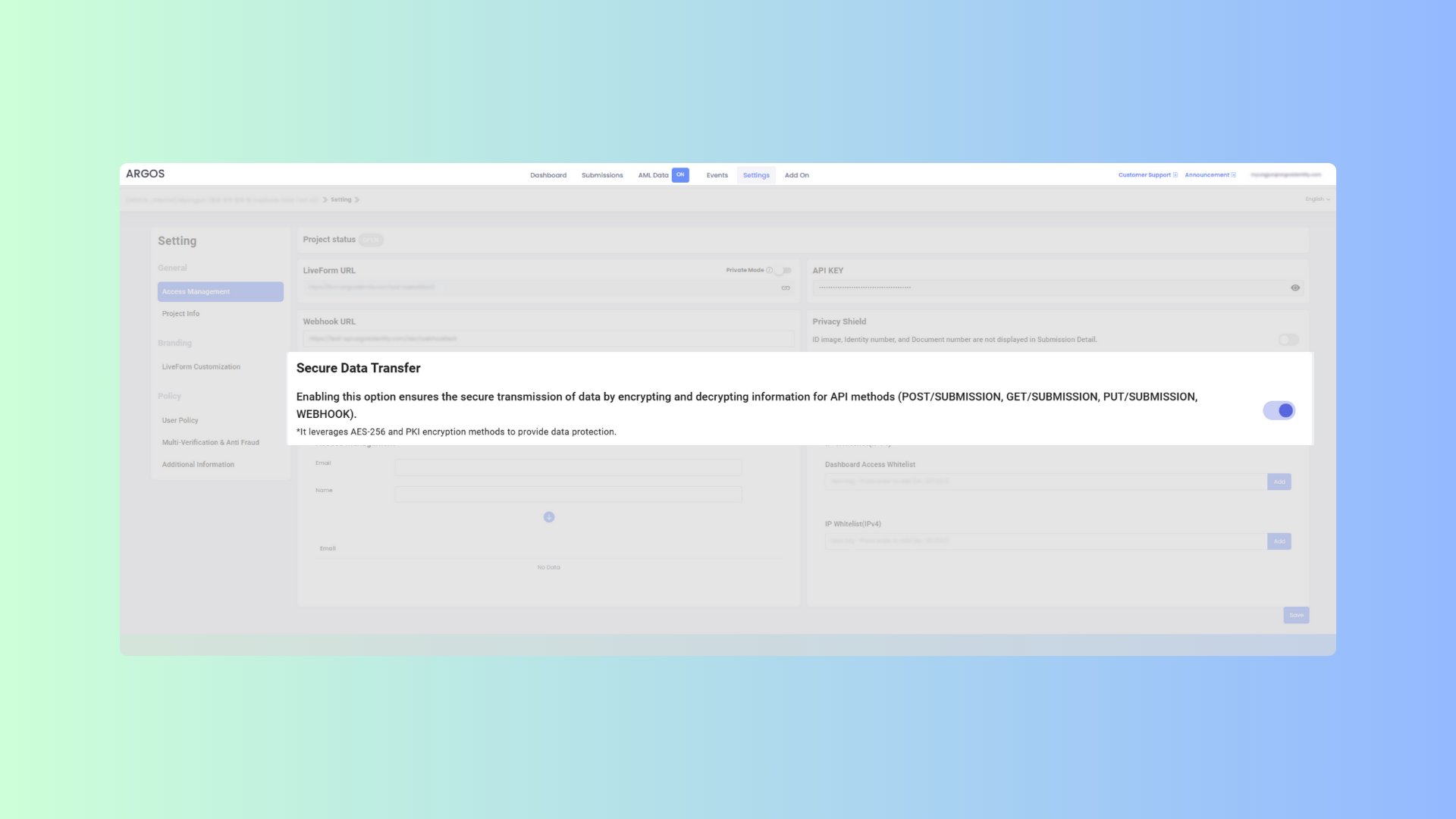
API 메서드(GET, POST, PATCH)와 WEBHOOK에서 데이터를 암호화하여 안전하게 전송합니다. API 메서드는 AES-256-ECB 방식을, WEBHOOK은 AES-256-CBC 방식을 사용하여 암호화합니다. 데이터를 안전하게 보호하기 위해 사용 전에 반드시 안전한 데이터 전송 기능이 활성화되어 있는지 확인하세요.
안전한 데이터 전송 기능이 활성화 되어 있을 경우, Request body 는 반드시 암호화하여 전송하여야 합니다. 암호화를 사용할 때: 전체 요청 본문 객체를 암호화합니다. 암호화된 문자열을 body 매개변수로 전송합니다. AES-256-ECB 형태로 암호화가 필요하며, 암호화 방법은 하기 주요 특징과 설명을 참조하세요.
```json body theme={null}
body : encrypt({
email : 'string',
fullName : 'string',
issuingCountry : 'string',
birthDate: 'string'
...
})
```
응답에는 isEncrypted 플래그와 암호화된 데이터가 포함됩니다.
```json response.json theme={null}
body : {
"data": "encrypted-string",
"isEncrypted": true
}
```
### 4-1. 주요 특징
* GET, POST, PATCH 요청은 `AES-256-ECB` 방식으로 암호화
* WEBHOOK 데이터는 `AES-256-CBC` 방식으로 암호화
* PKI를 통한 데이터 무결성 및 인증 보장
* 전송 중 데이터 보호 강화
 ### 4-2. API 요청 데이터 암호화 (AES-256-ECB)
```javascript Node.js(crypto-js library) theme={null}
const CryptoJS = require('crypto-js');
function encryptECB(data, apiKey) {
const hashedKey = CryptoJS.SHA256(apiKey);
const key = CryptoJS.lib.WordArray.create(hashedKey.words.slice(0, 8), 32);
const encrypted = CryptoJS.AES.encrypt(JSON.stringify(data), key, {
mode: CryptoJS.mode.ECB
});
return encrypted.ciphertext.toString(CryptoJS.enc.Base64);
}
```
```java AES-256-CBC.java theme={null}
import javax.crypto.Cipher;
import javax.crypto.spec.SecretKeySpec;
import java.nio.charset.StandardCharsets;
import java.security.MessageDigest;
import java.util.Base64;
import com.google.gson.Gson;
import com.google.gson.JsonObject;
public class Encryptor {
public static String encryptECB(JsonObject data, String apiKey) throws Exception {
Gson gson = new Gson();
String jsonData = gson.toJson(data);
MessageDigest digest = MessageDigest.getInstance("SHA-256");
byte[] rawKeyBytes = digest.digest(apiKey.getBytes(StandardCharsets.UTF_8));
byte[] hashedKey = new byte[32];
System.arraycopy(rawKeyBytes, 0, hashedKey, 0, 32);
SecretKeySpec key = new SecretKeySpec(hashedKey, "AES");
Cipher cipher = Cipher.getInstance("AES/ECB/PKCS5Padding");
cipher.init(Cipher.ENCRYPT_MODE, key);
byte[] encryptedBytes = cipher.doFinal(jsonData.getBytes(StandardCharsets.UTF_8));
return Base64.getEncoder().encodeToString(encryptedBytes);
}
}
```
### 4-3. API 데이터 복호화 (AES-256-ECB)
```javascript Node.js(crypto-js library) theme={null}
const CryptoJS = require('crypto-js');
function decryptECB(encryptedData, apiKey) {
const hashedKey = CryptoJS.SHA256(apiKey);
const key = CryptoJS.lib.WordArray.create(hashedKey.words.slice(0, 8), 32);
const cipherParams = CryptoJS.lib.CipherParams.create({
ciphertext: CryptoJS.enc.Base64.parse(encryptedData)
});
const decrypted = CryptoJS.AES.decrypt(cipherParams, key, {
mode: CryptoJS.mode.ECB
});
return JSON.parse(decrypted.toString(CryptoJS.enc.Utf8));
}
```
```java AES-256-CBC.java theme={null}
import javax.crypto.Cipher;
import javax.crypto.spec.SecretKeySpec;
import java.nio.charset.StandardCharsets;
import java.security.MessageDigest;
import java.util.Base64;
import com.google.gson.Gson;
import com.google.gson.JsonObject;
public class Encryptor {
public static JsonObject decryptECB(String encryptedData, String apiKey) throws Exception {
Gson gson = new Gson();
MessageDigest digest = MessageDigest.getInstance("SHA-256");
byte[] hashedKey = digest.digest(apiKey.getBytes(StandardCharsets.UTF_8));
byte[] aesCompatibleKey = new byte[32];
System.arraycopy(hashedKey, 0, aesCompatibleKey, 0, 32);
SecretKeySpec key = new SecretKeySpec(aesCompatibleKey, "AES");
Cipher cipher = Cipher.getInstance("AES/ECB/PKCS5Padding");
cipher.init(Cipher.DECRYPT_MODE, key);
byte[] decryptedBytes = cipher.doFinal(Base64.getDecoder().decode(encryptedData));
String jsonData = new String(decryptedBytes, StandardCharsets.UTF_8);
return gson.fromJson(jsonData, JsonObject.class);
}
}
```
### 4-4. WEBHOOK 데이터 암호화 (AES-256-CBC)
```javascript Node.js(crypto-js library) theme={null}
const CryptoJS = require('crypto-js');
function generateKeyAndIV(apiKey) {
const hashedKey = CryptoJS.SHA256(apiKey);
const key = CryptoJS.lib.WordArray.create(hashedKey.words.slice(0, 8), 32);
const iv = CryptoJS.lib.WordArray.create(hashedKey.words.slice(8, 12), 16);
return { key, iv };
}
function encryptCBC(data, apiKey) {
const { key, iv } = generateKeyAndIV(apiKey);
const encrypted = CryptoJS.AES.encrypt(JSON.stringify(data), key, { iv: iv, mode: CryptoJS.mode.CBC });
return encrypted.ciphertext.toString(CryptoJS.enc.Base64);
}
```
```java AES-256-CBC.java theme={null}
import javax.crypto.Cipher;
import javax.crypto.spec.SecretKeySpec;
import javax.crypto.spec.IvParameterSpec;
import java.nio.charset.StandardCharsets;
import java.security.MessageDigest;
import java.util.Base64;
import com.google.gson.Gson;
import com.google.gson.JsonObject;
import java.util.Arrays;
public class Encryptor {
public static String encryptCBC(JsonObject data, String apiKey) throws Exception {
String jsonData = new Gson().toJson(data);
MessageDigest digest = MessageDigest.getInstance("SHA-256");
byte[] hash = digest.digest(apiKey.getBytes(StandardCharsets.UTF_8));
byte[] keyBytes = Arrays.copyOf(hash, 32);
SecretKeySpec key = new SecretKeySpec(keyBytes, "AES");
byte[] ivBytes = new byte[16];
Arrays.fill(ivBytes, (byte) 0);
IvParameterSpec iv = new IvParameterSpec(ivBytes);
Cipher cipher = Cipher.getInstance("AES/CBC/PKCS5Padding");
cipher.init(Cipher.ENCRYPT_MODE, key, iv);
byte[] encryptedBytes = cipher.doFinal(jsonData.getBytes(StandardCharsets.UTF_8));
return Base64.getEncoder().encodeToString(encryptedBytes);
}
}
```
### 4-5. WEBHOOK 데이터 복호화 (AES-256-CBC)
```javascript Node.js(crypto-js library) theme={null}
const CryptoJS = require('crypto-js');
function generateKeyAndIV(apiKey) {
const hashedKey = CryptoJS.SHA256(apiKey);
const key = CryptoJS.lib.WordArray.create(hashedKey.words.slice(0, 8), 32);
const iv = CryptoJS.lib.WordArray.create(hashedKey.words.slice(8, 12), 16);
return { key, iv };
}
function decryptCBC(encryptedData, apiKey) {
const { key, iv } = generateKeyAndIV(apiKey);
// Create cipher params for decryption
const cipherParams = CryptoJS.lib.CipherParams.create({
ciphertext: CryptoJS.enc.Base64.parse(encryptedData)
});
// Decrypt the data
const decrypted = CryptoJS.AES.decrypt(cipherParams, key, {
iv: iv,
mode: CryptoJS.mode.CBC,
padding: CryptoJS.pad.Pkcs7
});
return JSON.parse(decrypted.toString(CryptoJS.enc.Utf8));
}
```
```java AES-256-CBC.java theme={null}
import javax.crypto.Cipher;
import javax.crypto.spec.SecretKeySpec;
import javax.crypto.spec.IvParameterSpec;
import java.nio.charset.StandardCharsets;
import java.security.MessageDigest;
import java.util.Base64;
import com.google.gson.Gson;
import com.google.gson.JsonObject;
import java.util.Arrays;
public class Encryptor {
public static JsonObject decryptCBC(String encryptedData, String apiKey) throws Exception {
MessageDigest digest = MessageDigest.getInstance("SHA-256");
byte[] hash = digest.digest(apiKey.getBytes(StandardCharsets.UTF_8));
byte[] keyBytes = Arrays.copyOf(hash, 32);
SecretKeySpec key = new SecretKeySpec(keyBytes, "AES");
byte[] ivBytes = new byte[16];
Arrays.fill(ivBytes, (byte) 0);
IvParameterSpec iv = new IvParameterSpec(ivBytes);
Cipher cipher = Cipher.getInstance("AES/CBC/PKCS5Padding");
cipher.init(Cipher.DECRYPT_MODE, key, iv);
byte[] decryptedBytes = cipher.doFinal(Base64.getDecoder().decode(encryptedData));
String jsonData = new String(decryptedBytes, StandardCharsets.UTF_8);
return new Gson().fromJson(jsonData, JsonObject.class);
}
}
```
### 4-2. API 요청 데이터 암호화 (AES-256-ECB)
```javascript Node.js(crypto-js library) theme={null}
const CryptoJS = require('crypto-js');
function encryptECB(data, apiKey) {
const hashedKey = CryptoJS.SHA256(apiKey);
const key = CryptoJS.lib.WordArray.create(hashedKey.words.slice(0, 8), 32);
const encrypted = CryptoJS.AES.encrypt(JSON.stringify(data), key, {
mode: CryptoJS.mode.ECB
});
return encrypted.ciphertext.toString(CryptoJS.enc.Base64);
}
```
```java AES-256-CBC.java theme={null}
import javax.crypto.Cipher;
import javax.crypto.spec.SecretKeySpec;
import java.nio.charset.StandardCharsets;
import java.security.MessageDigest;
import java.util.Base64;
import com.google.gson.Gson;
import com.google.gson.JsonObject;
public class Encryptor {
public static String encryptECB(JsonObject data, String apiKey) throws Exception {
Gson gson = new Gson();
String jsonData = gson.toJson(data);
MessageDigest digest = MessageDigest.getInstance("SHA-256");
byte[] rawKeyBytes = digest.digest(apiKey.getBytes(StandardCharsets.UTF_8));
byte[] hashedKey = new byte[32];
System.arraycopy(rawKeyBytes, 0, hashedKey, 0, 32);
SecretKeySpec key = new SecretKeySpec(hashedKey, "AES");
Cipher cipher = Cipher.getInstance("AES/ECB/PKCS5Padding");
cipher.init(Cipher.ENCRYPT_MODE, key);
byte[] encryptedBytes = cipher.doFinal(jsonData.getBytes(StandardCharsets.UTF_8));
return Base64.getEncoder().encodeToString(encryptedBytes);
}
}
```
### 4-3. API 데이터 복호화 (AES-256-ECB)
```javascript Node.js(crypto-js library) theme={null}
const CryptoJS = require('crypto-js');
function decryptECB(encryptedData, apiKey) {
const hashedKey = CryptoJS.SHA256(apiKey);
const key = CryptoJS.lib.WordArray.create(hashedKey.words.slice(0, 8), 32);
const cipherParams = CryptoJS.lib.CipherParams.create({
ciphertext: CryptoJS.enc.Base64.parse(encryptedData)
});
const decrypted = CryptoJS.AES.decrypt(cipherParams, key, {
mode: CryptoJS.mode.ECB
});
return JSON.parse(decrypted.toString(CryptoJS.enc.Utf8));
}
```
```java AES-256-CBC.java theme={null}
import javax.crypto.Cipher;
import javax.crypto.spec.SecretKeySpec;
import java.nio.charset.StandardCharsets;
import java.security.MessageDigest;
import java.util.Base64;
import com.google.gson.Gson;
import com.google.gson.JsonObject;
public class Encryptor {
public static JsonObject decryptECB(String encryptedData, String apiKey) throws Exception {
Gson gson = new Gson();
MessageDigest digest = MessageDigest.getInstance("SHA-256");
byte[] hashedKey = digest.digest(apiKey.getBytes(StandardCharsets.UTF_8));
byte[] aesCompatibleKey = new byte[32];
System.arraycopy(hashedKey, 0, aesCompatibleKey, 0, 32);
SecretKeySpec key = new SecretKeySpec(aesCompatibleKey, "AES");
Cipher cipher = Cipher.getInstance("AES/ECB/PKCS5Padding");
cipher.init(Cipher.DECRYPT_MODE, key);
byte[] decryptedBytes = cipher.doFinal(Base64.getDecoder().decode(encryptedData));
String jsonData = new String(decryptedBytes, StandardCharsets.UTF_8);
return gson.fromJson(jsonData, JsonObject.class);
}
}
```
### 4-4. WEBHOOK 데이터 암호화 (AES-256-CBC)
```javascript Node.js(crypto-js library) theme={null}
const CryptoJS = require('crypto-js');
function generateKeyAndIV(apiKey) {
const hashedKey = CryptoJS.SHA256(apiKey);
const key = CryptoJS.lib.WordArray.create(hashedKey.words.slice(0, 8), 32);
const iv = CryptoJS.lib.WordArray.create(hashedKey.words.slice(8, 12), 16);
return { key, iv };
}
function encryptCBC(data, apiKey) {
const { key, iv } = generateKeyAndIV(apiKey);
const encrypted = CryptoJS.AES.encrypt(JSON.stringify(data), key, { iv: iv, mode: CryptoJS.mode.CBC });
return encrypted.ciphertext.toString(CryptoJS.enc.Base64);
}
```
```java AES-256-CBC.java theme={null}
import javax.crypto.Cipher;
import javax.crypto.spec.SecretKeySpec;
import javax.crypto.spec.IvParameterSpec;
import java.nio.charset.StandardCharsets;
import java.security.MessageDigest;
import java.util.Base64;
import com.google.gson.Gson;
import com.google.gson.JsonObject;
import java.util.Arrays;
public class Encryptor {
public static String encryptCBC(JsonObject data, String apiKey) throws Exception {
String jsonData = new Gson().toJson(data);
MessageDigest digest = MessageDigest.getInstance("SHA-256");
byte[] hash = digest.digest(apiKey.getBytes(StandardCharsets.UTF_8));
byte[] keyBytes = Arrays.copyOf(hash, 32);
SecretKeySpec key = new SecretKeySpec(keyBytes, "AES");
byte[] ivBytes = new byte[16];
Arrays.fill(ivBytes, (byte) 0);
IvParameterSpec iv = new IvParameterSpec(ivBytes);
Cipher cipher = Cipher.getInstance("AES/CBC/PKCS5Padding");
cipher.init(Cipher.ENCRYPT_MODE, key, iv);
byte[] encryptedBytes = cipher.doFinal(jsonData.getBytes(StandardCharsets.UTF_8));
return Base64.getEncoder().encodeToString(encryptedBytes);
}
}
```
### 4-5. WEBHOOK 데이터 복호화 (AES-256-CBC)
```javascript Node.js(crypto-js library) theme={null}
const CryptoJS = require('crypto-js');
function generateKeyAndIV(apiKey) {
const hashedKey = CryptoJS.SHA256(apiKey);
const key = CryptoJS.lib.WordArray.create(hashedKey.words.slice(0, 8), 32);
const iv = CryptoJS.lib.WordArray.create(hashedKey.words.slice(8, 12), 16);
return { key, iv };
}
function decryptCBC(encryptedData, apiKey) {
const { key, iv } = generateKeyAndIV(apiKey);
// Create cipher params for decryption
const cipherParams = CryptoJS.lib.CipherParams.create({
ciphertext: CryptoJS.enc.Base64.parse(encryptedData)
});
// Decrypt the data
const decrypted = CryptoJS.AES.decrypt(cipherParams, key, {
iv: iv,
mode: CryptoJS.mode.CBC,
padding: CryptoJS.pad.Pkcs7
});
return JSON.parse(decrypted.toString(CryptoJS.enc.Utf8));
}
```
```java AES-256-CBC.java theme={null}
import javax.crypto.Cipher;
import javax.crypto.spec.SecretKeySpec;
import javax.crypto.spec.IvParameterSpec;
import java.nio.charset.StandardCharsets;
import java.security.MessageDigest;
import java.util.Base64;
import com.google.gson.Gson;
import com.google.gson.JsonObject;
import java.util.Arrays;
public class Encryptor {
public static JsonObject decryptCBC(String encryptedData, String apiKey) throws Exception {
MessageDigest digest = MessageDigest.getInstance("SHA-256");
byte[] hash = digest.digest(apiKey.getBytes(StandardCharsets.UTF_8));
byte[] keyBytes = Arrays.copyOf(hash, 32);
SecretKeySpec key = new SecretKeySpec(keyBytes, "AES");
byte[] ivBytes = new byte[16];
Arrays.fill(ivBytes, (byte) 0);
IvParameterSpec iv = new IvParameterSpec(ivBytes);
Cipher cipher = Cipher.getInstance("AES/CBC/PKCS5Padding");
cipher.init(Cipher.DECRYPT_MODE, key, iv);
byte[] decryptedBytes = cipher.doFinal(Base64.getDecoder().decode(encryptedData));
String jsonData = new String(decryptedBytes, StandardCharsets.UTF_8);
return new Gson().fromJson(jsonData, JsonObject.class);
}
}
```