> ## Documentation Index
> Fetch the complete documentation index at: https://developers.argosidentity.com/llms.txt
> Use this file to discover all available pages before exploring further.
# Claude로 MCP 활용하기
> Claude에 ARGOS Identity 개발자 가이드 MCP를 연결하는 방법입니다.
## 1. 준비
다음 Quickstart 링크를 참조하셔서 Claude 데스크톱 앱을 설치합니다.\
[https://modelcontextprotocol.io/quickstart/user](https://modelcontextprotocol.io/quickstart/user)
## 2. MCP 서버 연결 방법
ARGOS Identity MCP 서버에 연결하는 방법은 **웹 URL 방식**을 사용합니다. 이 방법은 별도 설치 없이 바로 사용할 수 있으며, 항상 최신 버전의 문서를 제공합니다.
웹 URL 방식은 가장 간단하고 안정적인 방법입니다. 별도 설치나 설정 없이 바로 사용할 수 있습니다.
## 3. MCP 서버 연결하기
### 3.1. MCP 서버 URL 확인
Mintlify 대시보드의 MCP 섹션에서 제공하는 MCP 서버 URL을 확인하세요:
```
https://developers.argosidentity.com/mcp
```
### 3.2. claude\_desktop\_config.json 설정
다음과 같이 `claude_desktop_config.json` 파일을 설정합니다.
```json claude_desktop_config.json (mac) theme={null}
{
"mcpServers": {
"argosidentity": {
"url": "https://developers.argosidentity.com/mcp"
}
}
}
```
```json claude_desktop_config.json (win) theme={null}
{
"mcpServers": {
"argosidentity": {
"url": "https://developers.argosidentity.com/mcp"
}
}
}
```
`claude_desktop_config.json` 파일의 위치:
* **macOS**: `~/Library/Application Support/Claude/claude_desktop_config.json`
* **Windows**: `%APPDATA%\Claude\claude_desktop_config.json`
### 3.3. Claude Desktop 재시작
설정을 저장한 후 Claude Desktop 앱을 완전히 종료하고 다시 실행합니다.
Claude Desktop을 재시작하면 ARGOS Identity MCP 서버가 자동으로 연결됩니다.
## 4. 사용하기
Claude Desktop 앱을 실행하면, 다음과 같이 적절한 프롬프트를 입력하여 ARGOS Identity 매뉴얼에 필요한 정보들을 쉽게 가져올 수 있습니다.
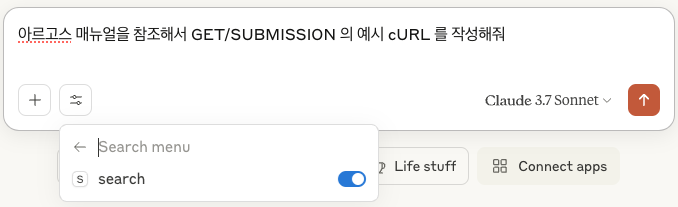 MCP 서버가 정상적으로 연결되면 Claude에서 ARGOS Identity 문서를 검색하고 질문에 답변할 수 있습니다.