> ## Documentation Index
> Fetch the complete documentation index at: https://developers.argosidentity.com/llms.txt
> Use this file to discover all available pages before exploring further.
# Best Practices for Face Liveness
> Guidelines for optimal Face Liveness detection and accuracy
To ensure optimal performance and accuracy, the following image file guidelines must be followed for identity verification processing.
## Image Quality Requirements
Use high-resolution images (minimum 640x480 pixels) for better detection accuracy.
Supported formats: JPEG, PNG, WebP. Ensure proper compression without quality loss.
Ensure adequate, even lighting without harsh shadows or overexposure.
Images should be clear and in focus, avoiding blurry or pixelated content.
## Image Content Constraints
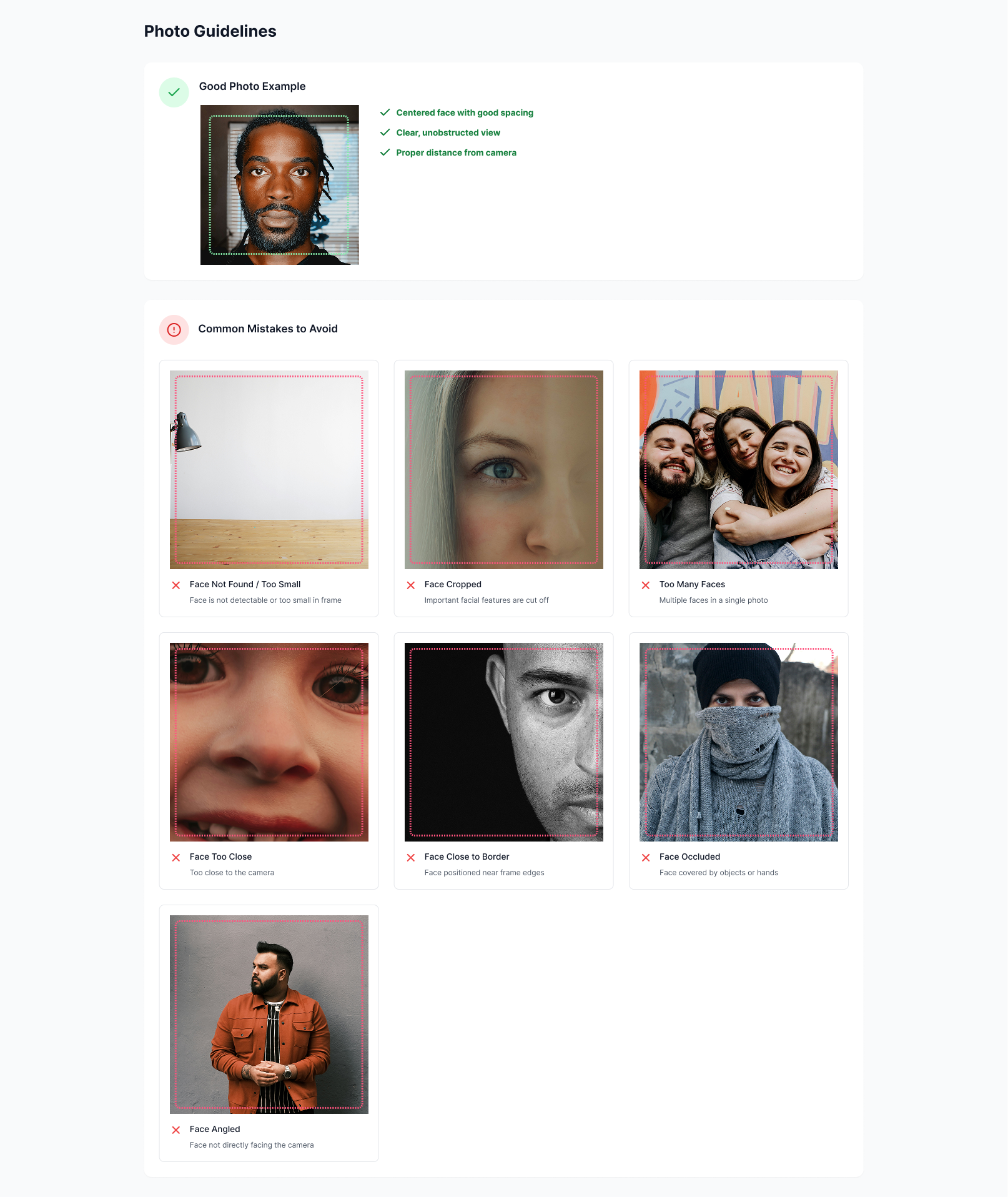
### 1. Face Area
* Only one visible face allowed
* Face must be fully visible — no cropping at top, sides, or chin- Minimum face box size: 150 x 150 pixels
* Minimum pupil-to-pupil distance (distance between eyes): 50 pixels or more
* Padding between face and image borders: at least 15 pixels
* No occlusions (e.g. hair, hand, mask, accessories)
* No background faces or partial faces in the image
### 2. Face Orientation
* Frontal face required
* Pitch / yaw angle must be within ±30 degrees
* No extreme tilt or side-view
* Eyes, nose, and mouth must be symmetrically aligned
## Conditions That May Cause Failure
* Motion blur
* Filtered images (e.g. texture smoothing, beautify filters)
* Strong light reflections or glare on the face
* Low light or colored lighting conditions
* Wide-angle or fish-eye lens distortion
* Sunglasses or heavily tinted glasses
## Content Guidelines
Capture natural facial expressions without forced smiles or exaggerated poses.
Eyes should be open and looking directly at the camera for optimal detection.
Ensure the entire face is visible, including ears and hairline when possible.
Avoid glasses, masks, hats, or other items that may cover facial features.
## Common Issues to Avoid
Avoid low light conditions, harsh shadows, or overexposed images that may interfere with detection.
Ensure images are clear and in focus. Blurry images may result in detection failures.
Avoid cropping that cuts off parts of the face or showing only partial facial features.
Images should contain only one face. Multiple faces may cause detection issues.
Avoid reflections on glasses or other surfaces that may interfere with facial analysis.
## Technical Requirements
* **Format**: JPEG, PNG, WebP
* **Maximum Size**: 10MB
* **Minimum Resolution**: 640x480 pixels
* **Aspect Ratio**: 1:1 to 4:3 recommended
* **Color Space**: RGB or sRGB
* Remove MIME type prefix (e.g., "image/png;base64,")
* Use standard base64 encoding
* Ensure no line breaks or special characters
* Maximum encoded length: 15MB
* Typical response time: 2-5 seconds
* May vary based on image size and server load
* Larger images may take longer to process
## Success Tips
Use our sample images to test the API before implementing in production.
Add retry mechanisms for failed requests due to temporary issues.
Track API response times and adjust image sizes if needed.
Always validate the liveness score and implement appropriate thresholds for your use case.
Remember that liveness detection is not 100% foolproof. Always implement additional security measures and consider the liveness score as part of a broader verification strategy.
## Photo Guidelines