> ## Documentation Index
> Fetch the complete documentation index at: https://developers.argosidentity.com/llms.txt
> Use this file to discover all available pages before exploring further.
# Introduction to Omni
> ARGOS Omni is a policy-to-workflow automation platform that transforms natural language policies into executable AI-powered verification workflows.
## What is ARGOS Omni?
ARGOS Omni is a **policy-to-workflow automation platform** built on top of the ARGOS AI document analysis layer. Define your verification policies in natural language, and Omni automatically orchestrates the right AI engines to execute them.
Omni is designed for teams that need to automate document reviews that traditionally require manual, human inspection — invoices, compliance documents, business registrations, and more. Define your policies in natural language, and Omni handles KYB, AML, document compliance workflows without writing code.
## Key Features
Define verification policies in plain language. Omni's NLP engine converts them into executable workflows automatically.
Omni's Identity Agent (DAG Planner) selects and orchestrates the right combination of AI engines for each workflow.
Define the exact JSON structure you want for results. Get verification outputs in the format your systems need.
Start with pre-built templates for KYB, AML, document compliance, and more. Customize them to fit your specific requirements.
## Data Hierarchy
Omni organizes data in a hierarchical structure:
```
Project
└── Workflow (verification template with policy + engines + schema)
└── Profile (individual verification instance)
└── Folder (document grouping)
└── Item (document, image, text, or structured data)
```
| Level | Description | Limits |
| ------------ | ----------------------------------------------- | ---------------------- |
| **Project** | Top-level container tied to an API key | Max 5 per user |
| **Workflow** | Defines policy, engines, and output schema | Max 10 per project |
| **Profile** | A single verification case (e.g., one customer) | Unlimited per workflow |
| **Folder** | Groups related documents within a profile | Multiple per profile |
| **Item** | Individual file, text, or data to analyze | Max 5 per folder |
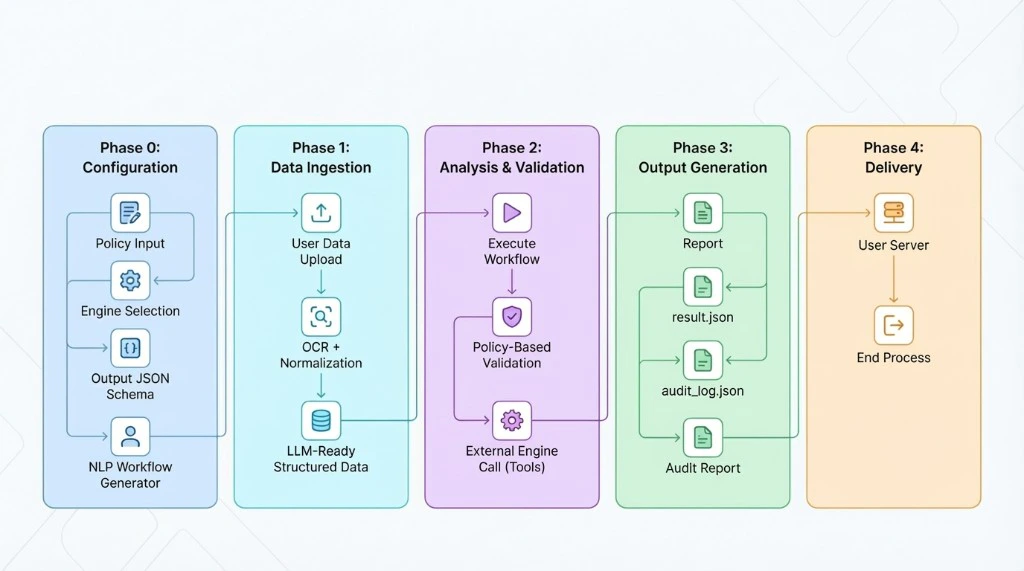
## Omni process
 ## How It Works
Set up your verification workflow by defining a **policy** (in natural language), selecting **engines**, and specifying an **output schema**.
For each verification case (e.g., a customer), create a profile under the workflow via the API.
Upload documents, images, or data into folders within the profile.
Trigger the analysis. Omni's Identity Agent orchestrates the engines and returns structured results matching your output schema.
## Use Cases
| Use Case | Description |
| ------------------------ | --------------------------------------------------------- |
| **KYB** | Corporate identity and beneficial ownership verification |
| **AML** | Watchlist screening and risk assessment |
| **Document Compliance** | Regulatory compliance checking for various document types |
| **Address Verification** | Location validation against official records |
| **Income Verification** | Financial document analysis and validation |
**Coming soon:** KYC (individual identity verification) features from [ID check](/en/introduction) will be integrated into Omni in a future release. For KYC needs today, please use ID check.
## Next Steps
Set up your API key to start making requests.
Run your first verification workflow end-to-end.
## How It Works
Set up your verification workflow by defining a **policy** (in natural language), selecting **engines**, and specifying an **output schema**.
For each verification case (e.g., a customer), create a profile under the workflow via the API.
Upload documents, images, or data into folders within the profile.
Trigger the analysis. Omni's Identity Agent orchestrates the engines and returns structured results matching your output schema.
## Use Cases
| Use Case | Description |
| ------------------------ | --------------------------------------------------------- |
| **KYB** | Corporate identity and beneficial ownership verification |
| **AML** | Watchlist screening and risk assessment |
| **Document Compliance** | Regulatory compliance checking for various document types |
| **Address Verification** | Location validation against official records |
| **Income Verification** | Financial document analysis and validation |
**Coming soon:** KYC (individual identity verification) features from [ID check](/en/introduction) will be integrated into Omni in a future release. For KYC needs today, please use ID check.
## Next Steps
Set up your API key to start making requests.
Run your first verification workflow end-to-end.