> ## Documentation Index
> Fetch the complete documentation index at: https://developers.argosidentity.com/llms.txt
> Use this file to discover all available pages before exploring further.
# Output Schema
> Define the JSON structure for your verification results with custom output schemas.
## What is an Output Schema?
An output schema defines the **exact JSON structure** of the verification results returned by Omni. Instead of receiving raw engine outputs, you get results formatted precisely the way your systems need them.
## Defining an Output Schema
Output schemas are defined as JSON structures in the workflow configuration. Each field maps to data extracted and verified by the workflow engines.
### Schema writing guide
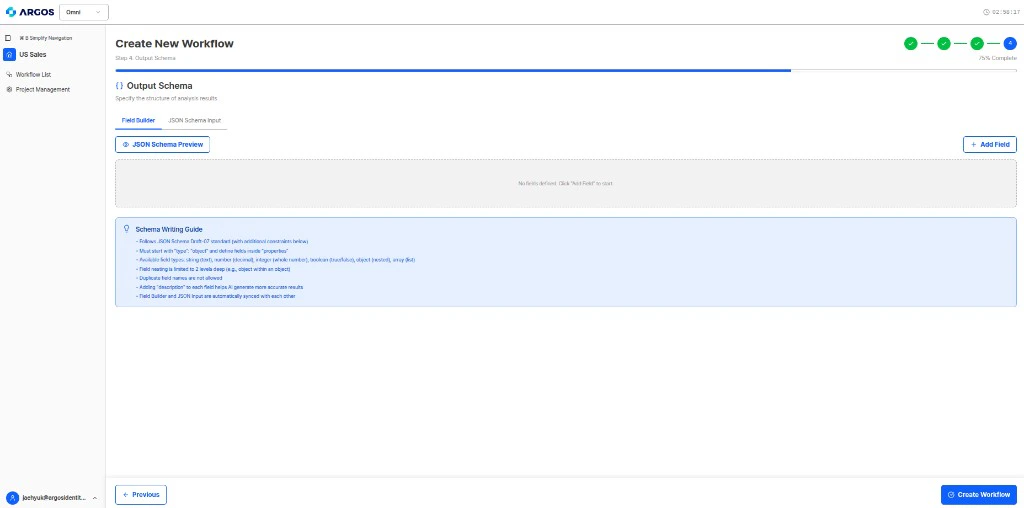
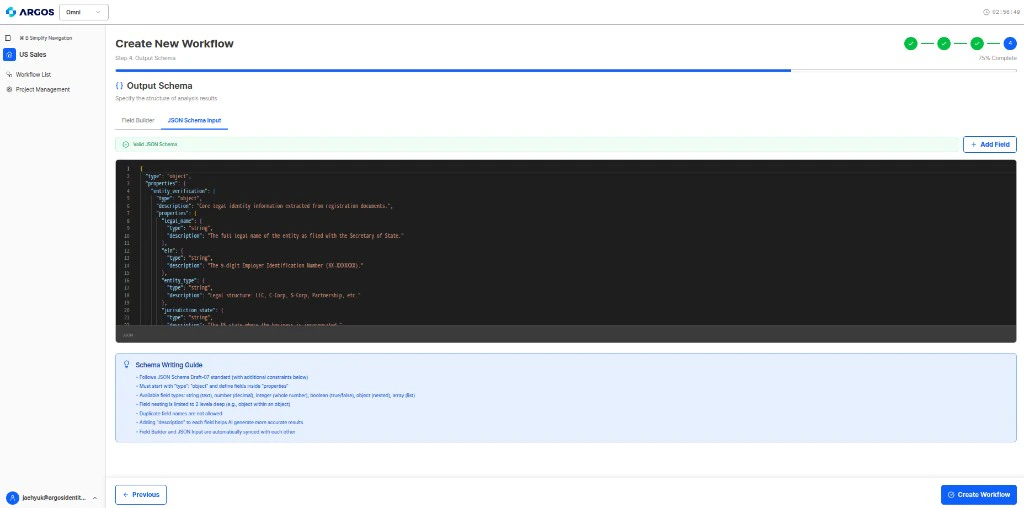
When you configure the output schema in workflow creation **Step 4**, the UI applies the following rules (whether you use the Field Builder or JSON input).
* **Standard**: Schemas follow [JSON Schema Draft-07](https://json-schema.org/draft-07/json-schema-release-notes.html), plus the **additional constraints** below.
* **Root shape**: The document must start with `"type": "object"` and define fields under `"properties"`.
* **Field types**: You can use `string`, `number`, `integer`, `boolean`, `object` (nested object), and `array` (list).
* **Nesting depth**: Field nesting is limited to **2 levels** (for example, an `object` inside another `object` at the root).
* **Duplicate names**: Duplicate field names are not allowed.
* **`description`**: Adding a `description` on each field helps the AI produce **more accurate** structured results.
* **Sync**: **Field Builder** (table view) and **JSON input** (code view) stay **automatically synced**—edits in one are reflected in the other.
 **Example output schema for KYB:**
```json theme={null}
{
"company": {
"name": "string",
"registrationNumber": "string",
"country": "string",
"incorporationDate": "string",
"directors": ["string"]
},
"verification": {
"amlScreeningResult": "string",
"registrationValid": "boolean",
"beneficialOwnership": "string"
},
"decision": {
"result": "APPROVE | REJECT | FLAG",
"verificationStatus": "pending_review | approved | rejected",
"flagReasons": ["string"]
}
}
```
## Verification status
The analysis response exposes a single **`verificationStatus`** on the result with one of three values: `pending_review`, `approved`, or `rejected`. Model your **decision** block so downstream systems can branch on the same enum (for example `decision.verificationStatus` aligned with your schema).
| Value | Typical use |
| ---------------- | ---------------------------------------- |
| `approved` | Outcome cleared for automatic acceptance |
| `pending_review` | Queue for human review |
| `rejected` | Outcome denied or failed policy checks |
## Schema Best Practices
Design the schema to match what your backend or compliance systems expect. This eliminates the need for post-processing transformations.
Always include a top-level decision field with `result`, `verificationStatus` (`pending_review` / `approved` / `rejected`), and reasons. This enables automated routing in your workflow.
Simpler schemas are easier to maintain and integrate. Only nest when the data naturally requires it.
## Ontology Mapper
The Ontology Mapper validates that engine outputs conform to your defined schema. If an engine returns data in a different format, the mapper normalizes it to match your schema before delivering results.
**Example output schema for KYB:**
```json theme={null}
{
"company": {
"name": "string",
"registrationNumber": "string",
"country": "string",
"incorporationDate": "string",
"directors": ["string"]
},
"verification": {
"amlScreeningResult": "string",
"registrationValid": "boolean",
"beneficialOwnership": "string"
},
"decision": {
"result": "APPROVE | REJECT | FLAG",
"verificationStatus": "pending_review | approved | rejected",
"flagReasons": ["string"]
}
}
```
## Verification status
The analysis response exposes a single **`verificationStatus`** on the result with one of three values: `pending_review`, `approved`, or `rejected`. Model your **decision** block so downstream systems can branch on the same enum (for example `decision.verificationStatus` aligned with your schema).
| Value | Typical use |
| ---------------- | ---------------------------------------- |
| `approved` | Outcome cleared for automatic acceptance |
| `pending_review` | Queue for human review |
| `rejected` | Outcome denied or failed policy checks |
## Schema Best Practices
Design the schema to match what your backend or compliance systems expect. This eliminates the need for post-processing transformations.
Always include a top-level decision field with `result`, `verificationStatus` (`pending_review` / `approved` / `rejected`), and reasons. This enables automated routing in your workflow.
Simpler schemas are easier to maintain and integrate. Only nest when the data naturally requires it.
## Ontology Mapper
The Ontology Mapper validates that engine outputs conform to your defined schema. If an engine returns data in a different format, the mapper normalizes it to match your schema before delivering results.