> ## Documentation Index
> Fetch the complete documentation index at: https://developers.argosidentity.com/llms.txt
> Use this file to discover all available pages before exploring further.
# Engine Selection
> Choose from the Omni engine catalog to build your verification workflow.
## Engine Catalog
Omni provides AI-powered MCP engines that can be selected during workflow configuration. When you define a policy, the system suggests relevant engines based on your verification steps. The Identity Agent (DAG Planner) orchestrates them automatically.
### Available Engines
| Engine | Type | Description |
| ------------------------- | ------------ | ------------------------------------------------------------------------------------------------------------- |
| **AML Search - Person** | Screening | Screen individuals against global AML/sanctions watchlists using name-based search |
| **Text Verifier - Glove** | Verification | Validate document text for consistency, accuracy, and cross-field verification using AI-powered text analysis |
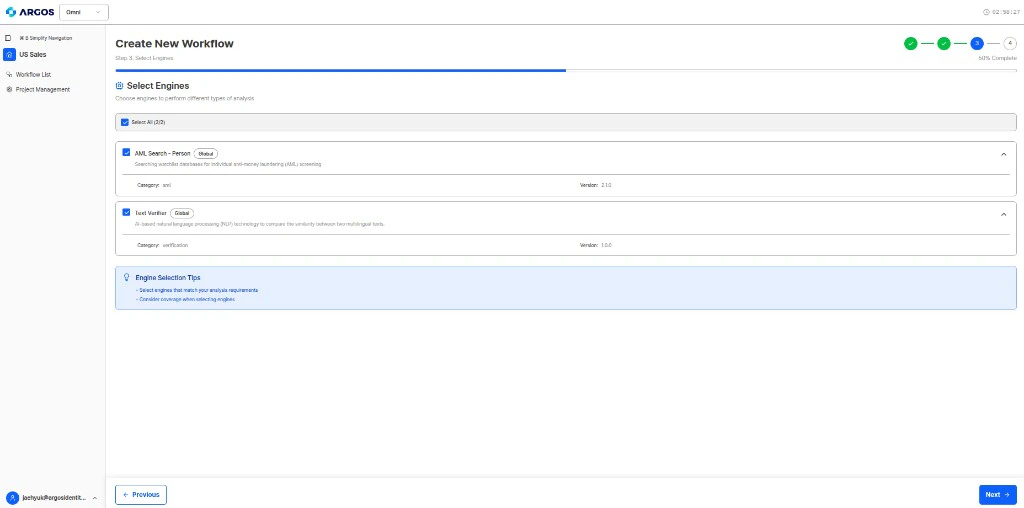 Additional engines will be added as Omni expands its capabilities. The engine catalog will grow to cover more verification use cases including identity document parsing, facial recognition, business registry validation, and more.
***
## AML Search - Person
The AML Search engine screens individuals against global AML/sanctions watchlists via MCP tool call (`search_individual`). This is the only engine that performs **external database lookups**.
### Input
The AI agent extracts the following fields from submitted documents and passes them to the AML Search engine:
| Field | Description |
| --------------- | ------------------------------------------------------------------ |
| `name` | Person's name (case-insensitive, supports nickname/alias matching) |
| `date_of_birth` | Date of birth (if available, improves match accuracy) |
| `nationality` | Nationality/country (if available, improves match accuracy) |
### Matching Score
The final matching score is calculated as the average of individual field scores:
| Field | Match | Score |
| ------------- | --------------------------------------------------- | -------- |
| Name | String distance algorithms + ARGOS nickname library | Variable |
| Date of Birth | Exact match = 100%, partial = 80% | 80–100% |
| Nationality | Exact match = 100%, partial = 80% | 80–100% |
### Output — Risk Icons
Screening results are classified by risk level using the following risk icons:
| Risk Icon | Description |
| ------------- | ------------------------------------------------------------------------------------------------ |
| `SAN-CURRENT` | Individual currently registered on sanctions lists |
| `PEP-CURRENT` | Individual currently holding a prominent political role |
| `REL` | Individual or organization subject to action by financial regulatory or law enforcement agencies |
| Risk Icon | Description |
| ------------ | ----------------------------------------------------------- |
| `PEP-LINKED` | Individual related to a politically exposed person |
| `PEP-FORMER` | Individual who previously held a political role |
| `SAN-FORMER` | Individual previously registered on sanctions lists |
| `POI` | Profile of interest — expired PEP status or old RRE records |
| Risk Icon | Description |
| --------- | ----------------------------------------------------------------------- |
| `RRE` | Individual reported in global media for involvement in financial crimes |
| `INS` | Individual declared bankrupt or insolvent (UK & Ireland only) |
| `DD` | Individual disqualified as a company director (UK only) |
| `GRI` | Enhanced Due Diligence (EDD) summary report |
### Output — Result Status
| Status | Description |
| -------------- | ---------------------------------------------------------------------------- |
| `No Matches` | No matching individuals found in AML databases |
| `Not Screened` | Screening was not performed |
| `Red Flag` | High-risk individual or organization identified — additional review required |
### Analysis Response Fields
When this engine runs, results appear in:
* `agentAuditLog[].mcpToolCalls[]` — Raw MCP tool call details with `toolName` (e.g., `search_individual`), `engineCode`, `engineName`, parameters, and `rawContent` containing match results
* `findings[]` — Summarized result with `category`, `result` (passed/warning/failed), and `details`
* `rawActionResults` — Action result text with verification status
For the complete AML database source documentation, risk icon details, and search algorithm specifications, see the [AML Database Sources and Codes](/dashboard/en/aml-source) reference.
***
## Text Verifier - Glove
The Text Verifier engine validates document text for consistency, accuracy, and completeness using AI-powered analysis via RAG (Retrieval-Augmented Generation). This engine does **not** perform external database lookups — it works entirely with the documents uploaded to the profile.
### Input
The AI agent provides the engine with:
| Field | Description |
| ------------------- | ------------------------------------------------------------------------- |
| Documents | All uploaded items in the profile (text extracted via OCR or direct read) |
| Policy instructions | Verification rules defined in the workflow policy |
| Output schema | Expected result structure to fill |
### Capabilities
* **Data Extraction** — Extract structured values from documents (names, numbers, dates, addresses, etc.)
* **Cross-field Validation** — Check consistency between fields within and across documents
* **Completeness Check** — Verify all required fields are present and populated
* **Document Validity** — Assess whether a document appears valid and unaltered
* **Policy Compliance** — Evaluate documents against the natural language policy rules
### Output
The Text Verifier produces the primary content of the analysis response:
| Output Section | Description |
| ------------------------------------ | ------------------------------------------------------------------------------------------------------ |
| `extractedData.extracted_values` | Raw values extracted from documents (field names defined by your output schema) |
| `extractedData.category_judgements` | Per-category verification results with `pass` / `fail` / `unverifiable` / `needs_review` and reasoning |
| `extractedData.document_validations` | Document validity assessment with `is_valid` (boolean) and reasoning |
| `extractedData.review_result` | Final action (`approve` / `reject` / `manual_review`), risk level, and reasoning |
### Analysis Response Fields
When this engine runs, results appear in:
* `agentAuditLog[].ragResponse` — RAG query results with answer text, citations, and processing time
* `findings[]` — Summarized result per verification step
* `extractedData` — Full structured output following your output schema
* `rawActionResults` — Per-action result text and verification status
The fields inside `extractedData` are **determined by your workflow's [output schema](/en/omni/dashboard/workflow-setup/output-schema)**. The sections above (extracted\_values, category\_judgements, etc.) are common patterns, but the actual field names depend on your schema definition.
***
## How Engine Selection Works
When you define a policy, Omni suggests engines based on your verification steps. You can also manually add or remove engines.
The Identity Agent automatically determines the **execution order** of selected engines. You don't need to configure dependencies manually — the DAG Planner handles orchestration.
## Workflow Templates
Pre-configured engine combinations are available as [workflow templates](/en/omni/guides/workflow-templates). These provide recommended starting points for common use cases.
Additional engines will be added as Omni expands its capabilities. The engine catalog will grow to cover more verification use cases including identity document parsing, facial recognition, business registry validation, and more.
***
## AML Search - Person
The AML Search engine screens individuals against global AML/sanctions watchlists via MCP tool call (`search_individual`). This is the only engine that performs **external database lookups**.
### Input
The AI agent extracts the following fields from submitted documents and passes them to the AML Search engine:
| Field | Description |
| --------------- | ------------------------------------------------------------------ |
| `name` | Person's name (case-insensitive, supports nickname/alias matching) |
| `date_of_birth` | Date of birth (if available, improves match accuracy) |
| `nationality` | Nationality/country (if available, improves match accuracy) |
### Matching Score
The final matching score is calculated as the average of individual field scores:
| Field | Match | Score |
| ------------- | --------------------------------------------------- | -------- |
| Name | String distance algorithms + ARGOS nickname library | Variable |
| Date of Birth | Exact match = 100%, partial = 80% | 80–100% |
| Nationality | Exact match = 100%, partial = 80% | 80–100% |
### Output — Risk Icons
Screening results are classified by risk level using the following risk icons:
| Risk Icon | Description |
| ------------- | ------------------------------------------------------------------------------------------------ |
| `SAN-CURRENT` | Individual currently registered on sanctions lists |
| `PEP-CURRENT` | Individual currently holding a prominent political role |
| `REL` | Individual or organization subject to action by financial regulatory or law enforcement agencies |
| Risk Icon | Description |
| ------------ | ----------------------------------------------------------- |
| `PEP-LINKED` | Individual related to a politically exposed person |
| `PEP-FORMER` | Individual who previously held a political role |
| `SAN-FORMER` | Individual previously registered on sanctions lists |
| `POI` | Profile of interest — expired PEP status or old RRE records |
| Risk Icon | Description |
| --------- | ----------------------------------------------------------------------- |
| `RRE` | Individual reported in global media for involvement in financial crimes |
| `INS` | Individual declared bankrupt or insolvent (UK & Ireland only) |
| `DD` | Individual disqualified as a company director (UK only) |
| `GRI` | Enhanced Due Diligence (EDD) summary report |
### Output — Result Status
| Status | Description |
| -------------- | ---------------------------------------------------------------------------- |
| `No Matches` | No matching individuals found in AML databases |
| `Not Screened` | Screening was not performed |
| `Red Flag` | High-risk individual or organization identified — additional review required |
### Analysis Response Fields
When this engine runs, results appear in:
* `agentAuditLog[].mcpToolCalls[]` — Raw MCP tool call details with `toolName` (e.g., `search_individual`), `engineCode`, `engineName`, parameters, and `rawContent` containing match results
* `findings[]` — Summarized result with `category`, `result` (passed/warning/failed), and `details`
* `rawActionResults` — Action result text with verification status
For the complete AML database source documentation, risk icon details, and search algorithm specifications, see the [AML Database Sources and Codes](/dashboard/en/aml-source) reference.
***
## Text Verifier - Glove
The Text Verifier engine validates document text for consistency, accuracy, and completeness using AI-powered analysis via RAG (Retrieval-Augmented Generation). This engine does **not** perform external database lookups — it works entirely with the documents uploaded to the profile.
### Input
The AI agent provides the engine with:
| Field | Description |
| ------------------- | ------------------------------------------------------------------------- |
| Documents | All uploaded items in the profile (text extracted via OCR or direct read) |
| Policy instructions | Verification rules defined in the workflow policy |
| Output schema | Expected result structure to fill |
### Capabilities
* **Data Extraction** — Extract structured values from documents (names, numbers, dates, addresses, etc.)
* **Cross-field Validation** — Check consistency between fields within and across documents
* **Completeness Check** — Verify all required fields are present and populated
* **Document Validity** — Assess whether a document appears valid and unaltered
* **Policy Compliance** — Evaluate documents against the natural language policy rules
### Output
The Text Verifier produces the primary content of the analysis response:
| Output Section | Description |
| ------------------------------------ | ------------------------------------------------------------------------------------------------------ |
| `extractedData.extracted_values` | Raw values extracted from documents (field names defined by your output schema) |
| `extractedData.category_judgements` | Per-category verification results with `pass` / `fail` / `unverifiable` / `needs_review` and reasoning |
| `extractedData.document_validations` | Document validity assessment with `is_valid` (boolean) and reasoning |
| `extractedData.review_result` | Final action (`approve` / `reject` / `manual_review`), risk level, and reasoning |
### Analysis Response Fields
When this engine runs, results appear in:
* `agentAuditLog[].ragResponse` — RAG query results with answer text, citations, and processing time
* `findings[]` — Summarized result per verification step
* `extractedData` — Full structured output following your output schema
* `rawActionResults` — Per-action result text and verification status
The fields inside `extractedData` are **determined by your workflow's [output schema](/en/omni/dashboard/workflow-setup/output-schema)**. The sections above (extracted\_values, category\_judgements, etc.) are common patterns, but the actual field names depend on your schema definition.
***
## How Engine Selection Works
When you define a policy, Omni suggests engines based on your verification steps. You can also manually add or remove engines.
The Identity Agent automatically determines the **execution order** of selected engines. You don't need to configure dependencies manually — the DAG Planner handles orchestration.
## Workflow Templates
Pre-configured engine combinations are available as [workflow templates](/en/omni/guides/workflow-templates). These provide recommended starting points for common use cases.