> ## Documentation Index
> Fetch the complete documentation index at: https://developers.argosidentity.com/llms.txt
> Use this file to discover all available pages before exploring further.
# Product updates: July 2026
> ARGOS Identity product updates for July 2026
Hello, this is ARGOS Identity.
Here are the new features and improvements we delivered in July.
***
## Device verification extended through the capture stages
New Feature
Device verification previously ran **only once, at liveform entry**. That left a gap: after passing the check at entry, an attacker could **forge the camera path at the moment the ID or selfie was captured** and bypass verification.
With this update, verification now extends **through ID capture and selfie capture**. Values are collected again at each capture stage and **compared against the values from the initial entry** to determine whether the device or environment was swapped in between.
### Three verification points
| Verification point | When it occurs | Checks performed |
| ------------------ | -------------- | ------------------------------------------------------------- |
| `entry` | Liveform entry | Device (Static check), Fingerprint (includes duplicate check) |
| `idCapture` | ID capture | Device, Sensor, Fingerprint + **comparison against entry** |
| `selfie` | Selfie capture | Device, Sensor, Fingerprint + **comparison against entry** |
Each capture stage's values are compared against **the values from the initial entry**.
**Device Duplicate Check runs only at entry.** Duplicate checks are not executed or recorded at the capture stages. This prevents users from being rejected because their own earlier stage was flagged as a duplicate.
***
## New Sensor verification
New Feature
**Sensor verification** has been added as a new verification type. It collects the device's **motion sensor signals** at the moment the ID or selfie is captured, detecting attempts to inject pre-prepared images from emulators, virtual machines, or automation tools.
Enable it with a single toggle in the **Device Info** tab under [Project Management > Policy and Authentication > Authentication Enhancement and Forgery Prevention](/dashboard/en/project-management/policy-and-authentication/anti-fraud-and-forgery-prevention#sensor-verification). It runs at ID capture and selfie capture only — these stages are fixed, and it does not run at entry.
 **Legitimate users may also fail in webview (in-app browser) environments**
Some in-app browsers do not deliver device sensor signals, so Sensor verification can fail even when a real user captures with a real device. Before enabling this option, review how your users reach the liveform and, if needed, prompt them to **open it in an external browser**. See the [WebView integration guide](/en/idcheck/getting-started/liveform-webview-guide) for details.
**If you host the liveform in a native app WebView**, the **app must grant device motion/sensor permission**. If the app does not grant sensor permission, sensor signals are never delivered and even legitimate users fail.
***
## Fingerprint verification triggers
Feature Improvement
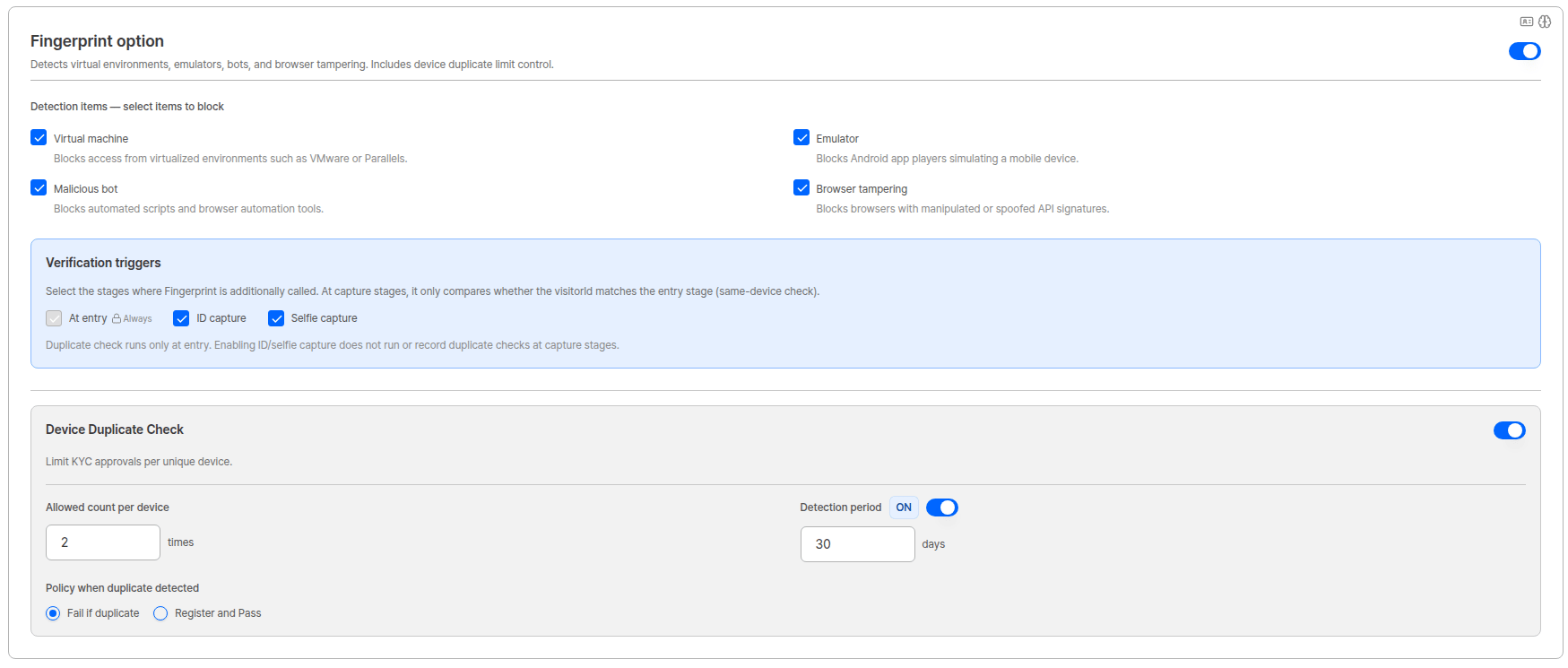
Fingerprint option now includes **verification triggers**, letting you select the stages where Fingerprint is additionally called.
| Stage | Description |
| ------------------ | ------------------------------------------ |
| **At entry** | Always runs. It cannot be unchecked. |
| **ID capture** | Calls Fingerprint again at ID capture. |
| **Selfie capture** | Calls Fingerprint again at selfie capture. |
At the capture stages, it **only compares whether the visitorId matches the entry stage** to confirm it is the same device.
**Legitimate users may also fail in webview (in-app browser) environments**
Some in-app browsers do not deliver device sensor signals, so Sensor verification can fail even when a real user captures with a real device. Before enabling this option, review how your users reach the liveform and, if needed, prompt them to **open it in an external browser**. See the [WebView integration guide](/en/idcheck/getting-started/liveform-webview-guide) for details.
**If you host the liveform in a native app WebView**, the **app must grant device motion/sensor permission**. If the app does not grant sensor permission, sensor signals are never delivered and even legitimate users fail.
***
## Fingerprint verification triggers
Feature Improvement
Fingerprint option now includes **verification triggers**, letting you select the stages where Fingerprint is additionally called.
| Stage | Description |
| ------------------ | ------------------------------------------ |
| **At entry** | Always runs. It cannot be unchecked. |
| **ID capture** | Calls Fingerprint again at ID capture. |
| **Selfie capture** | Calls Fingerprint again at selfie capture. |
At the capture stages, it **only compares whether the visitorId matches the entry stage** to confirm it is the same device.
 ***
## Dashboard — redesigned verification results view
Feature Improvement
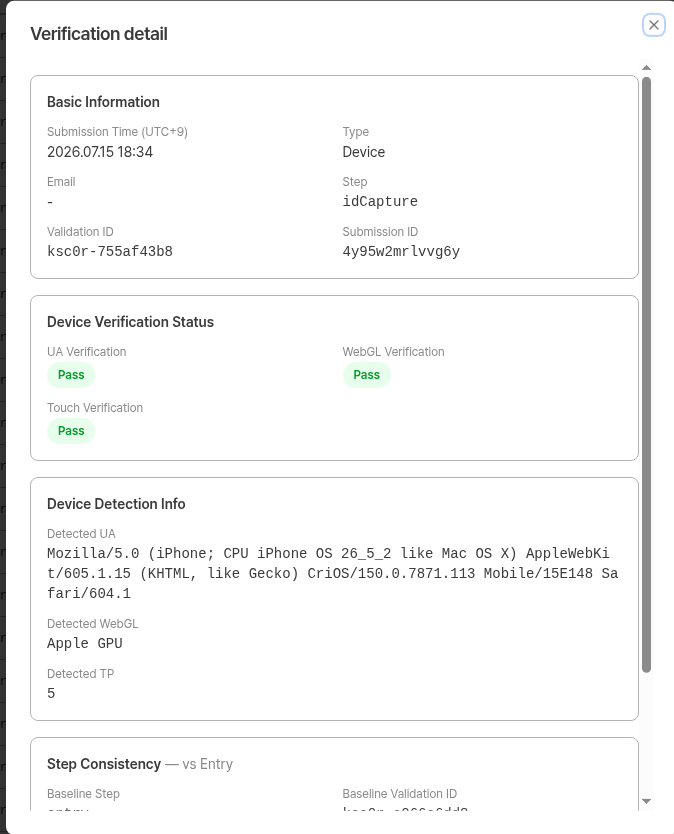
With more verification points, the **Device Verification** view has been redesigned.
* **List** — **Sensor** has been added to the `Type` column, so Device / Sensor / Fingerprint are all visible in one list.
* **Detail** — a `Step` field shows which point (`entry` / `idCapture` / `selfie`) a verification belongs to.
* **Step Consistency** — capture-stage verifications now show the **comparison result against entry**, including the baseline verification (`Baseline Validation ID`), whether values matched, and any mismatched items.
***
## Dashboard — redesigned verification results view
Feature Improvement
With more verification points, the **Device Verification** view has been redesigned.
* **List** — **Sensor** has been added to the `Type` column, so Device / Sensor / Fingerprint are all visible in one list.
* **Detail** — a `Step` field shows which point (`entry` / `idCapture` / `selfie`) a verification belongs to.
* **Step Consistency** — capture-stage verifications now show the **comparison result against entry**, including the baseline verification (`Baseline Validation ID`), whether values matched, and any mismatched items.
 **Up to 8 Validation IDs per user**
A Validation ID is issued **for each verification point × verification type**. With all options enabled, a single KYC session for one user produces up to 8. Seeing several rows at around the same time in the list is expected — use the `Step` field in the detail view to tell them apart.
For field-by-field descriptions, see the [Device Verification pre-verification list](/dashboard/en/preverification/device-verification) document.
***
## Bug fixes
* Fixed an issue where the pre-verification list showed fewer items than actually existed after ID capture retries.
* Fixed an issue where a submission's pre-verification list was not displayed accurately.
* Fixed an issue where Device Verification and Selfie items did not match each other in the verification list of user submissions.
* Fixed an issue where Raw Values data was displayed incorrectly in the Fingerprint verification detail view.
* Fixed an issue where the final result was incorrectly shown as Fail even though Device Static Match had actually passed.
* Fixed an issue where Device Detection info and Verification Status were shown as empty during Device verification.
* Fixed an issue where motion permission and probe result items were not displayed in the dashboard's Session Journey view.
* Fixed an issue where the sensor permission popup did not appear during Knowledge-based selfie capture. The permission popup now appears as it does with Active Liveness.
***
ARGOS continues to improve its identity verification service for stronger security and a better user experience.
Thank you for using ARGOS Identity.
**The ARGOS Identity team**
**Up to 8 Validation IDs per user**
A Validation ID is issued **for each verification point × verification type**. With all options enabled, a single KYC session for one user produces up to 8. Seeing several rows at around the same time in the list is expected — use the `Step` field in the detail view to tell them apart.
For field-by-field descriptions, see the [Device Verification pre-verification list](/dashboard/en/preverification/device-verification) document.
***
## Bug fixes
* Fixed an issue where the pre-verification list showed fewer items than actually existed after ID capture retries.
* Fixed an issue where a submission's pre-verification list was not displayed accurately.
* Fixed an issue where Device Verification and Selfie items did not match each other in the verification list of user submissions.
* Fixed an issue where Raw Values data was displayed incorrectly in the Fingerprint verification detail view.
* Fixed an issue where the final result was incorrectly shown as Fail even though Device Static Match had actually passed.
* Fixed an issue where Device Detection info and Verification Status were shown as empty during Device verification.
* Fixed an issue where motion permission and probe result items were not displayed in the dashboard's Session Journey view.
* Fixed an issue where the sensor permission popup did not appear during Knowledge-based selfie capture. The permission popup now appears as it does with Active Liveness.
***
ARGOS continues to improve its identity verification service for stronger security and a better user experience.
Thank you for using ARGOS Identity.
**The ARGOS Identity team**