> ## Documentation Index
> Fetch the complete documentation index at: https://developers.argosidentity.com/llms.txt
> Use this file to discover all available pages before exploring further.
# Product updates: June 2026
> ARGOS Identity product updates for June 2026
Hello, this is ARGOS Identity.
Here are the new features and improvements we delivered in June.
***
## Session Journey — tracking the progress of a submission
New Feature
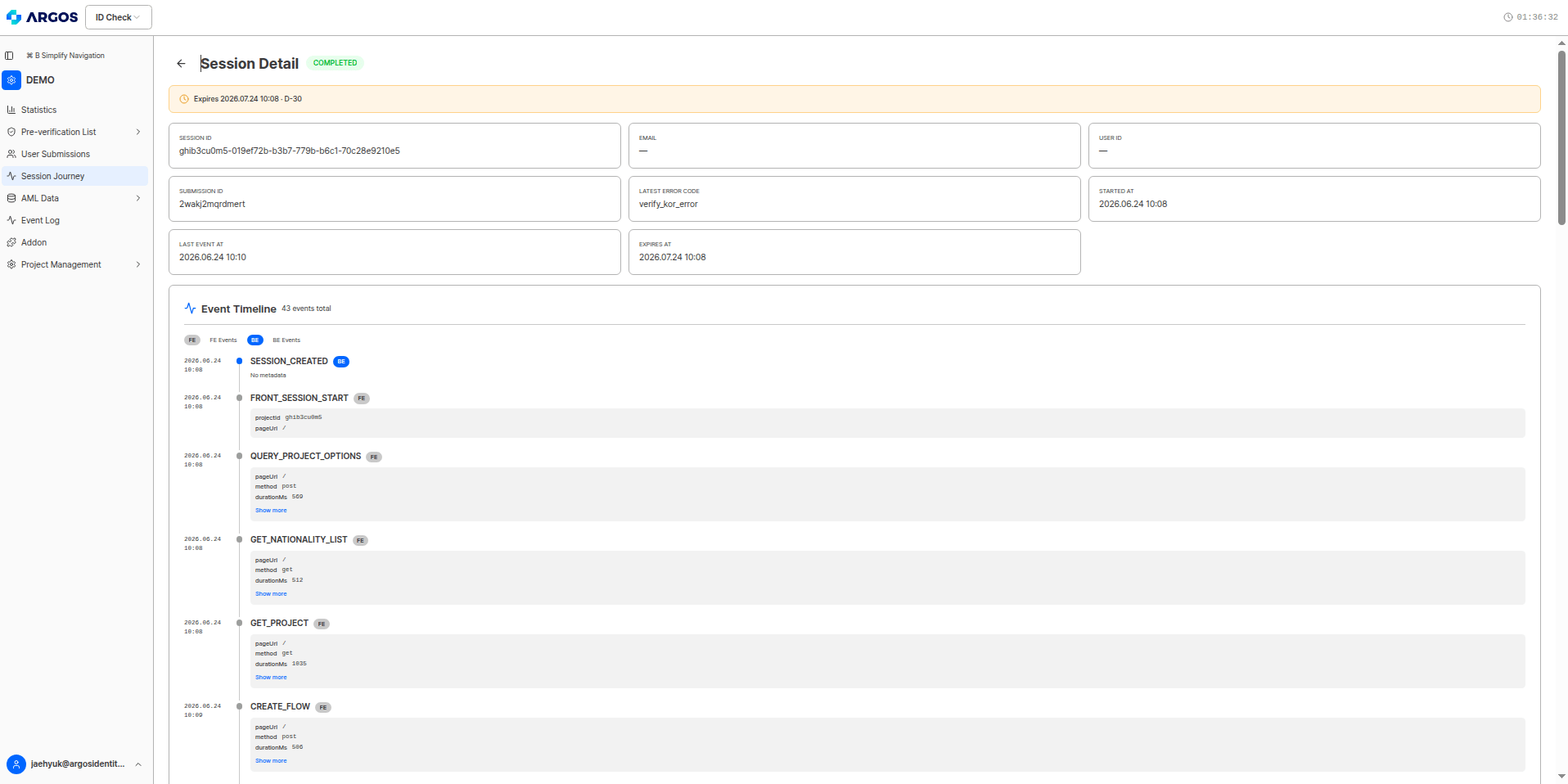
The **Session Journey** feature has been added to the dashboard. It shows **every event in chronological order, grouped by a single submission**, from the moment a user enters the liveform to the final outcome (approval, rejection, or hold).
Each event is collected from both the **frontend (FE — actions observed on the user's screen)** and the **backend (BE — verifications and decisions executed on the server)**. This lets clients trace back, without any code analysis, **"why this user got stuck at this step"** and **"what the reason for the rejection or hold was."**
### List view and Detail view
* **List view** — review sessions at a glance by creation date, Session ID, email, User ID, Submission ID, last event, and status, and search and filter by status, date range, or text.
* **Detail view** — provides a top summary card (including the most recent error code) and an **event timeline**. The timeline can be filtered by source with `FE`/`BE` chips, and you can expand each event's timestamp, name, and metadata (key-value).
 ### Session status
The **Status** column in the list shows the overall progress of a session as a color chip. The **`DROPPED`** status, which indicates drop-off, has been added in this release.
| Status | Meaning |
| ------------- | ------------------------------------------------------------------------------------------------------ |
| `COMPLETED` | Completed — the user finished the journey to the end (the outcome may be approval, rejection, or hold) |
| `IN_PROGRESS` | In progress — has not yet reached a final outcome |
| `DROPPED` | Drop-off — the user left without completing the journey (did not reach the final outcome page) |
| `ERROR` | Error — left the normal flow, e.g., via an error page |
Session status is **different from the final KYC decision (approval, rejection, or hold).** `COMPLETED` only means "the journey was completed to the end," not "it was approved." Check the final outcome with the `APPROVED`, `REJECTED`, or `PENDING` events.
Session Journey events are listed in chronological order, but in reality multiple verifications **run concurrently**. The display order is not necessarily a causal relationship, so interpret each event based on its result value and user impact. For more details, see the [Session Journey overview](/dashboard/en/session-journey/overview), [Dashboard guide](/dashboard/en/session-journey/dashboard-guide), and [Event reference](/dashboard/en/session-journey/event-reference).
***
## Setting the Session Journey data retention period
New Feature
A **Session Journey data retention period** option has been added to the **System Operations** page in project settings. You choose how long to keep session data; the retention period is calculated **from the session creation date**, and once the period passes, that session data is **deleted automatically**.
| Retention period | Notes |
| ---------------- | ----------------------- |
| 30 days | Default (about 1 month) |
| 90 days | About 3 months |
| 180 days | About 6 months |
| 365 days | About 1 year |
### Session status
The **Status** column in the list shows the overall progress of a session as a color chip. The **`DROPPED`** status, which indicates drop-off, has been added in this release.
| Status | Meaning |
| ------------- | ------------------------------------------------------------------------------------------------------ |
| `COMPLETED` | Completed — the user finished the journey to the end (the outcome may be approval, rejection, or hold) |
| `IN_PROGRESS` | In progress — has not yet reached a final outcome |
| `DROPPED` | Drop-off — the user left without completing the journey (did not reach the final outcome page) |
| `ERROR` | Error — left the normal flow, e.g., via an error page |
Session status is **different from the final KYC decision (approval, rejection, or hold).** `COMPLETED` only means "the journey was completed to the end," not "it was approved." Check the final outcome with the `APPROVED`, `REJECTED`, or `PENDING` events.
Session Journey events are listed in chronological order, but in reality multiple verifications **run concurrently**. The display order is not necessarily a causal relationship, so interpret each event based on its result value and user impact. For more details, see the [Session Journey overview](/dashboard/en/session-journey/overview), [Dashboard guide](/dashboard/en/session-journey/dashboard-guide), and [Event reference](/dashboard/en/session-journey/event-reference).
***
## Setting the Session Journey data retention period
New Feature
A **Session Journey data retention period** option has been added to the **System Operations** page in project settings. You choose how long to keep session data; the retention period is calculated **from the session creation date**, and once the period passes, that session data is **deleted automatically**.
| Retention period | Notes |
| ---------------- | ----------------------- |
| 30 days | Default (about 1 month) |
| 90 days | About 3 months |
| 180 days | About 6 months |
| 365 days | About 1 year |
 * Changes apply **only to sessions created after the update**; existing sessions are not affected.
* When the retention period expires, that session's journey data is deleted automatically and can no longer be viewed. Secure any data that needs long-term preservation before it expires.
For the retention period setting, see the [System Operations](/dashboard/en/project-management/project-settings/system-operation) dashboard guide; for how to use the Session Journey views, see the [Dashboard guide](/dashboard/en/session-journey/dashboard-guide).
***
ARGOS continues to improve its identity verification service for stronger security and a better user experience.
Thank you for using ARGOS Identity.
**The ARGOS Identity team**
* Changes apply **only to sessions created after the update**; existing sessions are not affected.
* When the retention period expires, that session's journey data is deleted automatically and can no longer be viewed. Secure any data that needs long-term preservation before it expires.
For the retention period setting, see the [System Operations](/dashboard/en/project-management/project-settings/system-operation) dashboard guide; for how to use the Session Journey views, see the [Dashboard guide](/dashboard/en/session-journey/dashboard-guide).
***
ARGOS continues to improve its identity verification service for stronger security and a better user experience.
Thank you for using ARGOS Identity.
**The ARGOS Identity team**