> ## Documentation Index
> Fetch the complete documentation index at: https://developers.argosidentity.com/llms.txt
> Use this file to discover all available pages before exploring further.
# Return URL Guide
> Learn how to return to your service with the configured Return URL and dynamic field parameters when KYC is completed or when users reach an error page.
## 1. Set Return URL Option in Dashboard
You can set the Return URL option in the Dashboard. When the KYC process is completed and the submitter selects the "Ok" button or waits for 5 seconds, the page redirects to the Return URL address with the dynamic field parameters. Starting with the 2026-04 update, users can also return to the configured Return URL **when they land on an error page**, and in that case the `errorCode` parameter is included so that your service can identify the reason for the block.
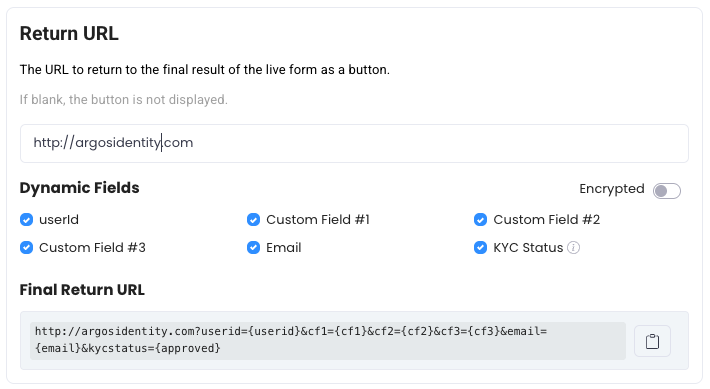 ## 2. Support to parameters in Dynamic Fields
### 2-1. Key Query String Parameters
The user ID value, which is connected to the submission
Custom field 1 optionally added during submission
Custom field 2 optionally added during submission
Custom field 3 optionally added during submission
The email value, which is connected to the submission
The Submission ID of the submitted record
KYC result. Following this parameter name is camelCase (case-sensitive). Based on the result, it returns `approved`, `pending`, or `rejected`.
**(2026-04 New)** The error code passed when the user is taken to an error page. Examples: `DE-20000` (Device Verification failure), `DE-30000` (Fingerprint detection), `DE-40000` (Device duplicate exceeded), `TK-10001` (token expired). Not passed on normal completion. See [Error Codes and Pages](/en/idcheck/reference_tables/Error-codes-and-pages) for the full code list.
### 2-2. Returning to Return URL from an error page
When a user is blocked by pre-verification (Device Info, VPN/Proxy, etc.) or token validation and is taken to an error page, they can return to your service via the Return URL button — as long as **Error Code (`errorCode`)** is checked in dynamic fields in the Dashboard. An example of the URL passed in this case is:
```
https://yourapp.com/verification-complete?kycStatus=rejected&errorCode=DE-20000
```
**Branching logic based on errorCode**
Your service can use the `errorCode` value to provide users with appropriate follow-up guidance (e.g., recommending use of a mobile device, directing them to request a new token, etc.).
### 2-3. Encrypted option applied
Encryption is enabled when the "encrypted" parameter is included in the final return URL. AES-256-ECB is required to decrypt the value. Please consult [this guide section](https://developers.argosidentity.com/getting-started/en/encrypt-and-decrypt-data/overview#3-3-api-data-decryption-aes-256-ecb) for further information.
By using this guide, you can effectively return URL with Query String in ID check to optimize your KYC process and enhance user experience.
## 2. Support to parameters in Dynamic Fields
### 2-1. Key Query String Parameters
The user ID value, which is connected to the submission
Custom field 1 optionally added during submission
Custom field 2 optionally added during submission
Custom field 3 optionally added during submission
The email value, which is connected to the submission
The Submission ID of the submitted record
KYC result. Following this parameter name is camelCase (case-sensitive). Based on the result, it returns `approved`, `pending`, or `rejected`.
**(2026-04 New)** The error code passed when the user is taken to an error page. Examples: `DE-20000` (Device Verification failure), `DE-30000` (Fingerprint detection), `DE-40000` (Device duplicate exceeded), `TK-10001` (token expired). Not passed on normal completion. See [Error Codes and Pages](/en/idcheck/reference_tables/Error-codes-and-pages) for the full code list.
### 2-2. Returning to Return URL from an error page
When a user is blocked by pre-verification (Device Info, VPN/Proxy, etc.) or token validation and is taken to an error page, they can return to your service via the Return URL button — as long as **Error Code (`errorCode`)** is checked in dynamic fields in the Dashboard. An example of the URL passed in this case is:
```
https://yourapp.com/verification-complete?kycStatus=rejected&errorCode=DE-20000
```
**Branching logic based on errorCode**
Your service can use the `errorCode` value to provide users with appropriate follow-up guidance (e.g., recommending use of a mobile device, directing them to request a new token, etc.).
### 2-3. Encrypted option applied
Encryption is enabled when the "encrypted" parameter is included in the final return URL. AES-256-ECB is required to decrypt the value. Please consult [this guide section](https://developers.argosidentity.com/getting-started/en/encrypt-and-decrypt-data/overview#3-3-api-data-decryption-aes-256-ecb) for further information.
By using this guide, you can effectively return URL with Query String in ID check to optimize your KYC process and enhance user experience.