> ## Documentation Index
> Fetch the complete documentation index at: https://developers.argosidentity.com/llms.txt
> Use this file to discover all available pages before exploring further.
# Query String and Token Guide
> A comprehensive guide to the Query String and Token ID options for Liveform. These options enable features such as transmitting additional information, preventing duplicate submissions, and identifying users. Explore essential tools to optimize your ID Check process.
## 1. Customizable Query String Options
The Query String options available in Liveform and API allow you to send additional information and customize the KYC process.
## 2. Basic URL Structure
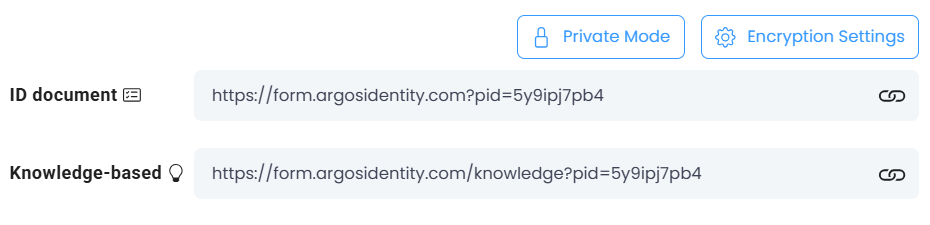
* **Base Form URL**: `https://form.argosidentity.com?pid={project_Id}`
* **URL with Query String**: `https://form.argosidentity.com?pid={project_Id}&blacklistCountries=false`
You can use the [Query String Encryption/Decryption Tool](/dashboard/en/project-management/project-settings/project-info#query-string-encryptiondecryption-tool) in the dashboard to generate encrypted URLs and test the query string parameters described below.
## 3. Key Query String Parameters
### 3-0. Which parameter for which situation?
Quick lookup by goal. For exact behavior, constraints, and encryption requirements, refer to the detailed table and Accordions below.
| What you want to do | Parameter(s) to use |
| ------------------------------------------------------------------- | ---------------------------------------------------------------------------------------- |
| Identify the user / submission and pass extra metadata | `email`, `userid`, `sid`, `cf1`, `cf2`, `cf3` |
| Restrict which ID document types are accepted | `allowedIdTypes`, `allowedCountries` |
| Restrict which OCR-extracted fields are shown / confirmed | `allowedDocumentFields` |
| Skip a step — country selection | `selectedIssuingCountry`, `allowedCountries` (with a single country) |
| Skip a step — ID type selection | `selectedIdType` |
| Skip a step — Knowledge-Based user info input | `knowledgeField: 'skip'` |
| Pick which items the Knowledge-Based step asks for | `knowledgeField` |
| Pre-fill Knowledge-Based input values | `knowledgePrefill` |
| Add identity verification beyond ID + selfie (e.g. SMS to phone) | `auxidField` |
| Override duplicate / age / blacklist policy for a single submission | `rejectDuplicateUser`, `approvePeriod`, `rejectPeriod`, `ageLimit`, `blacklistCountries` |
| Exclude specific fields from the response (apply a projection) | `projectionId`, `projectionName` |
| Brand the Liveform UI colors | `mainColor`, `innerColor` |
| Enforce a link-entry expiry (e.g. time-limited guardian flow) | `startValidUntil` |
| One-time link — prevent URL sharing / re-use | `tokenId` (see [Section 4. Token ID Options](#4-token-id-options) for details) |
| Parameter | ID Document | Knowledge-Based | Description |
| ------------------------- | ----------- | --------------- | ------------------------------------------------------------------------------------------------------------------------------------------------------------------------------------------------------------------------------------------------------------------------------------------------------------------------------------------------------------------------------------------------------------- |
| `blacklistCountries` | Yes | Yes | Turns off blacklist country restrictions for the specific submission (`false` only). |
| `approvePeriod` | Yes | No | Turns off the approved duplicate submission prevention period (`false` only). |
| `rejectPeriod` | Yes | No | Turns off the rejected duplicate submission prevention period (`false` only). |
| `ageLimit` | Yes | Yes | Turns off age restriction for the specific submission (`false` only). |
| `rejectDuplicateUser` | Yes | Yes | Enables/disables duplicate submission prevention (`true` or `false` accepted). - In Knowledge-Based Submission, it works to contain Name, Gender, Birth Date, and Nationality information. |
| `email` | Yes | Yes | User's email address. |
| `userid` | Yes | Yes | Custom unique identifier for the user. |
| `pid` | Yes | Yes | Unique identifier for each project. |
| `sid` | Yes | Yes | Unique identifier for each submission. |
| `cf1` | Yes | Yes | Custom option field #1. |
| `cf2` | Yes | Yes | Custom option field #2. |
| `cf3` | Yes | Yes | Custom option field #3. |
| `auxidField` | Yes | No | Must be encrypted. Used when auxiliary verification of identity information is required in addition to ID documents and selfie photos. Currently phoneNumber is implemented, see details below. Cannot be used simultaneously with selectedIssuingCountry and selectedIdType. This will be changed through future updates. |
| `allowedCountries` | Yes | Yes | Must be encrypted. `allowedCountries` can only be set using the encryption option and cannot be specified directly. e.g., If the encrypted value `{'allowedCountries': 'USA,KOR'}` is provided, only the United States (USA) and South Korea (KOR) will be allowed. |
| `allowedIdTypes` | Yes | No | Must be encrypted. Can set to show ID card type. Refer to the value below each parameter. |
| `allowedDocumentFields` | Yes | No | Must be encrypted. Can set to show available field. Refer to the value below each parameter. |
| `projectionId` | Yes | Yes | Must be encrypted. Can apply a projection to exclude fields. ProjectionName cannot be used together. |
| `projectionName` | Yes | Yes | Must be encrypted. Can apply a projection to exclude fields. ProjectionId cannot be used together. |
| `selectedIssuingCountry ` | Yes | Yes | Must be encrypted. By selecting, user can skip the selecting country page. `allowedCountries` and `selectedIdType` can be used together. Also, when `allowedCountries` is selected, countreis not in the `allowedCountries` cannot be used. Same countries in `blacklistCountries` cannot be used together. |
| `selectedIdType` | Yes | No | Must be encrypted. By selecting, user can skip the selecting Id type page. Must be used with `selectedIssuingCountry`. If `selectedIdType` is used alone, it will cause error. Also, using **Universal mode** and `selectedIdType` together will casue error; exceptional case: note that if the `issuingCountry`is KOR and **Universal mode** is on, selecting IdType page will be shown to users. |
| `mainColor` | Yes | Yes | Must be encrypted. Sets the primary color of CTA buttons and positive action UI elements. Value must be a 6-digit hex color code with `#` prefix (e.g., `#AEFF00`). See [Custom Theme](/en/idcheck/notices/2026-03-update#custom-theme) and [Liveform Customization](/dashboard/en/project-management/user-experience/liveform-customization#custom-theme-query-string). |
| `innerColor` | Yes | Yes | Must be encrypted. Sets the inner text/icon color within CTA buttons and action elements. Value must be a 6-digit hex color code with `#` prefix (e.g., `#FFFFFF`). See [Custom Theme](/en/idcheck/notices/2026-03-update#custom-theme) and [Liveform Customization](/dashboard/en/project-management/user-experience/liveform-customization#custom-theme-query-string). |
| `startValidUntil` | Yes | Yes | Must be encrypted. Specifies the expiration time **before** authentication begins in UTC+0 ISO 8601 format (e.g., `2026-04-30T15:00:00Z`). If the user accesses the link after the specified time has passed, authentication is blocked and they are directed to the PV-40018 error page. Use this when you need to enforce "link entry within a set time period" such as guardian authentication for minors. |
**`startValidUntil` Behavior (2026-04)**
* **Validation Priority**: Evaluated **before** all other validations such as token ID validation. If start expiration is confirmed, subsequent validations are not performed.
* **Encryption Required**: Cannot be used as plain text. Must be included in the `encrypted` parameter alongside other encryption options.
* **Timezone**: Always interpreted as UTC+0. Example: `{"startValidUntil":"2026-04-30T15:00:00Z"}`.
* **Supported Pipelines**: ID Document, Knowledge-based.
* **Expiration Behavior**: Redirects to error page `/error-page/expired-start-valid-until` (error code `PV-40018`), displaying the message "The verification link has expired. Please try again with a new link." to the user.
| Parameter | ID Document | Knowledge-Based | Description |
| ------------------ | ----------- | --------------- | --------------------------------------------------------------------------------------------------------------------------------------------------------------------------------------------------------------------------------------------------------- |
| `knowledgeField` | No | Yes | Must be encrypted. Set visible fields from the supported fields. Refer to the value below each parameter. |
| `knowledgePrefill` | No | Yes | Must be encrypted. Fill out the value in advance. Refer to the value below each parameter. |
| `skip` | No | Yes | Must be encrypted. When selected, users can skip the user information collection process in Knowledge-Based and proceed to the next step where they take a selfie photo as configured in the dashboard. Cannot be used with other knowledgeField options. |
### 3 - Common
* Below is an example of ID Check with and without an email query parameter.
* **Example:**
* `https://form.argosidentity.com?pid={project_Id}&email={type_your_email_address}`
 * Generate a unique user ID for KYC submitter identification during API calls.
* Add up to three custom fields (`cf1`, `cf2`, `cf3`) to transmit additional information.
* Generate a unique user ID for KYC submitter identification during API calls.
* Add up to three custom fields (`cf1`, `cf2`, `cf3`) to transmit additional information.
* **Example:**
* `https://form.argosidentity.com?pid={project_Id}&userid={type_userid}&cf1={type_cf1}&cf2={type_cf2}&cf3={type_cf3}`
Note that this is appliable both in ID Documnet and Knolwedge-Based
### 3 - ID check
Restrict which ID document types are accepted. Pick the values you need and combine them with commas.
* `passport` — Passport
* `drivers_license` — Driver's license
* `government_id` — Government-issued ID
* `residence_permit` — Residence permit
* `vehicle_registration_certificate` — Vehicle registration certificate
* `visa` — Visa
* `pancard` — India PAN card
* `aadhaar` — India Aadhaar card
* `foreign_registrator` — Foreign resident registration card
* `identification_card` — General identification card
* e.g. `{'allowedIdTypes': 'passport,government_id,drivers_license'}`
Restrict which OCR-extracted fields are shown and confirmed by the user.
* `gender` — Gender
* `nationality` — Nationality
* `expiry_date` — Expiry date
* `number` — Document number (same field as passport number for passports)
* `issue_date` — Issue date
* `id_number` — ID number unique to the document
* `serial_number` — Serial number
* `name` — Name
* `date_of_birth` — Date of birth
* `curp_number` — CURP number (only available for Mexican ID card)
* `version` — Card version (only available for New Zealand driver's license)
* `type_of_permit` — Type of permit (only available for Alien Registration Card in South Korea)
* e.g. `{'allowedDocumentFields': 'gender,name,date_of_birth,issue_date'}`
Pre-select a single document type so the user skips the ID type selection step.
* `passport` — Passport
* `drivers_license` — Driver's license
* `government_id` — Government-issued ID
* `residence_permit` — Residence permit
* `vehicle_registration_certificate` — Vehicle registration certificate
* `visa` — Visa
* `pancard` — India PAN card
* `aadhaar` — India Aadhaar card
* `identification_card` — General identification card
* e.g. `{'selectedIdType': 'passport'}`
* **allowedIdTypes:**
* `https://form.argosidentity.com?pid={project_Id}&encrypted={'allowedIdTypes': 'passport,government_id,drivers_license'}`
* **allowedDocumentFields:**
* `https://form.argosidentity.com?pid={project_Id}&encrypted={'allowedDocumentFields': 'gender,name,date_of_birth,issue_date'}`
* **selectedIdType:**
* `https://form.argosidentity.com?pid={project_Id}&encrypted={'selectedIdType': 'passport'}`
* note that inside of encrypted should be encrypted; the above query is only for example
* Every **field name is case-sensitive**.
* Every parameter value **must not contain a space**.
* ❌ Non-compliant Example:
`{'allowedDocumentFields': 'gender, name,date_of_birth, issue_date'}`
* The correct option should not have spaces after commas, like `{'allowedDocumentFields': 'gender,name,date_of_birth,issue_date'}`
For identity information that requires verification in addition to ID documents and selfie information (e.g., phone numbers), you can collect and verify using the auxidField option.
Specify auxiliary identity information to collect and verify in addition to the ID document and selfie.
* `phoneNumber` — SMS-based phone number verification
e.g. `{'auxidField': 'phoneNumber'}`
**Example:**
* `https://form.argosidentity.com?pid={project_Id}&encrypted={'auxidField': 'phoneNumber'}`
* note that inside of encrypted should be encrypted; the above query is only for example
**Caution**:
* Must be encrypted for use.
* The parameter values above are case-sensitive. For example, if you write phonenumber, it will not work. You must write phoneNumber as shown above.
* Cannot be used simultaneously with selectedIssuingCountry and selectedIdType. This will be changed through future updates.
* **Currently 91 countries do not support SMS verification.**
**Check Unsupported Countries**
To view the complete list of 91 countries where SMS verification for auxidField phoneNumber feature is not supported, please refer to the link below.
📋 [**View SMS Verification Unsupported Countries List**](/en/idcheck/getting-started/liveform-url/auxidfield-unsupported-countries)
### 3 - Knowledge-Based
Pick which items the user must input during the Knowledge-Based step.
* `name` — Full name
* `gender` — Gender
* `birthDate` — Date of birth
* `nationality` — Nationality
* `SSN` — Social Security Number (only the USA is supported)
* `address` — Address
* `phoneNumber` — Phone number
* `skip` — Skip the entire user information collection step (must be used alone; cannot be combined with other knowledgeField values)
e.g. `{'knowledgeField': 'gender,nationality,name'}`
e.g. `{'knowledgeField': 'skip'}`
The parameter values above are case-sensitive. For example, birthdate will not work. You must write birthDate as shown above.
Pre-populate the Knowledge-Based input fields.
* `name` — Name to prefill
* `birthDate` — Date of birth (`YYYY-MM-DD` format required)
* `gender` — Gender (`male` or `female`)
* `nationality` — Nationality (ISO Alpha-3 country code)
* `SSN` — Social Security Number (with hyphens `-`)
* `address` — Address (keyword that can be searched on Google Maps)
* `phoneNumber` — Phone number (country code included, no hyphens)
e.g. `{'knowledgePrefill': 'gender=male,birthdate=1990-01-01,SSN=123-12-0001,address=Washington D.C.,phoneNumber=+15555551234'}`
For `address`, use keywords that can be searched in Google Maps. The prefilled value will appear in the address search field.
* `https://form.argosidentity.comknowledge?pid={project_Id}&encrypted={'knowledgeField': 'gender,nationality,name'}`
* `https://form.argosidentity.comknowledge?pid={project_Id}&encrypted={'knowledgePrefill': 'gender=male,birthdate=1990-01-01,SSN=123-12-0001,address=Washington D.C.,phoneNumber=+15555551234'}`
* note that inside of encrypted should be encrypted; the above query is only for example
* Every field name is case-sensitive.
* Every parameter value must not contain a space.
* ❌ Non-compliant Example:
`{'knowledgeField': 'gender, nationality, name'}`
* The correct option should not have spaces after commas, like:
`{'knowledgeField': 'gender,nationality,name'}`
In `Knowledge-Based`, when you enter `skip`, users can skip the user information collection process and proceed to the next step.
**When configured, the country selection and user information input collection screens will be skipped.**
e.g. `{'knowledgeField': 'skip'}`
USECASE: when you want to perform Face-based authentication without collecting additional information, you can implement this by enabling the Selfie process option in the dashboard and setting ‘skip’ in the ‘knowledgeField’.
**Caution:**
* Cannot be used with other knowledgeField options besides skip.
* However, it can be used together with the administrator-provided email, userid, cf1, cf2, and cf3.
* Must be encrypted for use.
**Example:**
* `https://form.argosidentity.comknowledge?pid={project_Id}&encrypted={'knowledgeField': 'skip'}`
* `https://form.argosidentity.comknowledge?pid={project_Id}&encrypted={'email': 'example@example.com','userid': 'userid', 'cf1': 'cf1','knowledgeField': 'skip'}`
* note that inside of encrypted should be encrypted; the above query is only for example
In Knowledge-Based, if `allowedCountries` set one nationality.\
e.g. `{'allowedCountries': 'USA'}` The form skips to the select country page.
**Example:**
* `https://form.argosidentity.comknowledge?pid={project_Id}&encrypted={'allowedCountries': 'USA'}`
* note that inside of encrypted should be encrypted; the above query is only for example
All Query String values must be URL-encoded.
## 4. Token ID Options
The `tokenId` is a string used for Liveform submissions in Private Mode.
**Purpose**: Prevent shared or duplicate use of the same URL.
Validation fails (error occurs) under the following conditions:
1. **Time Expiry**: More than 3 minutes have elapsed since the first use.
2. **Existing Valid Submission**: There is an existing submission with a determined KYC status (approved, rejected, pending).
**Caution**:
* If the above conditions are not met, multiple users may proceed with the same Token ID simultaneously.
* [Webhook](/en/idcheck/webhooks/overview)
* **GET Submission API** (single retrieval using `submission_id`)
* Download Submission CSV from the dashboard
* **Base Form URL**: `https://form.argosidentity.com?pid={project_Id}`
* **URL with Token ID**: `https://form.argosidentity.com?pid={project_Id}&token={tokenId}`
* **with Encryption enabled**: `https://form.argosidentity.com?pid={project_Id}&encrypted={token={tokenId}}`
## 5. Encrypted Only
You can enable the encrypted only option in the dashboard. After activation, URL query parameters only allow `pid`(project id), `encrypted` and `lang`(language), other parameters are not allowed.
 * `https://form.argosidentity.com?pid={project_Id}&encrypted={encrypted_option}&lang=en`(O)
* `https://form.argosidentity.com?pid={project_Id}&encrypted={encrypted_option}&email=your_email_address@argosidentity.com`(X)
email is not an allowed parameter, so access is denied.
By using this guide, you can effectively leverage Query String and Token ID options in ID check to optimize your KYC process and enhance user experience.
* `https://form.argosidentity.com?pid={project_Id}&encrypted={encrypted_option}&lang=en`(O)
* `https://form.argosidentity.com?pid={project_Id}&encrypted={encrypted_option}&email=your_email_address@argosidentity.com`(X)
email is not an allowed parameter, so access is denied.
By using this guide, you can effectively leverage Query String and Token ID options in ID check to optimize your KYC process and enhance user experience.