> ## Documentation Index
> Fetch the complete documentation index at: https://developers.argosidentity.com/llms.txt
> Use this file to discover all available pages before exploring further.
# Data Encryption and Decryption
> Comprehensive guide to secure customer data through robust encryption solutions. Learn about methods to minimize risks of unauthorized access and data breaches while complying with the latest security standards.
## Encryption and Decryption Tool
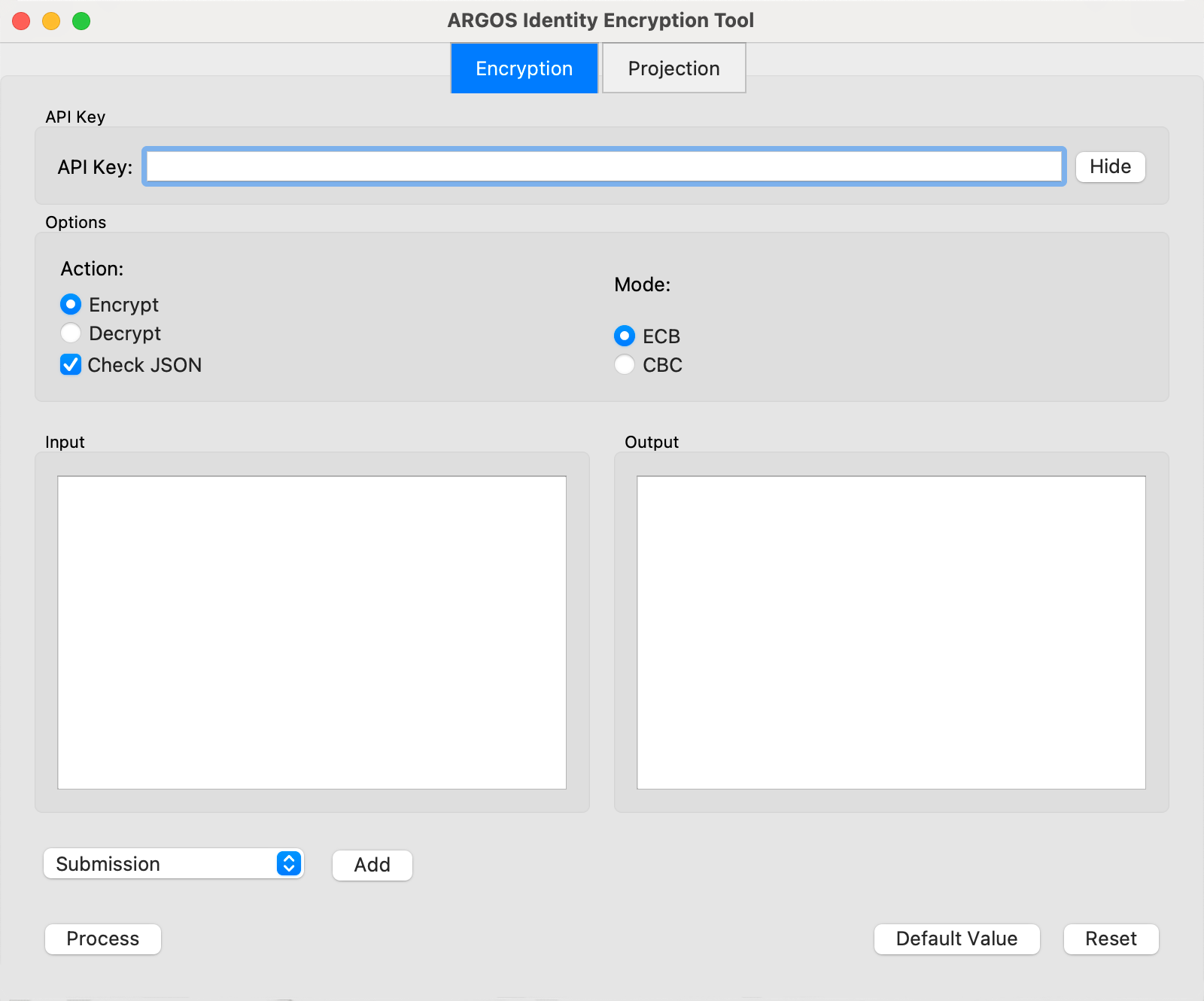
For development purposes, provide the Encryption and Decryption Tool.\
You may download it via this [link](https://argos-logo.s3.ap-northeast-2.amazonaws.com/developer_guide/EncryptionTool_0616.zip) and verify the results are accurate.
cf> In macOS, it requires allowing launching this app in the "Privacy & Security" settings menu.
 ## Encryption Options
Types of Encryption Modules
Query String Encryption
Secure Data Transmission Options
Encryption/Decryption Methods
## 1. Types of Encryption Modules
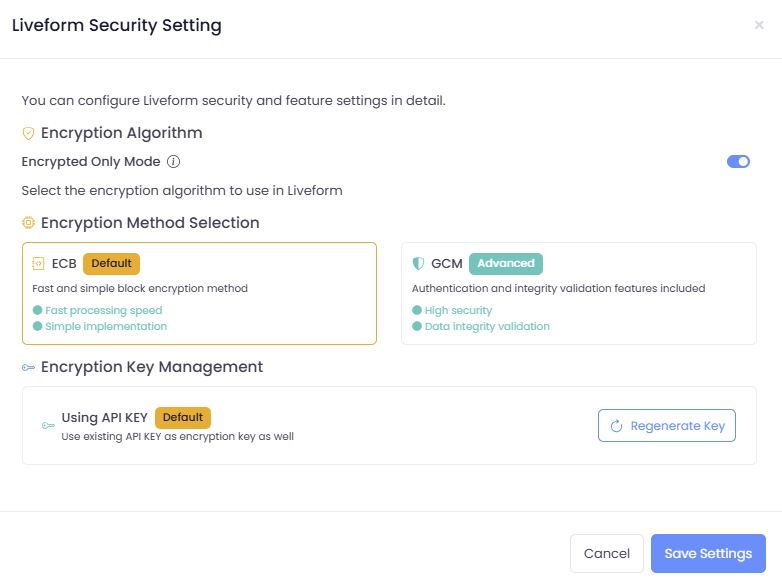
There are two types of encryption modules available:
* AES-256: Fast and simple block encryption method
* GCM-256: Enhanced encryption method with authentication and integrity features
### Types of Encryption Keys
* API Key: API key assigned to the Project
* Custom API Key (secretKey): New secretKey issued from Liveform for use
## Encryption Options
Types of Encryption Modules
Query String Encryption
Secure Data Transmission Options
Encryption/Decryption Methods
## 1. Types of Encryption Modules
There are two types of encryption modules available:
* AES-256: Fast and simple block encryption method
* GCM-256: Enhanced encryption method with authentication and integrity features
### Types of Encryption Keys
* API Key: API key assigned to the Project
* Custom API Key (secretKey): New secretKey issued from Liveform for use
 ## 2. Query String Encryption
Sensitive data sent via URL query strings is encrypted using the `AES-256-ECB` or `GCM-256` encryption method.
Refer to the link below for each parameter description
[Key Query String Parameters](https://developers.argosidentity.com/en/idcheck/getting-started/liveform-url/querystring-and-token-guide#2-1-key-query-string-parameters)
```json id_document.json theme={null}
{
"email": "email@email.com",
"userid": "userid",
"cf1": "value 1",
"cf2": "value 2",
"cf3": "value 3",
"blacklistCountries": false,
"approvePeriod": false,
"rejectPeriod": false,
"ageLimit": false,
"rejectDuplicateUser": true,
"token": "token_id",
"allowedCountries": "USA,KOR"
}
```
```json knowledge_based.json theme={null}
{
"email": "email@email.com",
"userid": "userid",
"cf1": "value 1",
"cf2": "value 2",
"cf3": "value 3",
"knowledgeField": "birthDate,gender,nationality,name,SSN,name,address,phoneNumber",
"knowledgePrefill" : "gender=male,nationality=USA,SSN=123-34-0001,address=Washington D.C.,name=Brown James,birthDate=1980-01-01,phoneNumber=+15555551234",
"blacklistCountries": false,
"ageLimit": false,
"rejectDuplicateUser": true,
"allowedCountries": "USA"
}
```
## 2. Query String Encryption
Sensitive data sent via URL query strings is encrypted using the `AES-256-ECB` or `GCM-256` encryption method.
Refer to the link below for each parameter description
[Key Query String Parameters](https://developers.argosidentity.com/en/idcheck/getting-started/liveform-url/querystring-and-token-guide#2-1-key-query-string-parameters)
```json id_document.json theme={null}
{
"email": "email@email.com",
"userid": "userid",
"cf1": "value 1",
"cf2": "value 2",
"cf3": "value 3",
"blacklistCountries": false,
"approvePeriod": false,
"rejectPeriod": false,
"ageLimit": false,
"rejectDuplicateUser": true,
"token": "token_id",
"allowedCountries": "USA,KOR"
}
```
```json knowledge_based.json theme={null}
{
"email": "email@email.com",
"userid": "userid",
"cf1": "value 1",
"cf2": "value 2",
"cf3": "value 3",
"knowledgeField": "birthDate,gender,nationality,name,SSN,name,address,phoneNumber",
"knowledgePrefill" : "gender=male,nationality=USA,SSN=123-34-0001,address=Washington D.C.,name=Brown James,birthDate=1980-01-01,phoneNumber=+15555551234",
"blacklistCountries": false,
"ageLimit": false,
"rejectDuplicateUser": true,
"allowedCountries": "USA"
}
```
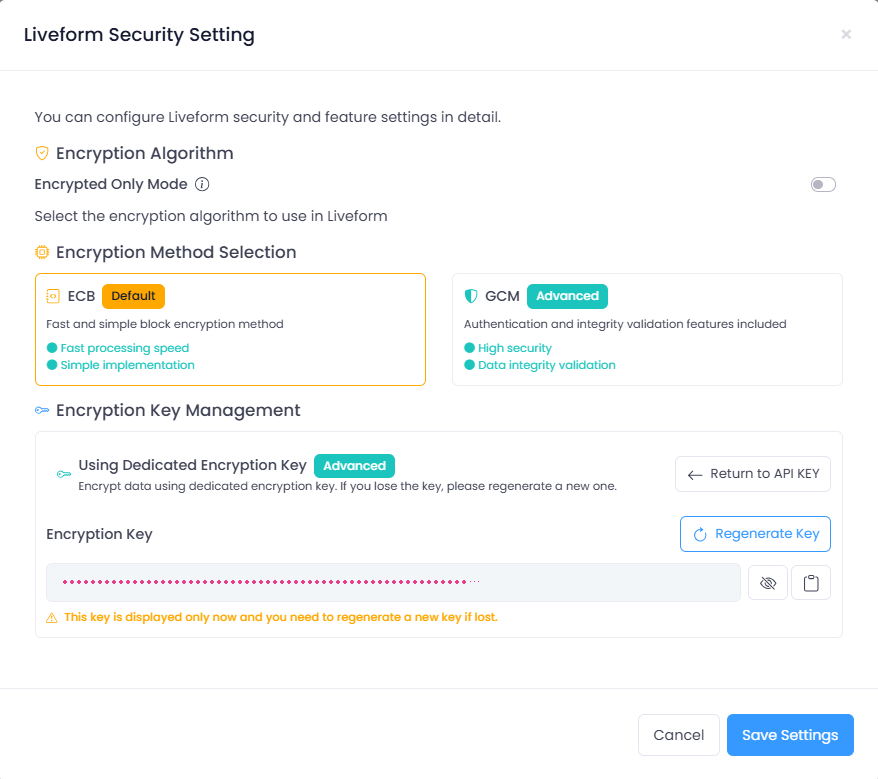 Once issued, secretKey will not be displayed again. If lost, please reissue and use it.
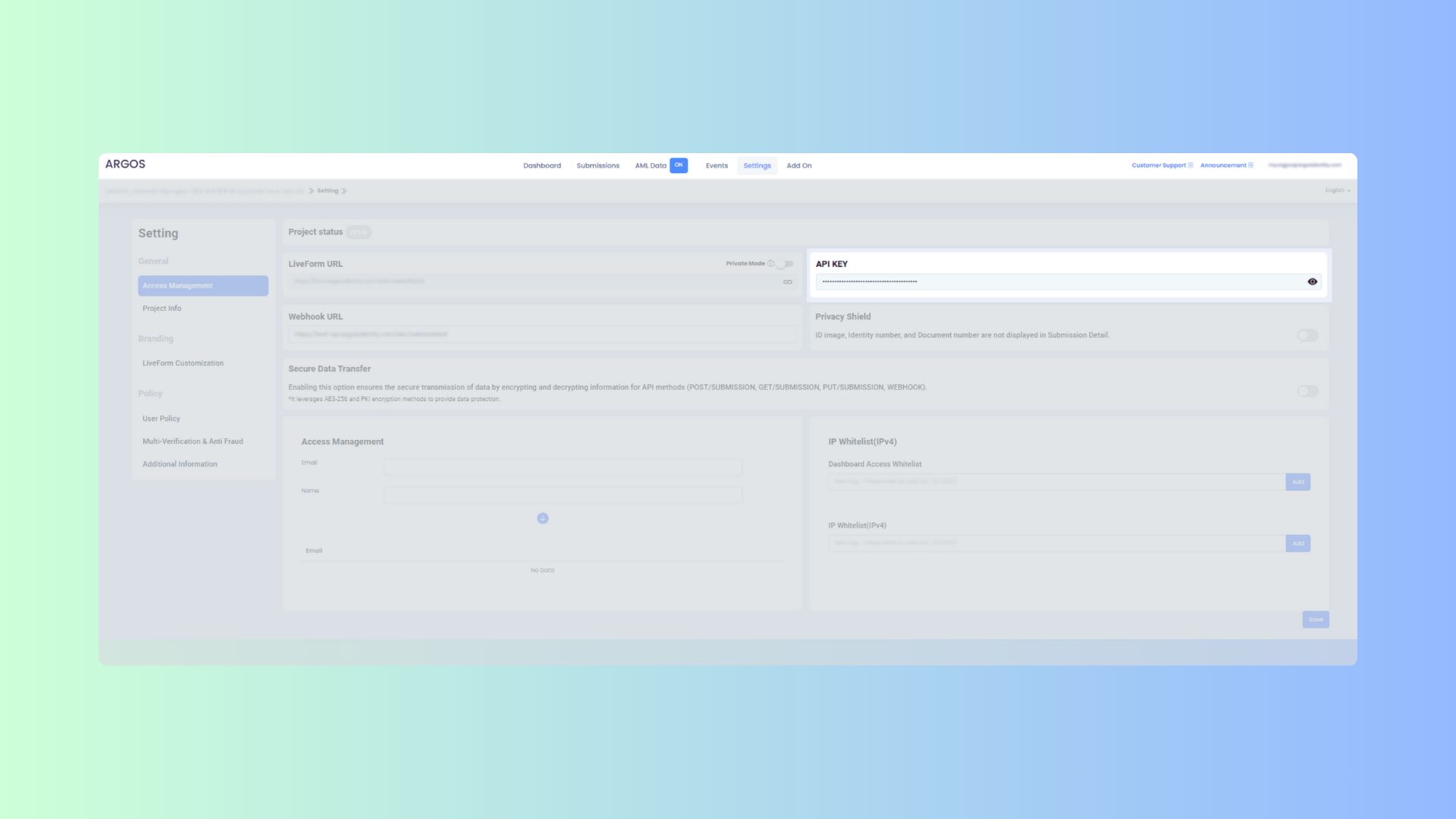 Before performing AES-256 encryption, please verify the query string encryption and decryption steps.
If you have received a secretKey, please use the secretKey.
```text example.url theme={null}
https://form.argosidentity.com?pid={project_Id}&encrypted={encrypted_json_text}
```
**Caution**: The following query parameters are not encrypted: `pid`, `lang`, `sid`, `action`.\
The `pid`, `lang` query strings and the `sid`, `action` query strings used on the "Additional Process (Injection)" page do not support encryption.
## 3. Query String Encryption and Decryption Methods
### 3-1. Key Generation Process
AES-256
```mermaid theme={null}
graph LR
A[API Key] -->|SHA-256 Hash| B[Hashed Key]
B -->|Used in AES-256 Encryption| C[Encryption/Decryption]
```
GCM-256
```mermaid theme={null}
flowchart LR
%% Key Generation
API[API Key] -->|SHA-256 Hash| KEY[Hashed Key 32 bytes]
%% Encryption
KEY --> ENC[AES-256-GCM Encryption]
IV[IV Nonce 12 bytes random generation] --> ENC
AAD[AAD Additional Authenticated Data optional] --> ENC
DATA[Plaintext Data] --> ENC
ENC --> CT[Ciphertext]
ENC --> TAG[Authentication Tag 16 bytes]
%% Packaging
CT --> OUT[IV + Ciphertext + Tag]
IV --> OUT
TAG --> OUT
AAD -->|Header or separate field| OUT
```
```javascript Node.js(crpyto module) theme={null}
var crypto = require('crypto');
var hashedKey = crypto.createHash('sha256').update(APIKEY).digest();
```
```javascript Node.js(crypto-js library) theme={null}
const CryptoJS = require('crypto-js');
const hashedKey = CryptoJS.SHA256(APIKEY);
```
Below are examples of encrypting data using AES-256
```javascript Node.js(crpyto module) theme={null}
var crypto = require('crypto');
/**
* @param {string} data - Stringified JSON data
* @param {string} apiKey - Project API key
* @returns {string} Encrypted data
*
* for exact encryption, use formatJSON.
* example below,
* const data = {
userid: "10912301",
email: "email@email.com"
* };
*
* do not use string direct way, like
* `{"userid":"10912301","email":"email@email.com"}`
* which is not same as expected encryption.
*/
function encrypt(data, apiKey) {
var hashedKey = crypto.createHash('sha256').update(apiKey).digest();
var cipher = crypto.createCipheriv('aes-256-ecb', hashedKey, null);
return cipher.update(data, 'utf8', 'base64') + cipher.final('base64');
}
```
```javascript Node.js(crypto-js library) theme={null}
const CryptoJS = require('crypto-js');
const encrypt = (data, apiKey) => {
const hashedKey = CryptoJS.SHA256(apiKey);
const encrypted = CryptoJS.AES.encrypt(data, hashedKey, {
mode: CryptoJS.mode.ECB,
});
return encrypted.ciphertext.toString(CryptoJS.enc.Base64);
};
```
```java java(crypto-js library) theme={null}
import javax.crypto.Cipher;
import javax.crypto.spec.SecretKeySpec;
import java.nio.charset.StandardCharsets;
import java.security.MessageDigest;
import java.util.Base64;
public class Encryption {
public static String encrypt(String data, String apiKey) throws Exception {
// Hash the API key using SHA-256
MessageDigest digest = MessageDigest.getInstance("SHA-256");
byte[] hashedKey = digest.digest(apiKey.getBytes(StandardCharsets.UTF_8));
// Ensure the key is 32 bytes long for AES-256 compatibility
byte[] aesCompatibleKey = new byte[32];
System.arraycopy(hashedKey, 0, aesCompatibleKey, 0, 32);
// Create the AES key for encryption
SecretKeySpec secretKey = new SecretKeySpec(hashedKey, "AES");
// Initialize the Cipher in AES/ECB/PKCS5Padding mode
Cipher cipher = Cipher.getInstance("AES/ECB/PKCS5Padding");
cipher.init(Cipher.ENCRYPT_MODE, secretKey);
// Encrypt the data
byte[] encryptedBytes = cipher.doFinal(data.getBytes(StandardCharsets.UTF_8));
// Return the encrypted result encoded in Base64
return Base64.getEncoder().encodeToString(encryptedBytes);
}
}
```
Below are examples of encrypting data using AES-256-GCM
```javascript Node.js(crypto module) theme={null}
var crypto = require('crypto');
/**
* @param {string} data - Stringified JSON data
* @param {string} apiKey - Project API key
* @returns {string} Encrypted data in hex format (IV + ciphertext + tag)
*
* GCM mode provides authenticated encryption and includes IV and authentication tag.
* Return value is hex string encoded form of 12-byte IV + ciphertext + 16-byte authentication tag.
*/
function encryptGCM(data, apiKey) {
var hashedKey = crypto.createHash('sha256').update(apiKey).digest();
var iv = crypto.randomBytes(12);
var cipher = crypto.createCipheriv('aes-256-gcm', hashedKey, iv);
var encrypted = cipher.update(data, 'utf8');
encrypted = Buffer.concat([encrypted, cipher.final()]);
var tag = cipher.getAuthTag();
var result = Buffer.concat([iv, encrypted, tag]);
return result.toString('hex');
}
/**
* @param {string} encryptedHex - Hex encoded encrypted data
* @param {string} apiKey - Project API key
* @returns {string} Decrypted data
*/
function decryptGCM(encryptedHex, apiKey) {
var hashedKey = crypto.createHash('sha256').update(apiKey).digest();
var encryptedBuffer = Buffer.from(encryptedHex, 'hex');
var iv = encryptedBuffer.slice(0, 12);
var tag = encryptedBuffer.slice(-16);
var encrypted = encryptedBuffer.slice(12, -16);
var decipher = crypto.createDecipheriv('aes-256-gcm', hashedKey, iv);
decipher.setAuthTag(tag);
var decrypted = decipher.update(encrypted);
decrypted = Buffer.concat([decrypted, decipher.final()]);
return decrypted.toString('utf8');
}
```
```javascript Node.js(crypto-js library) theme={null}
const CryptoJS = require('crypto-js');
/**
* @param {string} data - Stringified JSON data
* @param {string} apiKey - Project API key
* @returns {string} Encrypted data in hex format
*/
const encryptGCM = (data, apiKey) => {
const hashedKey = CryptoJS.SHA256(apiKey);
const iv = CryptoJS.lib.WordArray.random(12);
// GCM mode is not directly supported in crypto-js,
// so it's recommended to use Node.js crypto module.
// Below is a conceptual example.
// For actual implementation, use Node.js crypto module
throw new Error('GCM mode is not supported in crypto-js. Please use Node.js crypto module.');
};
/**
* @param {string} encryptedHex - Hex encoded encrypted data
* @param {string} apiKey - Project API key
* @returns {string} Decrypted data
*/
const decryptGCM = (encryptedHex, apiKey) => {
// crypto-js doesn't support GCM, so use Node.js crypto module
throw new Error('GCM mode is not supported in crypto-js. Please use Node.js crypto module.');
};
```
```java Java theme={null}
import javax.crypto.Cipher;
import javax.crypto.spec.GCMParameterSpec;
import javax.crypto.spec.SecretKeySpec;
import java.nio.charset.StandardCharsets;
import java.security.MessageDigest;
import java.security.SecureRandom;
import java.util.Base64;
import java.util.HexFormat;
public class GCMEncryption {
private static final int GCM_IV_LENGTH = 12;
private static final int GCM_TAG_LENGTH = 16;
/**
* @param data - Stringified JSON data
* @param apiKey - Project API key
* @return Encrypted data in hex format (IV + ciphertext + tag)
*/
public static String encryptGCM(String data, String apiKey) throws Exception {
// Hash the API key using SHA-256
MessageDigest digest = MessageDigest.getInstance("SHA-256");
byte[] hashedKey = digest.digest(apiKey.getBytes(StandardCharsets.UTF_8));
// Create AES key for encryption
SecretKeySpec secretKey = new SecretKeySpec(hashedKey, "AES");
// Initialize Cipher in GCM mode
Cipher cipher = Cipher.getInstance("AES/GCM/NoPadding");
// Generate 12-byte IV
byte[] iv = new byte[GCM_IV_LENGTH];
SecureRandom random = new SecureRandom();
random.nextBytes(iv);
// Set GCM parameters (tag length 128 bits)
GCMParameterSpec gcmSpec = new GCMParameterSpec(GCM_TAG_LENGTH * 8, iv);
cipher.init(Cipher.ENCRYPT_MODE, secretKey, gcmSpec);
// Encrypt the data
byte[] encryptedBytes = cipher.doFinal(data.getBytes(StandardCharsets.UTF_8));
// Combine IV + ciphertext + tag and encode as hex
byte[] result = new byte[iv.length + encryptedBytes.length];
System.arraycopy(iv, 0, result, 0, iv.length);
System.arraycopy(encryptedBytes, 0, result, iv.length, encryptedBytes.length);
return HexFormat.of().formatHex(result);
}
/**
* @param encryptedHex - Hex encoded encrypted data
* @param apiKey - Project API key
* @return Decrypted data
*/
public static String decryptGCM(String encryptedHex, String apiKey) throws Exception {
// Hash the API key using SHA-256
MessageDigest digest = MessageDigest.getInstance("SHA-256");
byte[] hashedKey = digest.digest(apiKey.getBytes(StandardCharsets.UTF_8));
// Create AES key for decryption
SecretKeySpec secretKey = new SecretKeySpec(hashedKey, "AES");
// Convert hex string to byte array
byte[] encryptedData = HexFormat.of().parseHex(encryptedHex);
// Separate IV and ciphertext
byte[] iv = new byte[GCM_IV_LENGTH];
byte[] ciphertext = new byte[encryptedData.length - GCM_IV_LENGTH];
System.arraycopy(encryptedData, 0, iv, 0, GCM_IV_LENGTH);
System.arraycopy(encryptedData, GCM_IV_LENGTH, ciphertext, 0, ciphertext.length);
// Initialize Cipher in GCM mode
Cipher cipher = Cipher.getInstance("AES/GCM/NoPadding");
GCMParameterSpec gcmSpec = new GCMParameterSpec(GCM_TAG_LENGTH * 8, iv);
cipher.init(Cipher.DECRYPT_MODE, secretKey, gcmSpec);
// Decrypt the data
byte[] decryptedBytes = cipher.doFinal(ciphertext);
return new String(decryptedBytes, StandardCharsets.UTF_8);
}
}
```
```python Python theme={null}
import os
import base64
from cryptography.hazmat.primitives import hashes
from cryptography.hazmat.primitives.ciphers.aead import AESGCM
def hashed_key(api_key: str) -> bytes:
"""Hash API key using SHA-256 to generate 32-byte key"""
digest = hashes.Hash(hashes.SHA256())
digest.update(api_key.encode("utf-8"))
return digest.finalize()
def encrypt_gcm(data: str, api_key: str) -> str:
"""
Encrypt data using AES-256-GCM method.
Args:
data: JSON string to encrypt
api_key: Project API key
Returns:
hex format encrypted data (IV + ciphertext + tag)
"""
key = hashed_key(api_key)
iv = os.urandom(12) # Generate 12-byte IV
aesgcm = AESGCM(key)
# Encrypt data (includes authentication tag)
ct_tag = aesgcm.encrypt(iv, data.encode("utf-8"), None)
# Combine IV + ciphertext + tag and encode as hex
result = iv + ct_tag
return result.hex()
def decrypt_gcm(encrypted_hex: str, api_key: str) -> str:
"""
Decrypt data encrypted using AES-256-GCM method.
Args:
encrypted_hex: hex format encrypted data
api_key: Project API key
Returns:
decrypted data
"""
key = hashed_key(api_key)
encrypted_data = bytes.fromhex(encrypted_hex)
# Separate IV and ciphertext+tag
iv = encrypted_data[:12]
ct_tag = encrypted_data[12:]
aesgcm = AESGCM(key)
decrypted_data = aesgcm.decrypt(iv, ct_tag, None)
return decrypted_data.decode("utf-8")
```
Below are examples of decrypting data encrypted with AES-256
```javascript Node.js(crpyto module) theme={null}
var crypto = require('crypto');
/**
* @param {string} encryptedData
* @param {string} apiKey
* @returns {string} Decrypted data
*/
function decrypt(encryptedData, apiKey) {
var hashedKey = crypto.createHash('sha256').update(apiKey).digest();
var decipher = crypto.createDecipheriv('aes-256-ecb', hashedKey, null);
return decipher.update(encryptedData, 'base64', 'utf8') + decipher.final('utf8');
}
```
```javascript Node.js(crypto-js library) theme={null}
const CryptoJS = require('crypto-js');
const decrypt = (encryptedData, apiKey) => {
const hashedKey = CryptoJS.SHA256(apiKey);
const decrypted = CryptoJS.AES.decrypt(encryptedData, hashedKey, {
mode: CryptoJS.mode.ECB
});
return decrypted.toString(CryptoJS.enc.Utf8);
};
```
Below are examples of decrypting data encrypted with AES-256-GCM
```javascript Node.js(crypto module) theme={null}
var crypto = require('crypto');
/**
* @param {string} encryptedHex - Hex encoded encrypted data (IV + ciphertext + tag)
* @param {string} apiKey - Project API key
* @returns {string} Decrypted data
*/
function decryptGCM(encryptedHex, apiKey) {
var hashedKey = crypto.createHash('sha256').update(apiKey).digest();
var encryptedBuffer = Buffer.from(encryptedHex, 'hex');
// Separate IV, ciphertext, and tag
var iv = encryptedBuffer.slice(0, 12);
var tag = encryptedBuffer.slice(-16);
var encrypted = encryptedBuffer.slice(12, -16);
var decipher = crypto.createDecipheriv('aes-256-gcm', hashedKey, iv);
decipher.setAuthTag(tag);
var decrypted = decipher.update(encrypted);
decrypted = Buffer.concat([decrypted, decipher.final()]);
return decrypted.toString('utf8');
}
```
```javascript Node.js(crypto-js library) theme={null}
const CryptoJS = require('crypto-js');
/**
* @param {string} encryptedHex - Hex encoded encrypted data
* @param {string} apiKey - Project API key
* @returns {string} Decrypted data
*/
const decryptGCM = (encryptedHex, apiKey) => {
// crypto-js doesn't support GCM, so use Node.js crypto module
throw new Error('GCM mode is not supported in crypto-js. Please use Node.js crypto module.');
};
```
```java Java theme={null}
import javax.crypto.Cipher;
import javax.crypto.spec.GCMParameterSpec;
import javax.crypto.spec.SecretKeySpec;
import java.nio.charset.StandardCharsets;
import java.security.MessageDigest;
import java.util.HexFormat;
public class GCMDecryption {
private static final int GCM_IV_LENGTH = 12;
private static final int GCM_TAG_LENGTH = 16;
/**
* @param encryptedHex - Hex encoded encrypted data (IV + ciphertext + tag)
* @param apiKey - Project API key
* @return Decrypted data
*/
public static String decryptGCM(String encryptedHex, String apiKey) throws Exception {
// Hash the API key using SHA-256
MessageDigest digest = MessageDigest.getInstance("SHA-256");
byte[] hashedKey = digest.digest(apiKey.getBytes(StandardCharsets.UTF_8));
// Create AES key for decryption
SecretKeySpec secretKey = new SecretKeySpec(hashedKey, "AES");
// Convert hex string to byte array
byte[] encryptedData = HexFormat.of().parseHex(encryptedHex);
// Separate IV and ciphertext+tag
byte[] iv = new byte[GCM_IV_LENGTH];
byte[] ciphertext = new byte[encryptedData.length - GCM_IV_LENGTH];
System.arraycopy(encryptedData, 0, iv, 0, GCM_IV_LENGTH);
System.arraycopy(encryptedData, GCM_IV_LENGTH, ciphertext, 0, ciphertext.length);
// Initialize Cipher in GCM mode
Cipher cipher = Cipher.getInstance("AES/GCM/NoPadding");
GCMParameterSpec gcmSpec = new GCMParameterSpec(GCM_TAG_LENGTH * 8, iv);
cipher.init(Cipher.DECRYPT_MODE, secretKey, gcmSpec);
// Decrypt the data
byte[] decryptedBytes = cipher.doFinal(ciphertext);
return new String(decryptedBytes, StandardCharsets.UTF_8);
}
}
```
```python Python theme={null}
import os
from cryptography.hazmat.primitives import hashes
from cryptography.hazmat.primitives.ciphers.aead import AESGCM
def hashed_key(api_key: str) -> bytes:
"""Hash API key using SHA-256 to generate 32-byte key"""
digest = hashes.Hash(hashes.SHA256())
digest.update(api_key.encode("utf-8"))
return digest.finalize()
def decrypt_gcm(encrypted_hex: str, api_key: str) -> str:
"""
Decrypt data encrypted using AES-256-GCM method.
Args:
encrypted_hex: hex format encrypted data (IV + ciphertext + tag)
api_key: Project API key
Returns:
decrypted data
"""
key = hashed_key(api_key)
encrypted_data = bytes.fromhex(encrypted_hex)
# Separate IV and ciphertext+tag
iv = encrypted_data[:12]
ct_tag = encrypted_data[12:]
aesgcm = AESGCM(key)
decrypted_data = aesgcm.decrypt(iv, ct_tag, None)
return decrypted_data.decode("utf-8")
```
## 4. Secure Data Transfer Options
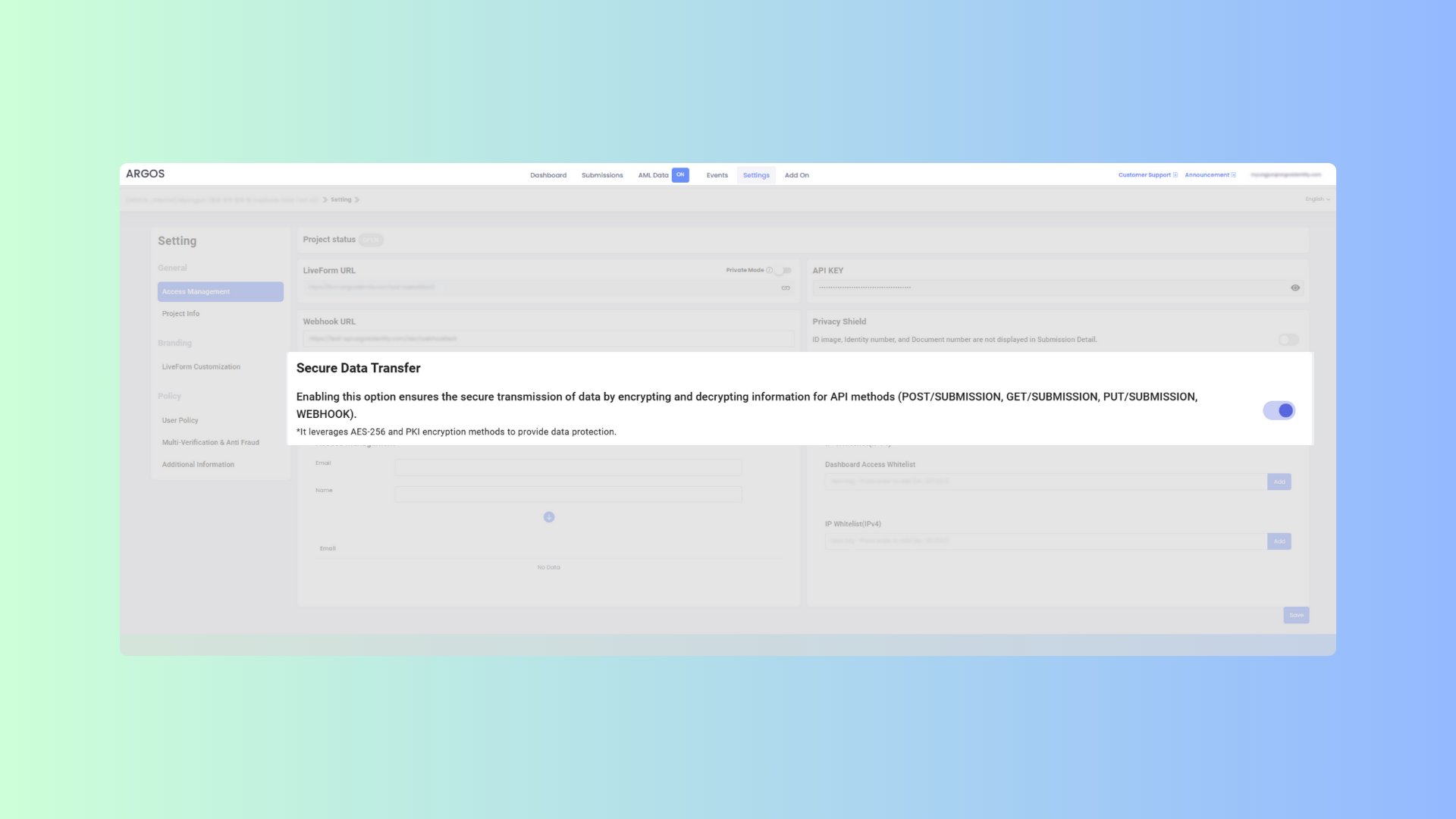
Encrypt data for secure transmission in API methods (GET, POST, PATCH) and WEBHOOKs. API methods use the `AES-256-ECB` encryption method, while WEBHOOKs use `AES-256-CBC` encryption. Ensure that secure data transfer is enabled before using it to protect sensitive information.
If this option is enabled, the request body must be encrypted. Inquire about a body parameter that is encrypted data. It is necessary to encrypt AES-256-ECB and refer to the Key Features and instructions on how to encrypt.
```json body theme={null}
body : encrypt({
email : 'string',
fullName : 'string',
issuingCountry : 'string',
birthDate: 'string'
...
})
```
Responses include encrypted data and the "isEncrypted" flag.
```json response.json theme={null}
body : {
"data": "encrypted-string",
"isEncrypted": true
}
```
### 4-1. Key Features
* GET, POST, PATCH requests are encrypted using `AES-256-ECB`
* WEBHOOK data is encrypted using `AES-256-CBC`
* Ensures data integrity and authentication through PKI
* Enhances data protection during transmission
 ### 4-2. API Request Data Encryption (AES-256-ECB)
```javascript Node.js(crypto-js library) theme={null}
const CryptoJS = require('crypto-js');
function encryptECB(data, apiKey) {
const hashedKey = CryptoJS.SHA256(apiKey);
const key = CryptoJS.lib.WordArray.create(hashedKey.words.slice(0, 8), 32);
const encrypted = CryptoJS.AES.encrypt(JSON.stringify(data), key, {
mode: CryptoJS.mode.ECB
});
return encrypted.ciphertext.toString(CryptoJS.enc.Base64);
}
```
```java AES-256-ECB.java theme={null}
import javax.crypto.Cipher;
import javax.crypto.spec.SecretKeySpec;
import java.nio.charset.StandardCharsets;
import java.security.MessageDigest;
import java.util.Base64;
import com.google.gson.Gson;
import com.google.gson.JsonObject;
public class Encryptor {
public static String encryptECB(JsonObject data, String apiKey) throws Exception {
Gson gson = new Gson();
String jsonData = gson.toJson(data);
MessageDigest digest = MessageDigest.getInstance("SHA-256");
byte[] rawKeyBytes = digest.digest(apiKey.getBytes(StandardCharsets.UTF_8));
byte[] hashedKey = new byte[32];
System.arraycopy(rawKeyBytes, 0, hashedKey, 0, 32);
SecretKeySpec key = new SecretKeySpec(hashedKey, "AES");
Cipher cipher = Cipher.getInstance("AES/ECB/PKCS5Padding");
cipher.init(Cipher.ENCRYPT_MODE, key);
byte[] encryptedBytes = cipher.doFinal(jsonData.getBytes(StandardCharsets.UTF_8));
return Base64.getEncoder().encodeToString(encryptedBytes);
}
}
```
### 4-3. API Data Decryption (AES-256-ECB)
```javascript Node.js(crypto-js library) theme={null}
const CryptoJS = require('crypto-js');
function decryptECB(encryptedData, apiKey) {
const hashedKey = CryptoJS.SHA256(apiKey);
const key = CryptoJS.lib.WordArray.create(hashedKey.words.slice(0, 8), 32);
const cipherParams = CryptoJS.lib.CipherParams.create({
ciphertext: CryptoJS.enc.Base64.parse(encryptedData)
});
const decrypted = CryptoJS.AES.decrypt(cipherParams, key, {
mode: CryptoJS.mode.ECB
});
return JSON.parse(decrypted.toString(CryptoJS.enc.Utf8));
}
```
```java AES-256-ECB.java theme={null}
import javax.crypto.Cipher;
import javax.crypto.spec.SecretKeySpec;
import java.nio.charset.StandardCharsets;
import java.security.MessageDigest;
import java.util.Base64;
import com.google.gson.Gson;
import com.google.gson.JsonObject;
public class Encryptor {
public static JsonObject decryptECB(String encryptedData, String apiKey) throws Exception {
Gson gson = new Gson();
MessageDigest digest = MessageDigest.getInstance("SHA-256");
byte[] hashedKey = digest.digest(apiKey.getBytes(StandardCharsets.UTF_8));
byte[] aesCompatibleKey = new byte[32];
System.arraycopy(hashedKey, 0, aesCompatibleKey, 0, 32);
SecretKeySpec key = new SecretKeySpec(aesCompatibleKey, "AES");
Cipher cipher = Cipher.getInstance("AES/ECB/PKCS5Padding");
cipher.init(Cipher.DECRYPT_MODE, key);
byte[] decryptedBytes = cipher.doFinal(Base64.getDecoder().decode(encryptedData));
String jsonData = new String(decryptedBytes, StandardCharsets.UTF_8);
return gson.fromJson(jsonData, JsonObject.class);
}
}
```
### 4-4. WEBHOOK Data Encryption (AES-256-CBC)
```javascript Node.js (crypto-js library) theme={null}
const CryptoJS = require('crypto-js');
function generateKeyAndIV(apiKey) {
const hashedKey = CryptoJS.SHA256(apiKey);
const key = CryptoJS.lib.WordArray.create(hashedKey.words.slice(0, 8), 32);
const iv = CryptoJS.lib.WordArray.create(hashedKey.words.slice(8, 12), 16);
return { key, iv };
}
function encryptCBC(data, apiKey) {
const { key, iv } = generateKeyAndIV(apiKey);
const encrypted = CryptoJS.AES.encrypt(JSON.stringify(data), key, { iv: iv, mode: CryptoJS.mode.CBC });
return encrypted.ciphertext.toString(CryptoJS.enc.Base64);
}
```
```java AES-256-CBC.java theme={null}
import javax.crypto.Cipher;
import javax.crypto.spec.SecretKeySpec;
import javax.crypto.spec.IvParameterSpec;
import java.nio.charset.StandardCharsets;
import java.security.MessageDigest;
import java.util.Base64;
import com.google.gson.Gson;
import com.google.gson.JsonObject;
import java.util.Arrays;
public class Encryptor {
public static String encryptCBC(JsonObject data, String apiKey) throws Exception {
String jsonData = new Gson().toJson(data);
MessageDigest digest = MessageDigest.getInstance("SHA-256");
byte[] hash = digest.digest(apiKey.getBytes(StandardCharsets.UTF_8));
byte[] keyBytes = Arrays.copyOf(hash, 32);
SecretKeySpec key = new SecretKeySpec(keyBytes, "AES");
byte[] ivBytes = new byte[16];
Arrays.fill(ivBytes, (byte) 0);
IvParameterSpec iv = new IvParameterSpec(ivBytes);
Cipher cipher = Cipher.getInstance("AES/CBC/PKCS5Padding");
cipher.init(Cipher.ENCRYPT_MODE, key, iv);
byte[] encryptedBytes = cipher.doFinal(jsonData.getBytes(StandardCharsets.UTF_8));
return Base64.getEncoder().encodeToString(encryptedBytes);
}
}
```
### 4-5. WEBHOOK Data Decryption (AES-256-CBC)
```javascript Node.js (crypto-js library) theme={null}
const CryptoJS = require('crypto-js');
function generateKeyAndIV(apiKey) {
const hashedKey = CryptoJS.SHA256(apiKey);
const key = CryptoJS.lib.WordArray.create(hashedKey.words.slice(0, 8), 32);
const iv = CryptoJS.lib.WordArray.create(hashedKey.words.slice(8, 12), 16);
return { key, iv };
}
function decryptCBC(encryptedData, apiKey) {
const { key, iv } = generateKeyAndIV(apiKey);
// Create cipher params for decryption
const cipherParams = CryptoJS.lib.CipherParams.create({
ciphertext: CryptoJS.enc.Base64.parse(encryptedData)
});
// Decrypt the data
const decrypted = CryptoJS.AES.decrypt(cipherParams, key, {
iv: iv,
mode: CryptoJS.mode.CBC,
padding: CryptoJS.pad.Pkcs7
});
return JSON.parse(decrypted.toString(CryptoJS.enc.Utf8));
}
```
```java AES-256-CBC.java theme={null}
import javax.crypto.Cipher;
import javax.crypto.spec.SecretKeySpec;
import javax.crypto.spec.IvParameterSpec;
import java.nio.charset.StandardCharsets;
import java.security.MessageDigest;
import java.util.Base64;
import com.google.gson.Gson;
import com.google.gson.JsonObject;
import java.util.Arrays;
public class Encryptor {
public static JsonObject decryptCBC(String encryptedData, String apiKey) throws Exception {
MessageDigest digest = MessageDigest.getInstance("SHA-256");
byte[] hash = digest.digest(apiKey.getBytes(StandardCharsets.UTF_8));
byte[] keyBytes = Arrays.copyOf(hash, 32);
SecretKeySpec key = new SecretKeySpec(keyBytes, "AES");
byte[] ivBytes = new byte[16];
Arrays.fill(ivBytes, (byte) 0);
IvParameterSpec iv = new IvParameterSpec(ivBytes);
Cipher cipher = Cipher.getInstance("AES/CBC/PKCS5Padding");
cipher.init(Cipher.DECRYPT_MODE, key, iv);
byte[] decryptedBytes = cipher.doFinal(Base64.getDecoder().decode(encryptedData));
String jsonData = new String(decryptedBytes, StandardCharsets.UTF_8);
return new Gson().fromJson(jsonData, JsonObject.class);
}
}
```
### 4-2. API Request Data Encryption (AES-256-ECB)
```javascript Node.js(crypto-js library) theme={null}
const CryptoJS = require('crypto-js');
function encryptECB(data, apiKey) {
const hashedKey = CryptoJS.SHA256(apiKey);
const key = CryptoJS.lib.WordArray.create(hashedKey.words.slice(0, 8), 32);
const encrypted = CryptoJS.AES.encrypt(JSON.stringify(data), key, {
mode: CryptoJS.mode.ECB
});
return encrypted.ciphertext.toString(CryptoJS.enc.Base64);
}
```
```java AES-256-ECB.java theme={null}
import javax.crypto.Cipher;
import javax.crypto.spec.SecretKeySpec;
import java.nio.charset.StandardCharsets;
import java.security.MessageDigest;
import java.util.Base64;
import com.google.gson.Gson;
import com.google.gson.JsonObject;
public class Encryptor {
public static String encryptECB(JsonObject data, String apiKey) throws Exception {
Gson gson = new Gson();
String jsonData = gson.toJson(data);
MessageDigest digest = MessageDigest.getInstance("SHA-256");
byte[] rawKeyBytes = digest.digest(apiKey.getBytes(StandardCharsets.UTF_8));
byte[] hashedKey = new byte[32];
System.arraycopy(rawKeyBytes, 0, hashedKey, 0, 32);
SecretKeySpec key = new SecretKeySpec(hashedKey, "AES");
Cipher cipher = Cipher.getInstance("AES/ECB/PKCS5Padding");
cipher.init(Cipher.ENCRYPT_MODE, key);
byte[] encryptedBytes = cipher.doFinal(jsonData.getBytes(StandardCharsets.UTF_8));
return Base64.getEncoder().encodeToString(encryptedBytes);
}
}
```
### 4-3. API Data Decryption (AES-256-ECB)
```javascript Node.js(crypto-js library) theme={null}
const CryptoJS = require('crypto-js');
function decryptECB(encryptedData, apiKey) {
const hashedKey = CryptoJS.SHA256(apiKey);
const key = CryptoJS.lib.WordArray.create(hashedKey.words.slice(0, 8), 32);
const cipherParams = CryptoJS.lib.CipherParams.create({
ciphertext: CryptoJS.enc.Base64.parse(encryptedData)
});
const decrypted = CryptoJS.AES.decrypt(cipherParams, key, {
mode: CryptoJS.mode.ECB
});
return JSON.parse(decrypted.toString(CryptoJS.enc.Utf8));
}
```
```java AES-256-ECB.java theme={null}
import javax.crypto.Cipher;
import javax.crypto.spec.SecretKeySpec;
import java.nio.charset.StandardCharsets;
import java.security.MessageDigest;
import java.util.Base64;
import com.google.gson.Gson;
import com.google.gson.JsonObject;
public class Encryptor {
public static JsonObject decryptECB(String encryptedData, String apiKey) throws Exception {
Gson gson = new Gson();
MessageDigest digest = MessageDigest.getInstance("SHA-256");
byte[] hashedKey = digest.digest(apiKey.getBytes(StandardCharsets.UTF_8));
byte[] aesCompatibleKey = new byte[32];
System.arraycopy(hashedKey, 0, aesCompatibleKey, 0, 32);
SecretKeySpec key = new SecretKeySpec(aesCompatibleKey, "AES");
Cipher cipher = Cipher.getInstance("AES/ECB/PKCS5Padding");
cipher.init(Cipher.DECRYPT_MODE, key);
byte[] decryptedBytes = cipher.doFinal(Base64.getDecoder().decode(encryptedData));
String jsonData = new String(decryptedBytes, StandardCharsets.UTF_8);
return gson.fromJson(jsonData, JsonObject.class);
}
}
```
### 4-4. WEBHOOK Data Encryption (AES-256-CBC)
```javascript Node.js (crypto-js library) theme={null}
const CryptoJS = require('crypto-js');
function generateKeyAndIV(apiKey) {
const hashedKey = CryptoJS.SHA256(apiKey);
const key = CryptoJS.lib.WordArray.create(hashedKey.words.slice(0, 8), 32);
const iv = CryptoJS.lib.WordArray.create(hashedKey.words.slice(8, 12), 16);
return { key, iv };
}
function encryptCBC(data, apiKey) {
const { key, iv } = generateKeyAndIV(apiKey);
const encrypted = CryptoJS.AES.encrypt(JSON.stringify(data), key, { iv: iv, mode: CryptoJS.mode.CBC });
return encrypted.ciphertext.toString(CryptoJS.enc.Base64);
}
```
```java AES-256-CBC.java theme={null}
import javax.crypto.Cipher;
import javax.crypto.spec.SecretKeySpec;
import javax.crypto.spec.IvParameterSpec;
import java.nio.charset.StandardCharsets;
import java.security.MessageDigest;
import java.util.Base64;
import com.google.gson.Gson;
import com.google.gson.JsonObject;
import java.util.Arrays;
public class Encryptor {
public static String encryptCBC(JsonObject data, String apiKey) throws Exception {
String jsonData = new Gson().toJson(data);
MessageDigest digest = MessageDigest.getInstance("SHA-256");
byte[] hash = digest.digest(apiKey.getBytes(StandardCharsets.UTF_8));
byte[] keyBytes = Arrays.copyOf(hash, 32);
SecretKeySpec key = new SecretKeySpec(keyBytes, "AES");
byte[] ivBytes = new byte[16];
Arrays.fill(ivBytes, (byte) 0);
IvParameterSpec iv = new IvParameterSpec(ivBytes);
Cipher cipher = Cipher.getInstance("AES/CBC/PKCS5Padding");
cipher.init(Cipher.ENCRYPT_MODE, key, iv);
byte[] encryptedBytes = cipher.doFinal(jsonData.getBytes(StandardCharsets.UTF_8));
return Base64.getEncoder().encodeToString(encryptedBytes);
}
}
```
### 4-5. WEBHOOK Data Decryption (AES-256-CBC)
```javascript Node.js (crypto-js library) theme={null}
const CryptoJS = require('crypto-js');
function generateKeyAndIV(apiKey) {
const hashedKey = CryptoJS.SHA256(apiKey);
const key = CryptoJS.lib.WordArray.create(hashedKey.words.slice(0, 8), 32);
const iv = CryptoJS.lib.WordArray.create(hashedKey.words.slice(8, 12), 16);
return { key, iv };
}
function decryptCBC(encryptedData, apiKey) {
const { key, iv } = generateKeyAndIV(apiKey);
// Create cipher params for decryption
const cipherParams = CryptoJS.lib.CipherParams.create({
ciphertext: CryptoJS.enc.Base64.parse(encryptedData)
});
// Decrypt the data
const decrypted = CryptoJS.AES.decrypt(cipherParams, key, {
iv: iv,
mode: CryptoJS.mode.CBC,
padding: CryptoJS.pad.Pkcs7
});
return JSON.parse(decrypted.toString(CryptoJS.enc.Utf8));
}
```
```java AES-256-CBC.java theme={null}
import javax.crypto.Cipher;
import javax.crypto.spec.SecretKeySpec;
import javax.crypto.spec.IvParameterSpec;
import java.nio.charset.StandardCharsets;
import java.security.MessageDigest;
import java.util.Base64;
import com.google.gson.Gson;
import com.google.gson.JsonObject;
import java.util.Arrays;
public class Encryptor {
public static JsonObject decryptCBC(String encryptedData, String apiKey) throws Exception {
MessageDigest digest = MessageDigest.getInstance("SHA-256");
byte[] hash = digest.digest(apiKey.getBytes(StandardCharsets.UTF_8));
byte[] keyBytes = Arrays.copyOf(hash, 32);
SecretKeySpec key = new SecretKeySpec(keyBytes, "AES");
byte[] ivBytes = new byte[16];
Arrays.fill(ivBytes, (byte) 0);
IvParameterSpec iv = new IvParameterSpec(ivBytes);
Cipher cipher = Cipher.getInstance("AES/CBC/PKCS5Padding");
cipher.init(Cipher.DECRYPT_MODE, key, iv);
byte[] decryptedBytes = cipher.doFinal(Base64.getDecoder().decode(encryptedData));
String jsonData = new String(decryptedBytes, StandardCharsets.UTF_8);
return new Gson().fromJson(jsonData, JsonObject.class);
}
}
```