> ## Documentation Index
> Fetch the complete documentation index at: https://developers.argosidentity.com/llms.txt
> Use this file to discover all available pages before exploring further.
# Getting Started
> The ID check API is a solution designed to help enterprise clients manage KYC (Know Your Customer) and AML (Anti-Money Laundering) processes more systematically and efficiently. This API supports seamless integration with existing systems and provides features to securely handle and manage user data.
## Key Features
The ARGOS KYC API offers the following core functionalities:
* KYC Data Submission and Management: Create, retrieve, update, and delete customer information.
* AML Checks and Report Retrieval: Request AML checks and review results.
* Image Processing: Upload and manage ID documents and other required images.
## API Endpoints
The ARGOS KYC API follows a RESTful architecture and provides the following key endpoints:
Submit KYC Data
Update KYC Data
Retrieve KYC Data
Delete KYC Data
Partial-Delete KYC Data Components
Reviewing pending cases
Retrieve Images
Upload/Update Images
Retrieve AML Reports
Request AML Checks
Register AML Ongoing Monitoring recordId
Retrieve AML Ongoing Monitoring recordId
Delete AML Ongoing Monitoring recordId
Request registering Private tokens
Request downloading Private tokens
Request deleting Private tokens
Request to view project configuration
## Important Notes
### Understanding Our ID check APIs
Our ID check APIs are designed to seamlessly transfer data, acting as a conduit for information moving both into and out of the ARGOS system. Think of them as secure pipelines: you can use them to bring external data into ARGOS, or to extract data from ARGOS for use in other applications. Their primary function is efficient data movement, ensuring your information flows where it needs to go.
### Data Handling and Limitations
It's crucial to understand that while these APIs are excellent for data transfer, they do not process or validate the data itself. This means if you use a POST submission API to send data to ARGOS, or a PUT Image API to upload images, the system won't automatically approve or reject the results. The APIs facilitate the transfer, but any subsequent data processing, validation, or decision-making would not work.
### Verify Module for Custom UI Development
For customers who want to utilize ID check functionality through their own UI, we recommend using the Verify module. Verify is a flexible tool that provides ARGOS functionality in API format.
**Considerations When Using the Verify Module**
* **No Built-in Database**: Requires building your own database
* **No Built-in Processing**: All data processing logic must be implemented by you
* **No Dashboard**: No web interface provided for submission management
* **Complete Self-Configuration**: You must configure everything yourself - connecting all features, storage, and management
If your goal is to provide API-based services to clients, ARGOS is willing to provide support for integration and connectivity. For more detailed information, please refer to the [Verify Getting Started page](https://dev.argosidentity.com/verify/getting-started).
## API Key
The ID Check API key plays a vital role in authenticating and authorizing client and server requests. It ensures that the requester's credentials are validated, and ARGOS Identity provides the appropriate response.
## How to Access the API Key
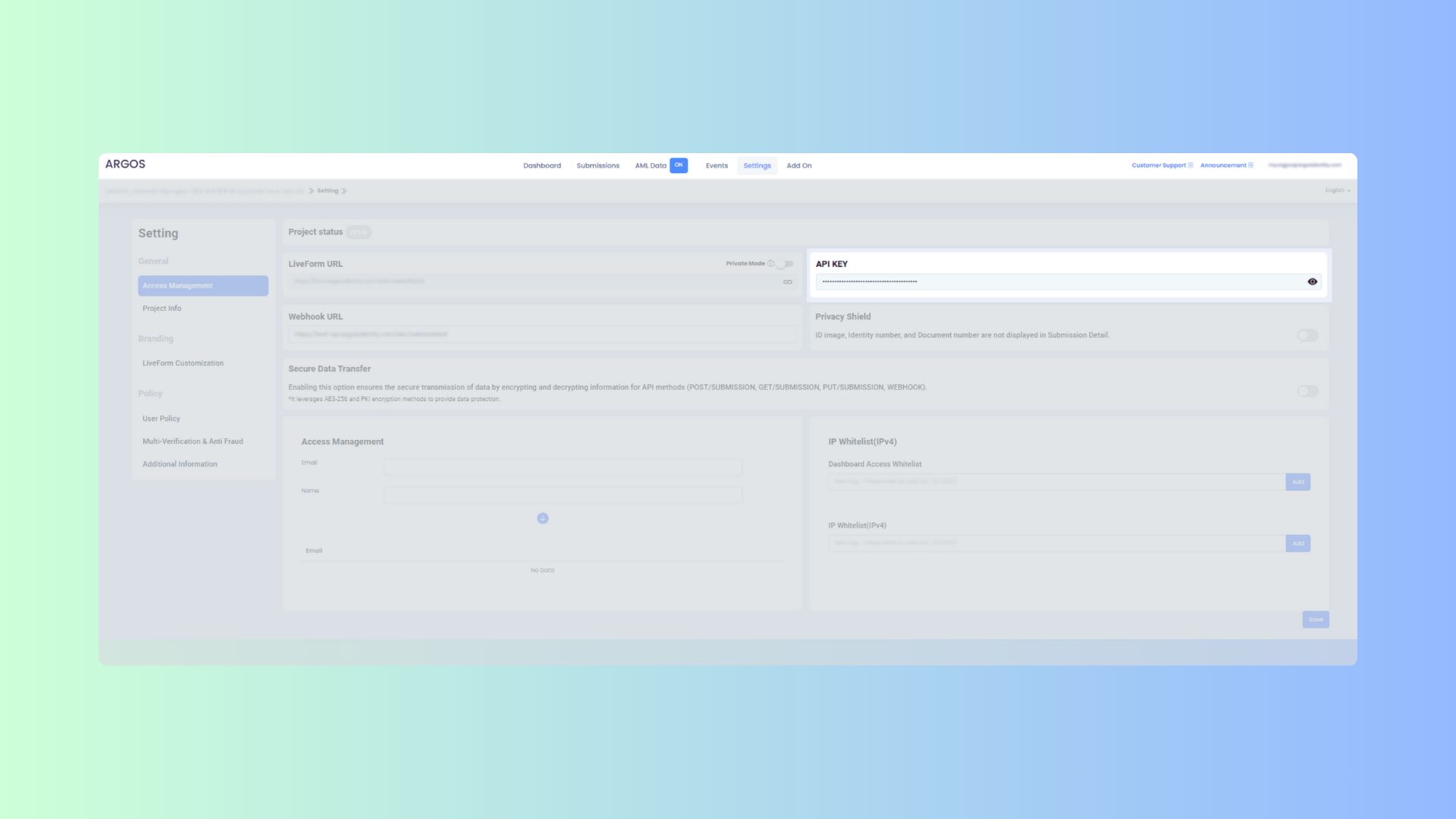 Log in to the ID Check [Dashboard](https://idcheck.argosidentity.com/).
Click on the `Settings` menu in the top navigation bar of the dashboard.
From the `General` section in the left sidebar, select `Access Management`.
Locate the `API Key` section, click the icon to copy the API key, and store it securely.
Locate the `API Key` section, click the icon to copy the API key, and store it securely.
Implement and test the API integration in your development environment.
Transition to the production environment and begin processing live data.
## HTTP Response Status Codes
HTTP response codes are used to indicate the status of a request. Each code represents the result of the request, following these rules:
* `2xx`: Successful request
* `4xx`: Client error
* `5xx`: Server error
| HTTP Status Code | Message | Description |
| :--------------: | :------------------------------------------------------------------: | :---------------------------------------------------------------------------------------------------------------------------------------------: |
| `200` | OK | The request was successfully processed. |
| `400` | Invalid Query String parameters | The request cannot be processed. Required parameters are missing or incorrectly formatted. Please check your request parameters again. |
| `403` | User is not authorized to access this resource with an explicit deny | Access denied. Access was attempted from an IP not registered in the IP whitelist. |
| `403` | Forbidden | Access denied. An incorrect API key may have been used. |
| `413` | Request Entity Too Large | The request is too large. The request contains data that exceeds the size the server can process. Please reduce the request data and try again. |
| `500` | Internal Server Error | A server error occurred. There may be an issue with the ARGOS server. In this case, please contact the ARGOS team. |
| `502` | Bad Gateway | The server received an invalid response from the upstream server. Please try again later or contact the ARGOS team. |
Simplify your KYC and AML processes, enhance regulatory compliance, and improve customer onboarding experiences using the ARGOS ID Check API.
Log in to the ID Check [Dashboard](https://idcheck.argosidentity.com/).
Click on the `Settings` menu in the top navigation bar of the dashboard.
From the `General` section in the left sidebar, select `Access Management`.
Locate the `API Key` section, click the icon to copy the API key, and store it securely.
Locate the `API Key` section, click the icon to copy the API key, and store it securely.
Implement and test the API integration in your development environment.
Transition to the production environment and begin processing live data.
## HTTP Response Status Codes
HTTP response codes are used to indicate the status of a request. Each code represents the result of the request, following these rules:
* `2xx`: Successful request
* `4xx`: Client error
* `5xx`: Server error
| HTTP Status Code | Message | Description |
| :--------------: | :------------------------------------------------------------------: | :---------------------------------------------------------------------------------------------------------------------------------------------: |
| `200` | OK | The request was successfully processed. |
| `400` | Invalid Query String parameters | The request cannot be processed. Required parameters are missing or incorrectly formatted. Please check your request parameters again. |
| `403` | User is not authorized to access this resource with an explicit deny | Access denied. Access was attempted from an IP not registered in the IP whitelist. |
| `403` | Forbidden | Access denied. An incorrect API key may have been used. |
| `413` | Request Entity Too Large | The request is too large. The request contains data that exceeds the size the server can process. Please reduce the request data and try again. |
| `500` | Internal Server Error | A server error occurred. There may be an issue with the ARGOS server. In this case, please contact the ARGOS team. |
| `502` | Bad Gateway | The server received an invalid response from the upstream server. Please try again later or contact the ARGOS team. |
Simplify your KYC and AML processes, enhance regulatory compliance, and improve customer onboarding experiences using the ARGOS ID Check API.