> ## Documentation Index
> Fetch the complete documentation index at: https://developers.argosidentity.com/llms.txt
> Use this file to discover all available pages before exploring further.
# User Submissions
> Learn how to manage submission list queries and view detailed information
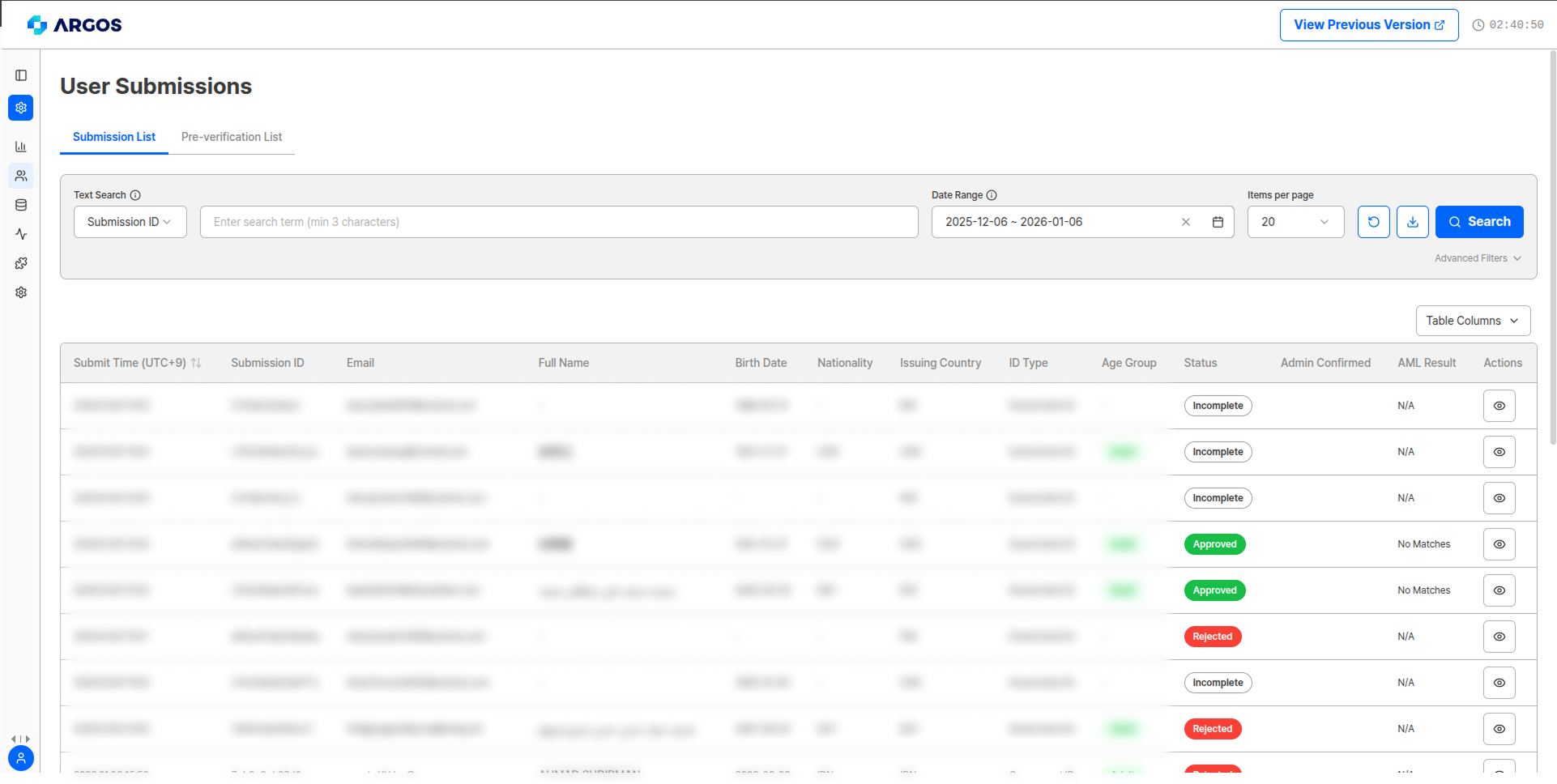
You can view and manage the individual status of all submissions received in the project. You can query all information collected from submission start to completion, and modify information directly as needed.
The scope of displayed information and modifiable items may vary depending on project-specific [user policy settings](/dashboard/en/project-management/policy-and-authentication/kyc-process).
You can view the status of all submissions that have been submitted and recorded in the project. You can query in detail by search criteria, date range, nationality, and submission status.
### Viewable Information
The following information can be viewed in the submission list:
You can select and display only the desired information through the table column button.
| Item | Description |
| --------------------- | ----------------------------------------------------- |
| Submission Time | Time when submission occurred |
| Submission Unique ID | Unique identifier for each submission |
| Email Address | Submitter's email |
| Name | Submitter's name |
| Date of Birth | Submitter's date of birth |
| Nationality | Submitter's nationality |
| Issuing Country | Based on ID issuing country |
| ID Type | ID type selected by submitter |
| Age Group | Age derived from submitter's ID |
| Status | KYC status of submission |
| Reviewer Confirmation | Whether project reviewer has confirmed the submission |
| AML Result | AML search result for each submission |
 ### Search and Advanced Filter Functions
 You can use the following functions for efficient submission management:
#### Search Items
* **Date Range Setting**: Query submissions for a specific period
* **Text Search**: Search by submission ID, user ID, name, email, etc. (minimum **2 characters**)
As of the April 2026 update, the search minimum length has been reduced from 3 to **2 characters**, so environments using 2-character `userId` values can search successfully.
#### Advanced Filter Items
* **Query by Issuing Country**: Filter submissions from specific issuing countries
* **Query by Nationality**: Filter submissions from specific countries
* **Filter by Status**: Filter by approved/rejected/pending/incomplete status
* **Query by ID Type**: Filter submissions by specific ID type
* **Filter by Data Type**: Query only relevant data using OR or AND for each data type
**Data Type Filter Parameters**
| Item | Description | Detail View Location |
| ---------------------- | ---------------------------------------------------------------- | ------------------------------------------------- |
| ID Image | ID exists in submission | Detail View > ID Information |
| Selfie Image | Selfie image exists in submission | Detail View > Selfie Information |
| User PII | User input data exists in submission | Detail View > Submission Information > Input Data |
| Address | Address exists in submission | Detail View > Address Information |
| Phone Number | Phone number collected through SMS authentication exists | Detail View > Auxiliary Fields |
| Additional Information | Information entered using additional information function exists | Detail View > Metadata |
**Submission Management Tips**
* Search submissions by userId
* Regularly review submissions in Pending status
* Analyze causes of Incomplete status submissions
* Monitor patterns by country and time period
***
## Submission Detail View
Click the **Detail View (eye icon)** button on the right of each submission to view and modify all recorded information.
Information fields collected may vary depending on authentication options set for each project.
### Top Information and Management Functions in Submission Detail View
You can use the following functions for efficient submission management:
#### Search Items
* **Date Range Setting**: Query submissions for a specific period
* **Text Search**: Search by submission ID, user ID, name, email, etc. (minimum **2 characters**)
As of the April 2026 update, the search minimum length has been reduced from 3 to **2 characters**, so environments using 2-character `userId` values can search successfully.
#### Advanced Filter Items
* **Query by Issuing Country**: Filter submissions from specific issuing countries
* **Query by Nationality**: Filter submissions from specific countries
* **Filter by Status**: Filter by approved/rejected/pending/incomplete status
* **Query by ID Type**: Filter submissions by specific ID type
* **Filter by Data Type**: Query only relevant data using OR or AND for each data type
**Data Type Filter Parameters**
| Item | Description | Detail View Location |
| ---------------------- | ---------------------------------------------------------------- | ------------------------------------------------- |
| ID Image | ID exists in submission | Detail View > ID Information |
| Selfie Image | Selfie image exists in submission | Detail View > Selfie Information |
| User PII | User input data exists in submission | Detail View > Submission Information > Input Data |
| Address | Address exists in submission | Detail View > Address Information |
| Phone Number | Phone number collected through SMS authentication exists | Detail View > Auxiliary Fields |
| Additional Information | Information entered using additional information function exists | Detail View > Metadata |
**Submission Management Tips**
* Search submissions by userId
* Regularly review submissions in Pending status
* Analyze causes of Incomplete status submissions
* Monitor patterns by country and time period
***
## Submission Detail View
Click the **Detail View (eye icon)** button on the right of each submission to view and modify all recorded information.
Information fields collected may vary depending on authentication options set for each project.
### Top Information and Management Functions in Submission Detail View
 Deletes a specific submission for the user. Detailed data is removed upon deletion and **cannot be restored**.
Sends submission data to external systems through webhook functionality.
#### Pre-verification List
In the top area of the submission detail view, you can check pre-verification results linked to the submission through the **Pre-verification List** dropdown. Clicking the dropdown displays categories (Device Verification, VPN & Proxy) and Validation IDs. Clicking an entry navigates to the corresponding detail page.
Deletes a specific submission for the user. Detailed data is removed upon deletion and **cannot be restored**.
Sends submission data to external systems through webhook functionality.
#### Pre-verification List
In the top area of the submission detail view, you can check pre-verification results linked to the submission through the **Pre-verification List** dropdown. Clicking the dropdown displays categories (Device Verification, VPN & Proxy) and Validation IDs. Clicking an entry navigates to the corresponding detail page.
 Deletion history itself can be viewed on the [Event Log page](/dashboard/en/event).
### eKYC Results
When all authentication documents and selfie have been authenticated normally
When user policy criteria are not met or forgery/alteration is detected
A brief rejection reason is displayed on the detail page when rejected.
When direct administrator review is required by the system
When submitter abandoned the process during the liveform stage
Frequent abandonment may lead to rejection.
### AML Results
| Result | Description |
| ------------------ | ------------------------------------------------------------------------------ |
| **Not Applicable** | No available AML results (mainly seen when liveform is abandoned mid-process) |
| **No Match** | No monitoring target person information based on submitted materials |
| **Red Flag** | Risk/concern person information exists based on name/nationality/date of birth |
**AML Screening Result Codes**: For detailed information about AML result codes, risk levels, and icons, refer to the [AML Database Sources and Codes](/dashboard/en/aml-source) documentation.
### Other Information Fields
Classified as adult/adolescent/early teens/minor. Not displayed in incomplete status.
Reliability score of the authentication result calculated by analyzing the user's submission information.
Displays other submissions within the same project that match the submitter's information.
Displays other submissions within the same project that match the submitter's face information.
View Proxy & VPN detection and [Device Verification](/dashboard/en/preverification/device-verification) results on the [Pre-verification List](/dashboard/en/preverification/vpn-proxy) page.
### User Information
You can view information at the time the submitter executed the submission:
Deletion history itself can be viewed on the [Event Log page](/dashboard/en/event).
### eKYC Results
When all authentication documents and selfie have been authenticated normally
When user policy criteria are not met or forgery/alteration is detected
A brief rejection reason is displayed on the detail page when rejected.
When direct administrator review is required by the system
When submitter abandoned the process during the liveform stage
Frequent abandonment may lead to rejection.
### AML Results
| Result | Description |
| ------------------ | ------------------------------------------------------------------------------ |
| **Not Applicable** | No available AML results (mainly seen when liveform is abandoned mid-process) |
| **No Match** | No monitoring target person information based on submitted materials |
| **Red Flag** | Risk/concern person information exists based on name/nationality/date of birth |
**AML Screening Result Codes**: For detailed information about AML result codes, risk levels, and icons, refer to the [AML Database Sources and Codes](/dashboard/en/aml-source) documentation.
### Other Information Fields
Classified as adult/adolescent/early teens/minor. Not displayed in incomplete status.
Reliability score of the authentication result calculated by analyzing the user's submission information.
Displays other submissions within the same project that match the submitter's information.
Displays other submissions within the same project that match the submitter's face information.
View Proxy & VPN detection and [Device Verification](/dashboard/en/preverification/device-verification) results on the [Pre-verification List](/dashboard/en/preverification/vpn-proxy) page.
### User Information
You can view information at the time the submitter executed the submission:
 | Field | Description |
| -------------------------- | ----------------------------------------------------------------------- |
| Submission Time (UTC+9) | Submission occurrence time based on Korean server time |
| Submission ID | Unique ID for each submission |
| Service Type | Submission form |
| Email | Email address mapped to the submission |
| IP Address | IP connected at time of submission |
| DI (Duplicate Information) | Unique encrypted value generated when identity verification is approved |
**DI Value Generation Conditions**
DI value is generated only when name, date of birth, gender, nationality, etc. are all provided. If a submitter's identity has been verified through ARGOS Identity service, the existing DI value is maintained even when authenticated in a different project.
**English Name (`fullNameEn`) — 2026-04**
After KYC approval, you can view the submitter's English Full Name (`fullNameEn`) in the submission details, and administrators can also edit it. The name is processed through transliteration and not translation (e.g., `KIM SAN` instead of `Kim Mountain`). First Name / Last Name translations are not provided, and this field is not exposed during the Liveform stage.
### Metadata
| Field | Description |
| -------------------------- | ----------------------------------------------------------------------- |
| Submission Time (UTC+9) | Submission occurrence time based on Korean server time |
| Submission ID | Unique ID for each submission |
| Service Type | Submission form |
| Email | Email address mapped to the submission |
| IP Address | IP connected at time of submission |
| DI (Duplicate Information) | Unique encrypted value generated when identity verification is approved |
**DI Value Generation Conditions**
DI value is generated only when name, date of birth, gender, nationality, etc. are all provided. If a submitter's identity has been verified through ARGOS Identity service, the existing DI value is maintained even when authenticated in a different project.
**English Name (`fullNameEn`) — 2026-04**
After KYC approval, you can view the submitter's English Full Name (`fullNameEn`) in the submission details, and administrators can also edit it. The name is processed through transliteration and not translation (e.g., `KIM SAN` instead of `Kim Mountain`). First Name / Last Name translations are not provided, and this field is not exposed during the Liveform stage.
### Metadata
 | Field | Description |
| --------------------- | ------------------------------------------------- |
| User ID | User unique ID |
| Custom Field #1 \~ #3 | Values entered when additional input is requested |
Metadata can be modified, and when modified, **Updated webhook** automatically synchronizes data to external systems.
### Memo Function
| Field | Description |
| --------------------- | ------------------------------------------------- |
| User ID | User unique ID |
| Custom Field #1 \~ #3 | Values entered when additional input is requested |
Metadata can be modified, and when modified, **Updated webhook** automatically synchronizes data to external systems.
### Memo Function
 You can write memos for each submission, which can be used for communication between administrators and record management.
### ID Information
You can write memos for each submission, which can be used for communication between administrators and record management.
### ID Information
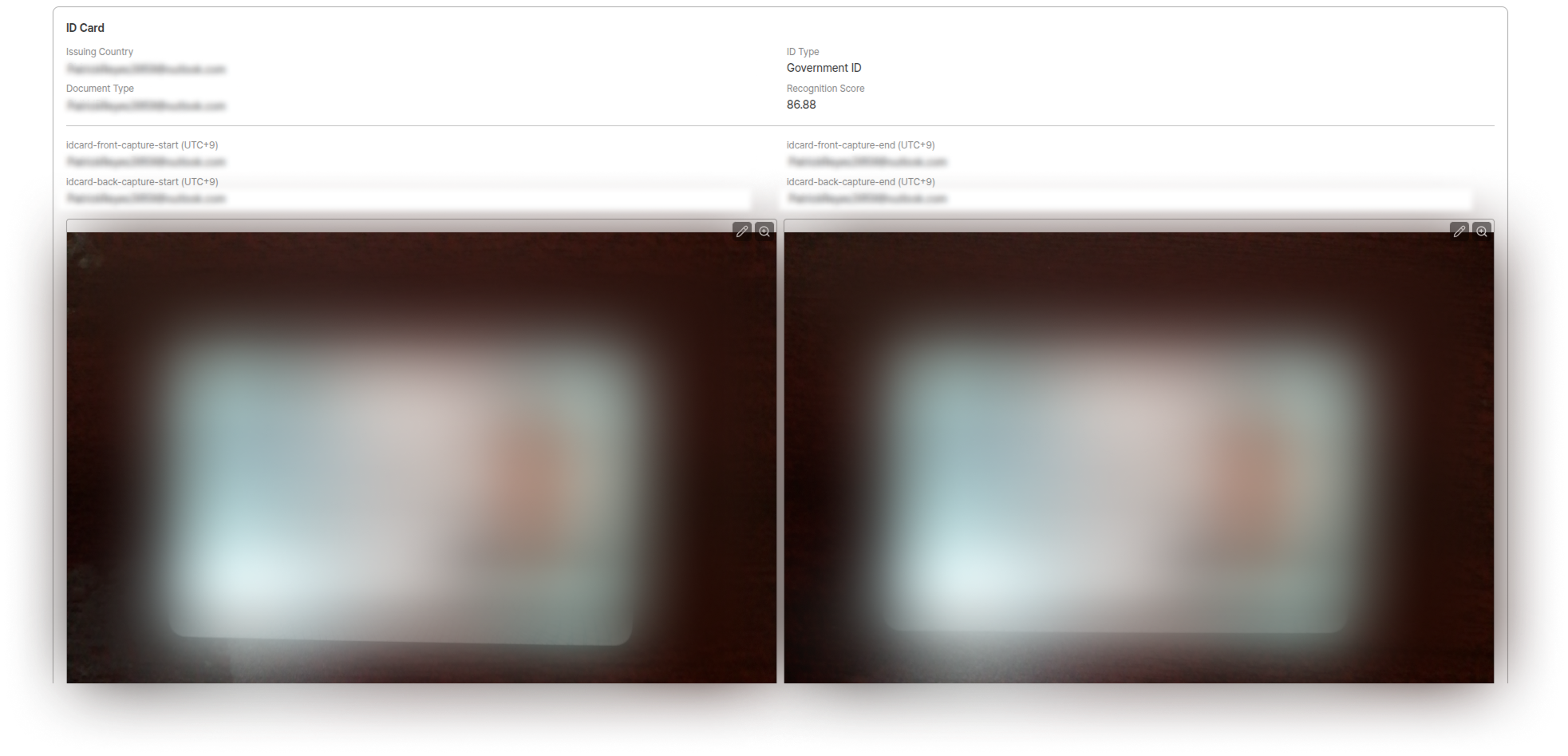 | Field | Description |
| ----------------- | ------------------------------------------------------------- |
| Issuing Country | Issuing country of submitted ID (may differ from nationality) |
| ID Type | Type of ID selected by submitter |
| Document Type | Issuing country & ID type |
| Recognition Score | Recognition score collected through ID photo |
**Image Editing Functions:**
* 🔍 **Zoom**: Zoom in/out
* 🔄 **Edit**: Rotate, flip left/right, reset to original
* ✂️ **Image Crop**: Auto-enlarge ID center
* 🖌️ **Masking**: Direct masking when needed
### Submission Information
| Field | Description |
| ----------------- | ------------------------------------------------------------- |
| Issuing Country | Issuing country of submitted ID (may differ from nationality) |
| ID Type | Type of ID selected by submitter |
| Document Type | Issuing country & ID type |
| Recognition Score | Recognition score collected through ID photo |
**Image Editing Functions:**
* 🔍 **Zoom**: Zoom in/out
* 🔄 **Edit**: Rotate, flip left/right, reset to original
* ✂️ **Image Crop**: Auto-enlarge ID center
* 🖌️ **Masking**: Direct masking when needed
### Submission Information
 | Data Type | Description |
| ------------------ | ----------------------------------------------------------------------------------------- |
| **OCR Extraction** | Raw data displayed on the ID document extracted by OCR & its recognition confidence |
| **OCR Data** | Information converted by standardizing the extracted results & its recognition confidence |
| **Input Data** | Claimed identity information for final verification |
| **Final Data** | Final identity information after authentication is completed & its recognition confidence |
OCR recognition confidence per field is displayed as a percentage (%) in the **OCR Extraction**, **OCR Data**, and **Final Data** sections. For field definitions and possible values, see the **Signals Object and Confidence** section in [GET/Submission Response Fields](/en/idcheck/api-reference/api-reference-guide/get-submission-response-fields).
### Selfie Information
| Data Type | Description |
| ------------------ | ----------------------------------------------------------------------------------------- |
| **OCR Extraction** | Raw data displayed on the ID document extracted by OCR & its recognition confidence |
| **OCR Data** | Information converted by standardizing the extracted results & its recognition confidence |
| **Input Data** | Claimed identity information for final verification |
| **Final Data** | Final identity information after authentication is completed & its recognition confidence |
OCR recognition confidence per field is displayed as a percentage (%) in the **OCR Extraction**, **OCR Data**, and **Final Data** sections. For field definitions and possible values, see the **Signals Object and Confidence** section in [GET/Submission Response Fields](/en/idcheck/api-reference/api-reference-guide/get-submission-response-fields).
### Selfie Information
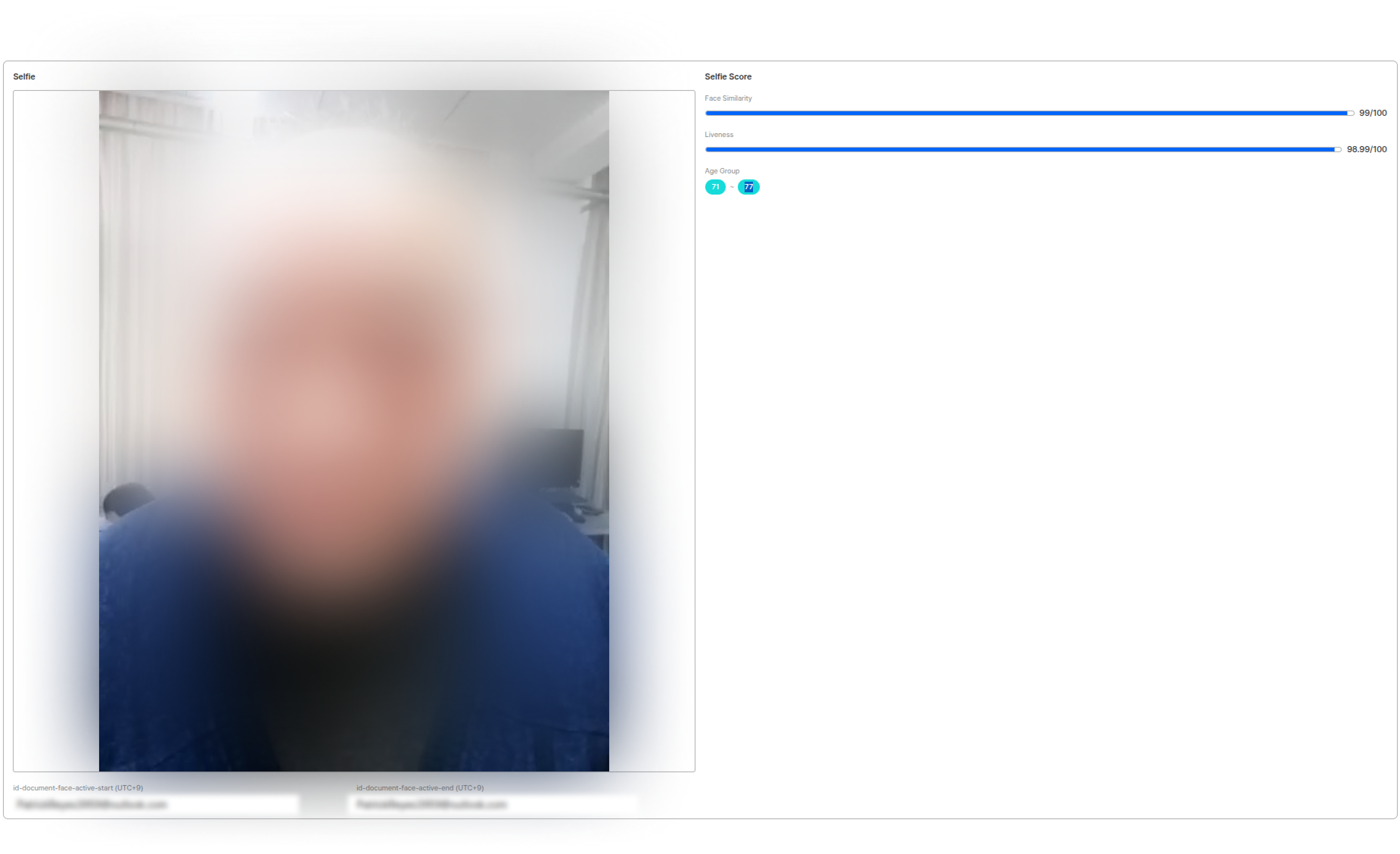 Compares the person's photo on the ID with the actual submitter's photo.
| Score Type | Description |
| ------------------- | ----------------------------------------------------- |
| **Face Similarity** | Passes when above the set threshold out of 100 points |
| **Liveness** | Passes when above the set threshold out of 100 points |
### Address Information
Displays Geo-Location information based on IP address at time of submission.
Address information is only displayed when related functions are activated.
***
## User Data Download
Compares the person's photo on the ID with the actual submitter's photo.
| Score Type | Description |
| ------------------- | ----------------------------------------------------- |
| **Face Similarity** | Passes when above the set threshold out of 100 points |
| **Liveness** | Passes when above the set threshold out of 100 points |
### Address Information
Displays Geo-Location information based on IP address at time of submission.
Address information is only displayed when related functions are activated.
***
## User Data Download
 **Download Limitations**
* Downloads within the dashboard are limited to **maximum 10,000 items based on most recent date**
* Email and name are masked as `***` according to ARGOS default policy
* Masking is applied regardless of setting options
For more data and all information, we recommend [calling via API](/en/idcheck/api-reference/api-reference-guide/get-submissions).
### API Call Limits
| Limit Type | Quota | Description |
| --------------------------------- | ---------------- | -------------------------------------------- |
| Maximum Requests Per Second (QPS) | 5,000 requests | Maximum API requests processable in 1 second |
| Maximum Requests Per Day (QPD) | 100,000 requests | Total API requests allowed in 24 hours |
***
## Related Documentation
View overall service usage status.
View VPN & Proxy and Device Verification pre-verification results.
Track event history for each submission.
Learn how to configure Proxy & VPN detection and Device Verification settings.
**Download Limitations**
* Downloads within the dashboard are limited to **maximum 10,000 items based on most recent date**
* Email and name are masked as `***` according to ARGOS default policy
* Masking is applied regardless of setting options
For more data and all information, we recommend [calling via API](/en/idcheck/api-reference/api-reference-guide/get-submissions).
### API Call Limits
| Limit Type | Quota | Description |
| --------------------------------- | ---------------- | -------------------------------------------- |
| Maximum Requests Per Second (QPS) | 5,000 requests | Maximum API requests processable in 1 second |
| Maximum Requests Per Day (QPD) | 100,000 requests | Total API requests allowed in 24 hours |
***
## Related Documentation
View overall service usage status.
View VPN & Proxy and Device Verification pre-verification results.
Track event history for each submission.
Learn how to configure Proxy & VPN detection and Device Verification settings.