> ## Documentation Index
> Fetch the complete documentation index at: https://developers.argosidentity.com/llms.txt
> Use this file to discover all available pages before exploring further.
# Integration Information
> Learn how to configure system integration settings including API keys, webhook settings, return URLs, skip result page, and dynamic fields.
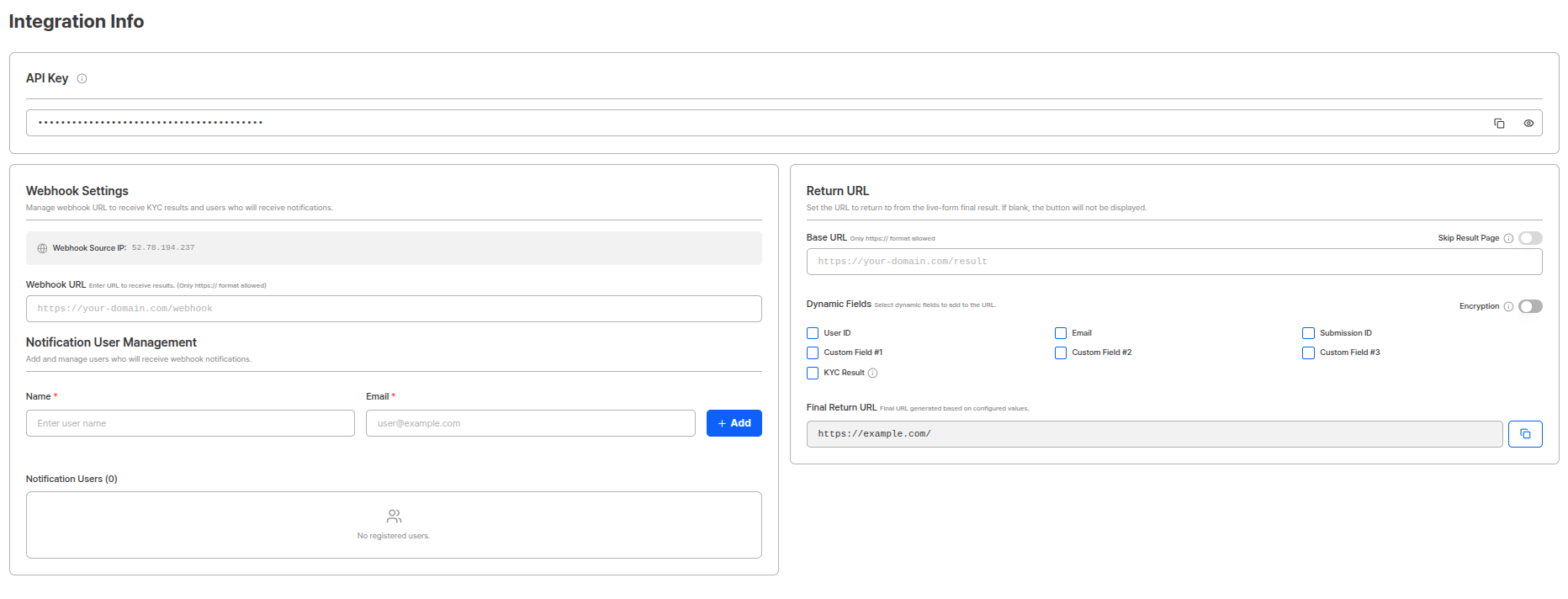
Integration information settings support real-time data integration with customer systems. You can build smooth integration with business systems through API key management, webhook settings, return URL configuration, dynamic field settings, etc.
 ***
## API Key
You can view and manage the API key for the project.
***
## API Key
You can view and manage the API key for the project.
 API key is a unique key used for authentication when calling ARGOS ID Check API. It must be included in the `x-api-key` header for all API requests.
**API Key Security**
Be careful not to expose API keys externally. If an API key is leaked, all project data can be accessed, so it must be managed securely.
**API Key Usage**
You can use various API functions such as submission queries, approval/rejection processing, token management, etc. using the API key.
***
## Webhook Settings
The Webhook function supports real-time data integration with customer systems. When specific events occur, it sends HTTP POST requests to the endpoint (Endpoint URL) set by the customer, enabling real-time notifications and data processing without separate API calls.
API key is a unique key used for authentication when calling ARGOS ID Check API. It must be included in the `x-api-key` header for all API requests.
**API Key Security**
Be careful not to expose API keys externally. If an API key is leaked, all project data can be accessed, so it must be managed securely.
**API Key Usage**
You can use various API functions such as submission queries, approval/rejection processing, token management, etc. using the API key.
***
## Webhook Settings
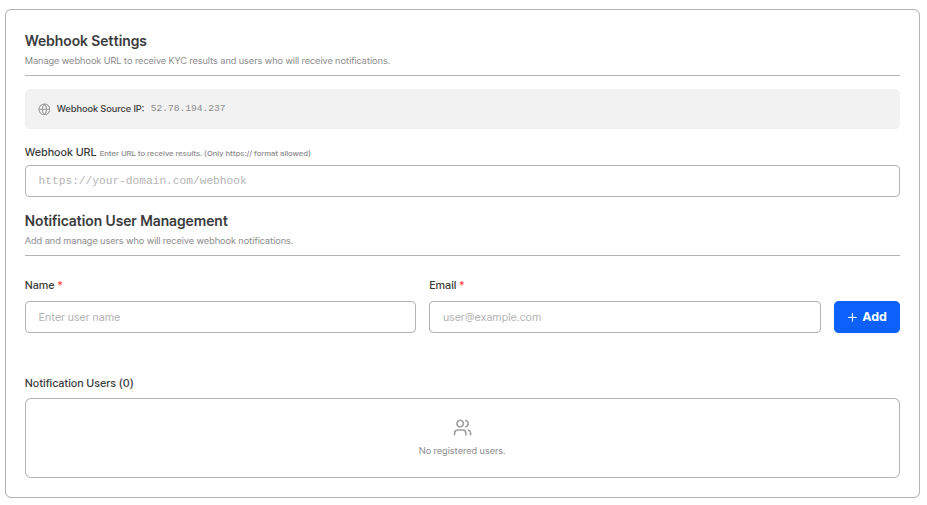
The Webhook function supports real-time data integration with customer systems. When specific events occur, it sends HTTP POST requests to the endpoint (Endpoint URL) set by the customer, enabling real-time notifications and data processing without separate API calls.
 ### Webhook URL Settings
Set the endpoint URL where the customer system will receive webhook data.
HTTP POST requests are sent to the set URL when webhook events occur.
**Webhook Security and Stability**
Webhook endpoints must use HTTPS to ensure secure data transmission. It is also recommended to implement signature verification mechanisms to verify the authenticity of webhook requests.
**Firewall Configuration Required**
The IP address used by ARGOS when sending webhooks is **52.78.194.237**. To receive webhooks normally, you must configure the firewall to allow requests from this IP address.
**Firewall Configuration Method**
Add the following IP address to the allow list in your customer's firewall or security group settings:
* **Webhook IP**: `52.78.194.237`
If HTTP POST requests from this IP address are not allowed, webhooks will be blocked and cannot be received.
**Webhook IP and URL Management**
Fixed webhook IPs for each project can only be viewed on this page, and webhook URL change history is not stored, so please be mindful of webhook URL management.
### Notification User Management
By adding names and emails through notification user management, you can receive information about webhooks sent yesterday via email the next morning.
**Configuration Method:**
1. Enter name and email address.
2. Click the add button to register notification users.
3. Registered users receive webhook information sent the previous day via email every morning.
**Daily Webhook Report**
A summary of all webhook events sent the previous day (00:00 \~ 23:59 UTC) is sent via email to registered notification users every morning. This allows you to monitor webhook transmission status.
***
## Return URL
Users are redirected to the set URL when KYC is completed or **when they are taken to an error page**.
### Webhook URL Settings
Set the endpoint URL where the customer system will receive webhook data.
HTTP POST requests are sent to the set URL when webhook events occur.
**Webhook Security and Stability**
Webhook endpoints must use HTTPS to ensure secure data transmission. It is also recommended to implement signature verification mechanisms to verify the authenticity of webhook requests.
**Firewall Configuration Required**
The IP address used by ARGOS when sending webhooks is **52.78.194.237**. To receive webhooks normally, you must configure the firewall to allow requests from this IP address.
**Firewall Configuration Method**
Add the following IP address to the allow list in your customer's firewall or security group settings:
* **Webhook IP**: `52.78.194.237`
If HTTP POST requests from this IP address are not allowed, webhooks will be blocked and cannot be received.
**Webhook IP and URL Management**
Fixed webhook IPs for each project can only be viewed on this page, and webhook URL change history is not stored, so please be mindful of webhook URL management.
### Notification User Management
By adding names and emails through notification user management, you can receive information about webhooks sent yesterday via email the next morning.
**Configuration Method:**
1. Enter name and email address.
2. Click the add button to register notification users.
3. Registered users receive webhook information sent the previous day via email every morning.
**Daily Webhook Report**
A summary of all webhook events sent the previous day (00:00 \~ 23:59 UTC) is sent via email to registered notification users every morning. This allows you to monitor webhook transmission status.
***
## Return URL
Users are redirected to the set URL when KYC is completed or **when they are taken to an error page**.
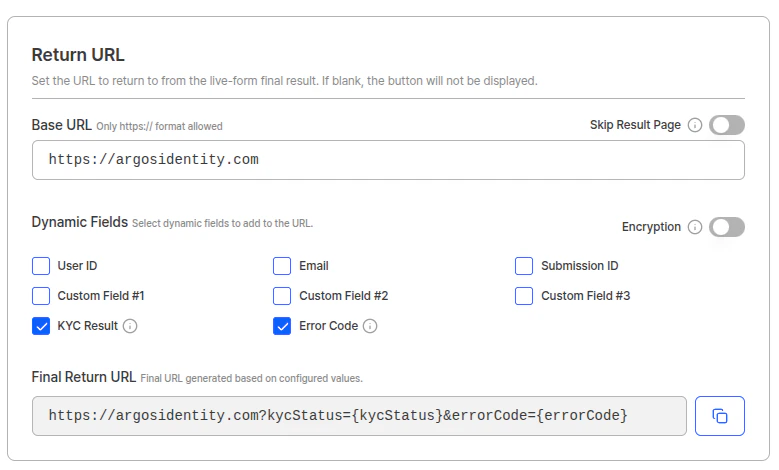 When the KYC process is completed and the submitter selects the "Ok" button or waits for 5 seconds, they are redirected to the return URL with the parameters selected in dynamic fields. Starting with the 2026-04 update, the return URL can also be reached **after landing on an error page**, and in that case the `errorCode` parameter is included so that your service can identify the reason for the block.
**Return URL Example (normal completion):**
```
https://yourapp.com/verification-complete?userid=user123&email=user@example.com&kycStatus=approved&submissionId=sub_abc123&cf1=campaign_summer
```
**Return URL Example (error page → return URL):**
```
https://yourapp.com/verification-complete?kycStatus=rejected&errorCode=DE-20000
```
### Return URL Encryption
When the return URL encryption function is activated, return URL parameters are encrypted and delivered.
When the KYC process is completed and the submitter selects the "Ok" button or waits for 5 seconds, they are redirected to the return URL with the parameters selected in dynamic fields. Starting with the 2026-04 update, the return URL can also be reached **after landing on an error page**, and in that case the `errorCode` parameter is included so that your service can identify the reason for the block.
**Return URL Example (normal completion):**
```
https://yourapp.com/verification-complete?userid=user123&email=user@example.com&kycStatus=approved&submissionId=sub_abc123&cf1=campaign_summer
```
**Return URL Example (error page → return URL):**
```
https://yourapp.com/verification-complete?kycStatus=rejected&errorCode=DE-20000
```
### Return URL Encryption
When the return URL encryption function is activated, return URL parameters are encrypted and delivered.
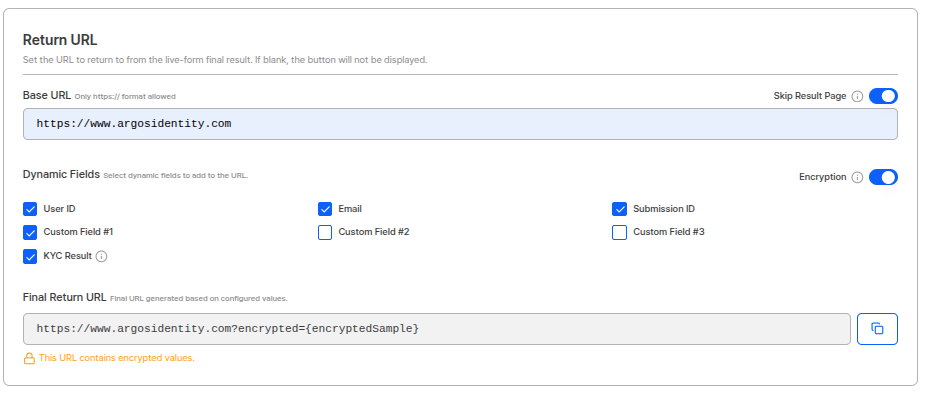 When return URL encryption is activated, parameters selected in dynamic fields are encrypted and included in the `encrypted` parameter.
**Encrypted Return URL Example:**
```
https://yourapp.com/verification-complete?encrypted={encrypted_data}
```
**Return URL Encryption Usage**
When using return URLs containing sensitive information (email, user ID, etc.), you can strengthen security by activating the encryption function. AES-256-ECB method is used for decryption.
Learn how to decrypt return URL encryption data.
**Return URL Usage**
After KYC completion, users can be automatically redirected to the customer's service page, providing customized guidance pages according to approval/rejection status.
***
## Skip Result Page
You can skip users viewing KYC results and redirect to your desired URL.
When the skip result page function is activated, it skips the KYC result page and moves directly to the return URL.
**Usage Scenarios:**
* When customers want to provide their own result page
* When you want to flexibly provide results through dynamic field parameters in the return URL
**Skip Result Page and Dynamic Fields Combination**
When you activate the skip result page function and select parameters such as `kycStatus`, `submissionId` in dynamic fields, KYC result information is included in the return URL. This allows customers to configure their own result pages.
***
## Dynamic Fields
Click the checkboxes in dynamic fields to select which items to pass as return URL query parameters. The selected values are automatically reflected in the **Final Return URL** preview at the bottom of the screen.
| Field | Parameter key | Description |
| ------------------------------------------------------------------------------------------------------------------------------------------------------------------------------------------------ | ------------------- | ------------------------------------------------------------------------------------ |
| **User ID** | `userid` | User ID |
| **Email** | `email` | User email address |
| **Submission ID** | `submissionId` | Submission ID |
| **Custom Field #1·#2·#3** | `cf1`, `cf2`, `cf3` | User-defined fields |
| **KYC Status** | `kycStatus` | KYC result status (`approved`, `pending`, `rejected`) |
| **Error Code** 2026-04 New | `errorCode` | Error code passed when the user reaches an error page (e.g., `DE-20000`, `TK-10001`) |
**Final Return URL preview:**
```
https://argosidentity.com?kycStatus={kycStatus}&errorCode={errorCode}
```
**Using the Error Code (`errorCode`) parameter**
When you check **Error Code** in dynamic fields, users who land on an error page can return to your service via the return URL button, with the `errorCode` value included in the query string. This lets your service identify the reason for the block (e.g., Device Verification failure, token expiry). For the full error code mapping, see the [Error Codes and Pages](/en/idcheck/reference_tables/Error-codes-and-pages) reference.
**Dynamic Fields Precautions**
The `kycStatus` and `errorCode` parameters follow camelCase, so case must be accurately distinguished. `kycStatus` returns one of `approved`, `pending`, or `rejected` depending on the result.
***
## Webhook Event Types
The main event types sent via webhook are as follows:
| Event | Description |
| --------------- | --------------------------------------------------- |
| **approved** | Occurs when KYC authentication is approved |
| **rejected** | Occurs when KYC authentication is rejected |
| **pending** | Occurs when status changes to require manual review |
| **retry** | Occurs when retry happens |
| **updated** | Occurs when submission information is updated |
| **delete** | Occurs when submission is deleted |
| **submit** | Occurs when new submission is completed |
| **token** | When token-related events occur |
| **injection** | When data injection occurs |
| **aml** | When AML check results occur |
| **aml-ongoing** | When AML ongoing monitoring results occur |
***
## Use Cases
When a financial institution's new customer's KYC authentication is completed, they can receive immediate notifications via webhook and automatically proceed with follow-up processes such as account opening, card issuance, and service activation. Using return URLs and dynamic fields, customized guidance pages can be provided to customers according to approval/rejection status.
When KYC submissions are rejected or specific risk factors are detected, immediate notifications can be sent to the operations team via webhook for rapid response. You can check the previous day's webhook transmission status every morning through the notification user management function.
Customers can configure their own result pages using the skip result page function and dynamic fields. Since KYC result information is included in the return URL, results can be processed immediately without separate API calls.
***
## Related Documentation
View project basic information settings.
View complete overview of webhook events.
Learn how to use return URLs in detail.
View approved webhook payload.
View rejected webhook payload.
Learn how to use APIs.
When return URL encryption is activated, parameters selected in dynamic fields are encrypted and included in the `encrypted` parameter.
**Encrypted Return URL Example:**
```
https://yourapp.com/verification-complete?encrypted={encrypted_data}
```
**Return URL Encryption Usage**
When using return URLs containing sensitive information (email, user ID, etc.), you can strengthen security by activating the encryption function. AES-256-ECB method is used for decryption.
Learn how to decrypt return URL encryption data.
**Return URL Usage**
After KYC completion, users can be automatically redirected to the customer's service page, providing customized guidance pages according to approval/rejection status.
***
## Skip Result Page
You can skip users viewing KYC results and redirect to your desired URL.
When the skip result page function is activated, it skips the KYC result page and moves directly to the return URL.
**Usage Scenarios:**
* When customers want to provide their own result page
* When you want to flexibly provide results through dynamic field parameters in the return URL
**Skip Result Page and Dynamic Fields Combination**
When you activate the skip result page function and select parameters such as `kycStatus`, `submissionId` in dynamic fields, KYC result information is included in the return URL. This allows customers to configure their own result pages.
***
## Dynamic Fields
Click the checkboxes in dynamic fields to select which items to pass as return URL query parameters. The selected values are automatically reflected in the **Final Return URL** preview at the bottom of the screen.
| Field | Parameter key | Description |
| ------------------------------------------------------------------------------------------------------------------------------------------------------------------------------------------------ | ------------------- | ------------------------------------------------------------------------------------ |
| **User ID** | `userid` | User ID |
| **Email** | `email` | User email address |
| **Submission ID** | `submissionId` | Submission ID |
| **Custom Field #1·#2·#3** | `cf1`, `cf2`, `cf3` | User-defined fields |
| **KYC Status** | `kycStatus` | KYC result status (`approved`, `pending`, `rejected`) |
| **Error Code** 2026-04 New | `errorCode` | Error code passed when the user reaches an error page (e.g., `DE-20000`, `TK-10001`) |
**Final Return URL preview:**
```
https://argosidentity.com?kycStatus={kycStatus}&errorCode={errorCode}
```
**Using the Error Code (`errorCode`) parameter**
When you check **Error Code** in dynamic fields, users who land on an error page can return to your service via the return URL button, with the `errorCode` value included in the query string. This lets your service identify the reason for the block (e.g., Device Verification failure, token expiry). For the full error code mapping, see the [Error Codes and Pages](/en/idcheck/reference_tables/Error-codes-and-pages) reference.
**Dynamic Fields Precautions**
The `kycStatus` and `errorCode` parameters follow camelCase, so case must be accurately distinguished. `kycStatus` returns one of `approved`, `pending`, or `rejected` depending on the result.
***
## Webhook Event Types
The main event types sent via webhook are as follows:
| Event | Description |
| --------------- | --------------------------------------------------- |
| **approved** | Occurs when KYC authentication is approved |
| **rejected** | Occurs when KYC authentication is rejected |
| **pending** | Occurs when status changes to require manual review |
| **retry** | Occurs when retry happens |
| **updated** | Occurs when submission information is updated |
| **delete** | Occurs when submission is deleted |
| **submit** | Occurs when new submission is completed |
| **token** | When token-related events occur |
| **injection** | When data injection occurs |
| **aml** | When AML check results occur |
| **aml-ongoing** | When AML ongoing monitoring results occur |
***
## Use Cases
When a financial institution's new customer's KYC authentication is completed, they can receive immediate notifications via webhook and automatically proceed with follow-up processes such as account opening, card issuance, and service activation. Using return URLs and dynamic fields, customized guidance pages can be provided to customers according to approval/rejection status.
When KYC submissions are rejected or specific risk factors are detected, immediate notifications can be sent to the operations team via webhook for rapid response. You can check the previous day's webhook transmission status every morning through the notification user management function.
Customers can configure their own result pages using the skip result page function and dynamic fields. Since KYC result information is included in the return URL, results can be processed immediately without separate API calls.
***
## Related Documentation
View project basic information settings.
View complete overview of webhook events.
Learn how to use return URLs in detail.
View approved webhook payload.
View rejected webhook payload.
Learn how to use APIs.