> ## Documentation Index
> Fetch the complete documentation index at: https://developers.argosidentity.com/llms.txt
> Use this file to discover all available pages before exploring further.
# Notices and Additional Information
> Learn how to configure legal notices (terms of service, privacy policy URLs) and custom information to request from users in liveform.
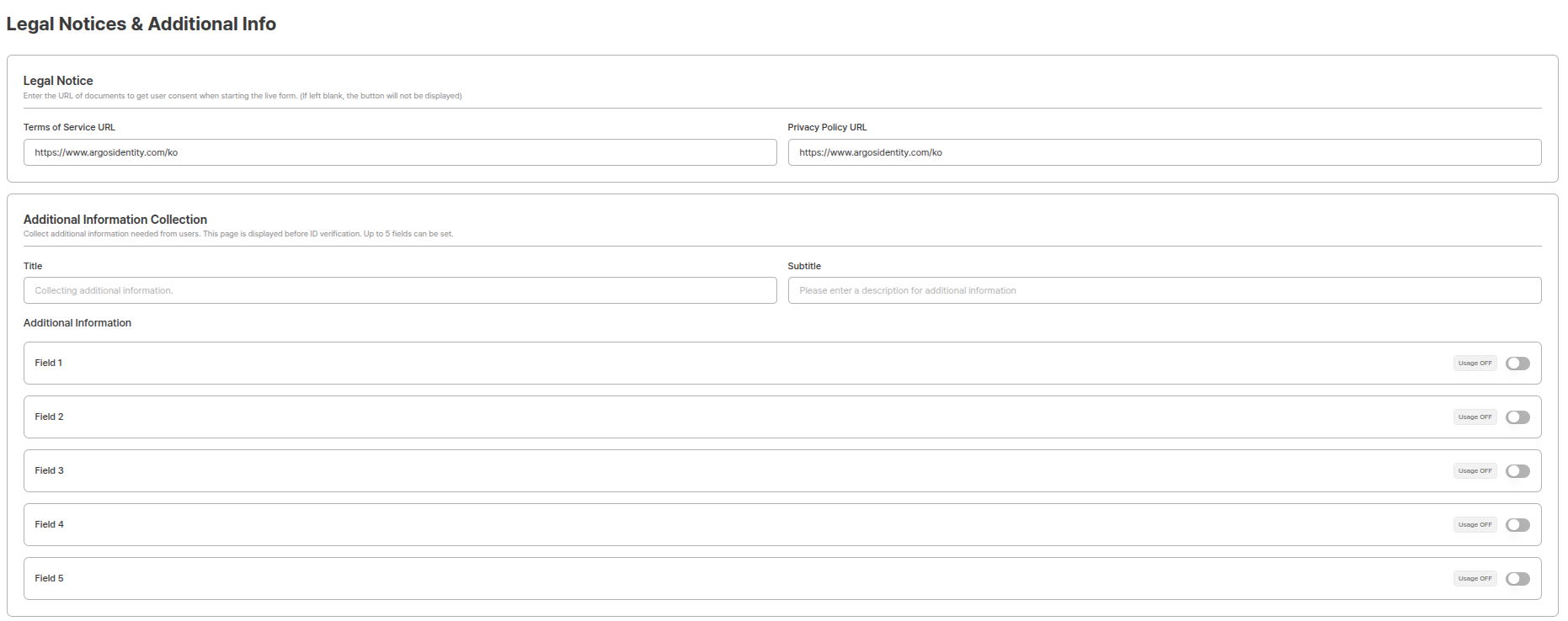
Notices and additional information settings is a function for configuring legal notices to display to users in liveform and custom information to collect additionally. You can set terms of service and privacy policy URLs, and efficiently collect necessary information for EDD (Enhanced Due Diligence).
 ***
## Notices
You can configure legal notices to display to users in liveform.
***
## Notices
You can configure legal notices to display to users in liveform.
 ### Terms of Service URL
Set the URL of the terms of service page that users can view in liveform.
**Configuration Method:**
1. Enter the full URL of the terms of service page in the terms of service URL input field.
2. Click the save button to apply settings.
**URL Example:**
```
https://yourapp.com/terms-of-service
```
**Terms of Service Display**
The set terms of service URL is displayed so users can view it in liveform. Users can click the link to view the terms of service.
### Privacy Policy URL
Set the URL of the privacy policy page that users can view in liveform.
**Configuration Method:**
1. Enter the full URL of the privacy policy page in the privacy policy URL input field.
2. Click the save button to apply settings.
**URL Example:**
```
https://yourapp.com/privacy-policy
```
**Legal Notice Obligations**
According to privacy protection laws and related regulations, when collecting personal information, privacy policy must be notified. Accurately set terms of service and privacy policy URLs to comply with legal obligations.
**Privacy Policy Display**
The set privacy policy URL is displayed so users can view it in liveform. Users can click the link to view the privacy policy.
### Terms of Service URL
Set the URL of the terms of service page that users can view in liveform.
**Configuration Method:**
1. Enter the full URL of the terms of service page in the terms of service URL input field.
2. Click the save button to apply settings.
**URL Example:**
```
https://yourapp.com/terms-of-service
```
**Terms of Service Display**
The set terms of service URL is displayed so users can view it in liveform. Users can click the link to view the terms of service.
### Privacy Policy URL
Set the URL of the privacy policy page that users can view in liveform.
**Configuration Method:**
1. Enter the full URL of the privacy policy page in the privacy policy URL input field.
2. Click the save button to apply settings.
**URL Example:**
```
https://yourapp.com/privacy-policy
```
**Legal Notice Obligations**
According to privacy protection laws and related regulations, when collecting personal information, privacy policy must be notified. Accurately set terms of service and privacy policy URLs to comply with legal obligations.
**Privacy Policy Display**
The set privacy policy URL is displayed so users can view it in liveform. Users can click the link to view the privacy policy.
#### Notices in Liveform

 ***
## Additional Information Collection
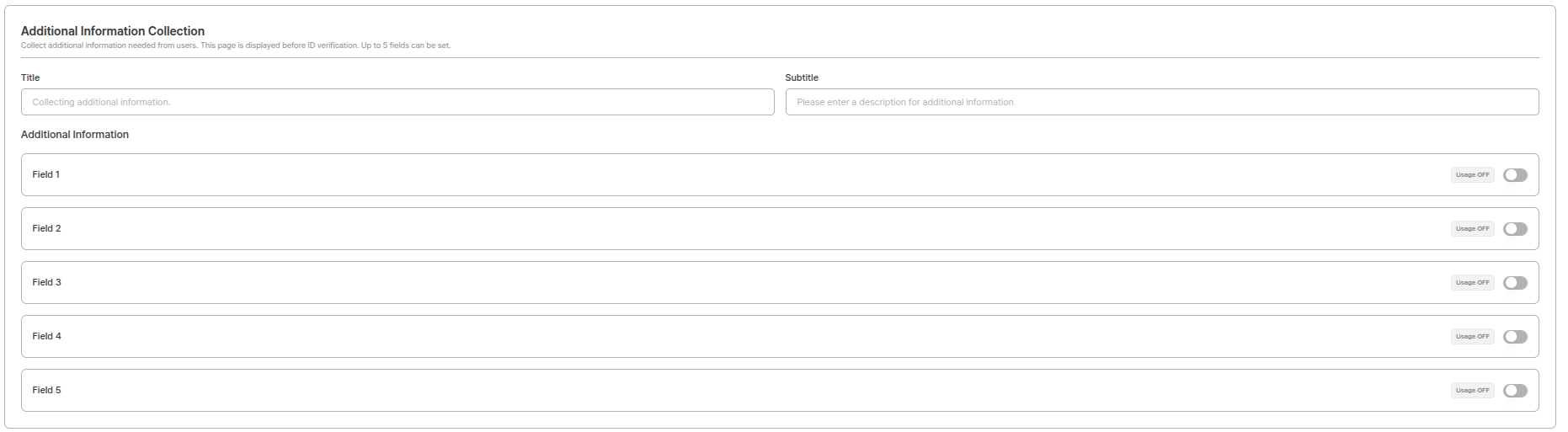
You can configure custom information to request from users during the liveform process. This function allows you to efficiently collect necessary information for EDD (Enhanced Due Diligence) and build a more sophisticated identity verification process.
***
## Additional Information Collection
You can configure custom information to request from users during the liveform process. This function allows you to efficiently collect necessary information for EDD (Enhanced Due Diligence) and build a more sophisticated identity verification process.
 **Privacy Protection**
When collecting additional information, privacy protection laws and related regulations must be complied with. It is important to clearly notify the purpose of collected information and collect **only the minimum necessary information**.
### Additional Information Item Settings
You can customize additional information to collect in liveform.
**Setting Limitations**
Up to **5 items** can be added, and each item requires a label.
### Supported Input Types
| Type | Description |
| ---------------- | ----------------------------------------------------------------------------------------------------------------------- |
| **Phone Number** | Collects phone numbers in accurate format linked with country selection. |
| **Text** | Suitable for freely collecting all types of character information. |
| **Dropdown** | Adds pre-defined options to dropdown menu to provide choices to users. |
| **Date** | Date information can be selected in calendar format. |
| **File Upload** | PDF documents can be uploaded. (Maximum 1MB, PDF files only) |
| **Checkbox** | Used to replace existing privacy policy or terms of service display, or when 3 or more consent procedures are required. |
### Title Settings
You can directly define the topic of information to collect, and the actual entered content is displayed on that information collection screen.
After completing the detailed settings above, click **Save**.
***
### Additional Information Collection in Liveform
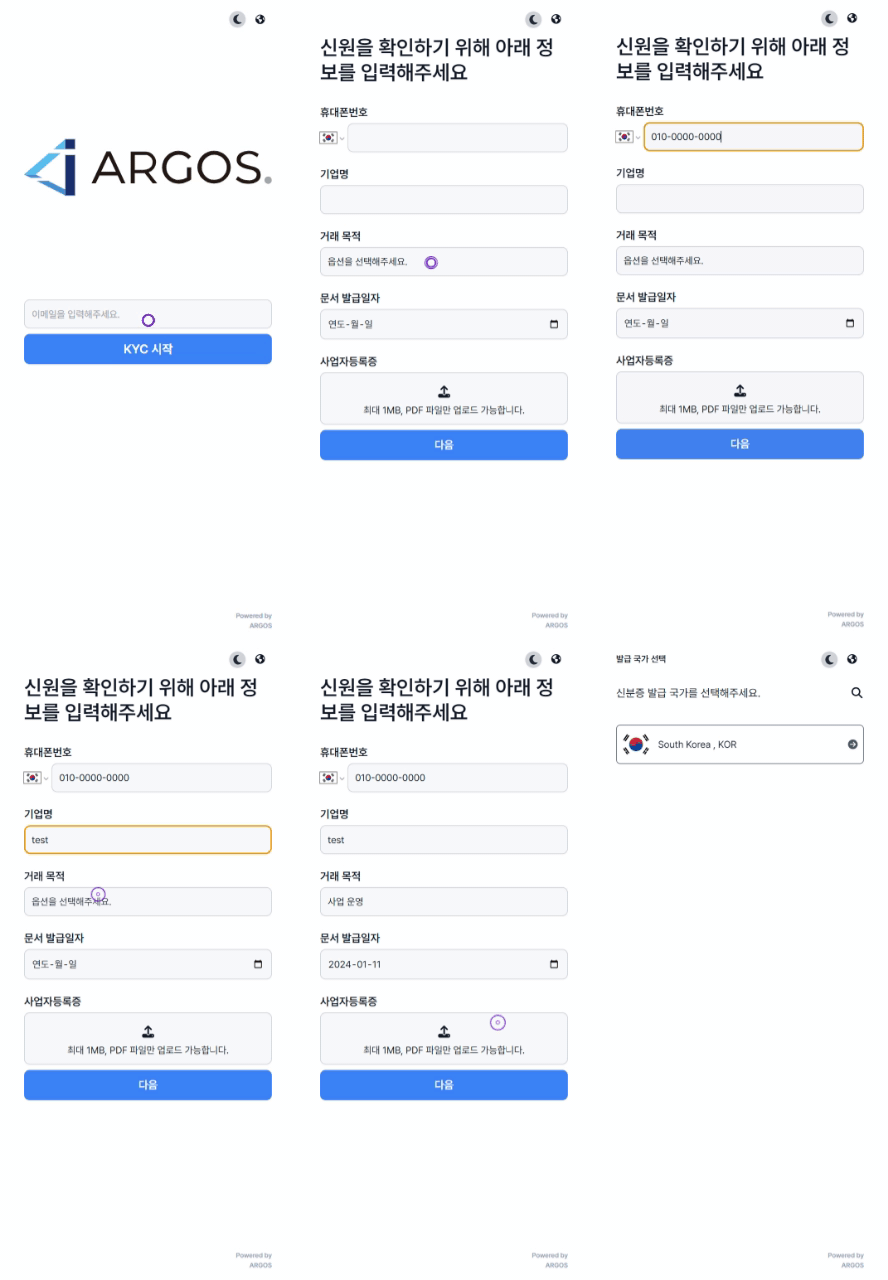
After settings are complete, the customized 'Additional Information' items are automatically displayed in **Liveform Step 2**.
Users can enter information or upload files according to the set fields.
**Privacy Protection**
When collecting additional information, privacy protection laws and related regulations must be complied with. It is important to clearly notify the purpose of collected information and collect **only the minimum necessary information**.
### Additional Information Item Settings
You can customize additional information to collect in liveform.
**Setting Limitations**
Up to **5 items** can be added, and each item requires a label.
### Supported Input Types
| Type | Description |
| ---------------- | ----------------------------------------------------------------------------------------------------------------------- |
| **Phone Number** | Collects phone numbers in accurate format linked with country selection. |
| **Text** | Suitable for freely collecting all types of character information. |
| **Dropdown** | Adds pre-defined options to dropdown menu to provide choices to users. |
| **Date** | Date information can be selected in calendar format. |
| **File Upload** | PDF documents can be uploaded. (Maximum 1MB, PDF files only) |
| **Checkbox** | Used to replace existing privacy policy or terms of service display, or when 3 or more consent procedures are required. |
### Title Settings
You can directly define the topic of information to collect, and the actual entered content is displayed on that information collection screen.
After completing the detailed settings above, click **Save**.
***
### Additional Information Collection in Liveform
After settings are complete, the customized 'Additional Information' items are automatically displayed in **Liveform Step 2**.
Users can enter information or upload files according to the set fields.
 ***
### View Collected Additional Information
After liveform submission is completed, you can view collected additional information in the following ways:
Check the additional information section on the submission query page.
Review collected data by item.
Download and review uploaded PDF files.
Proceed with follow-up actions for additional verification if needed.
**Personal Information Management**
Collected personal information must be managed safely according to related regulations and **destroyed at an appropriate time after the collection purpose is achieved**.
***
## Use Cases
When banks or securities companies conduct additional screening for high-risk customers, they can collect documents such as income certificates and fund source verification documents as PDFs, and receive information such as occupation or investment purpose through dropdowns. This enables securing detailed customer information for anti-money laundering law compliance.
During life insurance or health insurance enrollment, detailed information such as existing medical history, family history, lifestyle habits can be collected through text fields and dropdowns. Additionally, health checkup reports or medical records can be uploaded as PDF files to conduct accurate risk assessment.
In corporate recruitment processes, candidate career certificates, degree certificates, etc. can be collected as PDFs, and desired workplace or salary range can be received through dropdowns. Contact information can be collected in accurate format using Phone Number type to facilitate follow-up contact.
***
## Benefits of Additional Information Collection Function
Improves work efficiency through customized information collection.
Collects accurate data through various input types.
Supports regulatory compliance through EDD process automation.
Collects evidence documents through PDF file uploads.
***
## Configuration Tips
* **Minimum Collection Principle**: Collect only necessary information.
* **PDF Size**: Please guide PDFs to be 1MB or less.
* **Consent Items**: If there are 3 or more consent items, receive them separately using Checkbox.
***
## Related Documentation
View project basic information settings.
Learn how to view collected information.
View custom DI settings.
***
### View Collected Additional Information
After liveform submission is completed, you can view collected additional information in the following ways:
Check the additional information section on the submission query page.
Review collected data by item.
Download and review uploaded PDF files.
Proceed with follow-up actions for additional verification if needed.
**Personal Information Management**
Collected personal information must be managed safely according to related regulations and **destroyed at an appropriate time after the collection purpose is achieved**.
***
## Use Cases
When banks or securities companies conduct additional screening for high-risk customers, they can collect documents such as income certificates and fund source verification documents as PDFs, and receive information such as occupation or investment purpose through dropdowns. This enables securing detailed customer information for anti-money laundering law compliance.
During life insurance or health insurance enrollment, detailed information such as existing medical history, family history, lifestyle habits can be collected through text fields and dropdowns. Additionally, health checkup reports or medical records can be uploaded as PDF files to conduct accurate risk assessment.
In corporate recruitment processes, candidate career certificates, degree certificates, etc. can be collected as PDFs, and desired workplace or salary range can be received through dropdowns. Contact information can be collected in accurate format using Phone Number type to facilitate follow-up contact.
***
## Benefits of Additional Information Collection Function
Improves work efficiency through customized information collection.
Collects accurate data through various input types.
Supports regulatory compliance through EDD process automation.
Collects evidence documents through PDF file uploads.
***
## Configuration Tips
* **Minimum Collection Principle**: Collect only necessary information.
* **PDF Size**: Please guide PDFs to be 1MB or less.
* **Consent Items**: If there are 3 or more consent items, receive them separately using Checkbox.
***
## Related Documentation
View project basic information settings.
Learn how to view collected information.
View custom DI settings.