> ## Documentation Index
> Fetch the complete documentation index at: https://developers.argosidentity.com/llms.txt
> Use this file to discover all available pages before exploring further.
# Verification Data
> Learn about Verification data related settings including automatic English translation of submission names, partial data deletion, duplicate user detection, and submission rate limiting.
Verification data settings manage the quality and storage methods of Verification data collected in ID check projects. You can establish data management policies that meet business requirements through various options such as data conversion, data protection, duplicate management, etc.
***
## Tab Structure
Verification data settings consist of two tabs:
**Data conversion and storage related options**
* Automatic English translation of submission names
* Partial data deletion
* Custom DI (Duplicate Information)
**Duplicate check pipeline and submission restriction related options**
* Duplicate check pipeline
* Submission rate limiting
* Duplicate approval prevention period
* Duplicate rejection prevention period
***
## General
Set data conversion and storage related options.
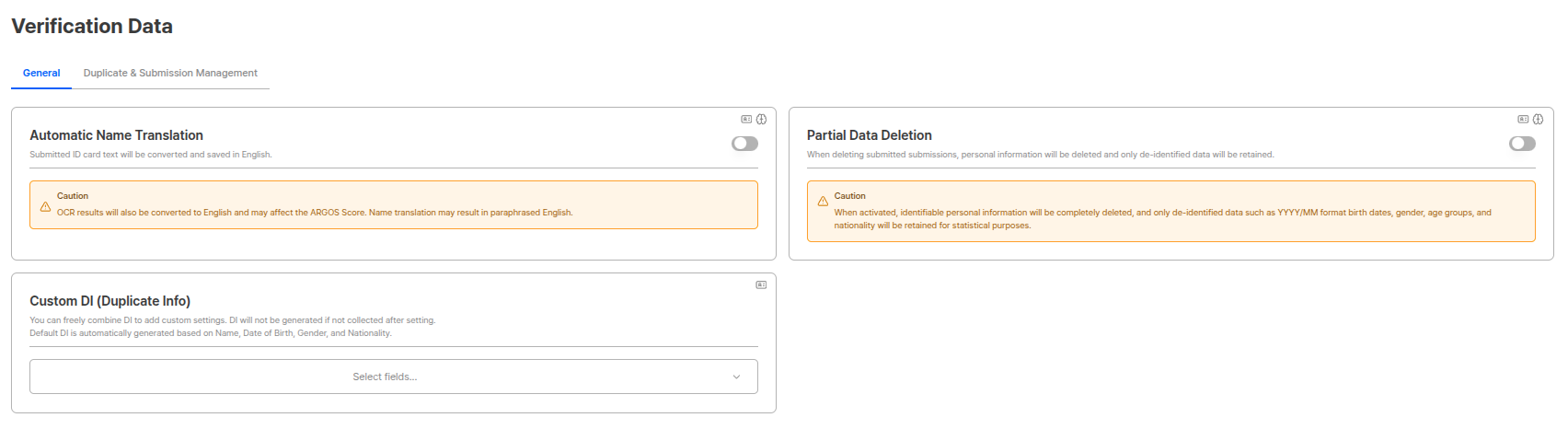 ### Automatic English Translation of Submission Names
Text from submitted IDs is changed to English for display and storage.
### Automatic English Translation of Submission Names
Text from submitted IDs is changed to English for display and storage.
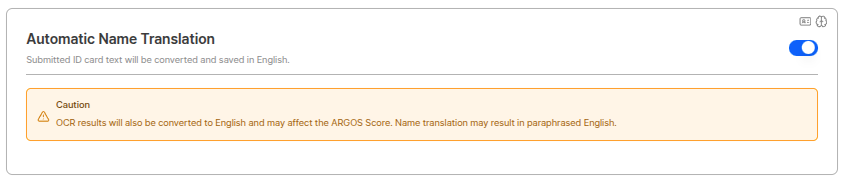 **Precautions**
OCR result values are also changed to English, which may affect options such as **government verification**. (e.g., Korean name but attempting verification with English name)
* In the above case, please request the sales team to create a new project, then reconfigure options for Korean targets before proceeding.
Translation may proceed with paraphrased English during the translation process.
**Usage Scenarios**
When providing global services, IDs in various languages can be unified to English to facilitate data management and search.
***
### Partial Data Deletion
When a submitted Submission is deleted, personal information is deleted and only de-identified data is maintained.
**Precautions**
OCR result values are also changed to English, which may affect options such as **government verification**. (e.g., Korean name but attempting verification with English name)
* In the above case, please request the sales team to create a new project, then reconfigure options for Korean targets before proceeding.
Translation may proceed with paraphrased English during the translation process.
**Usage Scenarios**
When providing global services, IDs in various languages can be unified to English to facilitate data management and search.
***
### Partial Data Deletion
When a submitted Submission is deleted, personal information is deleted and only de-identified data is maintained.
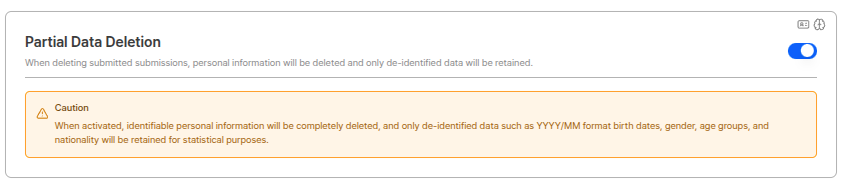 **Precautions**
Personally identifiable information from capture devices is completely deleted, and only de-identified data such as **date of birth/gender/age group/nationality in YYYYMM format** is maintained for statistical purposes.
**Partial Data Deletion Usage**
Used when you want to delete Submissions for privacy protection law compliance but maintain de-identified data for statistical and analysis purposes. Deleted data cannot be recovered, so set carefully.
***
### Custom DI (Duplicate Information)
You can freely combine DI (Duplicate Information) for additional settings. If not collected after setting, DI is not generated.
**Precautions**
Personally identifiable information from capture devices is completely deleted, and only de-identified data such as **date of birth/gender/age group/nationality in YYYYMM format** is maintained for statistical purposes.
**Partial Data Deletion Usage**
Used when you want to delete Submissions for privacy protection law compliance but maintain de-identified data for statistical and analysis purposes. Deleted data cannot be recovered, so set carefully.
***
### Custom DI (Duplicate Information)
You can freely combine DI (Duplicate Information) for additional settings. If not collected after setting, DI is not generated.
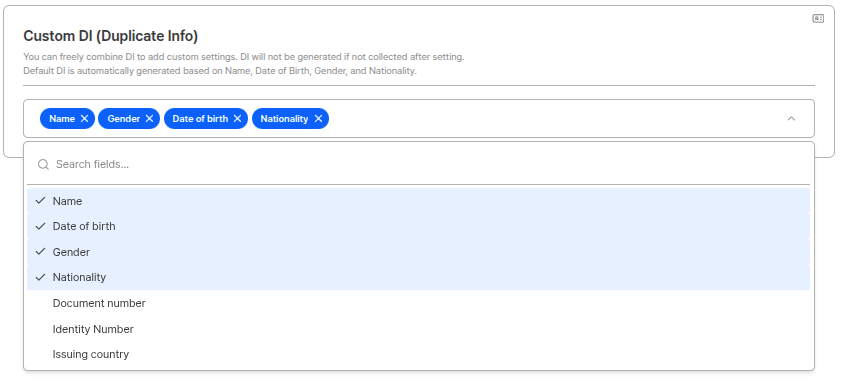 **Default DI**
Default DI is automatically generated based on **name/date of birth/gender/nationality/portrait (face on ID)**. Custom DI allows more detailed duplicate detection by combining fields in addition to default DI.
**DI Generation Conditions**
DI value is generated only when name, date of birth, gender, nationality, and portrait, etc. are all provided. If a submitter's identity has been verified through ARGOS Identity service, the existing DI value is maintained even when authenticated in a different project.
**Custom DI Usage**
Used when you want to set duplicate detection criteria suitable for project characteristics. For example, adding email addresses or phone numbers enables more accurate duplicate detection.
***
## Duplicate and Submission Management
Set duplicate check pipeline and submission restriction related options.
**Default DI**
Default DI is automatically generated based on **name/date of birth/gender/nationality/portrait (face on ID)**. Custom DI allows more detailed duplicate detection by combining fields in addition to default DI.
**DI Generation Conditions**
DI value is generated only when name, date of birth, gender, nationality, and portrait, etc. are all provided. If a submitter's identity has been verified through ARGOS Identity service, the existing DI value is maintained even when authenticated in a different project.
**Custom DI Usage**
Used when you want to set duplicate detection criteria suitable for project characteristics. For example, adding email addresses or phone numbers enables more accurate duplicate detection.
***
## Duplicate and Submission Management
Set duplicate check pipeline and submission restriction related options.
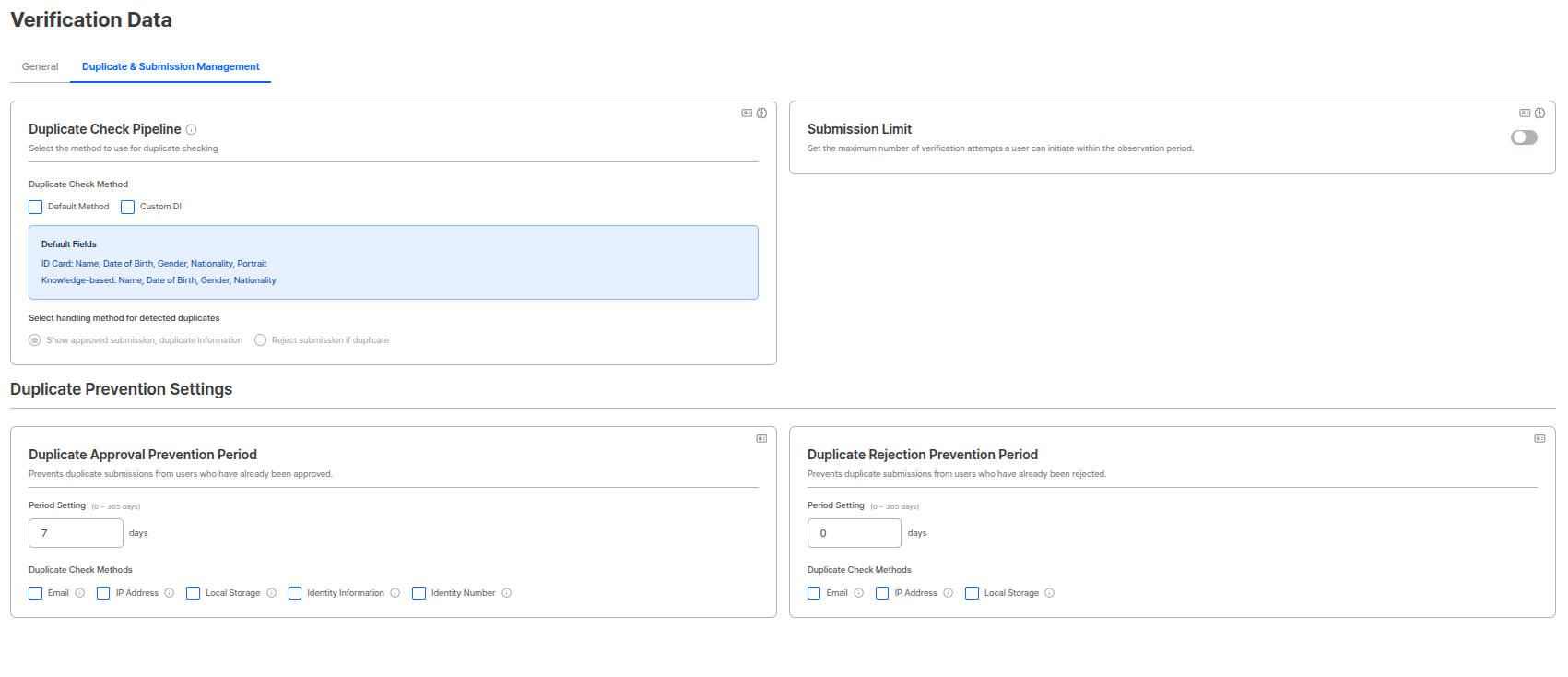 ### Duplicate Check Pipeline
Select the pipeline to use for duplicate checks. Both default method and custom DI pipelines can be selected, and the duplicate value from the first detected pipeline during detection is used.
### Duplicate Check Pipeline
Select the pipeline to use for duplicate checks. Both default method and custom DI pipelines can be selected, and the duplicate value from the first detected pipeline during detection is used.
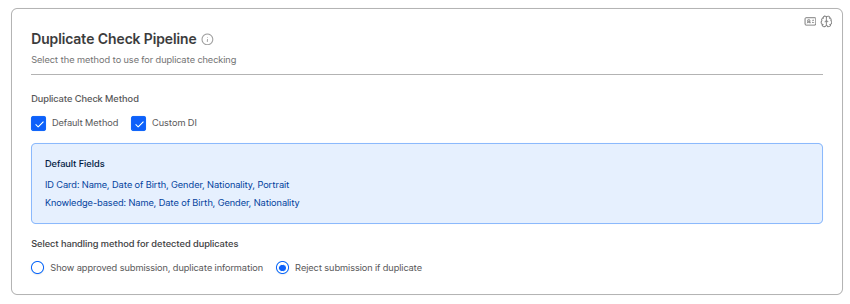 #### Pipeline Selection
Select the pipeline to perform duplicate checks. Both pipelines can be selected, and can be checked/unchecked with checkboxes.
| Pipeline | Description |
| ------------------ | --------------------------------------------------------- |
| **Default Method** | Pipeline that detects duplicates based on default fields. |
| **Custom DI** | Pipeline that detects duplicates based on custom DI. |
**Pipeline Operation Method**
When both default method and custom DI pipelines are selected, both pipelines run simultaneously. The duplicate value from the pipeline where duplicate is first found during detection is used.
#### Default Method Pipeline Operation
The default method pipeline proceeds as a type of filter function when detecting duplicate users using DI, and checks for duplicates in the following order when searching the database:
**DB Search Order:**
1. **Exact Matching** (Exact match)
2. **Fuzzy Matching** (Similar match)
3. **Compare Face** (Face comparison)
**Fields Used in Each Filter Stage:**
| Filter Stage | Fields Used | Description |
| ------------------ | ---------------------------------------------- | -------------------------------------------------------------------------- |
| **Exact Matching** | Date of birth (birthDate), Gender, Nationality | Searches for users with exactly matching information. |
| **Fuzzy Matching** | Name | Searches for users with similar names. Allows typos or slight differences. |
| **Compare Face** | Portrait | Confirms if same person by comparing face images. |
**Duplicate Judgment Process:**
When passing each filter stage sequentially, it proceeds to the next stage. Users who pass all filters are **judged as duplicate users**.
```
User Submission
↓
Exact Matching (birthDate, gender, nationality match?)
↓ Pass
Fuzzy Matching (name similar?)
↓ Pass
Compare Face (face match?)
↓ Pass
Judged as duplicate user
```
**Filter Pass Conditions**
When a user matching conditions is found at each filter stage, it proceeds to the next stage. Only when all stages are passed is it judged as a duplicate user, so cases where only some information matches are not detected as duplicates.
**Duplicate Detection Accuracy**
Since checks are performed in the order of Exact Matching → Fuzzy Matching → Compare Face, duplicates are only judged when birthDate/gender/nationality exactly match, name is similar, and face also matches. This enables accurate duplicate detection while minimizing false positives.
#### Default Fields
Default fields used for duplicate checks by pipeline are as follows:
| Pipeline | Base Fields |
| ------------------- | -------------------------------------------------- |
| **ID document** | Name, date of birth, gender, nationality, portrait |
| **Knowledge-based** | Name, date of birth, gender, nationality |
#### Processing When Duplicate Detected
Select the processing method for submissions detected as duplicates. (Radio button)
| Processing Method | Description |
| ------------------------------------------------------- | ------------------------------------------------------------------------------- |
| **Approved submission + Duplicate information display** | Approves submissions detected as duplicates but displays duplicate information. |
| **Reject submission if duplicate** | Rejects submissions when detected as duplicates. |
**Duplicate Check Pipeline Usage**
When operating a one-person-one-account policy, you can activate the duplicate check pipeline to prevent creating multiple accounts with the same identity information. Selecting both default method and custom DI pipelines enables more accurate duplicate detection.
***
### Submission Rate Limiting
Sets the maximum number of verification attempts a user can make within the same period. Operates in Window Sliding method to effectively block excessive submission attempts by malicious users.
#### Pipeline Selection
Select the pipeline to perform duplicate checks. Both pipelines can be selected, and can be checked/unchecked with checkboxes.
| Pipeline | Description |
| ------------------ | --------------------------------------------------------- |
| **Default Method** | Pipeline that detects duplicates based on default fields. |
| **Custom DI** | Pipeline that detects duplicates based on custom DI. |
**Pipeline Operation Method**
When both default method and custom DI pipelines are selected, both pipelines run simultaneously. The duplicate value from the pipeline where duplicate is first found during detection is used.
#### Default Method Pipeline Operation
The default method pipeline proceeds as a type of filter function when detecting duplicate users using DI, and checks for duplicates in the following order when searching the database:
**DB Search Order:**
1. **Exact Matching** (Exact match)
2. **Fuzzy Matching** (Similar match)
3. **Compare Face** (Face comparison)
**Fields Used in Each Filter Stage:**
| Filter Stage | Fields Used | Description |
| ------------------ | ---------------------------------------------- | -------------------------------------------------------------------------- |
| **Exact Matching** | Date of birth (birthDate), Gender, Nationality | Searches for users with exactly matching information. |
| **Fuzzy Matching** | Name | Searches for users with similar names. Allows typos or slight differences. |
| **Compare Face** | Portrait | Confirms if same person by comparing face images. |
**Duplicate Judgment Process:**
When passing each filter stage sequentially, it proceeds to the next stage. Users who pass all filters are **judged as duplicate users**.
```
User Submission
↓
Exact Matching (birthDate, gender, nationality match?)
↓ Pass
Fuzzy Matching (name similar?)
↓ Pass
Compare Face (face match?)
↓ Pass
Judged as duplicate user
```
**Filter Pass Conditions**
When a user matching conditions is found at each filter stage, it proceeds to the next stage. Only when all stages are passed is it judged as a duplicate user, so cases where only some information matches are not detected as duplicates.
**Duplicate Detection Accuracy**
Since checks are performed in the order of Exact Matching → Fuzzy Matching → Compare Face, duplicates are only judged when birthDate/gender/nationality exactly match, name is similar, and face also matches. This enables accurate duplicate detection while minimizing false positives.
#### Default Fields
Default fields used for duplicate checks by pipeline are as follows:
| Pipeline | Base Fields |
| ------------------- | -------------------------------------------------- |
| **ID document** | Name, date of birth, gender, nationality, portrait |
| **Knowledge-based** | Name, date of birth, gender, nationality |
#### Processing When Duplicate Detected
Select the processing method for submissions detected as duplicates. (Radio button)
| Processing Method | Description |
| ------------------------------------------------------- | ------------------------------------------------------------------------------- |
| **Approved submission + Duplicate information display** | Approves submissions detected as duplicates but displays duplicate information. |
| **Reject submission if duplicate** | Rejects submissions when detected as duplicates. |
**Duplicate Check Pipeline Usage**
When operating a one-person-one-account policy, you can activate the duplicate check pipeline to prevent creating multiple accounts with the same identity information. Selecting both default method and custom DI pipelines enables more accurate duplicate detection.
***
### Submission Rate Limiting
Sets the maximum number of verification attempts a user can make within the same period. Operates in Window Sliding method to effectively block excessive submission attempts by malicious users.
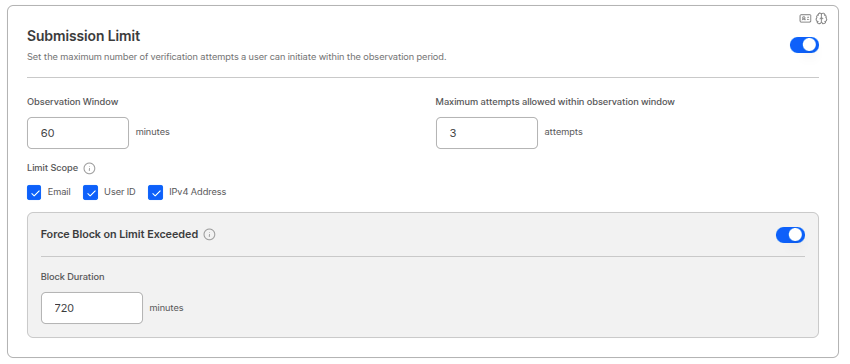 #### Operation Method (Window Sliding)
Submission rate limiting operates in **Window Sliding method**. Based on when the last submission came in, it goes back by the set time window (Window) and checks the number of submissions within that period.
**Operation Principle:**
1. User attempts submission.
2. System goes back by the set time window (e.g., 1 hour) from the last submission point.
3. Checks the number of submissions within that time window.
4. If allowed count is exceeded, blocks authentication for the remaining time of the time window.
**Example:**
```
Setting: Maximum 5 submissions allowed within 1 hour
Time axis: [---1 hour window---] [Current point]
Submissions: [3 submissions] [2 submissions] ← Current attempt
→ Total 5 submissions (within allowed range)
→ Submission allowed
Time axis: [---1 hour window---] [Current point]
Submissions: [3 submissions] [3 submissions] ← Current attempt
→ Total 6 submissions (exceeds allowed range)
→ Blocked for remaining time of window
```
#### Restriction Scope Settings
You can select criteria for detecting submission rate limiting. The following items can be combined:
| Criteria | Description |
| ---------------- | ------------------------------------------------------------------ |
| **Email** | Limits based on number of submissions with the same email address. |
| **User ID** | Limits based on number of submissions with the same user ID. |
| **IPv4 Address** | Limits based on number of submissions from the same IPv4 address. |
**Restriction Scope Combination**
Multiple criteria can be selected simultaneously. For example, if both email and IPv4 address are selected, blocking occurs if either criterion exceeds the allowed count.
#### Force Block Function
You can effectively block abusers through the force block function when limits are exceeded.
**Block Period Settings:**
You can set an additional block period for users who exceed the limit count. During this period, the user cannot attempt authentication.
**Usage Scenarios:**
* **Abuser Blocking**: Block users who continuously attempt submissions for malicious purposes
* **Prevent Bad Attempts**: Block repeated submission attempts for forgery or fraud purposes
* **System Protection**: Prevent system load from excessive submissions
**Effective Blocking Strategy**
* Set short time window (e.g., 1 hour) and low allowed count (e.g., 3) for quick blocking
* Set force block period sufficiently (e.g., 24 hours) to prevent retries
* Select email, user ID, and IPv4 address all together to block various bypass attempts
Using this function together with **Proxy/VPN Detection function** can more effectively prevent KYC forgery/alteration submissions quickly.
***
### Duplicate Approval Prevention Period
Prevents duplicate submissions from already approved users.
#### Operation Method (Window Sliding)
Submission rate limiting operates in **Window Sliding method**. Based on when the last submission came in, it goes back by the set time window (Window) and checks the number of submissions within that period.
**Operation Principle:**
1. User attempts submission.
2. System goes back by the set time window (e.g., 1 hour) from the last submission point.
3. Checks the number of submissions within that time window.
4. If allowed count is exceeded, blocks authentication for the remaining time of the time window.
**Example:**
```
Setting: Maximum 5 submissions allowed within 1 hour
Time axis: [---1 hour window---] [Current point]
Submissions: [3 submissions] [2 submissions] ← Current attempt
→ Total 5 submissions (within allowed range)
→ Submission allowed
Time axis: [---1 hour window---] [Current point]
Submissions: [3 submissions] [3 submissions] ← Current attempt
→ Total 6 submissions (exceeds allowed range)
→ Blocked for remaining time of window
```
#### Restriction Scope Settings
You can select criteria for detecting submission rate limiting. The following items can be combined:
| Criteria | Description |
| ---------------- | ------------------------------------------------------------------ |
| **Email** | Limits based on number of submissions with the same email address. |
| **User ID** | Limits based on number of submissions with the same user ID. |
| **IPv4 Address** | Limits based on number of submissions from the same IPv4 address. |
**Restriction Scope Combination**
Multiple criteria can be selected simultaneously. For example, if both email and IPv4 address are selected, blocking occurs if either criterion exceeds the allowed count.
#### Force Block Function
You can effectively block abusers through the force block function when limits are exceeded.
**Block Period Settings:**
You can set an additional block period for users who exceed the limit count. During this period, the user cannot attempt authentication.
**Usage Scenarios:**
* **Abuser Blocking**: Block users who continuously attempt submissions for malicious purposes
* **Prevent Bad Attempts**: Block repeated submission attempts for forgery or fraud purposes
* **System Protection**: Prevent system load from excessive submissions
**Effective Blocking Strategy**
* Set short time window (e.g., 1 hour) and low allowed count (e.g., 3) for quick blocking
* Set force block period sufficiently (e.g., 24 hours) to prevent retries
* Select email, user ID, and IPv4 address all together to block various bypass attempts
Using this function together with **Proxy/VPN Detection function** can more effectively prevent KYC forgery/alteration submissions quickly.
***
### Duplicate Approval Prevention Period
Prevents duplicate submissions from already approved users.
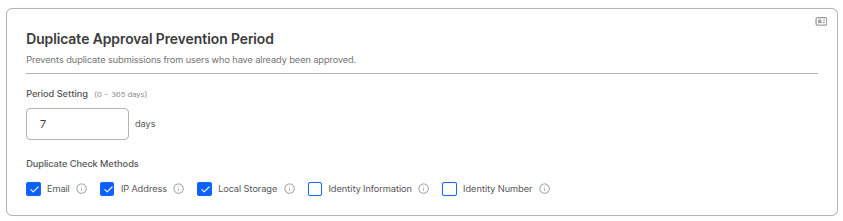 #### Period Settings
Period can be set within 0\~365 days range. (Example: 7 days)
#### Duplicate Check Method
Checks for duplicates based on the following items. (Checkboxes)
* Email
* IP address
* Local storage
* Identity information: name, date of birth, gender, nationality
* Resident registration number
**Duplicate Approval Prevention Period Usage**
If operating a one-person-one 'approved' account policy, be sure to set this function. If there is an approved submission with the same information within the set period, new submissions are rejected.
**Duplicate Check Field Precautions**
When Identity info and Identity number are set, users submitting identical information are rejected.
***
### Duplicate Rejection Prevention Period
Prevents duplicate submissions from already rejected users.
#### Period Settings
Period can be set within 0\~365 days range. (Example: 7 days)
#### Duplicate Check Method
Checks for duplicates based on the following items. (Checkboxes)
* Email
* IP address
* Local storage
* Identity information: name, date of birth, gender, nationality
* Resident registration number
**Duplicate Approval Prevention Period Usage**
If operating a one-person-one 'approved' account policy, be sure to set this function. If there is an approved submission with the same information within the set period, new submissions are rejected.
**Duplicate Check Field Precautions**
When Identity info and Identity number are set, users submitting identical information are rejected.
***
### Duplicate Rejection Prevention Period
Prevents duplicate submissions from already rejected users.
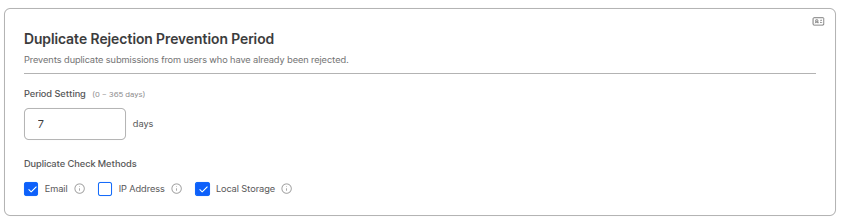 #### Period Settings
Period can be set within 0\~365 days range. (Example: 0 days)
#### Duplicate Check Method
Checks for duplicates based on the following items. (Checkboxes)
* Email
* IP address
* Local storage
**Duplicate Rejection Prevention Period Precautions**
Excessively strict settings may restrict legitimate user access, so settings must be made considering the balance between business goals and user experience. For example, it is good to set an appropriate period to allow retries when users accidentally enter incorrect information.
**Duplicate Rejection Prevention Period Usage**
Used to prevent malicious users from continuously resubmitting with rejected information. Setting the period to 0 days disables this function.
***
## Related Documentation
View basic authentication policies.
View forgery prevention settings.
Learn how to manage submissions.
Learn how to use API to query DI values.
#### Period Settings
Period can be set within 0\~365 days range. (Example: 0 days)
#### Duplicate Check Method
Checks for duplicates based on the following items. (Checkboxes)
* Email
* IP address
* Local storage
**Duplicate Rejection Prevention Period Precautions**
Excessively strict settings may restrict legitimate user access, so settings must be made considering the balance between business goals and user experience. For example, it is good to set an appropriate period to allow retries when users accidentally enter incorrect information.
**Duplicate Rejection Prevention Period Usage**
Used to prevent malicious users from continuously resubmitting with rejected information. Setting the period to 0 days disables this function.
***
## Related Documentation
View basic authentication policies.
View forgery prevention settings.
Learn how to manage submissions.
Learn how to use API to query DI values.