> ## Documentation Index
> Fetch the complete documentation index at: https://developers.argosidentity.com/llms.txt
> Use this file to discover all available pages before exploring further.
# Anti-Money Laundering (AML)
> Learn how to configure AML Watch list filtering and Ongoing Monitoring.
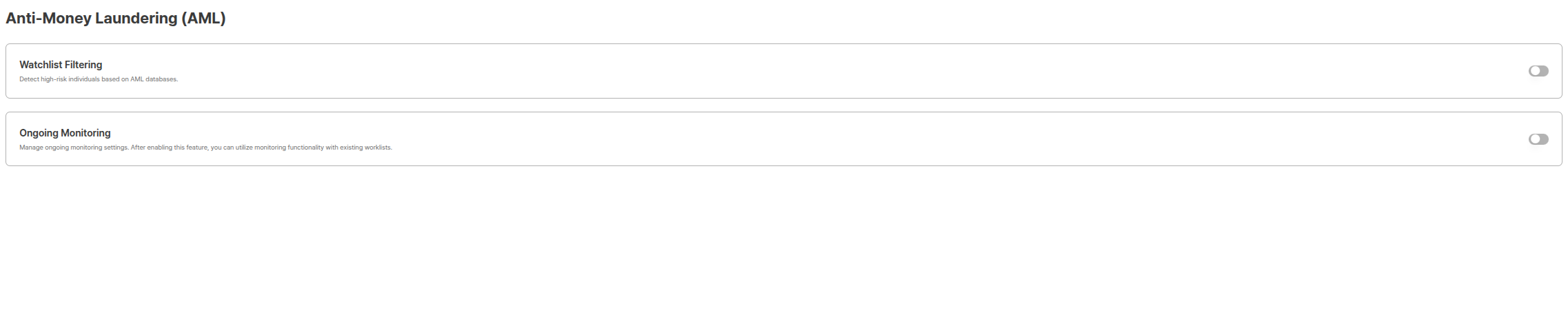
The Anti-Money Laundering (AML) function is an important security feature that checks whether users are included in risk person lists to prevent financial crimes. This function supports real-time identification of risk persons and taking appropriate measures.
 ***
## Why AML is Needed
Anti-Money Laundering (AML) is a legal obligation that financial institutions and regulated companies must comply with. Through AML functions, the following purposes can be achieved:
### Legal Compliance and Regulatory Response
* **Financial Real Name Transaction Act Compliance**: Fulfill obligations for customer identity verification and risk person checks
* **International Sanctions Regulation Compliance**: Identify persons included in international sanctions lists such as UN, OFAC
* **Financial Supervisory Service Guidelines Compliance**: Fulfill AML/CFT (Anti-Money Laundering and Counter-Terrorism Financing) obligations of financial institutions
### Risk Management and Loss Prevention
* **Money Laundering Prevention**: Preemptively block illegal fund inflows to prevent institutional reputation damage
* **Sanctions Violation Prevention**: Preemptively block transactions with sanctioned persons to avoid legal liability
* **PEP (Politically Exposed Person) Management**: Perform enhanced due diligence (EDD) when transacting with politically exposed persons
### Operational Efficiency Improvement
* **Automated Checks**: Improve operational efficiency by minimizing manual review work
* **Real-time Monitoring**: Immediately detect changes through continuous monitoring
* **Systematic Record Management**: Systematically manage AML check results for easy audit response
***
## AML Function Overview
The AML (Anti Money Laundering) function is anti-money laundering monitoring that can reference cases where the person collected from the submission is an actual person of concern or risk based on **name, date of birth, nationality**, etc.
ARGOS provides two AML check methods:
Performs **one-time check** at eKYC completion point to confirm whether it matches risk person lists.
**Continuously re-checks** registered users to detect changes in sanctions, PEP, reputation risks, etc.
***
## AML Watch list filtering vs AML Ongoing Monitoring
Compare the differences between the two methods and when to use each.
### Comparison Table
| Category | AML Watch list filtering | AML Ongoing Monitoring |
| -------------------------- | ---------------------------------------------------------------------------- | ---------------------------------------------------------------------------- |
| **Check Timing** | One-time check at eKYC completion point | Continuous regular checks after registration |
| **Check Target** | Approved submissions | Users registered for monitoring (monitor records) |
| **Check Cycle** | Immediate one-time | Automatic re-checks by set cycle |
| **Change Detection** | Only checks status at check point | Detects changes over time |
| **Usage Purpose** | Block risk persons at new customer registration | Continuous monitoring of existing customers |
| **Configuration Location** | Project Management > Policy and Authentication > Anti-Money Laundering (AML) | Project Management > Policy and Authentication > Anti-Money Laundering (AML) |
### Usage Scenarios
**Immediate Check at New Customer Registration**
* Check risk person status when opening bank accounts
* Block sanctioned persons when joining financial services
* Verify transaction counterparty before large transactions
* Check recipient before high-value remittances
**Features:**
* Automatically performs check simultaneously with eKYC completion
* Can immediately decide approval/rejection based on check results
* No separate monitoring registration process needed
**Continuous Monitoring of Existing Customers**
* Detect when existing customers are newly added to sanctions lists
* Detect PEP (Politically Exposed Person) status changes
* Detect reputation risk exposure (RRE) changes
* Regular customer re-screening (KYC re-verification)
**Features:**
* Manage monitoring policies by Worklist unit
* Immediate alerts for changes through periodic automatic re-checks
* Track changes by comparing with past judgment results
### Selection Guide
**When should you use which method?**
* **AML Watch list filtering**: When you want to immediately block risk persons at new customer registration
* **AML Ongoing Monitoring**: When continuous monitoring of existing customers is needed
* **Use Both**: When you want to perform both checks at new registration and existing customer monitoring
***
## AML Watch list filtering
You can perform AML Watch list filtering for users who have completed eKYC.
***
## Why AML is Needed
Anti-Money Laundering (AML) is a legal obligation that financial institutions and regulated companies must comply with. Through AML functions, the following purposes can be achieved:
### Legal Compliance and Regulatory Response
* **Financial Real Name Transaction Act Compliance**: Fulfill obligations for customer identity verification and risk person checks
* **International Sanctions Regulation Compliance**: Identify persons included in international sanctions lists such as UN, OFAC
* **Financial Supervisory Service Guidelines Compliance**: Fulfill AML/CFT (Anti-Money Laundering and Counter-Terrorism Financing) obligations of financial institutions
### Risk Management and Loss Prevention
* **Money Laundering Prevention**: Preemptively block illegal fund inflows to prevent institutional reputation damage
* **Sanctions Violation Prevention**: Preemptively block transactions with sanctioned persons to avoid legal liability
* **PEP (Politically Exposed Person) Management**: Perform enhanced due diligence (EDD) when transacting with politically exposed persons
### Operational Efficiency Improvement
* **Automated Checks**: Improve operational efficiency by minimizing manual review work
* **Real-time Monitoring**: Immediately detect changes through continuous monitoring
* **Systematic Record Management**: Systematically manage AML check results for easy audit response
***
## AML Function Overview
The AML (Anti Money Laundering) function is anti-money laundering monitoring that can reference cases where the person collected from the submission is an actual person of concern or risk based on **name, date of birth, nationality**, etc.
ARGOS provides two AML check methods:
Performs **one-time check** at eKYC completion point to confirm whether it matches risk person lists.
**Continuously re-checks** registered users to detect changes in sanctions, PEP, reputation risks, etc.
***
## AML Watch list filtering vs AML Ongoing Monitoring
Compare the differences between the two methods and when to use each.
### Comparison Table
| Category | AML Watch list filtering | AML Ongoing Monitoring |
| -------------------------- | ---------------------------------------------------------------------------- | ---------------------------------------------------------------------------- |
| **Check Timing** | One-time check at eKYC completion point | Continuous regular checks after registration |
| **Check Target** | Approved submissions | Users registered for monitoring (monitor records) |
| **Check Cycle** | Immediate one-time | Automatic re-checks by set cycle |
| **Change Detection** | Only checks status at check point | Detects changes over time |
| **Usage Purpose** | Block risk persons at new customer registration | Continuous monitoring of existing customers |
| **Configuration Location** | Project Management > Policy and Authentication > Anti-Money Laundering (AML) | Project Management > Policy and Authentication > Anti-Money Laundering (AML) |
### Usage Scenarios
**Immediate Check at New Customer Registration**
* Check risk person status when opening bank accounts
* Block sanctioned persons when joining financial services
* Verify transaction counterparty before large transactions
* Check recipient before high-value remittances
**Features:**
* Automatically performs check simultaneously with eKYC completion
* Can immediately decide approval/rejection based on check results
* No separate monitoring registration process needed
**Continuous Monitoring of Existing Customers**
* Detect when existing customers are newly added to sanctions lists
* Detect PEP (Politically Exposed Person) status changes
* Detect reputation risk exposure (RRE) changes
* Regular customer re-screening (KYC re-verification)
**Features:**
* Manage monitoring policies by Worklist unit
* Immediate alerts for changes through periodic automatic re-checks
* Track changes by comparing with past judgment results
### Selection Guide
**When should you use which method?**
* **AML Watch list filtering**: When you want to immediately block risk persons at new customer registration
* **AML Ongoing Monitoring**: When continuous monitoring of existing customers is needed
* **Use Both**: When you want to perform both checks at new registration and existing customer monitoring
***
## AML Watch list filtering
You can perform AML Watch list filtering for users who have completed eKYC.
 ### Settings Options
| Setting | Description |
| ----------------------------------- | -------------------------------------------------------------------------------------------------------------------------------------------- |
| **Risk Level Threshold Setting** | Directly set the score criteria for determining risk person status. All values are **more lenient when lower** and **stricter when higher**. |
| **Full Date of Birth Match Option** | Search results are displayed only when both profile (name, nationality) and date of birth match. |
**Threshold Setting Guide**
* **Low Threshold (e.g., 70-80)**: Returns more matching results but increases false positive possibility
* **High Threshold (e.g., 90-95)**: High accuracy but may miss some risk persons
* **Recommended Setting**: Industry standard is 90-93 range, adjustable according to internal policies
**AML Check Result Usage**
Use AML check results as **reference** and make final judgments according to related regulations and internal policies. If using automatic approval/rejection functions, set thresholds carefully.
### Operation Method
1. **eKYC Completion**: User completes ID authentication and becomes approved status.
2. **Automatic Check**: AML check is automatically performed according to set threshold and options.
3. **Result Verification**: Check results can be viewed on the [AML Search](/dashboard/en/aml-search) page.
4. **Action Decision**: Decide approval, additional verification, or rejection based on check results.
***
## AML Ongoing Monitoring
You can set up Ongoing Monitoring for continuous management monitoring of users who have completed eKYC.
### Settings Options
| Setting | Description |
| ----------------------------------- | -------------------------------------------------------------------------------------------------------------------------------------------- |
| **Risk Level Threshold Setting** | Directly set the score criteria for determining risk person status. All values are **more lenient when lower** and **stricter when higher**. |
| **Full Date of Birth Match Option** | Search results are displayed only when both profile (name, nationality) and date of birth match. |
**Threshold Setting Guide**
* **Low Threshold (e.g., 70-80)**: Returns more matching results but increases false positive possibility
* **High Threshold (e.g., 90-95)**: High accuracy but may miss some risk persons
* **Recommended Setting**: Industry standard is 90-93 range, adjustable according to internal policies
**AML Check Result Usage**
Use AML check results as **reference** and make final judgments according to related regulations and internal policies. If using automatic approval/rejection functions, set thresholds carefully.
### Operation Method
1. **eKYC Completion**: User completes ID authentication and becomes approved status.
2. **Automatic Check**: AML check is automatically performed according to set threshold and options.
3. **Result Verification**: Check results can be viewed on the [AML Search](/dashboard/en/aml-search) page.
4. **Action Decision**: Decide approval, additional verification, or rejection based on check results.
***
## AML Ongoing Monitoring
You can set up Ongoing Monitoring for continuous management monitoring of users who have completed eKYC.
 ### Key Concepts
A **workspace** for setting ongoing monitoring policies and registering monitoring targets. You can manage multiple Worklists within one Project.
**User information** registered as monitoring targets. ARGOS performs regular screening on these Monitor Records.
**Match results** that appear when regular screening is performed on monitoring targets. Compliance operations teams perform AML work by reviewing these Match results.
### Operation Method
1. **Worklist Creation**: Create Worklist by setting monitoring policies and thresholds.
2. **Monitoring Registration**: Automatically register at eKYC completion or manually register monitoring targets.
3. **Periodic Screening**: Automatically performs re-checks according to set cycle.
4. **Change Detection**: When changes occur in sanctions lists, PEP, reputation risks, etc., creates alerts as Open matches.
5. **Match Review**: Administrators review matching results and judge as True Positive or False Positive.
Learn detailed usage methods including Worklist creation, monitoring registration, and match review.
***
## API Integration Methods
You can build automated workflows by integrating AML functions via API.
### AML Watch list filtering API
Although automatically checked after eKYC completion, you can manually call the API to perform checks when needed.
Learn how to use API to perform AML checks.
**API Usage Example:**
```javascript theme={null}
// Perform AML check
const response = await fetch('https://rest-api.argosidentity.com/v3/submission/aml', {
method: 'POST',
headers: {
'x-api-key': 'YOUR_API_KEY',
'Content-Type': 'application/json'
},
body: JSON.stringify({
submissionId: 'sub_abc123',
amlThreshold: 93 // Set same as threshold set in dashboard
})
});
const result = await response.json();
// result.result: "Not Screened", "Match", "No Match", etc.
```
### AML Ongoing Monitoring API
You can perform Worklist creation, monitoring registration, match queries, etc. via API.
Create monitoring records.
Query monitoring records.
Delete monitoring records.
**API Usage Example:**
```javascript theme={null}
// Register monitoring record
const response = await fetch('https://rest-api.argosidentity.com/v3/submission/aml/ongoing', {
method: 'POST',
headers: {
'x-api-key': 'YOUR_API_KEY',
'Content-Type': 'application/json'
},
body: JSON.stringify({
submissionId: 'sub_abc123',
recordId: 'user_12345',
worklistName: 'High-Risk-Monitoring'
})
});
```
### Webhook Integration
You can receive AML check results or Ongoing Monitoring match results via webhook to perform automated processing.
Learn how to configure AML webhook events.
**Webhook Event Example:**
```javascript theme={null}
// AML check completion webhook processing
app.post('/webhooks/idcheck', (req, res) => {
if (req.body.webhook_trigger === 'aml') {
const { submissionId, amlStatus, matches } = req.body;
if (amlStatus === 'match') {
// Process when risk person matched
flagForReview(submissionId);
notifyComplianceTeam(submissionId, matches);
}
}
res.status(200).send('OK');
});
// Ongoing Monitoring match webhook processing
app.post('/webhooks/idcheck', (req, res) => {
if (req.body.webhook_trigger === 'aml_monitor') {
const { recordId, matchType, riskLevel } = req.body;
// Process when change detected
handleOngoingMatch(recordId, matchType, riskLevel);
}
res.status(200).send('OK');
});
```
***
## Related Documentation and Integration Methods
Refer to related documentation to effectively utilize AML functions.
View and manage AML Watch list filtering results.
Set up continuous AML monitoring and manage Worklists.
View AML check result code list and meanings.
Learn how to use API to perform AML checks.
Learn how to use API to query AML reports.
Configure AML webhook events to implement automated processing.
***
## Integrated Workflow Example
An example workflow using AML functions integrated.
Activate Watch list filtering and Ongoing Monitoring in Project Management > Policy and Authentication > Anti-Money Laundering (AML) and set thresholds.
When users complete ID authentication, AML Watch list filtering is automatically performed.
View check results on the AML Search page, and decide additional verification or rejection if risk persons are found.
For approved users requiring monitoring, register automatically or manually in Ongoing Monitoring.
Ongoing Monitoring performs regular re-checks, and when changes are detected, notifications are received via webhook.
Review Ongoing Monitoring match results and take appropriate actions.
***
**Recommendations for Optimal AML Operations**
1. **Watch list filtering**: Must activate at new customer registration to preemptively block risk persons
2. **Ongoing Monitoring**: Set continuous monitoring for high-risk customers or VIP customers
3. **Threshold Adjustment**: Start with conservative thresholds (high values) initially and adjust based on operational experience
4. **Webhook Integration**: Actively use webhooks for automated notifications and processing
5. **Regular Review**: Regularly review AML check results and match reviews to improve policies
### Key Concepts
A **workspace** for setting ongoing monitoring policies and registering monitoring targets. You can manage multiple Worklists within one Project.
**User information** registered as monitoring targets. ARGOS performs regular screening on these Monitor Records.
**Match results** that appear when regular screening is performed on monitoring targets. Compliance operations teams perform AML work by reviewing these Match results.
### Operation Method
1. **Worklist Creation**: Create Worklist by setting monitoring policies and thresholds.
2. **Monitoring Registration**: Automatically register at eKYC completion or manually register monitoring targets.
3. **Periodic Screening**: Automatically performs re-checks according to set cycle.
4. **Change Detection**: When changes occur in sanctions lists, PEP, reputation risks, etc., creates alerts as Open matches.
5. **Match Review**: Administrators review matching results and judge as True Positive or False Positive.
Learn detailed usage methods including Worklist creation, monitoring registration, and match review.
***
## API Integration Methods
You can build automated workflows by integrating AML functions via API.
### AML Watch list filtering API
Although automatically checked after eKYC completion, you can manually call the API to perform checks when needed.
Learn how to use API to perform AML checks.
**API Usage Example:**
```javascript theme={null}
// Perform AML check
const response = await fetch('https://rest-api.argosidentity.com/v3/submission/aml', {
method: 'POST',
headers: {
'x-api-key': 'YOUR_API_KEY',
'Content-Type': 'application/json'
},
body: JSON.stringify({
submissionId: 'sub_abc123',
amlThreshold: 93 // Set same as threshold set in dashboard
})
});
const result = await response.json();
// result.result: "Not Screened", "Match", "No Match", etc.
```
### AML Ongoing Monitoring API
You can perform Worklist creation, monitoring registration, match queries, etc. via API.
Create monitoring records.
Query monitoring records.
Delete monitoring records.
**API Usage Example:**
```javascript theme={null}
// Register monitoring record
const response = await fetch('https://rest-api.argosidentity.com/v3/submission/aml/ongoing', {
method: 'POST',
headers: {
'x-api-key': 'YOUR_API_KEY',
'Content-Type': 'application/json'
},
body: JSON.stringify({
submissionId: 'sub_abc123',
recordId: 'user_12345',
worklistName: 'High-Risk-Monitoring'
})
});
```
### Webhook Integration
You can receive AML check results or Ongoing Monitoring match results via webhook to perform automated processing.
Learn how to configure AML webhook events.
**Webhook Event Example:**
```javascript theme={null}
// AML check completion webhook processing
app.post('/webhooks/idcheck', (req, res) => {
if (req.body.webhook_trigger === 'aml') {
const { submissionId, amlStatus, matches } = req.body;
if (amlStatus === 'match') {
// Process when risk person matched
flagForReview(submissionId);
notifyComplianceTeam(submissionId, matches);
}
}
res.status(200).send('OK');
});
// Ongoing Monitoring match webhook processing
app.post('/webhooks/idcheck', (req, res) => {
if (req.body.webhook_trigger === 'aml_monitor') {
const { recordId, matchType, riskLevel } = req.body;
// Process when change detected
handleOngoingMatch(recordId, matchType, riskLevel);
}
res.status(200).send('OK');
});
```
***
## Related Documentation and Integration Methods
Refer to related documentation to effectively utilize AML functions.
View and manage AML Watch list filtering results.
Set up continuous AML monitoring and manage Worklists.
View AML check result code list and meanings.
Learn how to use API to perform AML checks.
Learn how to use API to query AML reports.
Configure AML webhook events to implement automated processing.
***
## Integrated Workflow Example
An example workflow using AML functions integrated.
Activate Watch list filtering and Ongoing Monitoring in Project Management > Policy and Authentication > Anti-Money Laundering (AML) and set thresholds.
When users complete ID authentication, AML Watch list filtering is automatically performed.
View check results on the AML Search page, and decide additional verification or rejection if risk persons are found.
For approved users requiring monitoring, register automatically or manually in Ongoing Monitoring.
Ongoing Monitoring performs regular re-checks, and when changes are detected, notifications are received via webhook.
Review Ongoing Monitoring match results and take appropriate actions.
***
**Recommendations for Optimal AML Operations**
1. **Watch list filtering**: Must activate at new customer registration to preemptively block risk persons
2. **Ongoing Monitoring**: Set continuous monitoring for high-risk customers or VIP customers
3. **Threshold Adjustment**: Start with conservative thresholds (high values) initially and adjust based on operational experience
4. **Webhook Integration**: Actively use webhooks for automated notifications and processing
5. **Regular Review**: Regularly review AML check results and match reviews to improve policies