> ## Documentation Index
> Fetch the complete documentation index at: https://developers.argosidentity.com/llms.txt
> Use this file to discover all available pages before exploring further.
# Device Verification
> Learn how to view results of device information verification that preemptively blocks non-mobile device access to KYC
Device Verification analyzes the information of devices accessing KYC authentication and **preemptively blocks access from non-mobile devices (desktops, virtual environments, automated bots, etc.)**. The 2026-04 update added **Fingerprint-based detection** and **Device Duplicate Check**, and the 2026-07 update extended verification **through the ID and selfie capture stages** and added **Sensor verification** as a new type.
**Verification now runs at three points** 2026-07 Change
Previously, verification ran **only once** at liveform entry. In addition to **entry**, verification now also runs at **ID capture (`idCapture`)** and **selfie capture (`selfie`)**, and the values collected at each capture stage are **compared against the values from entry** to detect whether the device or environment was swapped mid-session.
**How to Activate**
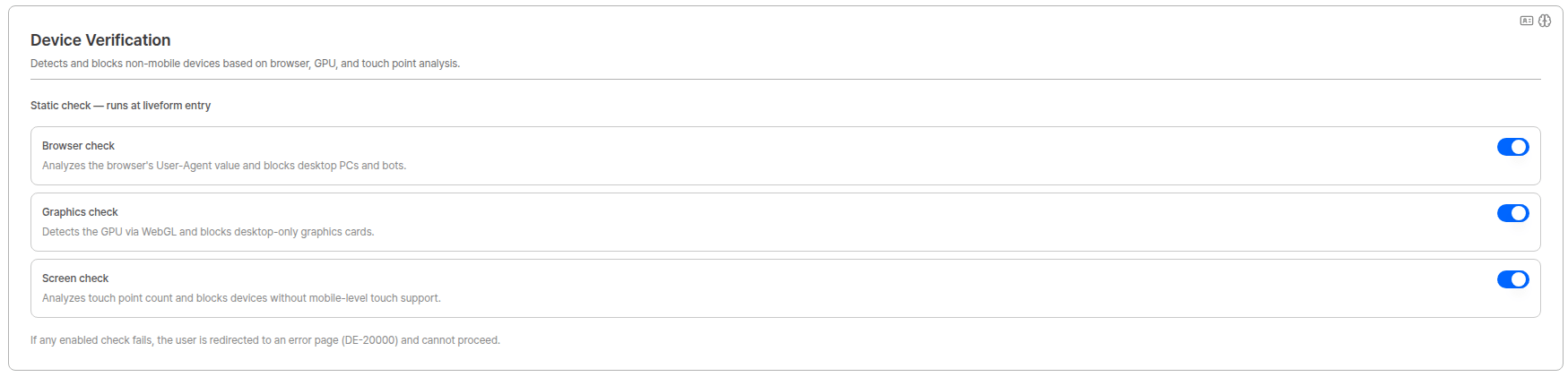
Configure Device verification, Sensor verification, and Fingerprint option in the **Device Info** tab under [Project Management > Policy and Authentication > Authentication Enhancement and Forgery Prevention](/dashboard/en/project-management/policy-and-authentication/anti-fraud-and-forgery-prevention#device-info).
 ***
## Verification Types
The Device Verification page shows results for **three types** of verification.
| Type | Description | Error code on failure |
| -------------------------------------------------------------------------------------------------------------------------------------------------------------------------------------------- | ----------------------------------------------------------------------------------------------------------------------- | -------------------------------------------------------- |
| **Device** | Static check — 3 checks: Browser check, Graphics check, Screen check. Determines whether the device is a mobile device. | `DE-20000` (at entry) |
| **Sensor** 2026-07 New | Verifies the device's sensor signals at the moment of capture to detect camera-path forgery (media injection). | — |
| **Fingerprint** | Fingerprint option — Virtual machine, Emulator, Malicious bot, Browser tampering detection and Device Duplicate Check. | `DE-30000` (detection) / `DE-40000` (duplicate exceeded) |
### Device (Static check)
Analyzes device information to determine whether it is a mobile device. If determined to be a non-mobile device, the check results in **FAIL**.
If **even 1 out of 3** checks fails, the device's KYC access is blocked and the user is redirected to an error page (`DE-20000`).
| Verification Item | Target | Description |
| ------------------ | -------------- | ------------------------------------------------------------------------------------------------------------------------------------------------- |
| **Browser check** | User-Agent | Analyzes the browser's UserAgent value and blocks the request if the accessing device is identified as a desktop PC or automation tool (bot). |
| **Graphics check** | WebGL Renderer | Detects the device's GPU/graphics card through WebGL information and blocks the request if a desktop-only GPU or virtual environment is detected. |
| **Screen check** | Touch Points | Analyzes the device's touchscreen support and blocks the request if the multitouch level falls below what is supported by mobile devices. |
### Sensor 2026-07 New
Collects and verifies the device's **motion sensor signals at the moment the ID or selfie is captured** to detect **attempts to forge the camera path and inject pre-prepared images** (media injection).
| Property | Details |
| ------------------------- | ---------------------------------------------------------------------------------- |
| **Runs at** | ID capture (`idCapture`), selfie capture (`selfie`) — **it does not run at entry** |
| **Cross-step comparison** | Not performed. Each capture stage is evaluated on its own. |
| **Error code** | No separate user-facing error code is assigned. |
Detection criteria are continuously updated, and specific decision logic and threshold values are not disclosed for security reasons.
### Fingerprint
Detects virtual environments, emulators, malicious bots, and tampered browsers based on device Fingerprint (Visitor ID), and limits repeated approvals from the same device.
| Verification Item | Blocked target | On failure |
| -------------------------- | ------------------------------------------------------------------- | ----------------------------------------------- |
| **Virtual machine** | Virtualized environments such as VMware or Parallels | `DE-30000` |
| **Emulator** | Android app players that simulate mobile devices | `DE-30000` |
| **Malicious bot** | Automated scripts and browser automation tools | `DE-30000` |
| **Browser tampering** | Browsers with manipulated or forged API signatures | `DE-30000` |
| **Device Duplicate Check** | New requests from the same Visitor ID that exceed the allowed count | `DE-40000` (when policy is "Fail if duplicate") |
Detection criteria are continuously updated, and specific detection logic is not disclosed for security reasons.
***
## Verification Points
2026-07 New
Verification runs at the following **three points (Steps)**, and the checks performed differ by point.
| Verification Point (Step) | When it occurs | Device | Sensor | Fingerprint |
| ------------------------- | -------------- | ------------------------- | ------ | ---------------------------- |
| `entry` | Liveform entry | ✅ | — | ✅ (includes duplicate check) |
| `idCapture` | ID capture | ✅ + cross-step comparison | ✅ | ✅ + cross-step comparison |
| `selfie` | Selfie capture | ✅ + cross-step comparison | ✅ | ✅ + cross-step comparison |
### Cross-step comparison (Step Consistency)
Values from each capture stage are **always compared against the values collected at entry**. This detects attempts to pass verification at entry and then switch to a different device or environment.
| Type | Compared against |
| --------------- | -------------------------------------------------------------------------------------------------------------------------------------- |
| **Device** | Whether the browser, GPU, and touch information **matches** what was collected at entry |
| **Fingerprint** | Whether it is the **same device** as the Visitor ID from entry, and whether any item **newly detected** that was not detected at entry |
| **Sensor** | Cross-step comparison is not performed. |
Each capture stage's values are compared against **the values from the initial entry**.
**Device Duplicate Check runs only at entry.** Even if you enable ID capture and selfie capture under Fingerprint verification triggers, duplicate checks are not executed or recorded at the capture stages. This prevents users from being rejected because their own earlier stage was flagged as a duplicate.
***
## Verification Results List
When Device Verification is activated, you can view each verification result in the list. All three types — **Device**, **Sensor**, and **Fingerprint** — are displayed together in one list, and you can select which columns to show using `Table Columns` at the top.
***
## Verification Types
The Device Verification page shows results for **three types** of verification.
| Type | Description | Error code on failure |
| -------------------------------------------------------------------------------------------------------------------------------------------------------------------------------------------- | ----------------------------------------------------------------------------------------------------------------------- | -------------------------------------------------------- |
| **Device** | Static check — 3 checks: Browser check, Graphics check, Screen check. Determines whether the device is a mobile device. | `DE-20000` (at entry) |
| **Sensor** 2026-07 New | Verifies the device's sensor signals at the moment of capture to detect camera-path forgery (media injection). | — |
| **Fingerprint** | Fingerprint option — Virtual machine, Emulator, Malicious bot, Browser tampering detection and Device Duplicate Check. | `DE-30000` (detection) / `DE-40000` (duplicate exceeded) |
### Device (Static check)
Analyzes device information to determine whether it is a mobile device. If determined to be a non-mobile device, the check results in **FAIL**.
If **even 1 out of 3** checks fails, the device's KYC access is blocked and the user is redirected to an error page (`DE-20000`).
| Verification Item | Target | Description |
| ------------------ | -------------- | ------------------------------------------------------------------------------------------------------------------------------------------------- |
| **Browser check** | User-Agent | Analyzes the browser's UserAgent value and blocks the request if the accessing device is identified as a desktop PC or automation tool (bot). |
| **Graphics check** | WebGL Renderer | Detects the device's GPU/graphics card through WebGL information and blocks the request if a desktop-only GPU or virtual environment is detected. |
| **Screen check** | Touch Points | Analyzes the device's touchscreen support and blocks the request if the multitouch level falls below what is supported by mobile devices. |
### Sensor 2026-07 New
Collects and verifies the device's **motion sensor signals at the moment the ID or selfie is captured** to detect **attempts to forge the camera path and inject pre-prepared images** (media injection).
| Property | Details |
| ------------------------- | ---------------------------------------------------------------------------------- |
| **Runs at** | ID capture (`idCapture`), selfie capture (`selfie`) — **it does not run at entry** |
| **Cross-step comparison** | Not performed. Each capture stage is evaluated on its own. |
| **Error code** | No separate user-facing error code is assigned. |
Detection criteria are continuously updated, and specific decision logic and threshold values are not disclosed for security reasons.
### Fingerprint
Detects virtual environments, emulators, malicious bots, and tampered browsers based on device Fingerprint (Visitor ID), and limits repeated approvals from the same device.
| Verification Item | Blocked target | On failure |
| -------------------------- | ------------------------------------------------------------------- | ----------------------------------------------- |
| **Virtual machine** | Virtualized environments such as VMware or Parallels | `DE-30000` |
| **Emulator** | Android app players that simulate mobile devices | `DE-30000` |
| **Malicious bot** | Automated scripts and browser automation tools | `DE-30000` |
| **Browser tampering** | Browsers with manipulated or forged API signatures | `DE-30000` |
| **Device Duplicate Check** | New requests from the same Visitor ID that exceed the allowed count | `DE-40000` (when policy is "Fail if duplicate") |
Detection criteria are continuously updated, and specific detection logic is not disclosed for security reasons.
***
## Verification Points
2026-07 New
Verification runs at the following **three points (Steps)**, and the checks performed differ by point.
| Verification Point (Step) | When it occurs | Device | Sensor | Fingerprint |
| ------------------------- | -------------- | ------------------------- | ------ | ---------------------------- |
| `entry` | Liveform entry | ✅ | — | ✅ (includes duplicate check) |
| `idCapture` | ID capture | ✅ + cross-step comparison | ✅ | ✅ + cross-step comparison |
| `selfie` | Selfie capture | ✅ + cross-step comparison | ✅ | ✅ + cross-step comparison |
### Cross-step comparison (Step Consistency)
Values from each capture stage are **always compared against the values collected at entry**. This detects attempts to pass verification at entry and then switch to a different device or environment.
| Type | Compared against |
| --------------- | -------------------------------------------------------------------------------------------------------------------------------------- |
| **Device** | Whether the browser, GPU, and touch information **matches** what was collected at entry |
| **Fingerprint** | Whether it is the **same device** as the Visitor ID from entry, and whether any item **newly detected** that was not detected at entry |
| **Sensor** | Cross-step comparison is not performed. |
Each capture stage's values are compared against **the values from the initial entry**.
**Device Duplicate Check runs only at entry.** Even if you enable ID capture and selfie capture under Fingerprint verification triggers, duplicate checks are not executed or recorded at the capture stages. This prevents users from being rejected because their own earlier stage was flagged as a duplicate.
***
## Verification Results List
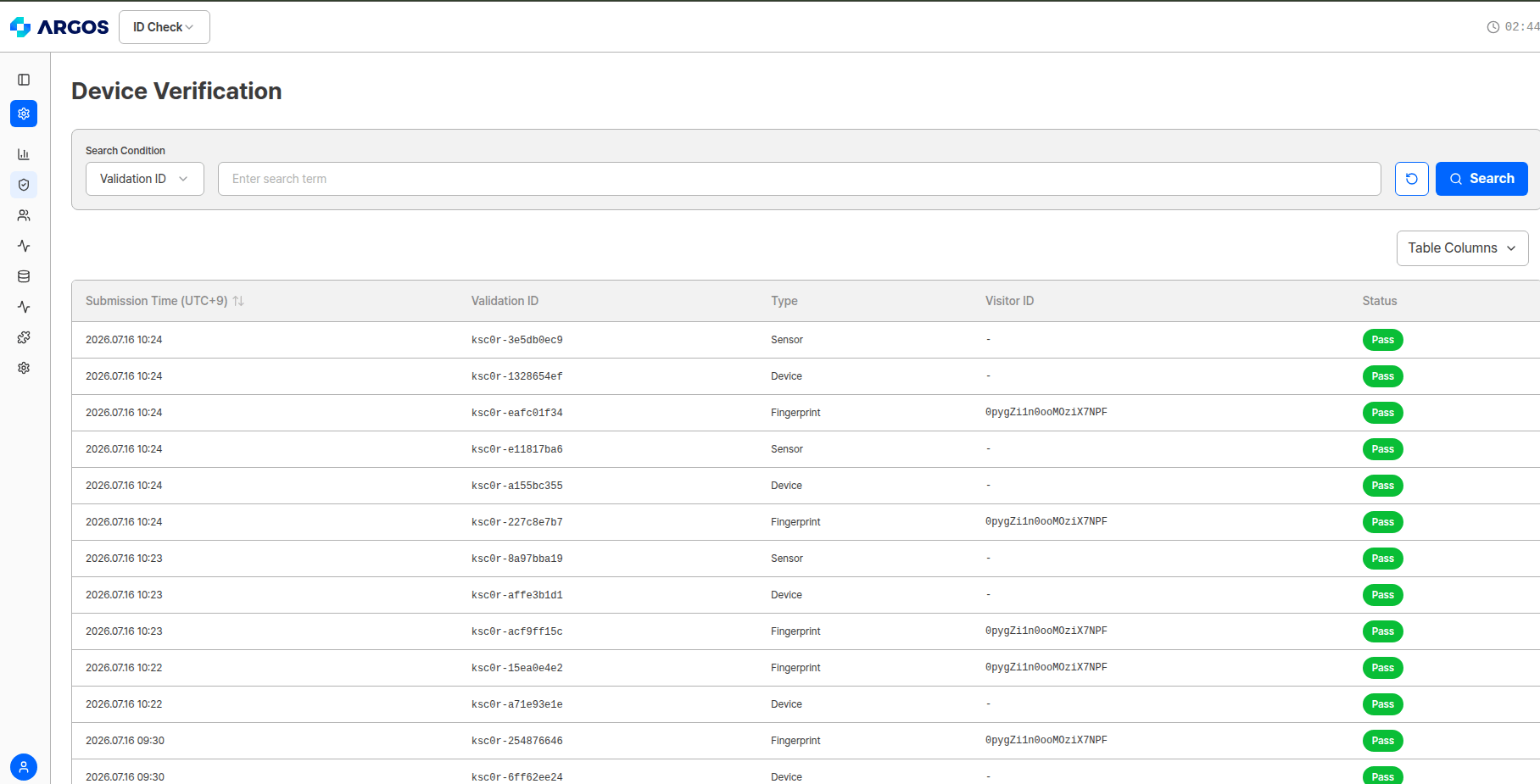
When Device Verification is activated, you can view each verification result in the list. All three types — **Device**, **Sensor**, and **Fingerprint** — are displayed together in one list, and you can select which columns to show using `Table Columns` at the top.
 | Item | Description |
| ----------------------- | ------------------------------------------------------------------------------------------------------------------------------- |
| Submission Time (UTC+9) | Time the verification occurred |
| Validation ID | Unique identifier for each verification |
| Type | Verification type (`Device` / `Sensor` / `Fingerprint`) |
| Visitor ID | Fingerprint-based unique device identifier. Only shown for `Fingerprint` rows; displayed as `-` for `Device` and `Sensor` rows. |
| Status | Result of that verification (Pass / Fail) |
**Multiple Validation IDs are created for a single user** 2026-07 Change
A Validation ID is issued **for each verification point × verification type**. With all options enabled, a single KYC session for one user produces **up to 8** Validation IDs.
`entry` 2 (Device, Fingerprint) + `idCapture` 3 (Device, Sensor, Fingerprint) + `selfie` 3 (Device, Sensor, Fingerprint) = **8**
Seeing several rows around the same `Submission Time` is expected. Use the `Step` field in the detail view to identify which point each row belongs to.
***
## Verification Detail
Clicking a row in the list opens the `Verification detail` modal for that verification. **The fields shown depend on the verification type.**
### Common — Basic Information
Shown for all types.
| Field | Description |
| ------------------------------------------------------------------------------------------------------------------------------------------------------------------------------------------ | -------------------------------------------------------------------------- |
| Submission Time (UTC+9) | Time the verification occurred |
| Type | Verification type (`Device` / `Sensor` / `Fingerprint`) |
| Email | Submitter's email |
| **Step** 2026-07 New | The point at which the verification ran (`entry` / `idCapture` / `selfie`) |
| Validation ID | Unique identifier for each verification |
| Submission ID | ID of the linked submission, if any |
| Visitor ID | Unique device identifier (`Fingerprint` type only) |
### Device detail
| Item | Description |
| ----------------------- | ------------------------------------------------------------------------------------------------------------------------------- |
| Submission Time (UTC+9) | Time the verification occurred |
| Validation ID | Unique identifier for each verification |
| Type | Verification type (`Device` / `Sensor` / `Fingerprint`) |
| Visitor ID | Fingerprint-based unique device identifier. Only shown for `Fingerprint` rows; displayed as `-` for `Device` and `Sensor` rows. |
| Status | Result of that verification (Pass / Fail) |
**Multiple Validation IDs are created for a single user** 2026-07 Change
A Validation ID is issued **for each verification point × verification type**. With all options enabled, a single KYC session for one user produces **up to 8** Validation IDs.
`entry` 2 (Device, Fingerprint) + `idCapture` 3 (Device, Sensor, Fingerprint) + `selfie` 3 (Device, Sensor, Fingerprint) = **8**
Seeing several rows around the same `Submission Time` is expected. Use the `Step` field in the detail view to identify which point each row belongs to.
***
## Verification Detail
Clicking a row in the list opens the `Verification detail` modal for that verification. **The fields shown depend on the verification type.**
### Common — Basic Information
Shown for all types.
| Field | Description |
| ------------------------------------------------------------------------------------------------------------------------------------------------------------------------------------------ | -------------------------------------------------------------------------- |
| Submission Time (UTC+9) | Time the verification occurred |
| Type | Verification type (`Device` / `Sensor` / `Fingerprint`) |
| Email | Submitter's email |
| **Step** 2026-07 New | The point at which the verification ran (`entry` / `idCapture` / `selfie`) |
| Validation ID | Unique identifier for each verification |
| Submission ID | ID of the linked submission, if any |
| Visitor ID | Unique device identifier (`Fingerprint` type only) |
### Device detail
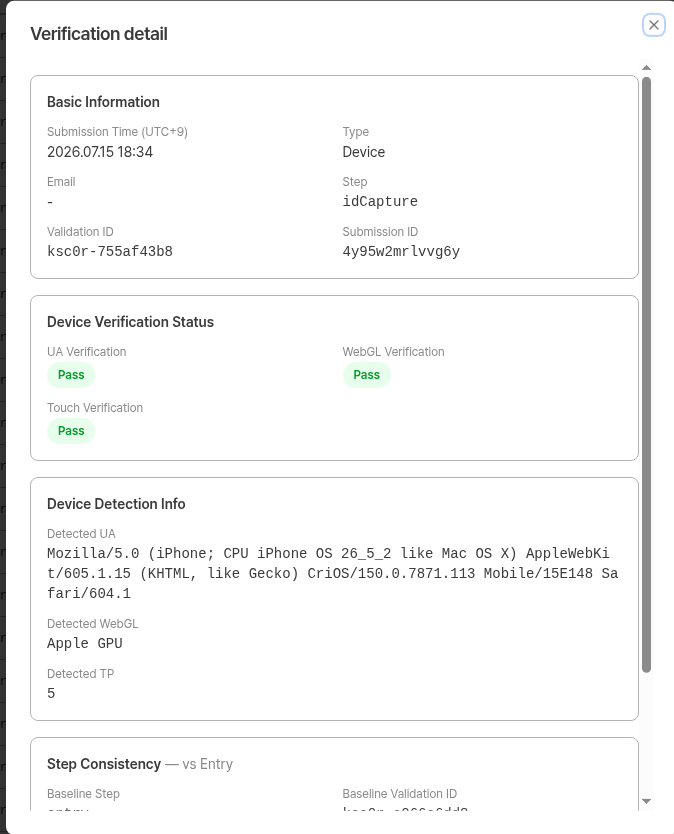 **Device Verification Status** — Pass or Fail for each check.
| Field | Description |
| ------------------ | ---------------------------------------------- |
| UA Verification | Result of the device's User-Agent string check |
| WebGL Verification | Result of the device's WebGL renderer check |
| Touch Verification | Result of the device's touch point check |
**Device Detection Info** — The raw values actually detected during verification.
| Field | Description |
| -------------- | ------------------------------- |
| Detected UA | Detected User-Agent string |
| Detected WebGL | Detected WebGL renderer |
| Detected TP | Detected number of touch points |
**Step Consistency — vs Entry** 2026-07 New
**Device Verification Status** — Pass or Fail for each check.
| Field | Description |
| ------------------ | ---------------------------------------------- |
| UA Verification | Result of the device's User-Agent string check |
| WebGL Verification | Result of the device's WebGL renderer check |
| Touch Verification | Result of the device's touch point check |
**Device Detection Info** — The raw values actually detected during verification.
| Field | Description |
| -------------- | ------------------------------- |
| Detected UA | Detected User-Agent string |
| Detected WebGL | Detected WebGL renderer |
| Detected TP | Detected number of touch points |
**Step Consistency — vs Entry** 2026-07 New
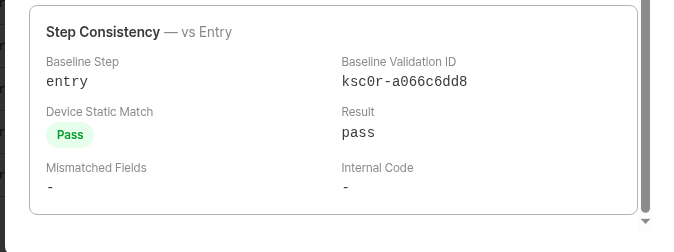 The comparison result against entry. **Shown only when `Step` is `idCapture` or `selfie`** — it does not appear on the `entry` record, which serves as the baseline.
| Field | Description |
| ---------------------- | --------------------------------------------------------------------------------- |
| Baseline Step | The point used as the comparison baseline. Always `entry`. |
| Baseline Validation ID | Validation ID of the entry-point verification used for comparison |
| Device Static Match | Whether the browser, GPU, and touch information matches the values from entry |
| Mismatched Fields | Items whose values differed from entry. Displayed as `-` when everything matches. |
| Result | Overall result of the cross-step comparison |
| Internal Code | Error code shown to the user on mismatch. Displayed as `-` when values match. |
### Sensor detail 2026-07 New
The comparison result against entry. **Shown only when `Step` is `idCapture` or `selfie`** — it does not appear on the `entry` record, which serves as the baseline.
| Field | Description |
| ---------------------- | --------------------------------------------------------------------------------- |
| Baseline Step | The point used as the comparison baseline. Always `entry`. |
| Baseline Validation ID | Validation ID of the entry-point verification used for comparison |
| Device Static Match | Whether the browser, GPU, and touch information matches the values from entry |
| Mismatched Fields | Items whose values differed from entry. Displayed as `-` when everything matches. |
| Result | Overall result of the cross-step comparison |
| Internal Code | Error code shown to the user on mismatch. Displayed as `-` when values match. |
### Sensor detail 2026-07 New
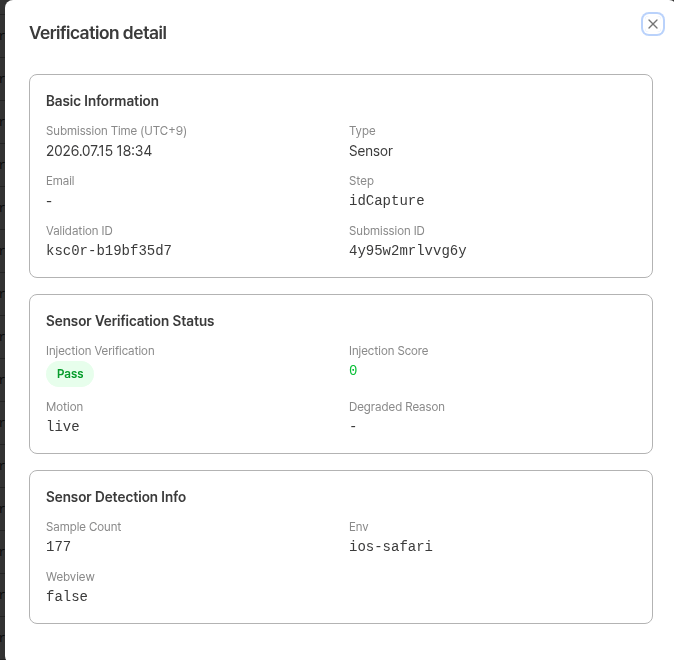 **Sensor Verification Status**
| Field | Description |
| ---------------------- | ------------------------------------------------------------------------------------------------------ |
| Injection Verification | Result of the sensor-signal-based injection check (Pass / Fail) |
| Injection Score | Computed value representing the likelihood of injection |
| Motion | Classification of the movement detected at the moment of capture |
| Degraded Reason | The reason sensor signals could not be collected normally. Displayed as `-` when collection succeeded. |
**Sensor Detection Info**
| Field | Description |
| ------------ | ---------------------------------------------------------- |
| Sample Count | Number of sensor samples used for the decision |
| Env | Browser and OS environment where the capture took place |
| Webview | Whether the capture occurred in a webview (in-app browser) |
The Sensor type has **no Step Consistency section.** Sensor signals represent the physical environment at the moment of capture, so they are not compared across points.
**Sensor signals may not be available in webview (in-app browser) environments.** If a user opens the liveform inside an app's built-in browser, sensor verification can fail even for legitimate users. Use the `Env` and `Webview` fields to identify these cases, and consider prompting users to **open the liveform in an external browser**. See the [WebView integration guide](/en/idcheck/getting-started/liveform-webview-guide) for details.
If you host the liveform embedded in a native app WebView, the **app itself must grant device motion/sensor permission**. Without it, sensor signals are never delivered and even legitimate users fail.
### Fingerprint detail
**Sensor Verification Status**
| Field | Description |
| ---------------------- | ------------------------------------------------------------------------------------------------------ |
| Injection Verification | Result of the sensor-signal-based injection check (Pass / Fail) |
| Injection Score | Computed value representing the likelihood of injection |
| Motion | Classification of the movement detected at the moment of capture |
| Degraded Reason | The reason sensor signals could not be collected normally. Displayed as `-` when collection succeeded. |
**Sensor Detection Info**
| Field | Description |
| ------------ | ---------------------------------------------------------- |
| Sample Count | Number of sensor samples used for the decision |
| Env | Browser and OS environment where the capture took place |
| Webview | Whether the capture occurred in a webview (in-app browser) |
The Sensor type has **no Step Consistency section.** Sensor signals represent the physical environment at the moment of capture, so they are not compared across points.
**Sensor signals may not be available in webview (in-app browser) environments.** If a user opens the liveform inside an app's built-in browser, sensor verification can fail even for legitimate users. Use the `Env` and `Webview` fields to identify these cases, and consider prompting users to **open the liveform in an external browser**. See the [WebView integration guide](/en/idcheck/getting-started/liveform-webview-guide) for details.
If you host the liveform embedded in a native app WebView, the **app itself must grant device motion/sensor permission**. Without it, sensor signals are never delivered and even legitimate users fail.
### Fingerprint detail
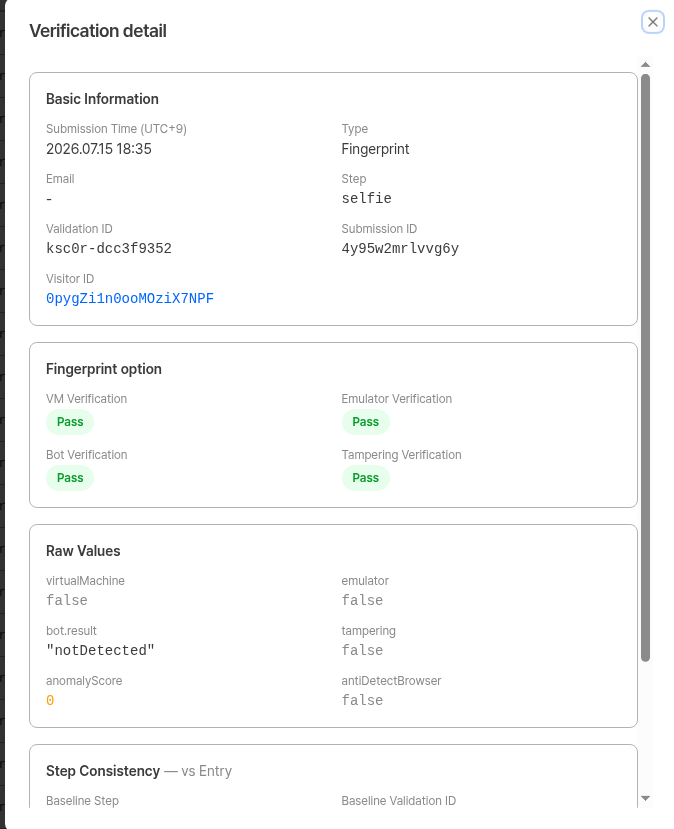 **Fingerprint option** — Result for each detection item.
| Field | Description |
| ---------------------- | ---------------------------------- |
| VM Verification | Virtual machine detection result |
| Emulator Verification | Emulator detection result |
| Bot Verification | Malicious bot detection result |
| Tampering Verification | Browser tampering detection result |
**Raw Values** — The raw values returned by the detection engine (`virtualMachine`, `emulator`, `bot.result`, `tampering`, `anomalyScore`, `antiDetectBrowser`).
**Step Consistency — vs Entry** 2026-07 New
**Fingerprint option** — Result for each detection item.
| Field | Description |
| ---------------------- | ---------------------------------- |
| VM Verification | Virtual machine detection result |
| Emulator Verification | Emulator detection result |
| Bot Verification | Malicious bot detection result |
| Tampering Verification | Browser tampering detection result |
**Raw Values** — The raw values returned by the detection engine (`virtualMachine`, `emulator`, `bot.result`, `tampering`, `anomalyScore`, `antiDetectBrowser`).
**Step Consistency — vs Entry** 2026-07 New
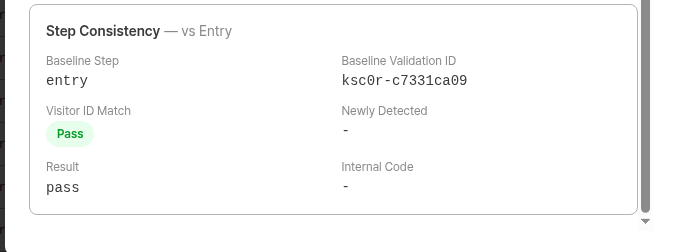 | Field | Description |
| ---------------------- | --------------------------------------------------------------------------------------------------- |
| Baseline Step | The point used as the comparison baseline. Always `entry`. |
| Baseline Validation ID | Validation ID of the entry-point verification used for comparison |
| Visitor ID Match | Whether this is the same device as at entry |
| Newly Detected | Items detected at this point that were not detected at entry. Displayed as `-` when there are none. |
| Result | Overall result of the cross-step comparison |
| Internal Code | Error code shown to the user on mismatch or new detection. Displayed as `-` when there is no issue. |
### Internal Code
When the cross-step comparison finds an issue, a reason-specific error code is recorded in the `Internal Code` field. This is the **error code shown to the user** when a capture-stage block occurs; in the dashboard you can review which reason applied via the `Internal Code` field.
| Reason | ID capture (`idCapture`) | Selfie capture (`selfie`) |
| ----------------------------------------------------------------- | ------------------------ | ------------------------- |
| Device — browser, GPU, and touch information does not match entry | `DE-51010` | `DE-52010` |
| Fingerprint — Visitor ID does not match entry (different device) | `DE-51020` | `DE-52020` |
| Fingerprint — an item not detected at entry is newly detected | `DE-51030` | `DE-52030` |
No code is assigned for Sensor verification failures.
***
## Viewing from Submission Detail
From a user submission's detail view, the **Pre-verification list** dropdown gives you direct access to that submission's Device Verification results.
| Field | Description |
| ---------------------- | --------------------------------------------------------------------------------------------------- |
| Baseline Step | The point used as the comparison baseline. Always `entry`. |
| Baseline Validation ID | Validation ID of the entry-point verification used for comparison |
| Visitor ID Match | Whether this is the same device as at entry |
| Newly Detected | Items detected at this point that were not detected at entry. Displayed as `-` when there are none. |
| Result | Overall result of the cross-step comparison |
| Internal Code | Error code shown to the user on mismatch or new detection. Displayed as `-` when there is no issue. |
### Internal Code
When the cross-step comparison finds an issue, a reason-specific error code is recorded in the `Internal Code` field. This is the **error code shown to the user** when a capture-stage block occurs; in the dashboard you can review which reason applied via the `Internal Code` field.
| Reason | ID capture (`idCapture`) | Selfie capture (`selfie`) |
| ----------------------------------------------------------------- | ------------------------ | ------------------------- |
| Device — browser, GPU, and touch information does not match entry | `DE-51010` | `DE-52010` |
| Fingerprint — Visitor ID does not match entry (different device) | `DE-51020` | `DE-52020` |
| Fingerprint — an item not detected at entry is newly detected | `DE-51030` | `DE-52030` |
No code is assigned for Sensor verification failures.
***
## Viewing from Submission Detail
From a user submission's detail view, the **Pre-verification list** dropdown gives you direct access to that submission's Device Verification results.
 Clicking the dropdown shows the pre-verification categories (Device Verification, VPN & Proxy) and Validation IDs linked to that submission. Click one to navigate to its detail page.
Since the 2026-07 update added more verification points, a single submission can now be linked to **up to 8** Validation IDs.
***
## User Error Pages on Block
When Device Verification fails at the **entry point**, the user sees a different error page depending on which verification failed. Every error page shows the **error code and its definition** so that clients can diagnose the cause quickly.
| Error code | Condition |
| ---------- | ------------------------------------------------------------------------------------------------------------------ |
| `DE-20000` | Device Verification (Static check) — one or more of Browser / Graphics / Screen check failed |
| `DE-30000` | Fingerprint option — one or more of virtual machine / emulator / malicious bot / browser tampering detected |
| `DE-40000` | Device Duplicate Check — duplicate device exceeding the allowed count detected while policy is `Fail if duplicate` |
Clicking the dropdown shows the pre-verification categories (Device Verification, VPN & Proxy) and Validation IDs linked to that submission. Click one to navigate to its detail page.
Since the 2026-07 update added more verification points, a single submission can now be linked to **up to 8** Validation IDs.
***
## User Error Pages on Block
When Device Verification fails at the **entry point**, the user sees a different error page depending on which verification failed. Every error page shows the **error code and its definition** so that clients can diagnose the cause quickly.
| Error code | Condition |
| ---------- | ------------------------------------------------------------------------------------------------------------------ |
| `DE-20000` | Device Verification (Static check) — one or more of Browser / Graphics / Screen check failed |
| `DE-30000` | Fingerprint option — one or more of virtual machine / emulator / malicious bot / browser tampering detected |
| `DE-40000` | Device Duplicate Check — duplicate device exceeding the allowed count detected while policy is `Fail if duplicate` |
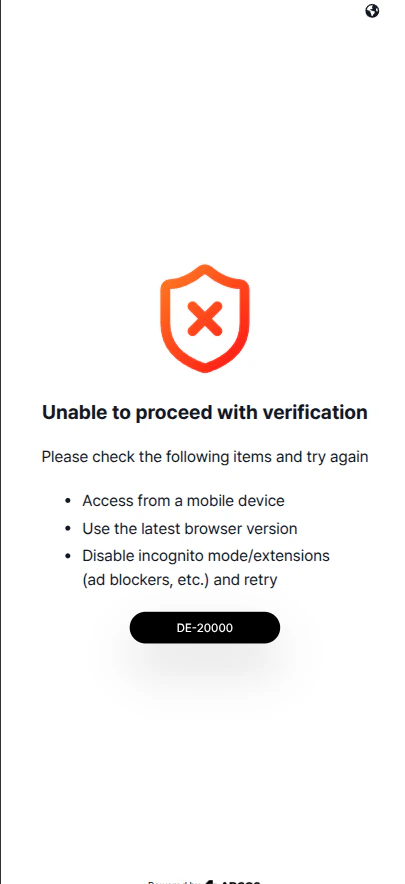 **Unable to proceed with verification**
Please check the following and try again.
* Access from a mobile device
* Use the latest browser version
* Disable incognito mode/extensions (ad blockers, etc.) and retry
For full error code details, see [Error Codes and Pages — DE category](/en/idcheck/reference_tables/Error-codes-and-pages#-de--device-error).
***
## Verification Process Flow
The user enters the KYC liveform. Device verification (Static check) and Fingerprint verification run **first among all pre-verification steps**, and the values collected here become the **baseline** for comparison at later capture stages.
If any Static check fails, the user is redirected to `DE-20000`; if a Fingerprint item is detected, to `DE-30000`; and if a duplicate device violates the policy, to `DE-40000`.
Once Device Info verification passes, Turnstile verification and Proxy & VPN detection run in sequence.
At the moment the ID document is captured, the configured checks run again.
* **Device** — collects the values again and compares them against entry
* **Sensor** — verifies the sensor signals at the moment of capture
* **Fingerprint** — compares the Visitor ID against entry (duplicate check is not performed)
The same checks run at selfie capture, again comparing against **the values from entry**.
These checks run **before** the paid selfie engines (liveness, face compare, etc.) are executed.
Once all verification points pass, KYC authentication proceeds normally.
Each verification point is recorded under its own Validation ID, so results can be reviewed per point in the dashboard.
In flows without ID capture, such as Knowledge-based, verification at that capture point does not run. Even then, the comparison baseline for selfie capture is still **entry**.
***
## Related Documents
Check VPN & Proxy detection results.
Learn how to configure Device Verification options.
Manage the submission list and view details.
See the full list of error codes.
**Unable to proceed with verification**
Please check the following and try again.
* Access from a mobile device
* Use the latest browser version
* Disable incognito mode/extensions (ad blockers, etc.) and retry
For full error code details, see [Error Codes and Pages — DE category](/en/idcheck/reference_tables/Error-codes-and-pages#-de--device-error).
***
## Verification Process Flow
The user enters the KYC liveform. Device verification (Static check) and Fingerprint verification run **first among all pre-verification steps**, and the values collected here become the **baseline** for comparison at later capture stages.
If any Static check fails, the user is redirected to `DE-20000`; if a Fingerprint item is detected, to `DE-30000`; and if a duplicate device violates the policy, to `DE-40000`.
Once Device Info verification passes, Turnstile verification and Proxy & VPN detection run in sequence.
At the moment the ID document is captured, the configured checks run again.
* **Device** — collects the values again and compares them against entry
* **Sensor** — verifies the sensor signals at the moment of capture
* **Fingerprint** — compares the Visitor ID against entry (duplicate check is not performed)
The same checks run at selfie capture, again comparing against **the values from entry**.
These checks run **before** the paid selfie engines (liveness, face compare, etc.) are executed.
Once all verification points pass, KYC authentication proceeds normally.
Each verification point is recorded under its own Validation ID, so results can be reviewed per point in the dashboard.
In flows without ID capture, such as Knowledge-based, verification at that capture point does not run. Even then, the comparison baseline for selfie capture is still **entry**.
***
## Related Documents
Check VPN & Proxy detection results.
Learn how to configure Device Verification options.
Manage the submission list and view details.
See the full list of error codes.