> ## Documentation Index
> Fetch the complete documentation index at: https://developers.argosidentity.com/llms.txt
> Use this file to discover all available pages before exploring further.
# Event Log
> Learn how to track event history for submissions and view administrator activity and deletion logs.
You can query all event messages that occurred before a user's submission reached its final status. After entering a specific person's name or a specific submission ID, you can check what event logs were stored for each individual submission by specifying the event type and event date range.
You can also view logs of administrator permission accounts added/deleted for the project and logs of deleted submissions.
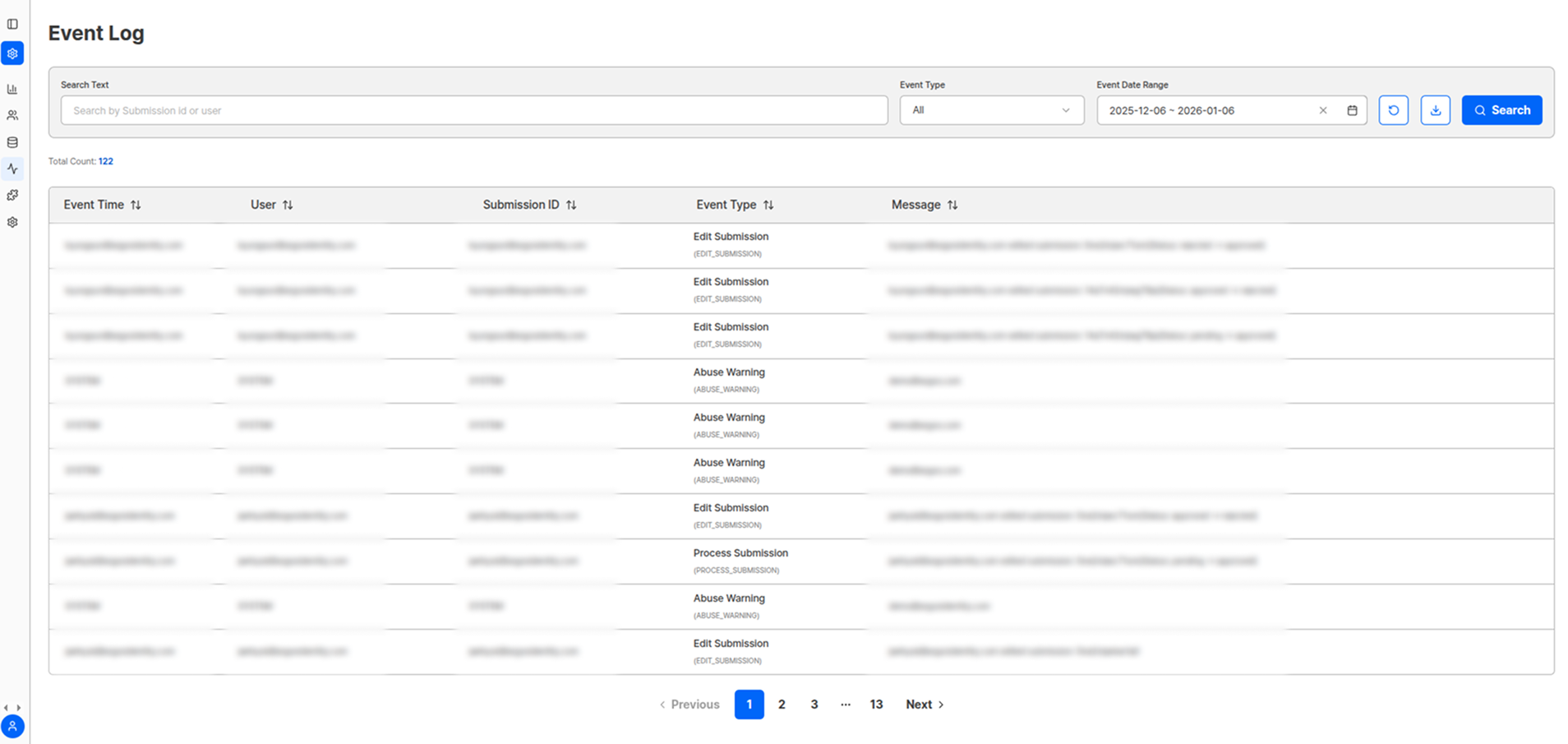 ## Search and Filter Options
| Option | Description |
| ------------------------ | -------------------------------------------------------- |
| **Specific Person Name** | Track event logs for individual users |
| **Submission ID** | View complete event history for a specific submission |
| **Event Type** | Filter by desired event type |
| **Date Range** | Query only events that occurred within a specific period |
You can view detailed content through messages for each type.
## Trackable Event Types
| Event Category | Included Content | Purpose |
| -------------------------- | --------------------------------------------------------------- | ------------------------------ |
| **Submission Process** | Submission start, step-by-step progress, completion/abandonment | Analyze user behavior patterns |
| **Authentication Results** | Approval, rejection, pending status changes | Track decision process |
| **Administrator Activity** | Account addition/deletion, permission changes | Security and access management |
| **Data Management** | Submission deletion, information modification | Ensure data integrity |
| **System Events** | Errors, warnings, system notifications | System monitoring |
## How to Use Event Logs
Analyze causes of submission failures and derive solutions.
Review administrator activity and data access history.
Understand the exact situation when users inquire.
Improve UX by analyzing event patterns.
Event logs can also be used as important evidence to meet audit requirements for regulatory compliance.
## Administrator Permission Logs
All activities related to administrator permissions within the project are recorded:
* New administrator account addition
* Existing administrator account deletion
* Permission level changes
* Access permission modifications
## Submission Deletion Logs
Records of deleted submissions are maintained for data protection and tracking:
| Record Item | Description |
| ------------------------------------ | ------------------------------ |
| Deletion Executor Information | Who executed the deletion |
| Deletion Time and Date | When it was deleted |
| Deletion Reason | Reason for deletion (optional) |
| Deleted Submission Basic Information | Which submission was deleted |
**Data Security**
Event logs are important audit materials, so manage them so that only administrators with appropriate permissions can access them.
## Log Analysis Tips
Regularly review abnormal patterns or error messages.
Identify and improve stages with high user drop-off rates.
Conduct security audits through administrator activity logs.
Optimize systems by analyzing activity patterns by time period.
Identify recurring error patterns and establish preventive measures.
***
## Related Documentation
View detailed information for individual submissions.
View overall service usage status.
Set up real-time event notifications.
Configure administrator permissions.
## Search and Filter Options
| Option | Description |
| ------------------------ | -------------------------------------------------------- |
| **Specific Person Name** | Track event logs for individual users |
| **Submission ID** | View complete event history for a specific submission |
| **Event Type** | Filter by desired event type |
| **Date Range** | Query only events that occurred within a specific period |
You can view detailed content through messages for each type.
## Trackable Event Types
| Event Category | Included Content | Purpose |
| -------------------------- | --------------------------------------------------------------- | ------------------------------ |
| **Submission Process** | Submission start, step-by-step progress, completion/abandonment | Analyze user behavior patterns |
| **Authentication Results** | Approval, rejection, pending status changes | Track decision process |
| **Administrator Activity** | Account addition/deletion, permission changes | Security and access management |
| **Data Management** | Submission deletion, information modification | Ensure data integrity |
| **System Events** | Errors, warnings, system notifications | System monitoring |
## How to Use Event Logs
Analyze causes of submission failures and derive solutions.
Review administrator activity and data access history.
Understand the exact situation when users inquire.
Improve UX by analyzing event patterns.
Event logs can also be used as important evidence to meet audit requirements for regulatory compliance.
## Administrator Permission Logs
All activities related to administrator permissions within the project are recorded:
* New administrator account addition
* Existing administrator account deletion
* Permission level changes
* Access permission modifications
## Submission Deletion Logs
Records of deleted submissions are maintained for data protection and tracking:
| Record Item | Description |
| ------------------------------------ | ------------------------------ |
| Deletion Executor Information | Who executed the deletion |
| Deletion Time and Date | When it was deleted |
| Deletion Reason | Reason for deletion (optional) |
| Deleted Submission Basic Information | Which submission was deleted |
**Data Security**
Event logs are important audit materials, so manage them so that only administrators with appropriate permissions can access them.
## Log Analysis Tips
Regularly review abnormal patterns or error messages.
Identify and improve stages with high user drop-off rates.
Conduct security audits through administrator activity logs.
Optimize systems by analyzing activity patterns by time period.
Identify recurring error patterns and establish preventive measures.
***
## Related Documentation
View detailed information for individual submissions.
View overall service usage status.
Set up real-time event notifications.
Configure administrator permissions.