> ## Documentation Index
> Fetch the complete documentation index at: https://developers.argosidentity.com/llms.txt
> Use this file to discover all available pages before exploring further.
# AML Ongoing Monitoring
> Learn about the ongoing monitoring service that continuously re-checks registered users to detect changes in sanctions, PEP, reputation risks, etc.
ARGOS Ongoing Monitoring is a service that continuously re-checks users (submissions) registered by customers and sends notifications when changes occur in **Sanctions, PEP, Regulatory Enforcement Lists, Reputation Risk Exposure (RRE), and Person of Interest (POI)**, etc.
## Core Concepts
Understanding Ongoing Monitoring is easier when divided into the following 3 units:
A **workspace** for setting ongoing monitoring policies and registering monitoring targets. You can manage multiple Worklists within one Project.
**User information** registered as monitoring targets. ARGOS performs regular screening on these Monitor Records.
**Match results** that appear when regular screening is performed on monitoring targets. Compliance operations teams perform AML work by reviewing these Match results.
 ***
## Ongoing Monitoring Workflow
**Goal**: Define monitoring scope and thresholds to determine "what changes trigger alerts."
* Thresholds specify matching score criteria (e.g., Open only if ≥ 90)
* Set operational criteria such as exact date of birth matching
* Set processing priority in order: Sanctions > PEP > Reputation
* Agree on responsible roles and SLA (e.g., first judgment within 1 business day after Open creation)
**Goal**: Confirm monitoring targets to determine "watchlist to compare regularly."
ARGOS allows monitoring target registration in 3 ways:
* Automatic registration after eKYC (Settings - Anti-Money Laundering - Ongoing Monitoring ON)
* Additional registration based on Submission ID
* Separate registration based on identity information
**Goal**: Perform matching on registered monitoring targets to determine "Match information requiring administrator review."
ARGOS re-screens all targets according to the set cycle, and when data changes are detected, creates alerts as **Open matches**.
**Goal**: Determine "final match result" through administrator review of matches (OPEN).
Open matches quickly verify facts and then judge as **True Positive** or **False Positive**.
**Goal**: Determine "re-execution process" based on administrator review results.
ARGOS re-evaluates past judgments based on profile updates or score changes.
***
## Worklist Management
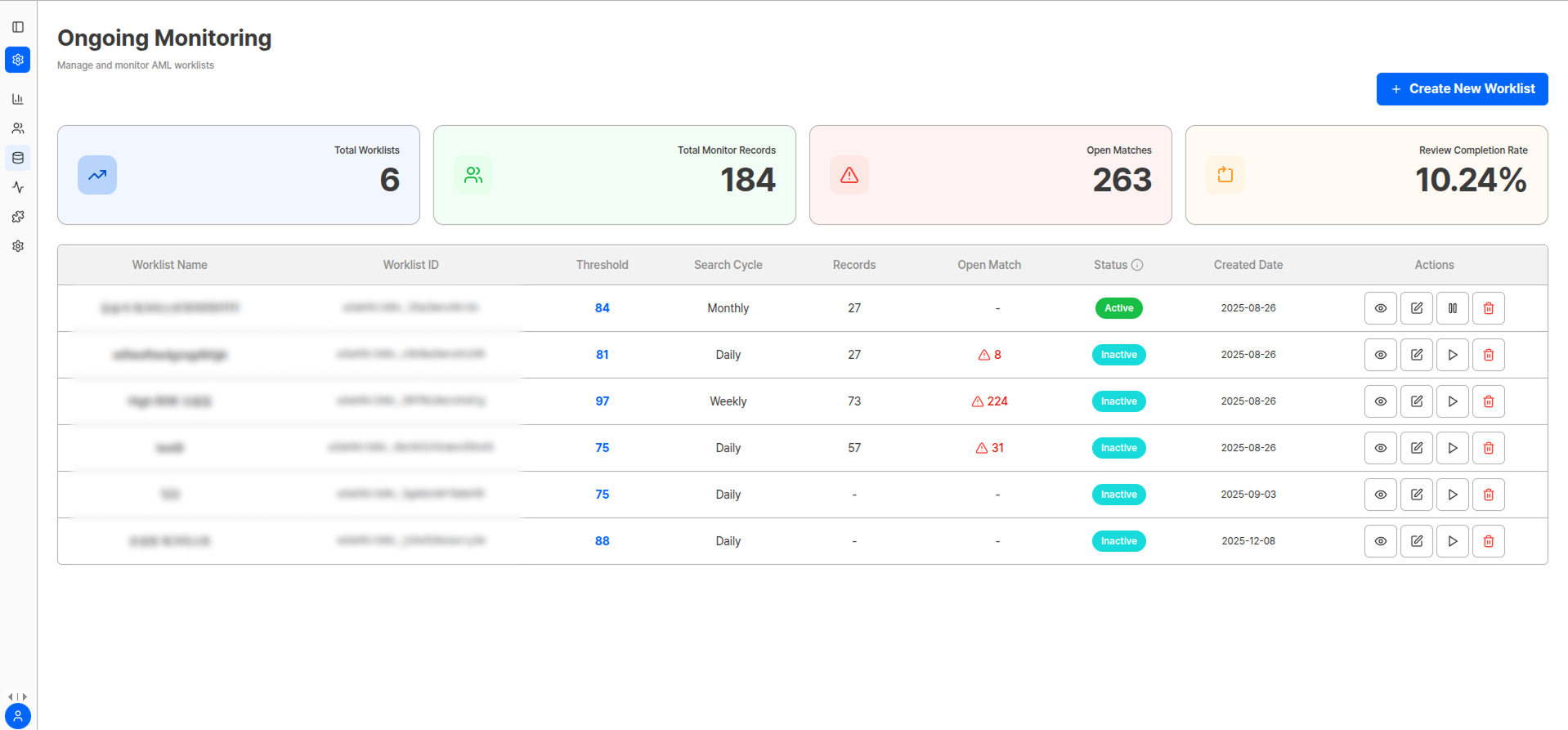
In Ongoing Monitoring, you can create multiple Worklists and operate different policies simultaneously.
### Key Indicators
| Indicator | Description |
| -------------------------- | --------------------------------------------------------------------------------------------------------------------- |
| **Total Worklists** | Total number of Worklists operating in the currently selected project |
| **Total Monitor Records** | Total number of individuals (records) registered for monitoring within the selected Worklist scope |
| **Open Matches** | Number of matches requiring review that have not yet been judged (including reopened matches) |
| **Review Completion Rate** | Percentage of matches that were closed (judgment completed) among matches created/reopened during the selected period |
### Worklist Creation Settings
Name to identify Monitor Records that will flow into the Worklist.
***
## Ongoing Monitoring Workflow
**Goal**: Define monitoring scope and thresholds to determine "what changes trigger alerts."
* Thresholds specify matching score criteria (e.g., Open only if ≥ 90)
* Set operational criteria such as exact date of birth matching
* Set processing priority in order: Sanctions > PEP > Reputation
* Agree on responsible roles and SLA (e.g., first judgment within 1 business day after Open creation)
**Goal**: Confirm monitoring targets to determine "watchlist to compare regularly."
ARGOS allows monitoring target registration in 3 ways:
* Automatic registration after eKYC (Settings - Anti-Money Laundering - Ongoing Monitoring ON)
* Additional registration based on Submission ID
* Separate registration based on identity information
**Goal**: Perform matching on registered monitoring targets to determine "Match information requiring administrator review."
ARGOS re-screens all targets according to the set cycle, and when data changes are detected, creates alerts as **Open matches**.
**Goal**: Determine "final match result" through administrator review of matches (OPEN).
Open matches quickly verify facts and then judge as **True Positive** or **False Positive**.
**Goal**: Determine "re-execution process" based on administrator review results.
ARGOS re-evaluates past judgments based on profile updates or score changes.
***
## Worklist Management
In Ongoing Monitoring, you can create multiple Worklists and operate different policies simultaneously.
### Key Indicators
| Indicator | Description |
| -------------------------- | --------------------------------------------------------------------------------------------------------------------- |
| **Total Worklists** | Total number of Worklists operating in the currently selected project |
| **Total Monitor Records** | Total number of individuals (records) registered for monitoring within the selected Worklist scope |
| **Open Matches** | Number of matches requiring review that have not yet been judged (including reopened matches) |
| **Review Completion Rate** | Percentage of matches that were closed (judgment completed) among matches created/reopened during the selected period |
### Worklist Creation Settings
Name to identify Monitor Records that will flow into the Worklist.
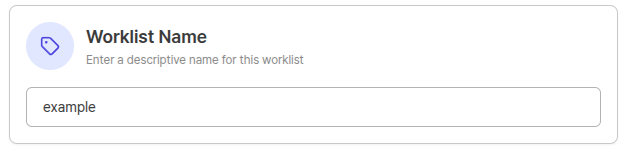 **Recommended Rule:**
```
{BusinessLine}-{Country/Region}-{Segment}-{RiskLevel}-{Frequency}-{Version}
```
**Examples:**
* KYC-KR-VIP-P-High-D2-v3
* Merchant-US-Standard-Low-D1-v1
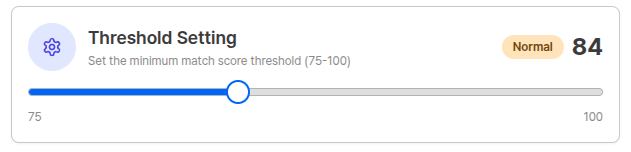
Defines the **match score (75–100)** at which the system creates Open alerts.
* **Recommended starting value**: Start with ≥ 93, then fine-tune by 1–2 points while observing false positive patterns
* **Operation tip**: Adjust so that daily Open volume is within 80% of team processing capacity, considering review personnel and SLA
**Recommended Rule:**
```
{BusinessLine}-{Country/Region}-{Segment}-{RiskLevel}-{Frequency}-{Version}
```
**Examples:**
* KYC-KR-VIP-P-High-D2-v3
* Merchant-US-Standard-Low-D1-v1
Defines the **match score (75–100)** at which the system creates Open alerts.
* **Recommended starting value**: Start with ≥ 93, then fine-tune by 1–2 points while observing false positive patterns
* **Operation tip**: Adjust so that daily Open volume is within 80% of team processing capacity, considering review personnel and SLA
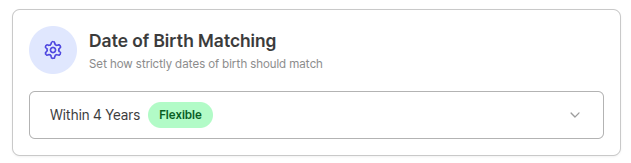
 Uses DOB (date of birth) as a secondary key to reduce false positives from name similarity.
| Option | Description |
| ------------------ | ---------------------------------------------------------------------------------------------------------- |
| 🔴 **Strict** | Exact match (YYYY-MM-DD). Recommended when false positive tolerance is low, such as sanctions, current PEP |
| 🔵 **Recommended** | Year only match (default). Balanced for multiple PEP/regulatory/reputation data |
| 🟡 **Moderate** | ±1 year allowed. Absorbs minor record errors |
| 🟠 **Lenient** | ±2/±3 years allowed. Use in markets with low DOB quality |
| 🟢 **Flexible** | ±4/±5 years allowed. Limited to special Worklists requiring maximum sensitivity |
Uses DOB (date of birth) as a secondary key to reduce false positives from name similarity.
| Option | Description |
| ------------------ | ---------------------------------------------------------------------------------------------------------- |
| 🔴 **Strict** | Exact match (YYYY-MM-DD). Recommended when false positive tolerance is low, such as sanctions, current PEP |
| 🔵 **Recommended** | Year only match (default). Balanced for multiple PEP/regulatory/reputation data |
| 🟡 **Moderate** | ±1 year allowed. Absorbs minor record errors |
| 🟠 **Lenient** | ±2/±3 years allowed. Use in markets with low DOB quality |
| 🟢 **Flexible** | ±4/±5 years allowed. Limited to special Worklists requiring maximum sensitivity |
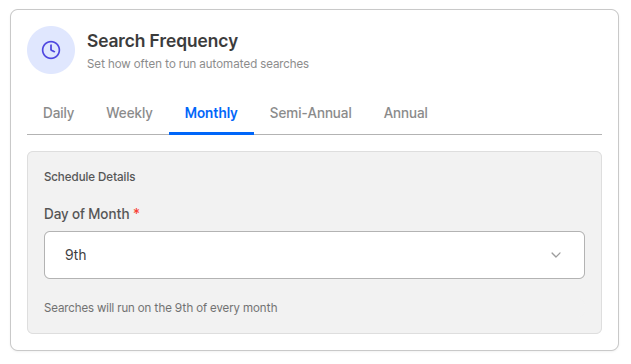
 Determines the re-screening execution cycle.
| Cycle | Description |
| ------------------ | ---------------------------------------------------------------------------------------------------- |
| 📅 **Daily** | Once per day (default, recommended). Does not miss frequent updates of sanctions·PEP·reputation data |
| 📅 **Weekly** | Once per week. Suitable for low-risk/inactive cohorts |
| 📆 **Monthly** | Once per month. Suitable for B2B partners with rare profile changes |
| 🌓 **Half-Yearly** | Once per half year. When regulatory expectations are low and audit trail acquisition is the goal |
| 🎯 **Annual** | Once per year. For legal minimum cycle compliance |
All screening tasks are executed at **19:00 GMT (04:00 AM Korea Time)**.
Determines the re-screening execution cycle.
| Cycle | Description |
| ------------------ | ---------------------------------------------------------------------------------------------------- |
| 📅 **Daily** | Once per day (default, recommended). Does not miss frequent updates of sanctions·PEP·reputation data |
| 📅 **Weekly** | Once per week. Suitable for low-risk/inactive cohorts |
| 📆 **Monthly** | Once per month. Suitable for B2B partners with rare profile changes |
| 🌓 **Half-Yearly** | Once per half year. When regulatory expectations are low and audit trail acquisition is the goal |
| 🎯 **Annual** | Once per year. For legal minimum cycle compliance |
All screening tasks are executed at **19:00 GMT (04:00 AM Korea Time)**.
 ***
## Monitor Record Management
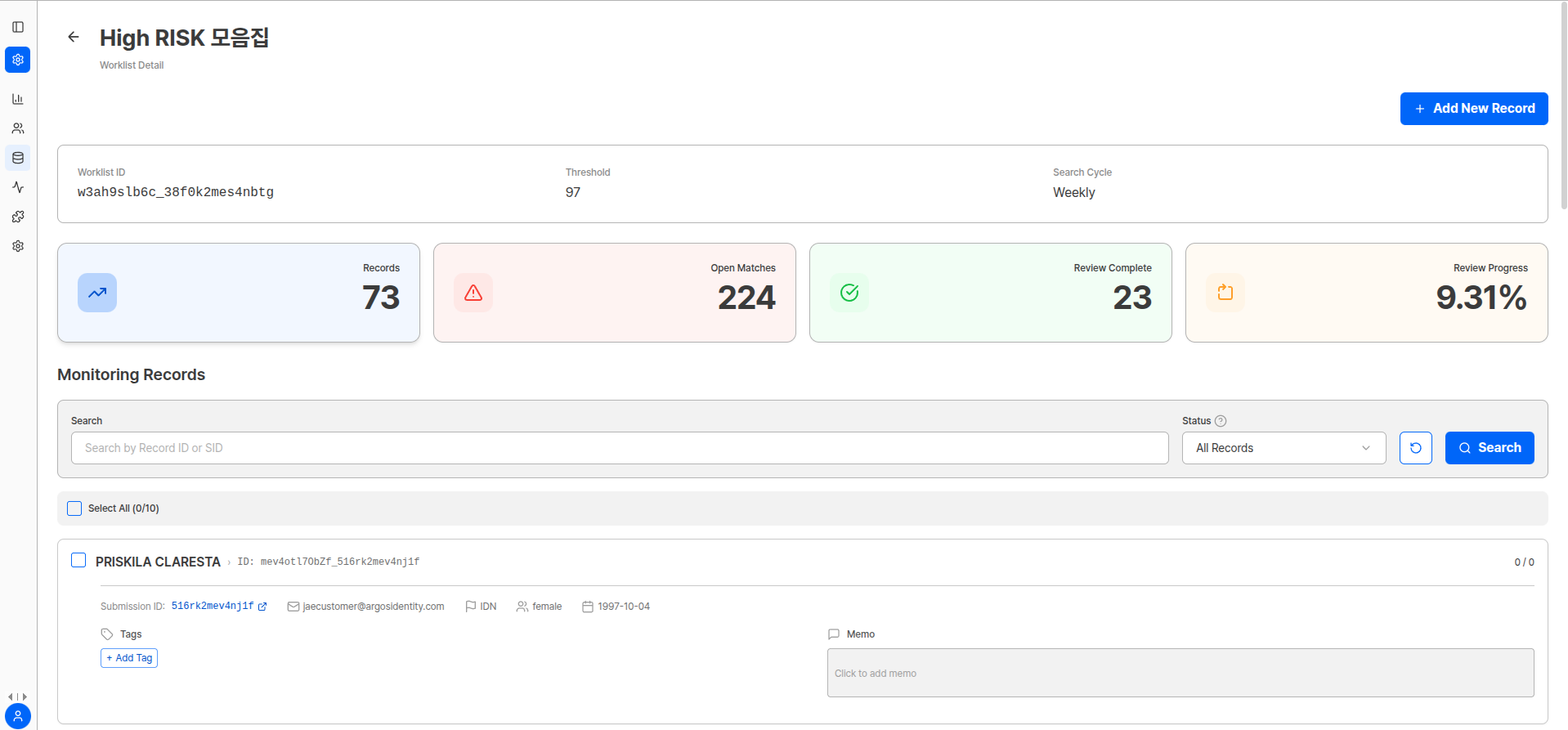
The Monitoring Records screen is where you query, add, and manage targets (Records) registered in the worklist.
***
## Monitor Record Management
The Monitoring Records screen is where you query, add, and manage targets (Records) registered in the worklist.
 ### Record Status
| Status | Description | Action |
| --------------------- | ---------------------------------------------------- | -------------------------------------------- |
| **Pending Screening** | Upload complete, not yet screened | System will automatically screen if you wait |
| **No Match** | Screening complete, no match | Maintain monitoring only, no action needed |
| **Match Open** | 1 or more open matches (review needed) | Click card → Check match details and process |
| **Review Completed** | No open matches (including closed/discarded matches) | Record storage state |
### Monitor Record Registration Methods
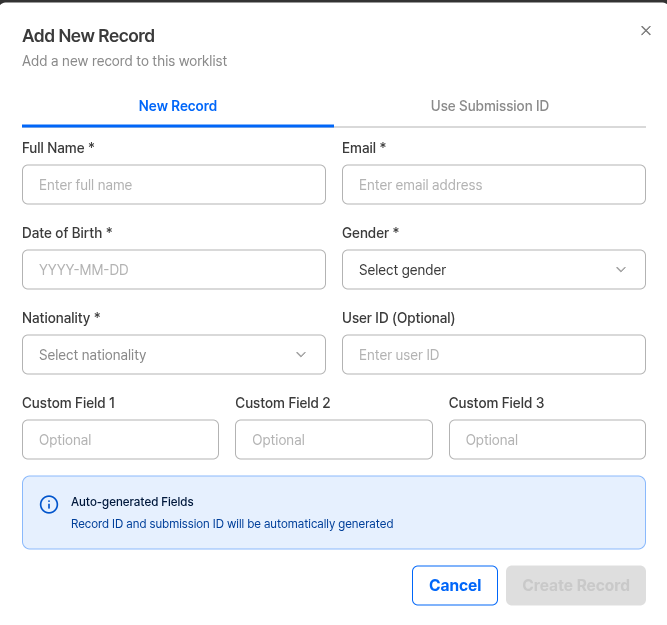
When there is no existing eKYC submission, you can incorporate externally collected targets into monitoring.
A new submission ID is created and the entered identity information is registered as an Approved eKYC.
### Record Status
| Status | Description | Action |
| --------------------- | ---------------------------------------------------- | -------------------------------------------- |
| **Pending Screening** | Upload complete, not yet screened | System will automatically screen if you wait |
| **No Match** | Screening complete, no match | Maintain monitoring only, no action needed |
| **Match Open** | 1 or more open matches (review needed) | Click card → Check match details and process |
| **Review Completed** | No open matches (including closed/discarded matches) | Record storage state |
### Monitor Record Registration Methods
When there is no existing eKYC submission, you can incorporate externally collected targets into monitoring.
A new submission ID is created and the entered identity information is registered as an Approved eKYC.
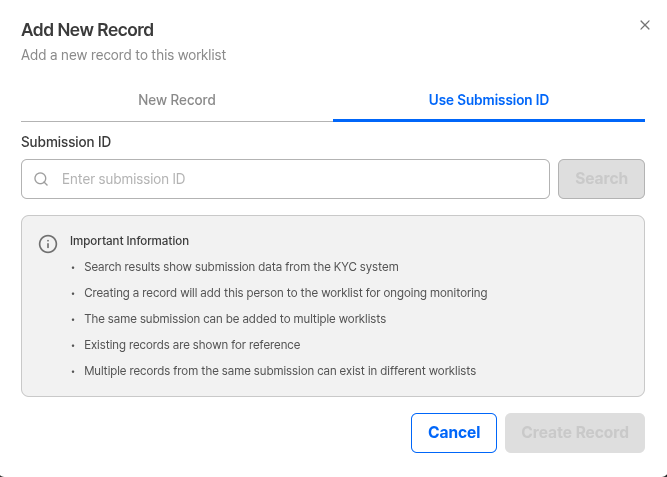
 You can register as a new Record using an existing submission ID.
Used when dividing eKYC completers into policy·segment-based worklists for monitoring, or for backfill of past data.
You can register as a new Record using an existing submission ID.
Used when dividing eKYC completers into policy·segment-based worklists for monitoring, or for backfill of past data.
 **Registration Requirements**
Name, date of birth, gender, nationality **all 4 must be present** to register.
**Operation Tips**
* Start daily operations from **Match Open view** for a clear queue.
* Maintain tags with at least 3 axes: risk/country/reason. (e.g., `risk:pep + country:ID + fp:dob-typo`)
* To manage Open volume below 80% of daily processing capacity, adjust both Worklist Threshold and Birthdate Matching together.
***
## Match List Management
Match List is a screen that shows all match results that occur when a specific user matches lists such as sanctions, PEP, regulatory enforcement, reputation risk, POI, etc. in ARGOS Ongoing Monitoring.
**Registration Requirements**
Name, date of birth, gender, nationality **all 4 must be present** to register.
**Operation Tips**
* Start daily operations from **Match Open view** for a clear queue.
* Maintain tags with at least 3 axes: risk/country/reason. (e.g., `risk:pep + country:ID + fp:dob-typo`)
* To manage Open volume below 80% of daily processing capacity, adjust both Worklist Threshold and Birthdate Matching together.
***
## Match List Management
Match List is a screen that shows all match results that occur when a specific user matches lists such as sanctions, PEP, regulatory enforcement, reputation risk, POI, etc. in ARGOS Ongoing Monitoring.
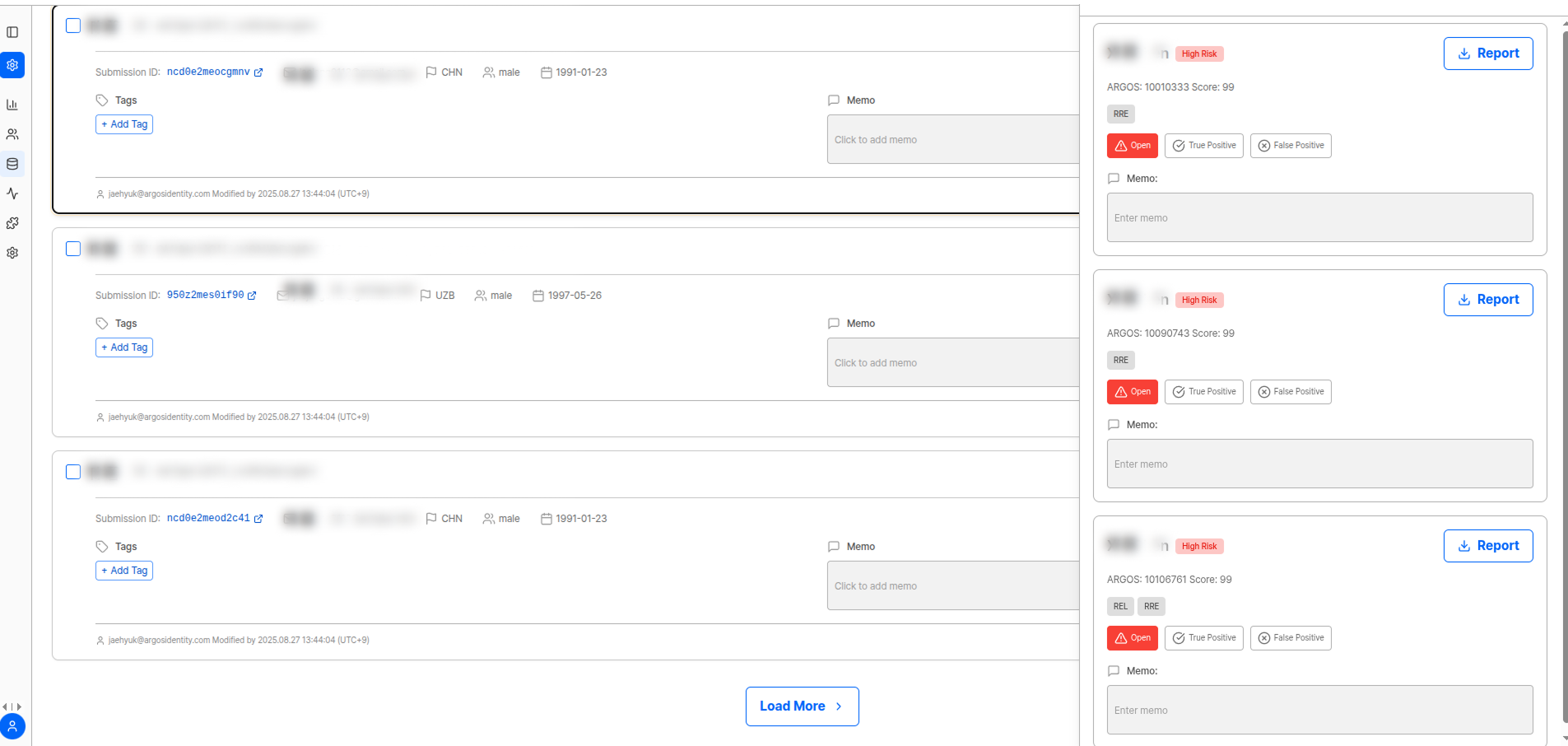 Matches indicate "similarity possibility," so **compliance officer review is mandatory**.
### Match List Components
Matches indicate "similarity possibility," so **compliance officer review is mandatory**.
### Match List Components
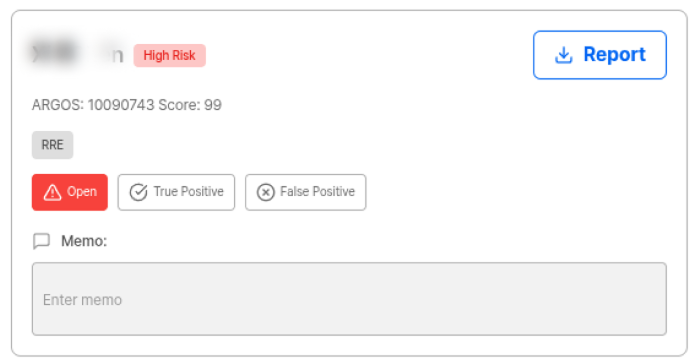 | Component | Description |
| ------------------- | ------------------------------------------------- |
| 🧑💼 Name·Profile | Matched person/institution information |
| 🚦 Risk Level | High / Medium / Low |
| 🎯 Match Score | 0\~100 (higher = greater match possibility ↑) |
| 📄 Report Download | View detailed evidence |
| 🛠️ Action Button | Open / True Positive / False Positive / Discarded |
| 📝 Memo Input Field | Record review reason and basis |
### Match Status
Indicates that the monitoring target showed similarity above a certain level when compared with the list, resulting in a **review pending status**.
Open status means review is needed, so it is important to **start review immediately**.
Review confirmed that the target is exactly the matched person/institution.
* Execute immediate actions such as offboarding, transaction restrictions, enhanced screening
* **Must record** initials, date, reason, and evidence links in memo
Review confirmed that the match is a different person/institution.
* Score may be high but decisively different target
* Recording mismatch basis in memo is useful for future audit response and system Threshold adjustment
Indicates that the match is no longer a meaningful review target.
* List was updated and item became unnecessary, or
* Policy criteria changed and item was excluded from match conditions
* Remove unnecessary items from queue to maintain efficient workflow
### Match Reopening
Refers to already judged matches returning to **"review (Open)" status** again due to data updates or risk indicator changes.
| Previous Judgment | Reopening Condition |
| ------------------ | ----------------------------------------------- |
| **True Positive** | **Always OPEN** when related profile is updated |
| **False Positive** | Reopen only when match score **rises** |
***
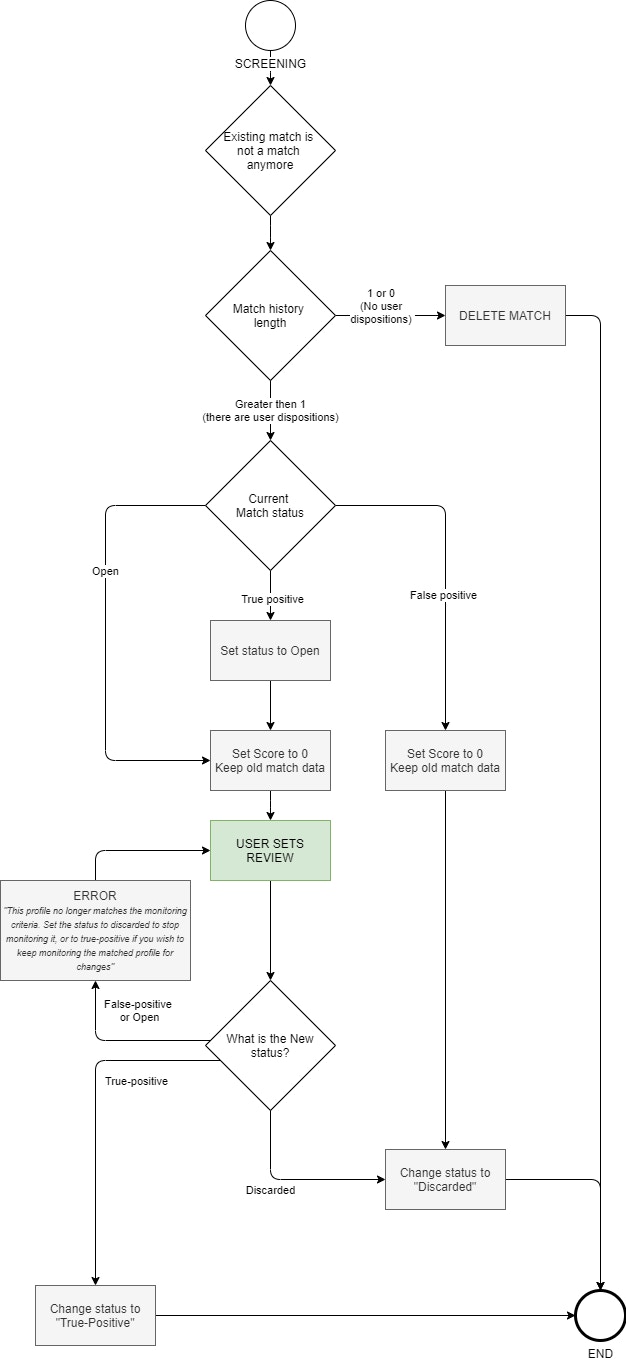
### No Longer a Match (Discard Logic)
When re-screening results show that a specific user no longer meets match conditions, it can be processed as 0.
* In this case, the match should be organized as Discarded status.
* However, matches with no judgment history may be automatically deleted by the system.
➡ Operators must clearly establish Discarded processing principles to maintain queue management and minimize noise.
| Component | Description |
| ------------------- | ------------------------------------------------- |
| 🧑💼 Name·Profile | Matched person/institution information |
| 🚦 Risk Level | High / Medium / Low |
| 🎯 Match Score | 0\~100 (higher = greater match possibility ↑) |
| 📄 Report Download | View detailed evidence |
| 🛠️ Action Button | Open / True Positive / False Positive / Discarded |
| 📝 Memo Input Field | Record review reason and basis |
### Match Status
Indicates that the monitoring target showed similarity above a certain level when compared with the list, resulting in a **review pending status**.
Open status means review is needed, so it is important to **start review immediately**.
Review confirmed that the target is exactly the matched person/institution.
* Execute immediate actions such as offboarding, transaction restrictions, enhanced screening
* **Must record** initials, date, reason, and evidence links in memo
Review confirmed that the match is a different person/institution.
* Score may be high but decisively different target
* Recording mismatch basis in memo is useful for future audit response and system Threshold adjustment
Indicates that the match is no longer a meaningful review target.
* List was updated and item became unnecessary, or
* Policy criteria changed and item was excluded from match conditions
* Remove unnecessary items from queue to maintain efficient workflow
### Match Reopening
Refers to already judged matches returning to **"review (Open)" status** again due to data updates or risk indicator changes.
| Previous Judgment | Reopening Condition |
| ------------------ | ----------------------------------------------- |
| **True Positive** | **Always OPEN** when related profile is updated |
| **False Positive** | Reopen only when match score **rises** |
***
### No Longer a Match (Discard Logic)
When re-screening results show that a specific user no longer meets match conditions, it can be processed as 0.
* In this case, the match should be organized as Discarded status.
* However, matches with no judgment history may be automatically deleted by the system.
➡ Operators must clearly establish Discarded processing principles to maintain queue management and minimize noise.
 ***
## Frequently Asked Questions
Since Worklists operate independently, the same user can enter multiple Worklists. To prevent this, establish a **1:1 mapping rule based on USER ID**, and if purposes overlap, it's good to merge Worklists or adjust filters.
It's effective to raise the Threshold to reduce alert numbers, or separate low-risk groups into separate Worklists and check at low frequency only. If alerts accumulate to a level where SLA cannot be maintained, queue management reflecting **priority (Sanctions > PEP > Reputation)** is needed.
No. Scores only show similarity possibility, and **final judgment requires operator review**. For example, same names with the same nationality may be False Positive.
Yes. Past False Positives can also **reopen (Open)** when match scores rise again or data is updated. In this case, review again.
Yes. Memo writing is recommended for all judgments. This is an **essential procedure for internal audit·regulatory audit response**.
***
## Related Documentation
View AML Watch list filtering results.
Return to complete project settings guide.
Learn how to manage ongoing monitoring via API.
View AML ongoing result webhook.
***
## Frequently Asked Questions
Since Worklists operate independently, the same user can enter multiple Worklists. To prevent this, establish a **1:1 mapping rule based on USER ID**, and if purposes overlap, it's good to merge Worklists or adjust filters.
It's effective to raise the Threshold to reduce alert numbers, or separate low-risk groups into separate Worklists and check at low frequency only. If alerts accumulate to a level where SLA cannot be maintained, queue management reflecting **priority (Sanctions > PEP > Reputation)** is needed.
No. Scores only show similarity possibility, and **final judgment requires operator review**. For example, same names with the same nationality may be False Positive.
Yes. Past False Positives can also **reopen (Open)** when match scores rise again or data is updated. In this case, review again.
Yes. Memo writing is recommended for all judgments. This is an **essential procedure for internal audit·regulatory audit response**.
***
## Related Documentation
View AML Watch list filtering results.
Return to complete project settings guide.
Learn how to manage ongoing monitoring via API.
View AML ongoing result webhook.